고급 연산

Python으로 시작하는 TensorFlow

Isaiah Hull

Visiting Associate Professor of Finance, BI Norwegian Business School

고급 연산 개요

  • TensorFlow의 기본 연산을 다뤘습니다.
    • add(), multiply(), matmul(), reduce_sum()
  • 이번 학습에서는 고급 연산을 살펴봅니다.
    • gradient(), reshape(), random()
Python으로 시작하는 TensorFlow

고급 연산 개요

Operation Use
gradient() 함수의 한 점에서 기울기 계산
reshape() 텐서 형태 변경(예: 10x10 → 100x1)
random() 확률분포에서 뽑은 값으로 텐서 채움
Python으로 시작하는 TensorFlow

최적점 찾기

  • 많은 문제에서 함수의 최적점을 찾습니다.

    • 최소값: 손실 함수의 가장 낮은 값
    • 최대값: 목적 함수의 가장 높은 값
  • gradient()로 구할 수 있습니다.

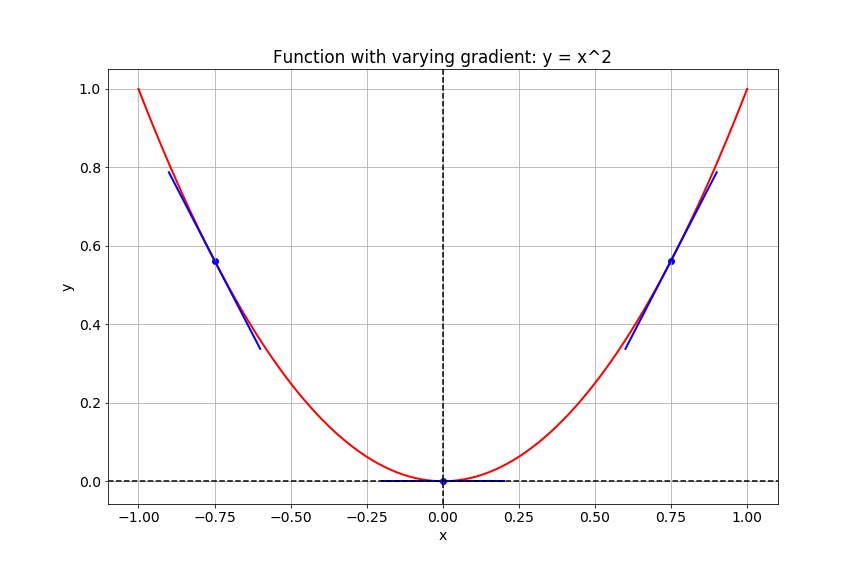
    • 최적점: 기울기 = 0인 점
    • 최소값: 기울기 변화 > 0
    • 최대값: 기울기 변화 < 0
Python으로 시작하는 TensorFlow

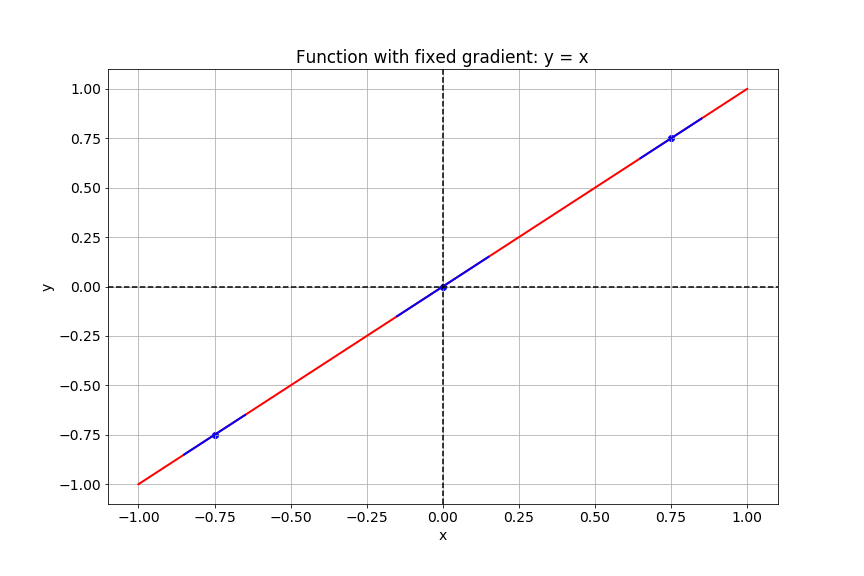
기울기 계산

함수 y = x의 그래프를 보여줍니다.

Python으로 시작하는 TensorFlow

기울기 계산

함수 y = x 제곱의 그래프를 보여줍니다.

Python으로 시작하는 TensorFlow

TensorFlow에서의 기울기

# Import tensorflow under the alias tf
import tensorflow as tf

# Define x
x = tf.Variable(-1.0)
# Define y within instance of GradientTape
with tf.GradientTape() as tape:
    tape.watch(x)
    y = tf.multiply(x, x)
# Evaluate the gradient of y at x = -1
g = tape.gradient(y, x)
print(g.numpy())
-2.0
Python으로 시작하는 TensorFlow

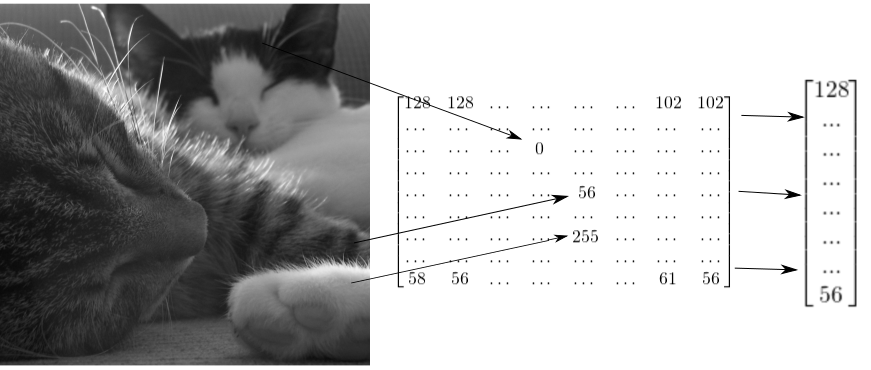
텐서로서의 이미지

두 마리 고양이 이미지가 2차원 텐서로 표현되고, 1차원 벡터로 재구성될 수 있음을 보여줍니다.

Python으로 시작하는 TensorFlow

그레이스케일 이미지 재구성 방법

# Import tensorflow as alias tf
import tensorflow as tf

# Generate grayscale image
gray = tf.random.uniform([2, 2], maxval=255, dtype='int32')

# Reshape grayscale image
gray = tf.reshape(gray, [2*2, 1])
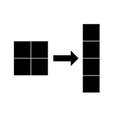
2×2 그레이스케일 이미지를 4×1 벡터로 재구성하는 모습을 보여줍니다.

Python으로 시작하는 TensorFlow

컬러 이미지 재구성 방법

# Import tensorflow as alias tf
import tensorflow as tf

# Generate color image
color = tf.random.uniform([2, 2, 3], maxval=255, dtype='int32')

# Reshape color image
color = tf.reshape(color, [2*2, 3])
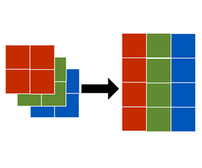
2×2×3 컬러 이미지를 2×3 행렬로 재구성하는 모습을 보여줍니다.

Python으로 시작하는 TensorFlow

연습해 봅시다!

Python으로 시작하는 TensorFlow

Preparing Video For Download...