파이썬에서의 하이퍼파라미터 튜닝

Python에서의 하이퍼파라미터 튜닝

Alex Scriven

Data Scientist

소개


이 과정을 왜 학습할까요?

  • 많은 하이퍼파라미터가 있는 최신 복잡한 알고리즘
  • 튜닝에는 많은 시간이 듭니다
  • 기본값을 넘어 더 깊이 이해합니다

내부 동작을 보면 놀랄 수 있습니다!

Python에서의 하이퍼파라미터 튜닝

데이터셋


이 데이터셋은 신용카드 연체와 관련됩니다.

대만 일부 소비자의 금융 이력이 포함됩니다. 30,000명의 사용자와 24개 속성이 있습니다.

모델링 대상은 대출 연체 여부입니다

이미 전처리되었으며, 개념 설명을 위해 때때로 더 작은 샘플을 사용합니다

데이터셋 추가 정보:

https://archive.ics.uci.edu/ml/datasets/default+of+credit+card+clients

Python에서의 하이퍼파라미터 튜닝

파라미터 개요


파라미터란?

  • 학습 과정에서 모델이 학습하는 구성 요소
  • 수동으로 설정하지 않습니다(실제로 불가)
  • 알고리즘이 자동으로 찾습니다
Python에서의 하이퍼파라미터 튜닝

로지스틱 회귀의 파라미터

간단한 로지스틱 회귀 모델:

log_reg_clf = LogisticRegression() 
log_reg_clf.fit(X_train, y_train)

print(log_reg_clf.coef_)
array([[-2.88651273e-06, -8.23168511e-03,  7.50857018e-04,
         3.94375060e-04,  3.79423562e-04,  4.34612046e-04,
         4.37561467e-04,  4.12107102e-04, -6.41089138e-06,
        -4.39364494e-06,  cont... ]])
Python에서의 하이퍼파라미터 튜닝

로지스틱 회귀의 파라미터

계수를 정리합니다:

# Get the original variable names
original_variables = list(X_train.columns)

# Zip together the names and coefficients zipped_together = list(zip(original_variables, log_reg_clf.coef_[0])) coefs = [list(x) for x in zipped_together]
# Put into a DataFrame with column labels coefs = pd.DataFrame(coefs, columns=["Variable", "Coefficient"])
Python에서의 하이퍼파라미터 튜닝

로지스틱 회귀의 파라미터


이제 상위 3개 계수를 정렬해 출력합니다

coefs.sort_values(by=["Coefficient"], axis=0, inplace=True, ascending=False)
print(coefs.head(3))
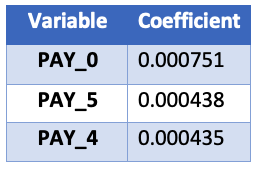
계수 테이블

Python에서의 하이퍼파라미터 튜닝

파라미터를 어디서 찾나


파라미터를 찾으려면:

  1. 알고리즘을 조금 이해해야 합니다
  2. Scikit-Learn 문서를 확인합니다

파라미터는 'parameters'가 아닌 'Attributes' 섹션에 있습니다!

Python에서의 하이퍼파라미터 튜닝

랜덤 포레스트의 파라미터

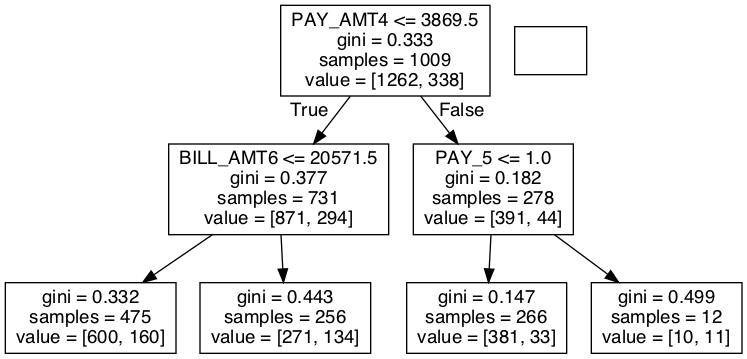
트리 기반 알고리즘은 어떨까요?

랜덤 포레스트에는 계수가 없고, 노드 결정(어떤 특성, 어떤 값으로 분기)이 있습니다.

# A simple random forest estimator
rf_clf = RandomForestClassifier(max_depth=2)
rf_clf.fit(X_train, y_train)

# Pull out one tree from the forest chosen_tree = rf_clf.estimators_[7]

간단히 결정트리의 최종 결과(이미지)만 보여 드립니다. 사용된 패키지(graphviz & pydotplus)는 직접 살펴보셔도 좋습니다.

Python에서의 하이퍼파라미터 튜닝

랜덤 포레스트 단일 트리 의사결정 흐름도

Python에서의 하이퍼파라미터 튜닝

노드 결정 추출하기

위에서 두 번째 왼쪽 노드의 세부를 가져올 수 있습니다:

# Get the column it split on
split_column = chosen_tree.tree_.feature[1]
split_column_name = X_train.columns[split_column]

# Get the level it split on split_value = chosen_tree.tree_.threshold[1]
print("This node split on feature {}, at a value of {}" .format(split_column_name, split_value))

"이 노드는 특성 PAY_0에서 값 1.5로 분기했습니다"

Python에서의 하이퍼파라미터 튜닝

Vamos praticar!

Python에서의 하이퍼파라미터 튜닝

Preparing Video For Download...