컴포넌트 관리
Great Expectations로 배우는 데이터 품질 입문

Davina Moossazadeh
Data Scientist
컴포넌트
GX 컴포넌트 - 데이터 및 데이터 검증 엔터티를 나타내는 Python 클래스
- Data Context
- Data Sources & Data Assets
- Batch Definitions & Batches
- Expectations
- Expectation Suites
- Validation Definitions
- Checkpoints & Actions
- Data Docs
GX에서 컴포넌트 관리
Data Sources:
- 데이터에 연결하고 Data Asset을 포함합니다
Expectation Suites:
- Expectation을 보관합니다
Validation Definitions:
- 데이터에 대해 Expectation을 검증합니다
Checkpoints:
- Validation을 그룹화하고 자동화합니다
context.data_sources
$$
context.suites
$$
context.validation_definitions
$$
context.checkpoints
컴포넌트 추가
Expectation Suite:
suite = context.suites.add(suite)
Validation Definition:
validation_definition = context.validation_definitions.add(validation_definition)
Checkpoint:
checkpoint = context.checkpoints.add(
    checkpoint=checkpoint
)
Data Source 추가
data_source = context.data_sources.add_<TYPE_NAME>()
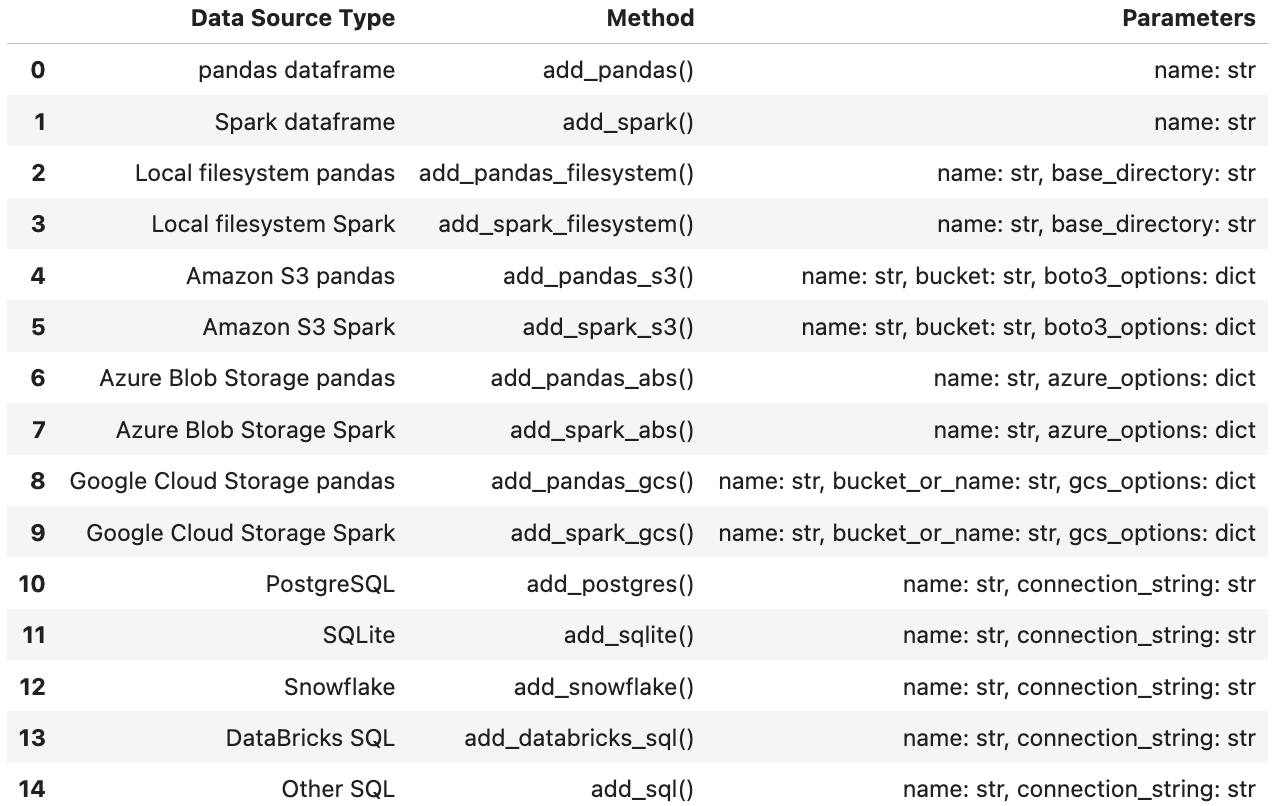
pandas Data Source 추가
.add_pandas()로 pandas DataFrame용 Data Source를 간단히 설정합니다:
data_source = context.data_sources.add_pandas(
    name="my_pandas_datasource"
)
컴포넌트 가져오기
이름 매개변수로 .get()을 사용해 컴포넌트를 가져옵니다:
context.<COMPONENT>s.get(name: str )
data_source = context.data_sources.get(name="my_pandas_datasource" )print(data_source)
id: 46c91f1b-1db9-4351-b5dd-83e038c0f511
name: 'my_pandas_datasource'
type: pandas
컴포넌트 가져오기
Data Sources:
context.data_sources.get(
    name="my_pandas_datasource"
)
Expectation Suites:
context.suites.get(
    name="my_suite"
)
Validation Definitions:
context.validation_definitions.get(
    name="my_validation_definition"
)
Checkpoints:
context.checkpoints.get(
    name="my_checkpoint"
)
컴포넌트 나열
.all()로 Data Context의 모든 컴포넌트(이름, 메타데이터 포함)를 나열합니다:
context.<COMPONENT>s.all()
data_sources = context.data_sources.all()print(data_sources)
{
    'my_pandas_datasource': PandasDatasource(
        type='pandas',
        name='my_pandas_datasource',
        id=UUID('c22b16f7-6945-400e-932f-026cbd63b112'),
        assets=[]
    )
}
컴포넌트 나열
Data Sources:
context.data_sources.all()
Expectation Suites:
context.suites.all()
Validation Definitions:
context.validation_definitions.all()
Checkpoints:
context.checkpoints.all()
컴포넌트 삭제
.delete()로 이름을 지정해 컴포넌트를 삭제합니다:
context.<COMPONENT>s.delete(name: str )
context.data_sources.delete( name="my_pandas_datasource" )print(context.data_sources.all())
{}
컴포넌트 삭제
Data Sources:
context.data_sources.delete(
name="my_pandas_datasource"
)
Expectation Suites:
context.suites.delete(
    name="my_suite"
)
Validation Definitions:
context.validation_definitions.delete(
    name="my_validation_definition"
)
Checkpoints:
context.checkpoints.delete(
    name="my_checkpoint"
)
치트시트
Data Context에 컴포넌트 추가:
context.data_sources.add(data_source)

context.suites.add(suite)

context.validation_definitions.add(
    validation_definition
)

context.checkpoints.add(checkpoint)
컴포넌트 가져오기:
.get(name: str)
컴포넌트 나열:
.all()
컴포넌트 삭제:
.delete(name: str)
Lass uns üben!
Great Expectations로 배우는 데이터 품질 입문

