ML 모델 패키징

프로덕션을 위한 Machine Learning 모델 개발

Sinan Ozdemir

Data Scientist, Entrepreneur, and Author

패키징이 중요한 이유

  • 성능 최적화
  • 호환성 보장
  • 배포 용이성 향상

패키징 방법

  • 직렬화: 단순, 가벼움, 언어 중립적
  • 환경 패키징: 전체 소프트웨어 환경 캡처
  • 컨테이너화: 이식성, 재현성, 격리 보장
프로덕션을 위한 Machine Learning 모델 개발

ML 모델 패키징 방법

  • 직렬화: ML 모델 저장·불러오기

  • 환경 패키징: 모델을 위한 일관되고 재현 가능한 환경

  • 컨테이너화: 모델·의존성·환경을 하나의 "컨테이너"로 패키징

프로덕션을 위한 Machine Learning 모델 개발

scikit-learn 모델 직렬화

scikit-learn 모델을 pickle로 직렬화:

import pickle

model = ...  # Train the scikit-learn model

# Serialize the model to a file
with open('model.pkl', 'wb') as f:
    pickle.dump(model, f)

# Load the serialized model from the file
with open('model.pkl', 'rb') as f:
    model = pickle.load(f)

scikit-learn 모델을 HDF5 형식으로 직렬화:

import h5py
import numpy as np
from sklearn.externals import joblib

model = ...  # Train the scikit-learn model

# Serialize the model to an HDF5 file
with h5py.File('model.h5', 'w') as f:
    f.create_dataset('model_weights',
    data=joblib.dump(model))

# Load the serialized model from the HDF5 file
with h5py.File('model.h5', 'r') as f:
    model = joblib.load(f['model_weights'][:])
프로덕션을 위한 Machine Learning 모델 개발

PyTorch와 TensorFlow 모델 직렬화

PyTorch 모델 직렬화:

import torch

# Train a PyTorch model and store it in a variable
trained_model = ...

# Serialize the trained model to a file
serialized_model_path = 'model.pt'
torch.save(trained_model.state_dict(), serialized_model_path)

# Load the serialized model from a file
loaded_model = ... # Initialize the model
loaded_model.load_state_dict(
    torch.load(serialized_model_path))

TensorFlow 모델 직렬화:

import tensorflow as tf

# Train a Tensorflow model
trained_model = ...

# Save the trained model to a directory 
saved_model_directory = 'model/'
tf.saved_model.save
    (trained_model, saved_model_directory)

# Load the saved model from the directory 
loaded_model = tf.saved_model.load(
    saved_model_directory)
프로덕션을 위한 Machine Learning 모델 개발

Docker로 ML 환경 패키징

  • 모델이 실행될 환경을 보장
  • virtualenv 등으로 일관되고 재현 가능한 환경 생성
  • Docker 컨테이너는 자체 포함되어 배포가 용이

docker

프로덕션을 위한 Machine Learning 모델 개발

Dockerfile 예시

# Use an existing image as the base image
FROM python:3.8-slim

# Set the working directory
WORKDIR /app

# Copy the requirements file to the image
COPY requirements.txt .

# Install the required dependencies
RUN pip install -r requirements.txt

# Copy the ML model and its dependencies to the image
COPY model/ .

# Set the entrypoint to run the model
ENTRYPOINT ["python", "run_model.py"]

<---- Python 3.8 베이스 이미지 사용


<---- 작업 디렉터리 설정


<---- requirements.txt 복사


<---- 의존 패키지 설치


<---- 모델 파일 복사


<---- 컨테이너 시작 방법 지정
프로덕션을 위한 Machine Learning 모델 개발

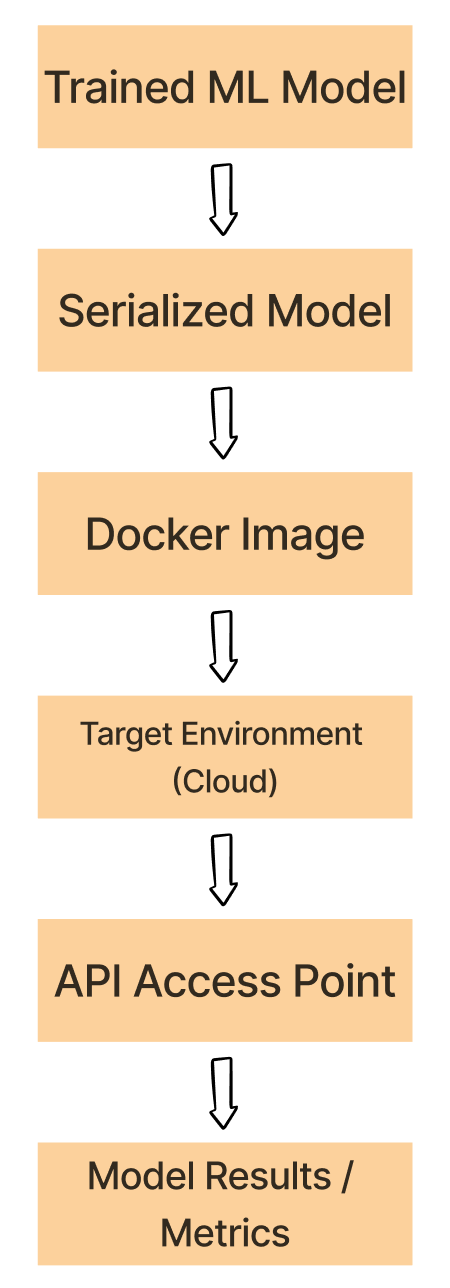
실험 -> Docker 워크플로

  1. 학습된 ML 모델을 pickle, HDF5, PyTorch 등으로 직렬화합니다.

  2. 직렬화된 모델, 의존성, 환경을 컨테이너화합니다.

  3. Docker 이미지를 클라우드 등 대상 환경에 배포합니다.

  4. 배포된 이미지로 컨테이너를 실행하고 모델을 구동합니다.

  5. 컨테이너 내 모델을 API 등으로 사용합니다.

Docker 워크플로

프로덕션을 위한 Machine Learning 모델 개발

연습해 봅시다!

프로덕션을 위한 Machine Learning 모델 개발

Preparing Video For Download...