데이터 삭제

PySpark로 하는 Feature Engineering

John Hogue

Lead Data Scientist, General Mills

데이터는 어디서 잘못될 수 있는가?

  • 잘못 기록된 경우
  • 고유 이벤트
  • 잘못된 형식
  • 중복
  • 누락
  • 관련 없는 데이터

도미노

PySpark로 하는 Feature Engineering

열 삭제

df.select(['NO', 'UNITNUMBER', 'CLASS']).show()
+----+----------+-----+
|  NO|UNITNUMBER|CLASS|
+----+----------+-----+
|   1|      null|   SF|
| 156|        A8|   SF|
| 157|       207|   SF|
| 158|      701G|   SF|
| 159|        36|   SF|

분석에 불필요한 여러 필드

  • 'NO' 자동 생성된 레코드 번호
  • 'UNITNUMBER' 관련 없는 데이터
  • 'CLASS' 모두 동일한 값
PySpark로 하는 Feature Engineering

열 삭제

drop(*cols)

  • *cols – 삭제할 열 이름 또는 열 이름 목록.
  • 지정된 열이 삭제된 새 DataFrame을 반환
# List of columns to drop
cols_to_drop = ['NO', 'UNITNUMBER', 'CLASS']

# Drop the columns df = df.drop(*cols_to_drop)
PySpark로 하는 Feature Engineering

텍스트 필터링

  • where(condition)
    • condition – types.BooleanType 열 또는 SQL 표현식 문자열.
    • 조건이 참인 행만 필터링
  • like(other)
    • other – SQL LIKE 패턴
    • 불리언 Column 반환
  • ~
    • NOT 조건
df = df.where(~df['POTENTIALSHORTSALE'].like('Not Disclosed'))
PySpark로 하는 Feature Engineering

이상값 필터링

평균(μ)의 3 표준편차(3σ) 이내로 데이터 필터링
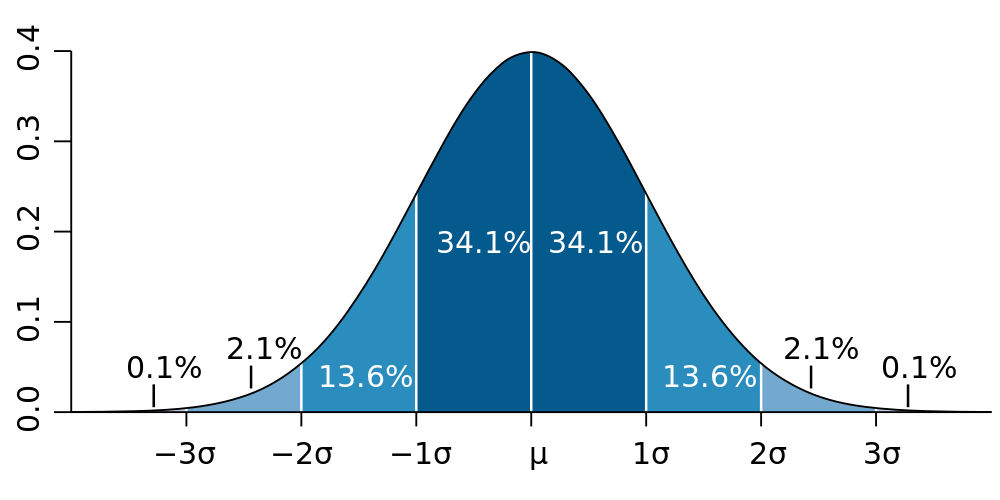
표준 정규 분포

PySpark로 하는 Feature Engineering

값 필터링 예시

# Calculate values used for filtering
std_val = df.agg({'SALESCLOSEPRICE': 'stddev'}).collect()[0][0]
mean_val = df.agg({'SALESCLOSEPRICE': 'mean'}).collect()[0][0]

# Create three standard deviation (μ ± 3σ) upper and lower bounds for data hi_bound = mean_val + (3 * std_val) low_bound = mean_val - (3 * std_val)
# Use where() to filter the DataFrame between values df = df.where((df['LISTPRICE'] < hi_bound) & (df['LISTPRICE'] > low_bound))
PySpark로 하는 Feature Engineering

NA 또는 NULL 삭제

DataFrame.dropna()

  • how: 'any' 또는 'all'. 'any'이면 null이 하나라도 있는 레코드를 삭제하고, 'all'이면 모든 값이 null인 경우에만 삭제합니다.
  • thresh: 정수, 기본값 None. 지정 시, 비-null 값이 thresh 미만인 레코드를 삭제합니다. how 매개변수보다 우선 적용됩니다.
  • subset: 고려할 열 이름의 선택적 목록.
PySpark로 하는 Feature Engineering

NA 또는 NULL 삭제

# Drop any records with NULL values
df = df.dropna()

# drop records if both LISTPRICE and SALESCLOSEPRICE are NULL df = df.dropna(how='all', subset['LISTPRICE', 'SALESCLOSEPRICE '])
# Drop records where at least two columns have NULL values df = df.dropna(thresh=2)
PySpark로 하는 Feature Engineering

중복 삭제

중복이란 무엇인가?

  • 두 개 이상의 레코드가 동일한 정보를 포함하는 경우
  • 열 삭제 또는 데이터셋 조인 후 중복 여부를 확인

dropDuplicates()

  • 전체 DataFrame 또는 특정 열 목록에 대해 실행 가능
  • PySpark에서는 제거되는 레코드의 순서가 정해져 있지 않음
# Entire DataFrame
df.dropDuplicates()

# Check only a column list df.dropDuplicates(['streetaddress'])
PySpark로 하는 Feature Engineering

연습해 봅시다!

PySpark로 하는 Feature Engineering

Preparing Video For Download...