HTTP 요청의 특성

R로 배우는 웹 스크레이핑

Timo Grossenbacher

Instructor

하이퍼텍스트 전송 프로토콜(HTTP)
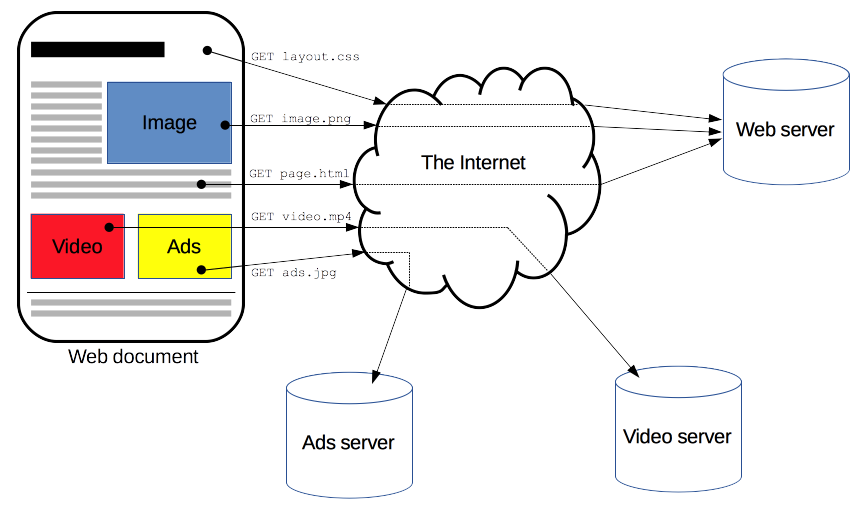
브라우저가 서버와 통신하는 방식에 대한 도식

1 https://developer.mozilla.org/en-US/docs/Web/HTTP/Overview
R로 배우는 웹 스크레이핑

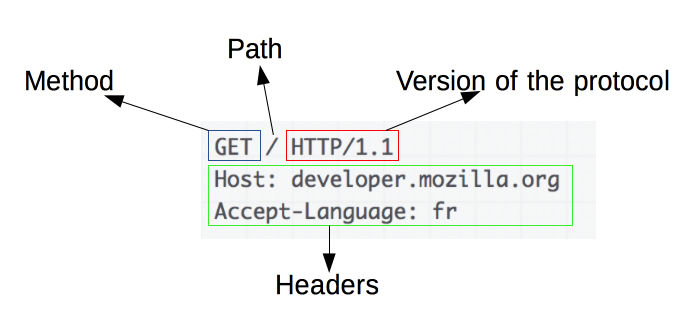
요청의 구조

요청은 웹 서버로 보내집니다

요청 예시

주요 상태 코드: 200(OK), 404(NOT FOUND), 3xx(리디렉션), 5xx(서버 오류)

응답은 웹 서버로부터 수신됩니다
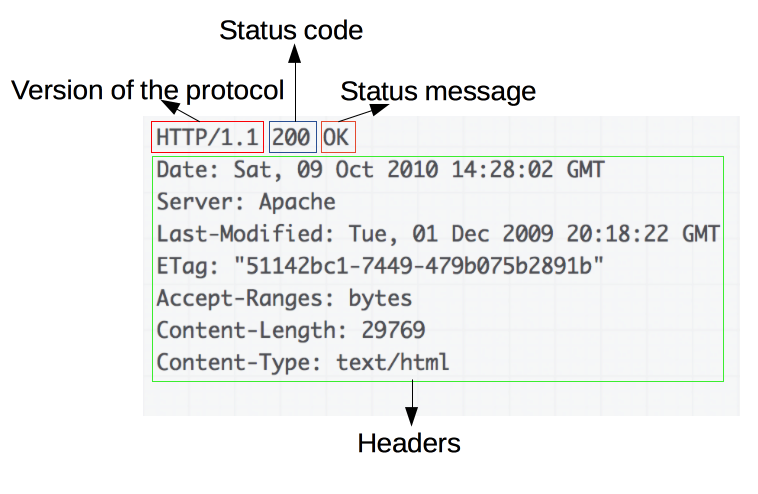
해당 응답

1 https://developer.mozilla.org/en-US/docs/Web/HTTP/Overview
R로 배우는 웹 스크레이핑

요청 메서드: GET과 POST

  • GET: 데이터를 제출하지 않고 리소스를 가져옵니다(GET /index.html)
  • POST: 폼 제출 등 서버로 데이터를 보냅니다
POST /test HTTP/1.1
Host: foo.example
Content-Type: application/x-www-form-urlencoded
Content-Length: 27

field1=value1&field2=value2

POST 요청에도 응답이 반환됩니다!

1 https://developer.mozilla.org/en-US/docs/Web/HTTP/Methods/POST
R로 배우는 웹 스크레이핑

httr로 HTTP 요청 보내기

library(httr)
GET('https://httpbin.org')
Response [https://httpbin.org/]
  Date: 2020-09-19 13:02
  Status: 200
  Content-Type: text/html; charset=utf-8
  Size: 9.59 kB
<!DOCTYPE html>
<html lang="en">

<head>
    <meta charset="UTF-8">
    ...
R로 배우는 웹 스크레이핑

httr로 HTTP 요청 보내기

library(httr)
response <- GET('https://httpbin.org')
content(response)
{html_document}
<html lang="en">
[1] <head>\n<meta http-equiv="Content-Type" content="text/html; charset=UTF ...
[2] <body>\n    <a href="https://github.com/requests/httpbin" class="github ...
R로 배우는 웹 스크레이핑

연습해 봅시다!

R로 배우는 웹 스크레이핑

Preparing Video For Download...