Reading AWS receipts

Using AWS Security for Developers

Rahul Singh

Technical Product Manager

What one record holds
CloudTrail: one API call, one record

  1. What was called: eventName
  2. When, in UTC: eventTime
  3. Who called it: userIdentity
  4. On which resource: requestParameters

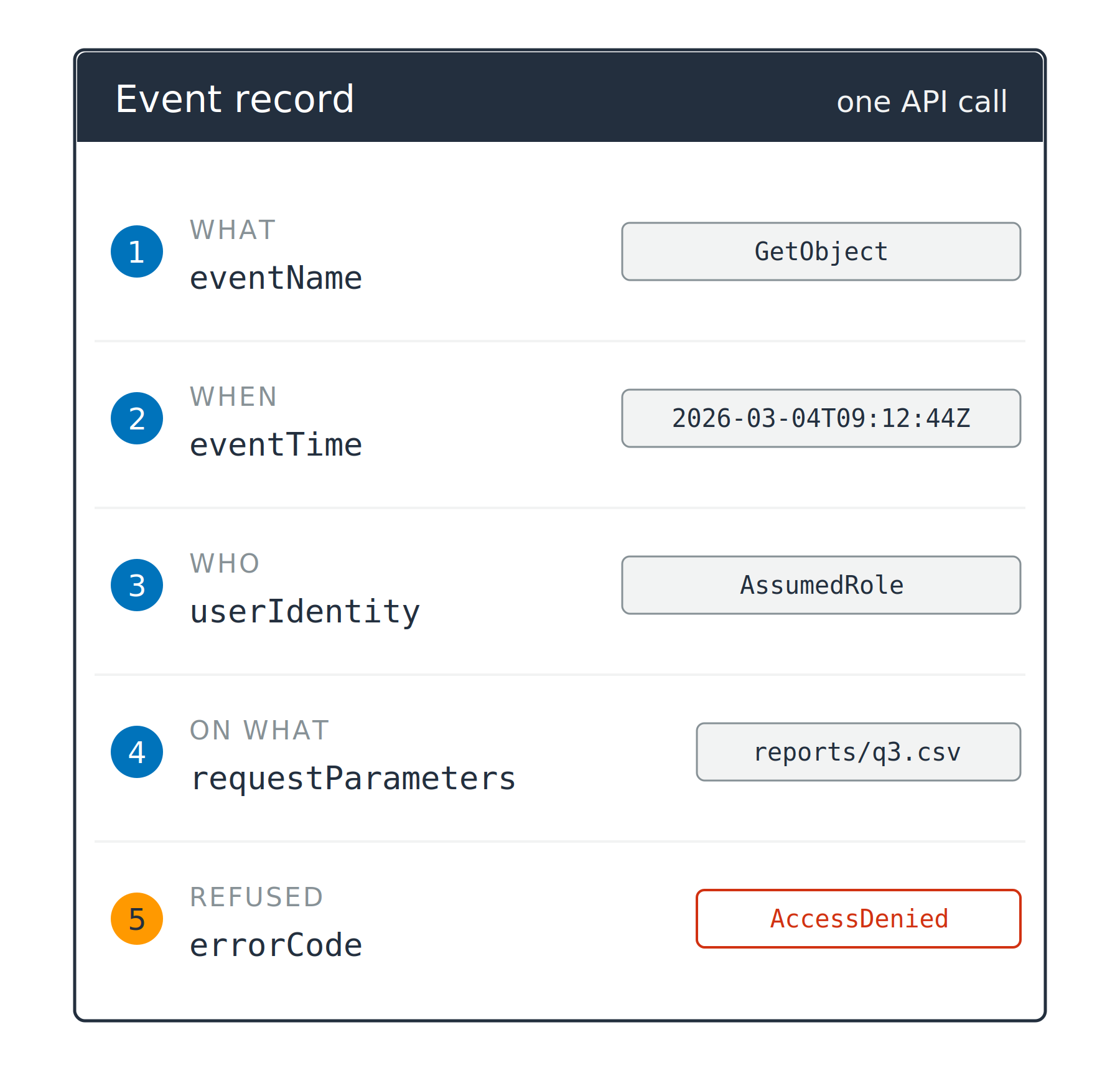
A record card listing five numbered fields, each with an example value beside it: eventName, eventTime, userIdentity, requestParameters, and errorCode. The fifth marker is orange and its value reads AccessDenied.

Using AWS Security for Developers

What one record holds

CloudTrail: one API call, one record

  1. What was called: eventName
  2. When, in UTC: eventTime
  3. Who called it: userIdentity
  4. On which resource: requestParameters
  5. Refused, and why: errorCode

A record card listing five numbered fields, each with an example value beside it: eventName, eventTime, userIdentity, requestParameters, and errorCode. The fifth marker is orange and its value reads AccessDenied.

Using AWS Security for Developers

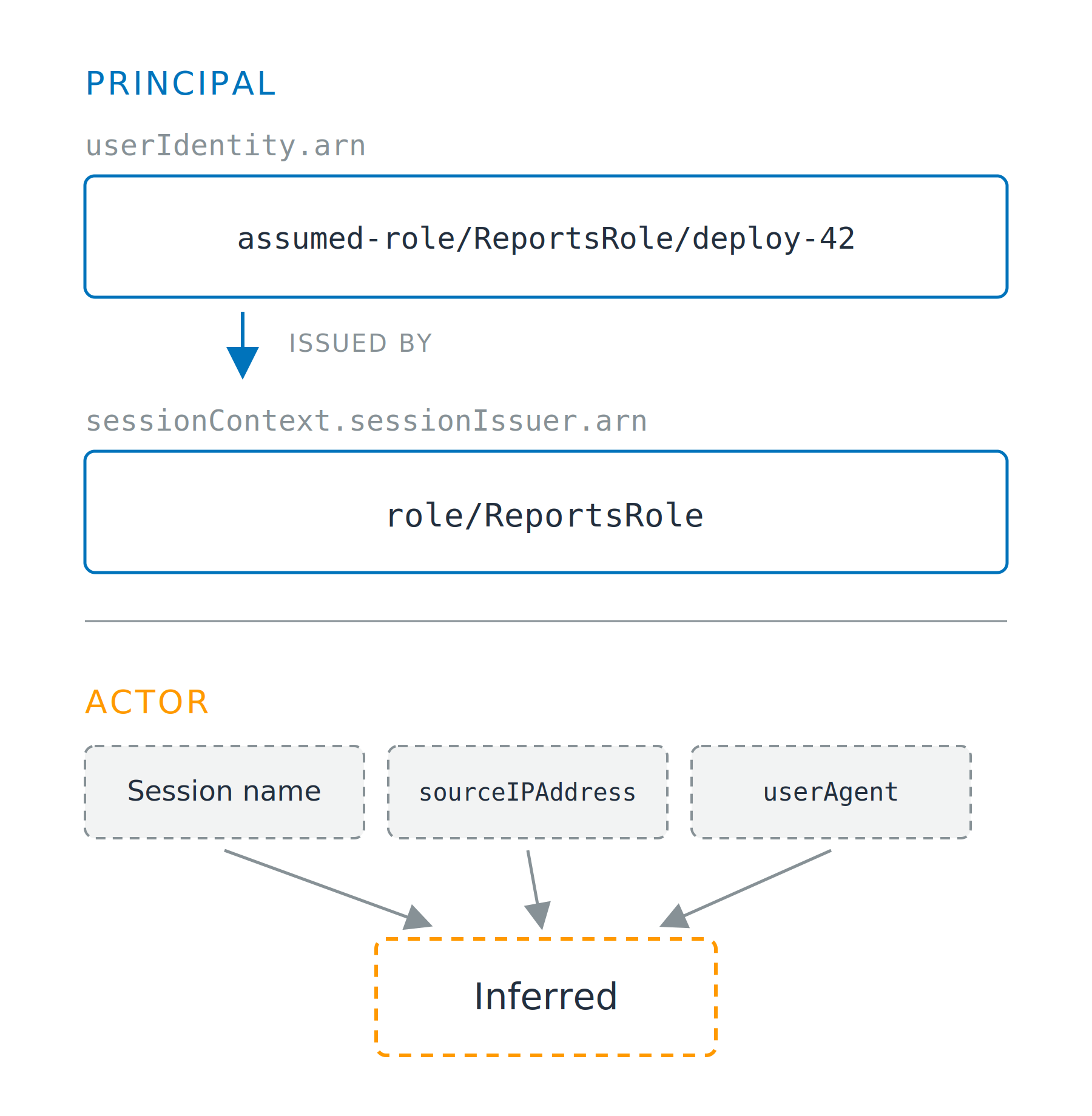
The log names the principal

Two fields, one identity

  • Session: the caller, in arn, starting arn:aws:sts:
  • Role: its authority, in sessionIssuer, starting arn:aws:iam:

Two stacked zones. The upper zone, headed Principal, shows the session ARN assumed-role/ReportsRole/deploy-42 with an arrow down to the role ARN role/ReportsRole that issued it, both drawn solid. The lower zone, headed Actor, shows three dashed boxes for session name, sourceIPAddress and userAgent, all pointing down at a dashed box reading Inferred.

Using AWS Security for Developers

The log names the principal

Two fields, one identity

  • Session: the caller, in arn, starting arn:aws:sts:
  • Role: its authority, in sessionIssuer, starting arn:aws:iam:

The actor is not a field

  • Inferred: session name, sourceIPAddress

Two stacked zones. The upper zone, headed Principal, shows the session ARN assumed-role/ReportsRole/deploy-42 with an arrow down to the role ARN role/ReportsRole that issued it, both drawn solid. The lower zone, headed Actor, shows three dashed boxes for session name, sourceIPAddress and userAgent, all pointing down at a dashed box reading Inferred.

Using AWS Security for Developers

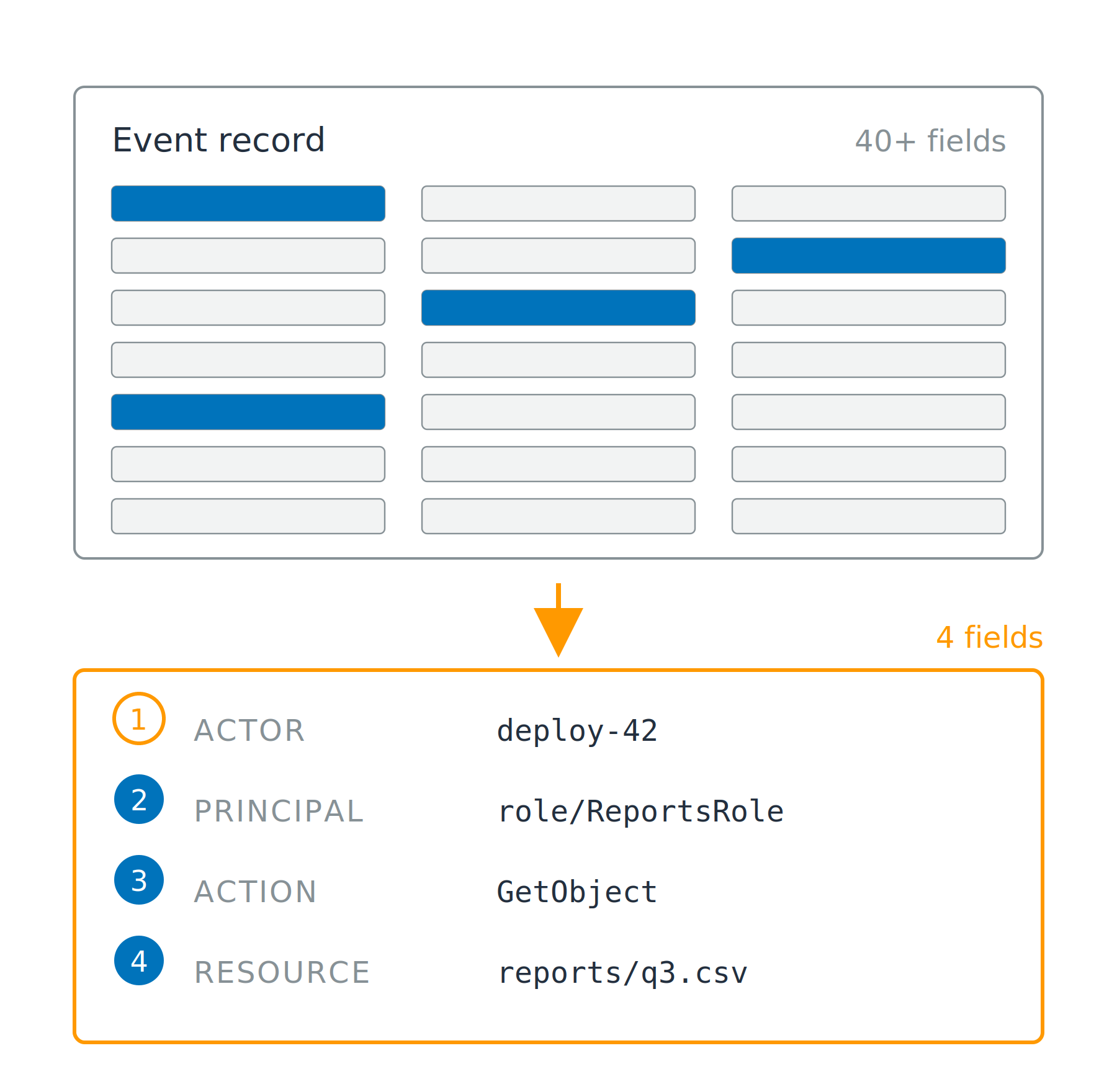
Keep four fields, not forty

Forty fields, four that matter

  • Actor: who set it in motion
  • Principal: the identity AWS checked
  • Action: what was called
  • Resource: what it touched

A dense event record of many gray field bars with four picked out in blue, and an arrow down to a compact card holding four numbered lines: actor, principal, action and resource.

Using AWS Security for Developers

Keep four fields, not forty

Forty fields, four that matter

  • Actor: who set it in motion
  • Principal: the identity AWS checked
  • Action: what was called
  • Resource: what it touched

Where they come from

  • Action from eventName, resource from requestParameters
  • Principal from userIdentity, actor inferred

A dense event record of many gray field bars with four picked out in blue, and an arrow down to a compact card holding four numbered lines: actor, principal, action and resource.

Using AWS Security for Developers

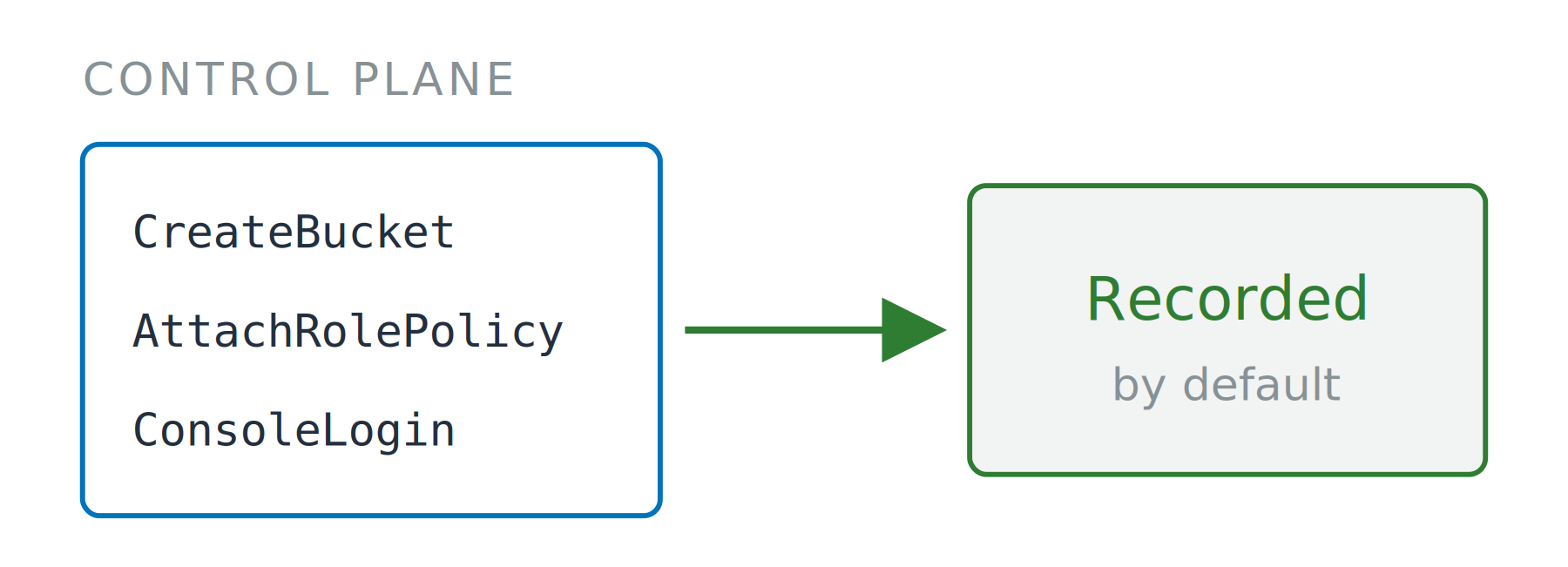
On by default, or off by default

Management events

  • Control plane calls
  • Includes every KMS call, so Decrypt lands here
  • Event history: free 90 day console view


Three control plane call names in a box, with a solid arrow to a box reading Recorded by default.


Using AWS Security for Developers

On by default, or off by default

Management events

  • Control plane calls
  • Includes every KMS call, so Decrypt lands here
  • Event history: free 90 day console view

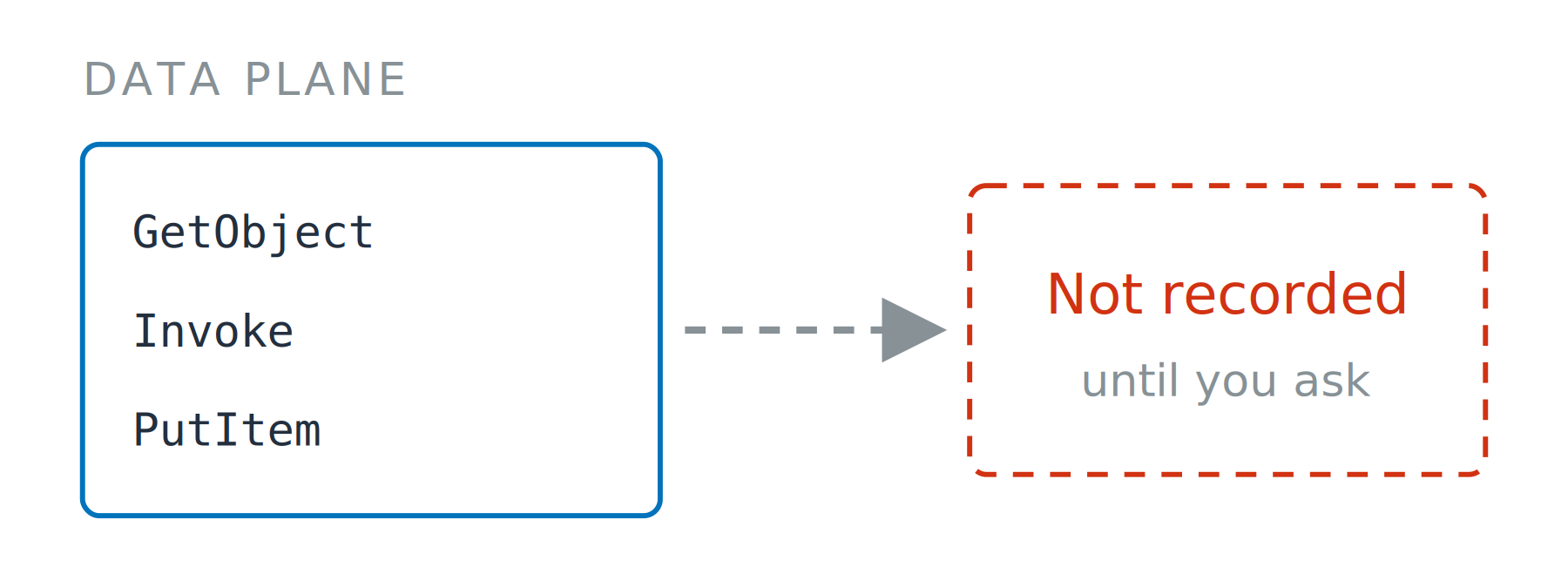
Data events

  • Object reads, function invokes, item writes
  • Trail: ongoing delivery, billed separately
  • A selector names the resource type, and reads, writes, or both

Three control plane call names in a box, with a solid arrow to a box reading Recorded by default.

Three data plane call names in a box, with a dashed arrow to a dashed box reading Not recorded until you ask.

Using AWS Security for Developers

Nobody was recording that

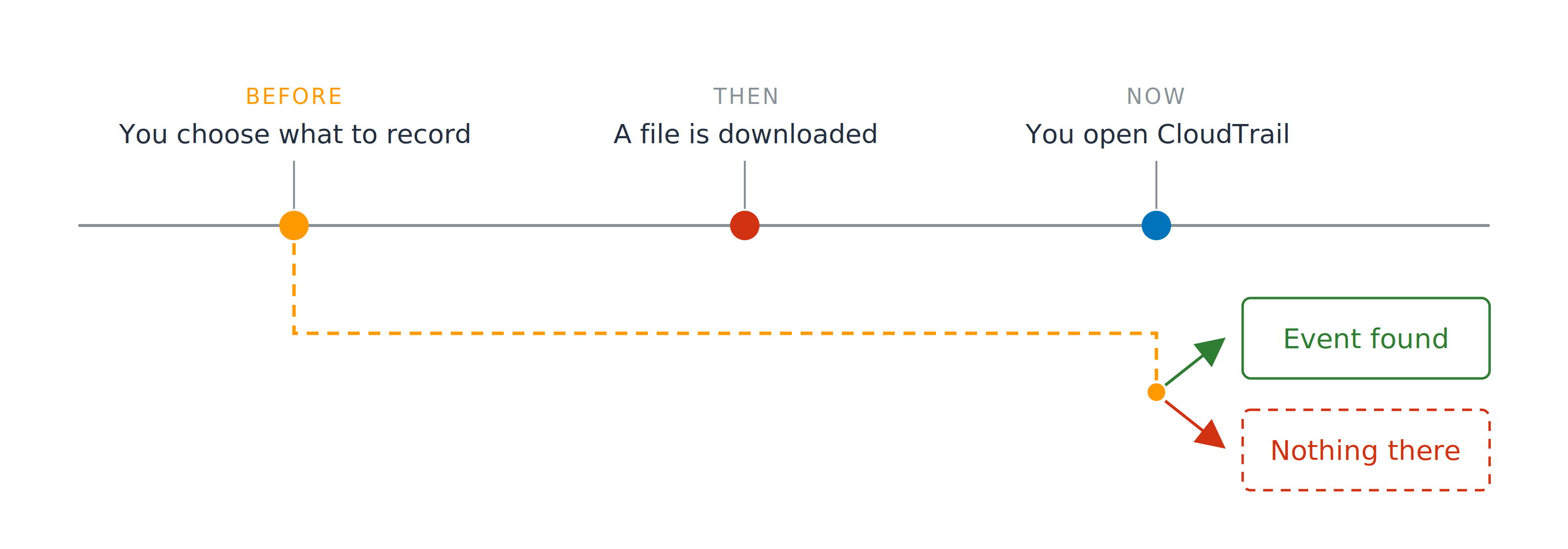
A timeline with three points: you choose what to record, a file is downloaded, and you open CloudTrail. A dashed line carries the first point forward to the last, where it forks into an event found box and a nothing there box.

Decided before, read after

Using AWS Security for Developers

Nobody was recording that

A timeline with three points: you choose what to record, a file is downloaded, and you open CloudTrail. A dashed line carries the first point forward to the last, where it forks into an event found box and a nothing there box.

Decided before, read after

  • Data events on for customer data
  • Off for the rest
Using AWS Security for Developers

Evidence, pointed forwards

IAM Access Analyzer

  • Policy validation: checks a policy you wrote

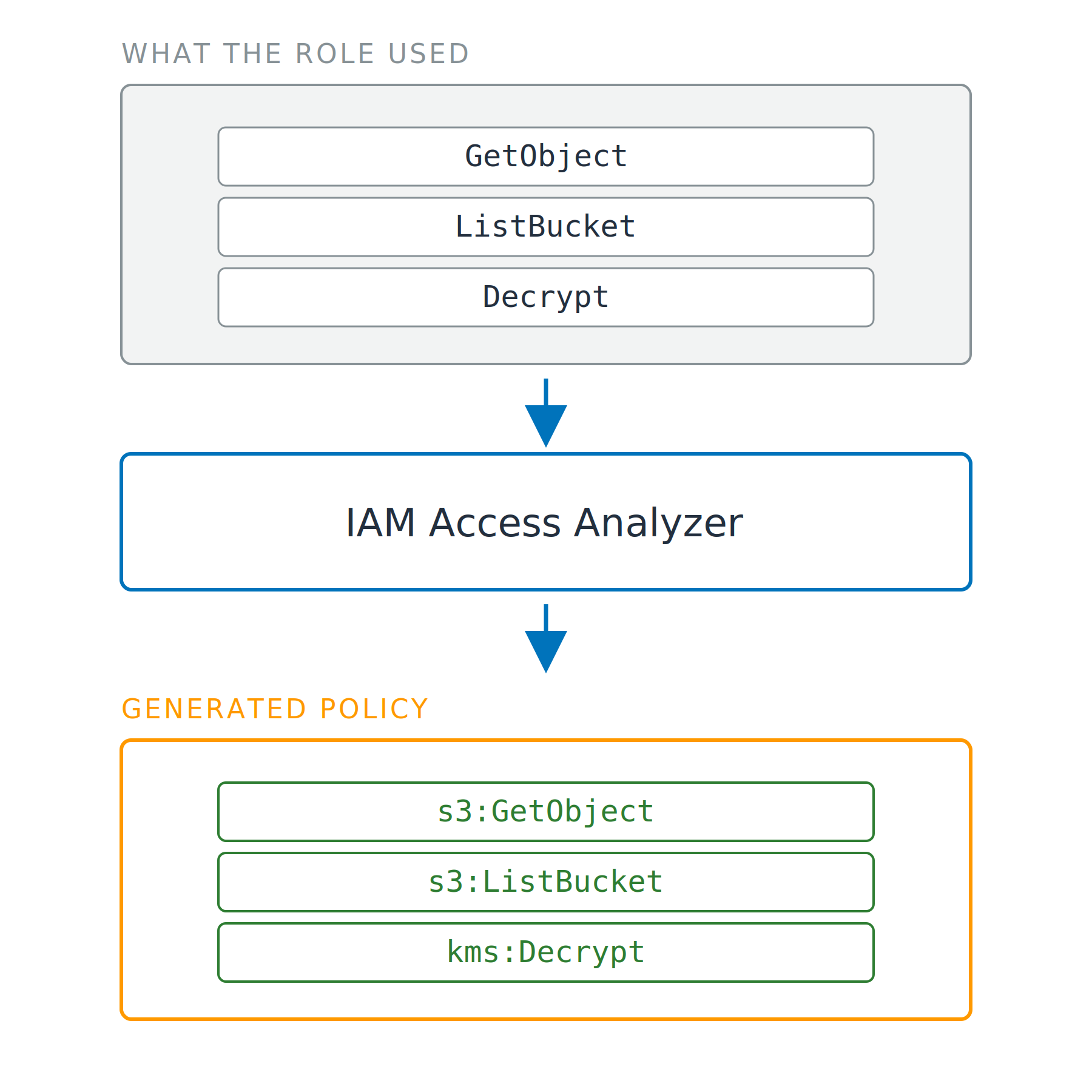
Three stacked stages. A box of the event names the role used, GetObject, ListBucket and Decrypt, flows into IAM Access Analyzer, which flows into a generated policy holding the namespaced IAM actions s3:GetObject, s3:ListBucket and kms:Decrypt.

Using AWS Security for Developers

Evidence, pointed forwards

IAM Access Analyzer

  • Policy validation: checks a policy you wrote
  • Policy generation: up to 90 days of your trail
  • Needs a trail, not Event history

Three stacked stages. A box of the event names the role used, GetObject, ListBucket and Decrypt, flows into IAM Access Analyzer, which flows into a generated policy holding the namespaced IAM actions s3:GetObject, s3:ListBucket and kms:Decrypt.

Using AWS Security for Developers

Granted, and never used

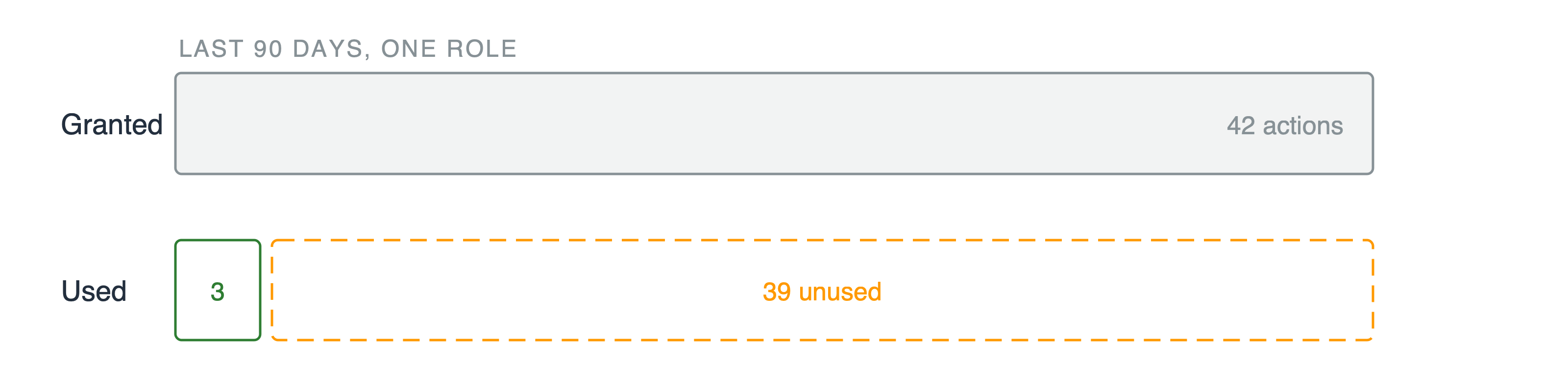
Two bars. The upper bar shows forty two granted actions. The lower bar splits into a narrow green segment of three actions and a wide dashed segment of thirty nine unused.

Unused access findings

  • Roles, keys, and actions nobody has called
Using AWS Security for Developers

Granted, and never used

Two bars. The upper bar shows forty two granted actions. The lower bar splits into a narrow green segment of three actions and a wide dashed segment of thirty nine unused.

Unused access findings

  • Roles, keys, and actions nobody has called

Used is not the same as required

Using AWS Security for Developers

Granted, and never used

Two bars. The upper bar shows forty two granted actions. The lower bar splits into a narrow green segment of three actions and a wide dashed segment of thirty nine unused.

Unused access findings

  • Roles, keys, and actions nobody has called

Used is not the same as required

Least privilege, measured

  • Evidence in, tighter policy out
Using AWS Security for Developers

Let's practice!

Using AWS Security for Developers

Preparing Video For Download...