Encryption modes and enforcing transit

Using AWS Security for Developers

Rahul Singh

Technical Product Manager

Two guarantees, one default
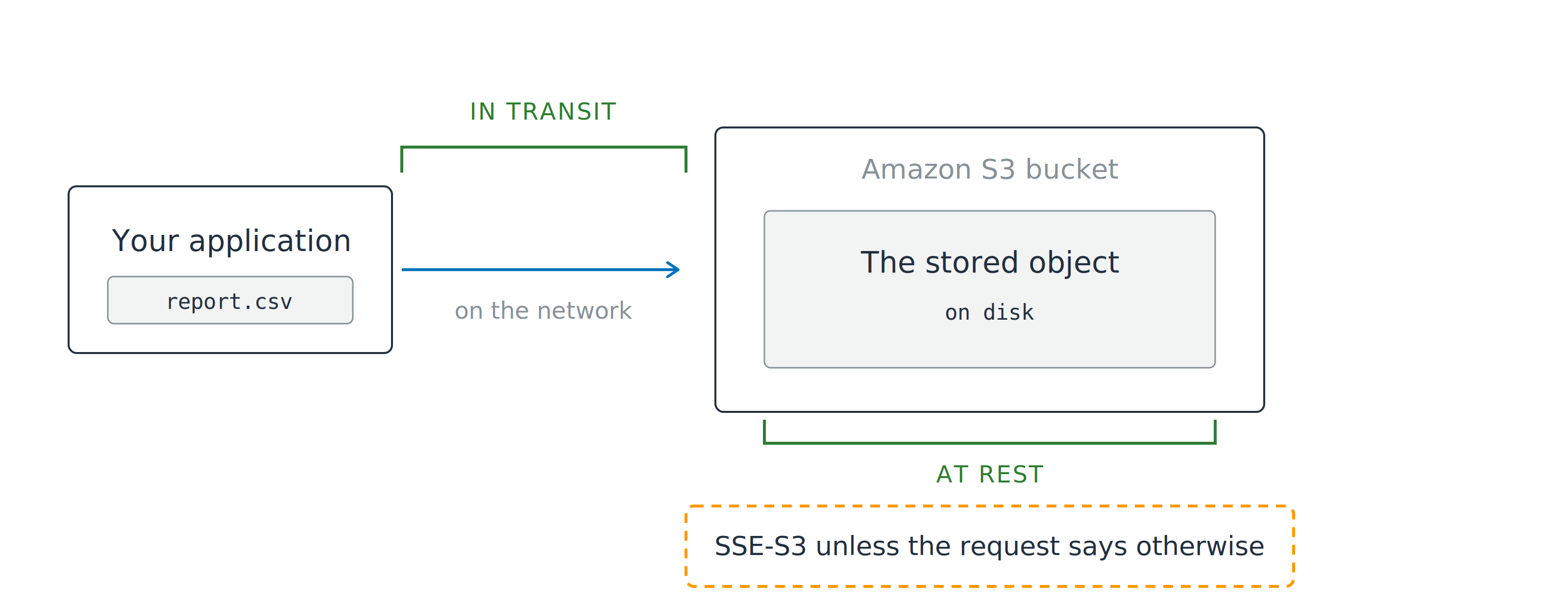
An application sends an object to an Amazon S3 bucket. A green bracket labeled in transit spans the network hop, and a second green bracket labeled at rest spans the stored object, above a note that SSE-S3 applies unless the request says otherwise.

  • At rest: the bytes on disk
  • In transit: the bytes on the network
Using AWS Security for Developers

Two guarantees, one default

An application sends an object to an Amazon S3 bucket. A green bracket labeled in transit spans the network hop, and a second green bracket labeled at rest spans the stored object, above a note that SSE-S3 applies unless the request says otherwise.

  • At rest: the bytes on disk
  • In transit: the bytes on the network
  • Already done: SSE-S3 on every new object
  • Still yours: Which mode, and who holds the key, do
Using AWS Security for Developers

Where the plaintext ends

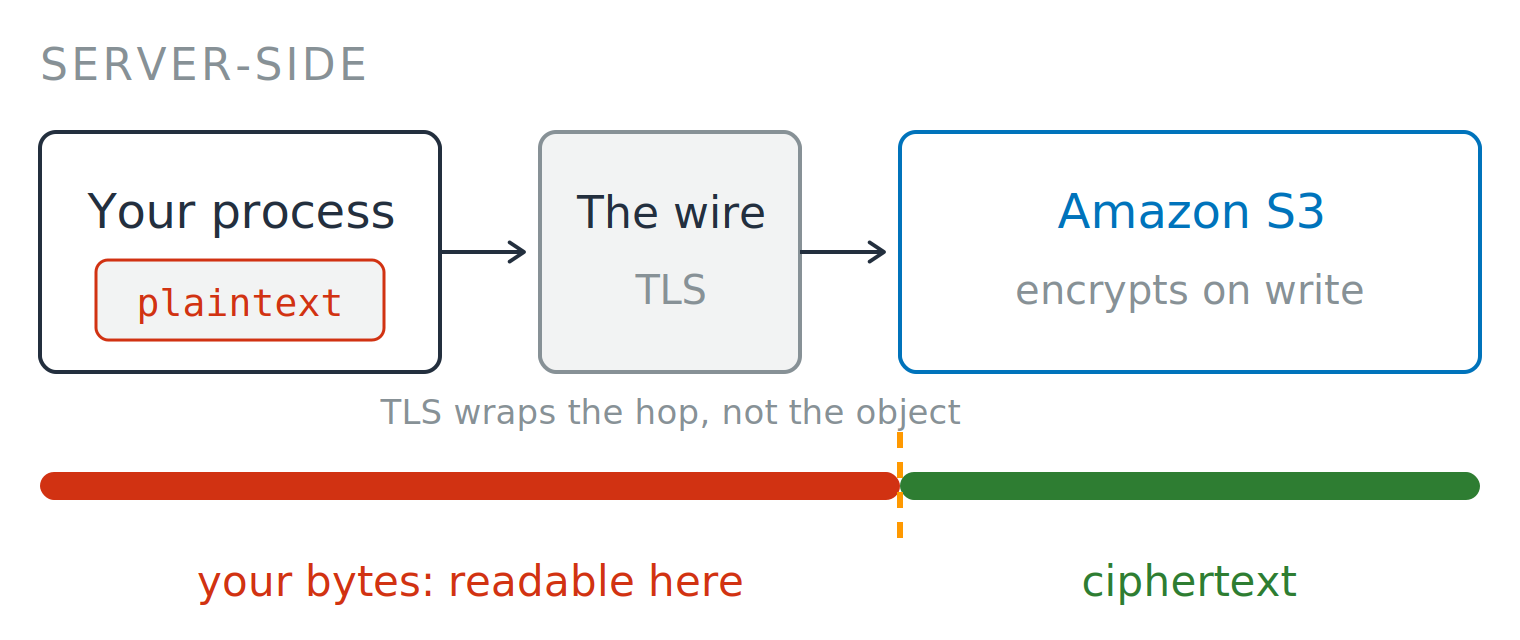
Server-side

  • AWS receives readable bytes
  • S3 encrypts as it writes


A server-side flow. Your process holds plaintext, sends it across a TLS wire, and Amazon S3 encrypts on write. A bar underneath tracks the bytes, split by a dashed divider at S3: the stretch before it is labeled "your bytes: readable here" and shown in red, the stretch after it is labeled "ciphertext" and shown in green.


Using AWS Security for Developers

Where the plaintext ends

Server-side

  • AWS receives readable bytes
  • S3 encrypts as it writes

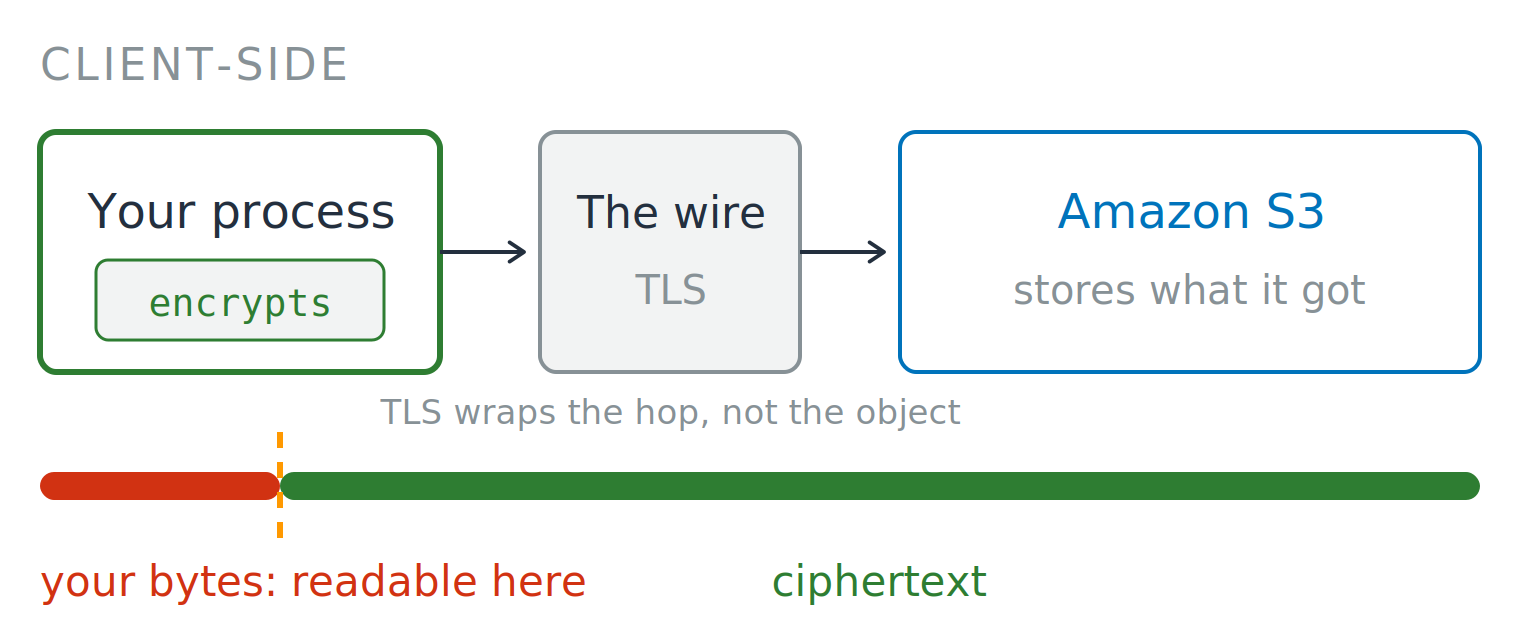
Client-side

  • You encrypt before it leaves
  • AWS only stores ciphertext

A server-side flow. Your process holds plaintext, sends it across a TLS wire, and Amazon S3 encrypts on write. A bar underneath tracks the bytes, split by a dashed divider at S3: the stretch before it is labeled "your bytes: readable here" and shown in red, the stretch after it is labeled "ciphertext" and shown in green.

A client-side flow. Your process encrypts first, sends ciphertext across a TLS wire, and Amazon S3 stores what it received. A bar underneath tracks the bytes, split by a dashed divider inside your process: the short stretch before it is labeled "your bytes: readable here" and shown in red, everything after it is labeled "ciphertext" and shown in green.

Using AWS Security for Developers

Four modes, one difference

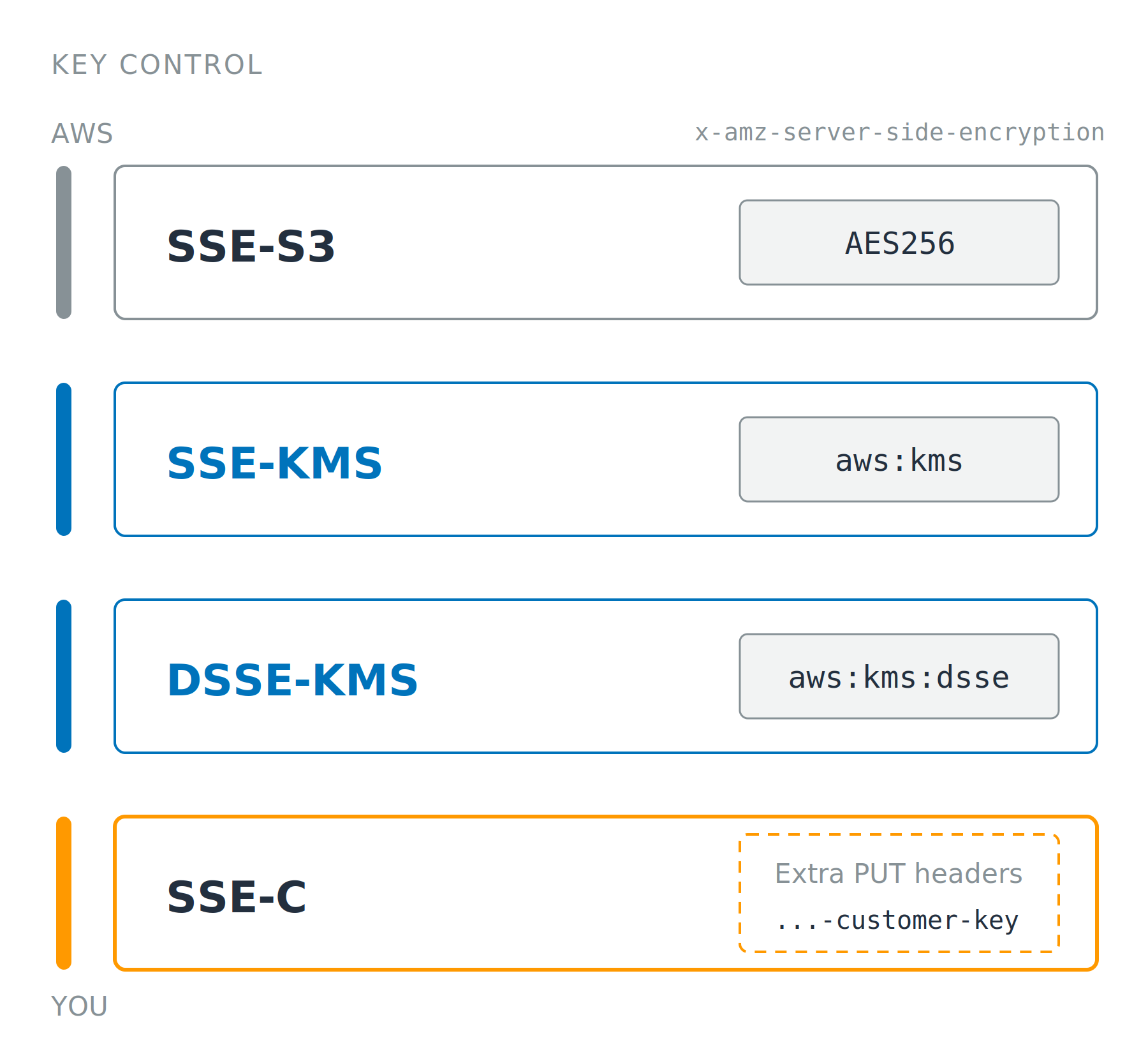
Same algorithm, four key owners

  • The mode travels as a header on the PUT
  • SSE-S3: AWS key, nothing to manage
  • SSE-KMS: your key, CloudTrail, and a key policy attached to the key saying who it will answer

Four stacked cards naming SSE-S3, SSE-KMS, DSSE-KMS and SSE-C. A rail down the left runs from AWS control at the top to your control at the bottom, and each card carries only the request header value that selects that mode.

Using AWS Security for Developers

Four modes, one difference

Same algorithm, four key owners

  • The mode travels as a header on the PUT
  • SSE-S3: AWS key, nothing to manage
  • SSE-KMS: your key, CloudTrail, and a key policy attached to the key saying who it will answer
  • DSSE-KMS: two independent layers
  • SSE-C: your key each request, yours to lose

Four stacked cards naming SSE-S3, SSE-KMS, DSSE-KMS and SSE-C. A rail down the left runs from AWS control at the top to your control at the bottom, and each card carries only the request header value that selects that mode.

Using AWS Security for Developers

The cost objection to SSE-KMS

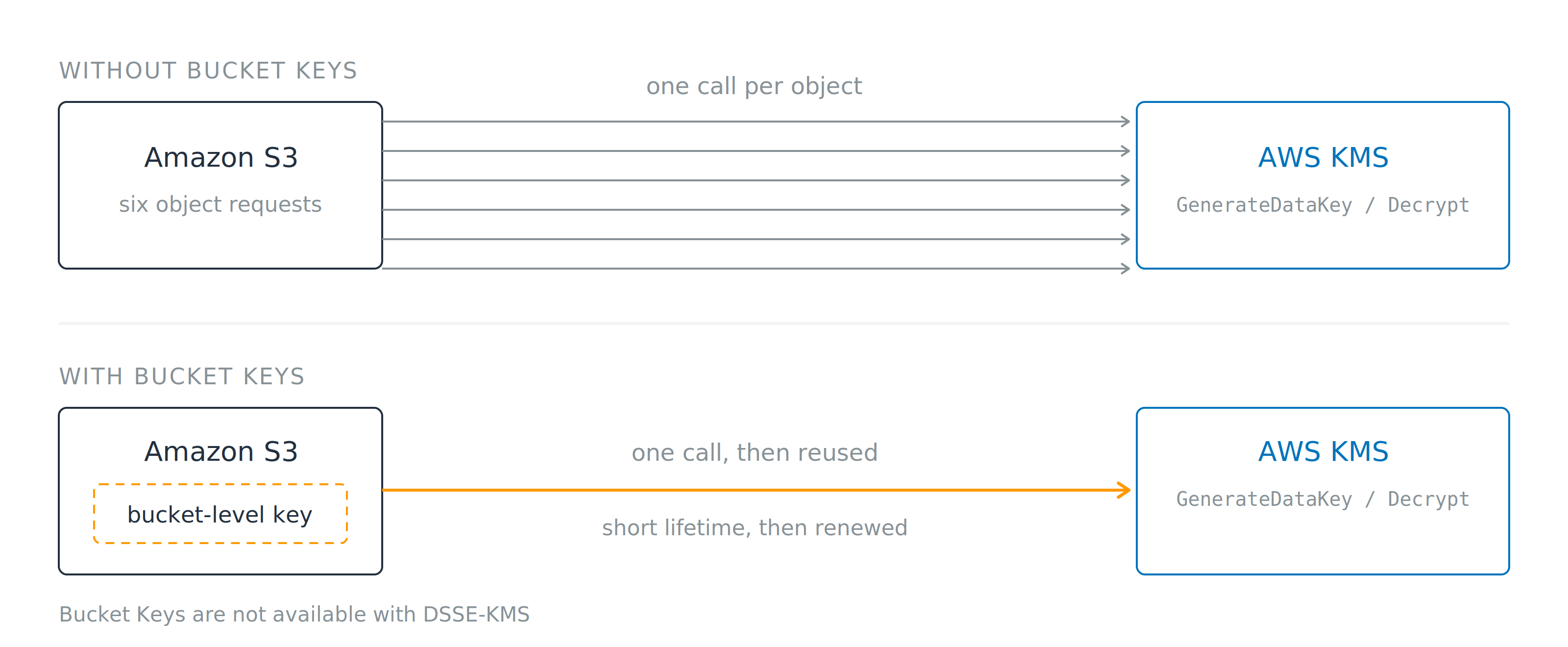
Two rows. Without Bucket Keys, six arrows run from Amazon S3 to AWS KMS, one for each object request. With Bucket Keys, a single arrow leaves a bucket-level key held inside S3. A note below states that Bucket Keys are not available with DSSE-KMS.

  • Without: one KMS call per object
  • With Bucket Keys: one short-lived key, reused
  • Not available with DSSE-KMS
  • Up to 99% fewer KMS requests
Using AWS Security for Developers

Encrypt the field, not the table

At rest is already on

  • A query returns plaintext to anyone with read access

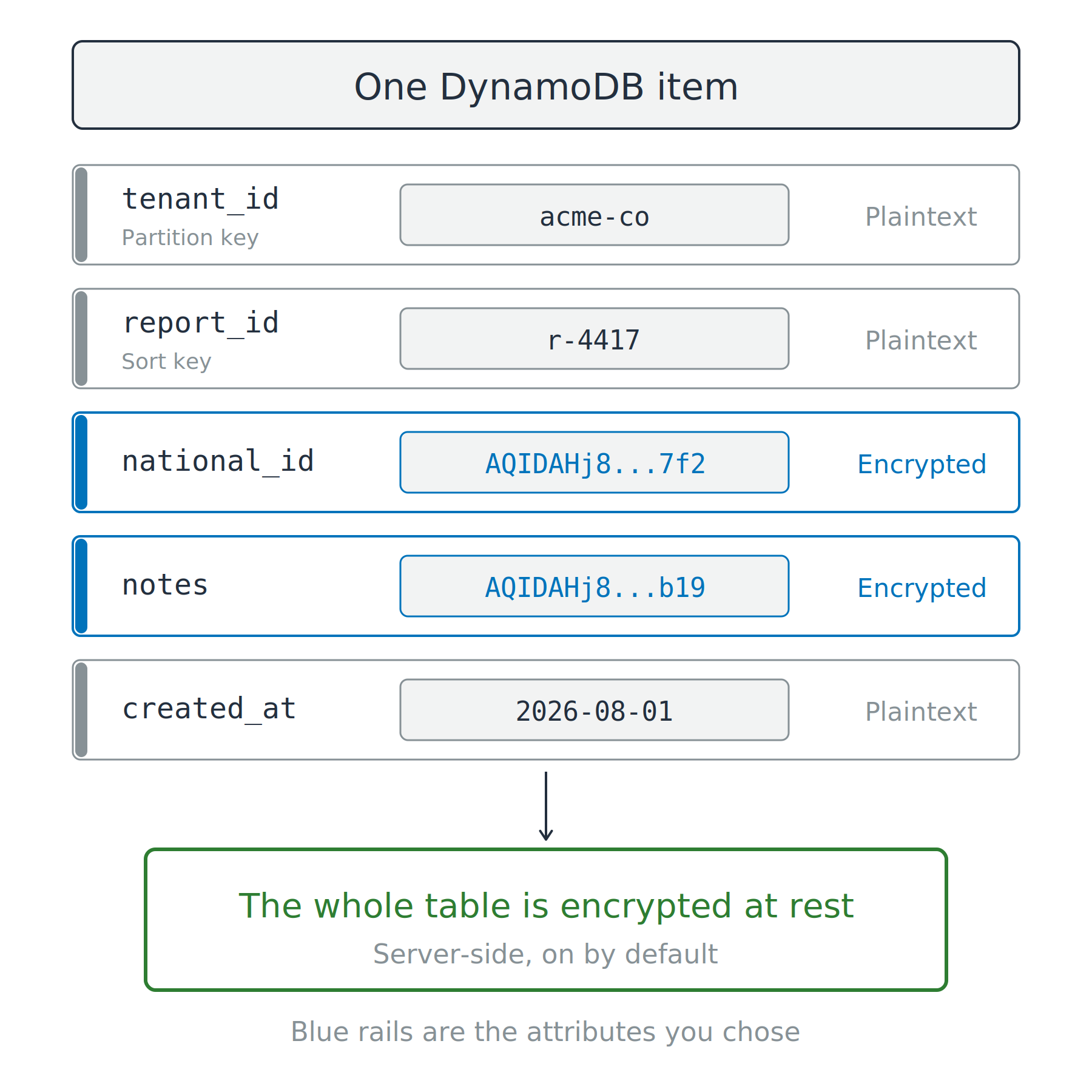
One DynamoDB item with five attributes. Two attributes hold ciphertext and carry blue rails, while the partition key, sort key and timestamp stay in plaintext. A green box below states that the whole table is encrypted at rest.

Using AWS Security for Developers

Encrypt the field, not the table

At rest is already on

  • A query returns plaintext to anyone with read access

AWS Database Encryption SDK

  • Encrypt chosen attributes in your code
  • Partition and sort keys, the fields DynamoDB finds items by, stay plaintext because it indexes on them

One DynamoDB item with five attributes. Two attributes hold ciphertext and carry blue rails, while the partition key, sort key and timestamp stay in plaintext. A green box below states that the whole table is encrypted at rest.

Using AWS Security for Developers

TLS is offered, not required

Offered, not enforced

  • S3 answers HTTP and HTTPS alike

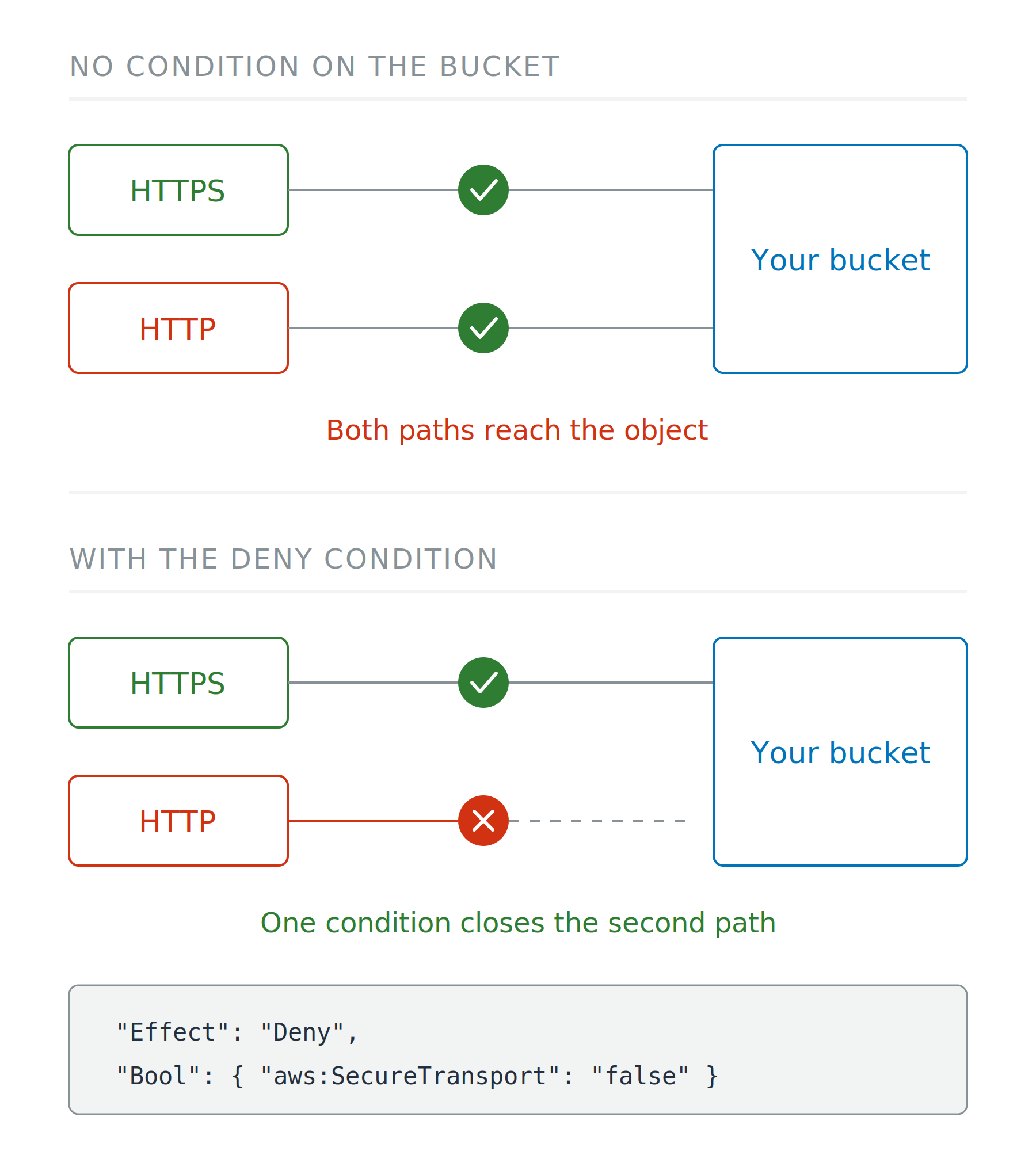
Two scenarios. With no condition on the bucket, both an HTTPS and an HTTP client reach the object. With the deny condition, the HTTP path stops at a red cross and never connects.

Using AWS Security for Developers

TLS is offered, not required

Offered, not enforced

  • S3 answers HTTP and HTTPS alike

Make it a requirement

  • Bucket policy: deny when aws:SecureTransport is false
  • Legitimate clients notice nothing

Two scenarios. With no condition on the bucket, both an HTTPS and an HTTP client reach the object. With the deny condition, the HTTP path stops at a red cross and never connects.

Using AWS Security for Developers

Which authority vouches for the name

Public name

  • ACM: publicly trusted, free, renews itself

Name only your network resolves

  • AWS Private CA: a certificate authority of your own
  • Never trusted on the public internet

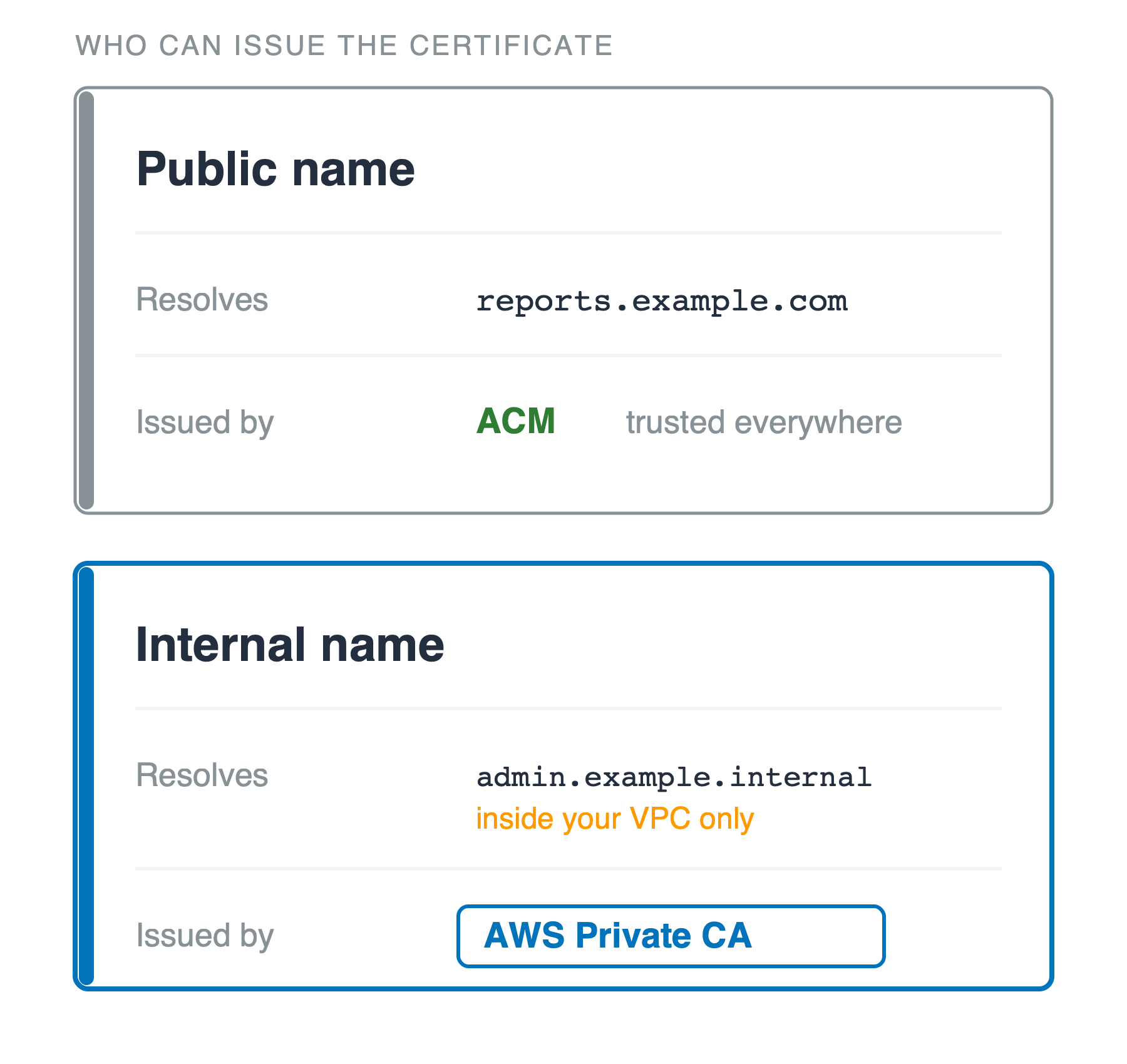
Two stacked cards headed who can issue the certificate. The upper card, public name, gives reports dot example dot com as the name it resolves and ACM as the issuer, trusted everywhere. The lower card, internal name, gives admin dot example dot internal, resolving inside your VPC only, and AWS Private CA as the issuer.

Using AWS Security for Developers

The private half is yours to lose

Who holds it

  • ACM: AWS keeps it
  • EC2 key pair, or any SSH key: you hold the private half, once

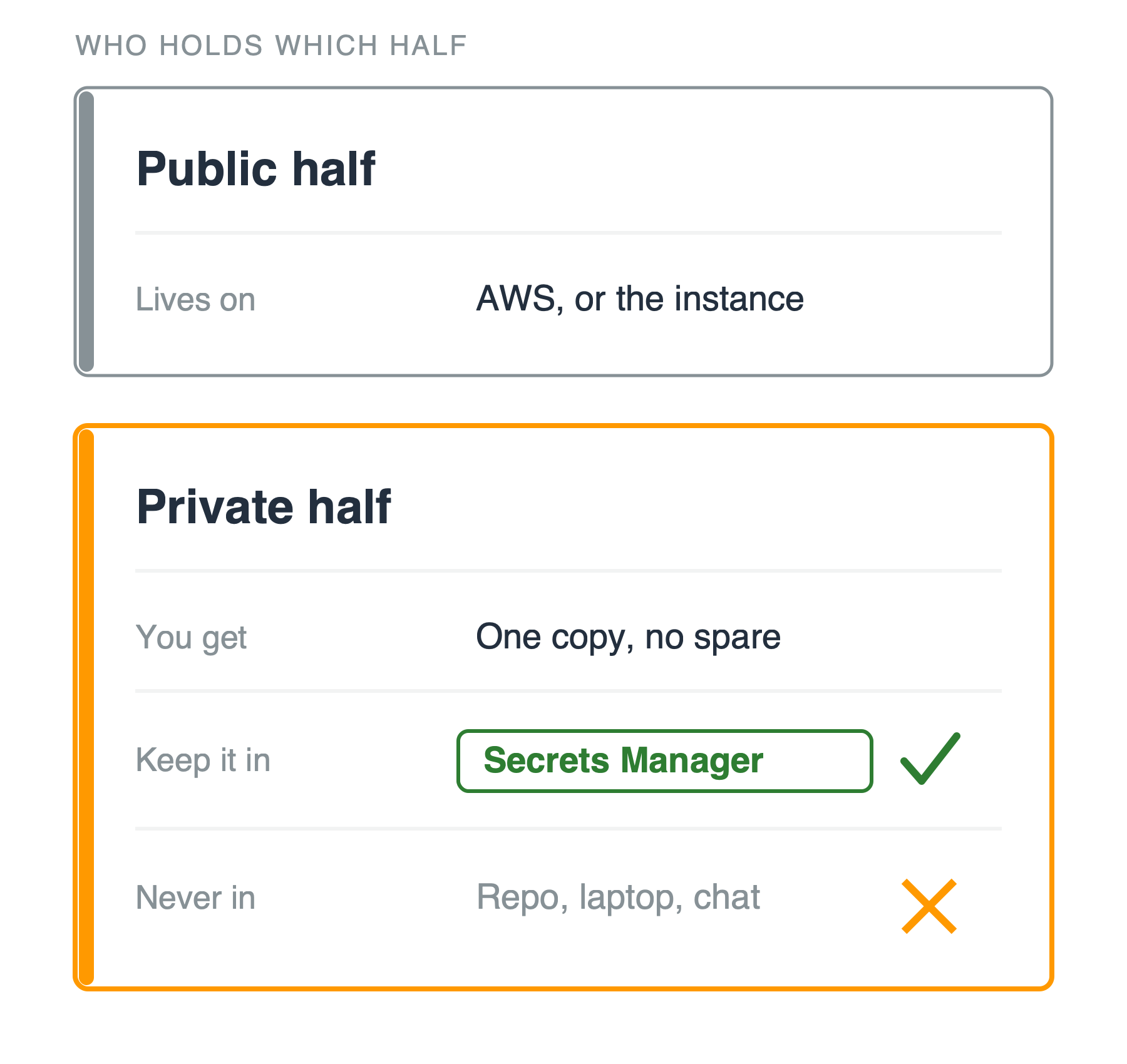
Two stacked cards headed who holds which half. The upper card, public half, says it lives on AWS or the instance. The lower orange card, private half, gives three rows: you get one copy and no spare, keep it in Secrets Manager with a green tick, and never in a repo, a laptop or chat, with an orange cross.

Using AWS Security for Developers

The private half is yours to lose

Who holds it

  • ACM: AWS keeps it
  • EC2 key pair, or any SSH key: you hold the private half, once

If it's yours

  • Secrets Manager, not a repo
  • Replace on a schedule

Two stacked cards headed who holds which half. The upper card, public half, says it lives on AWS or the instance. The lower orange card, private half, gives three rows: you get one copy and no spare, keep it in Secrets Manager with a green tick, and never in a repo, a laptop or chat, with an orange cross.

Using AWS Security for Developers

Three answers, not one

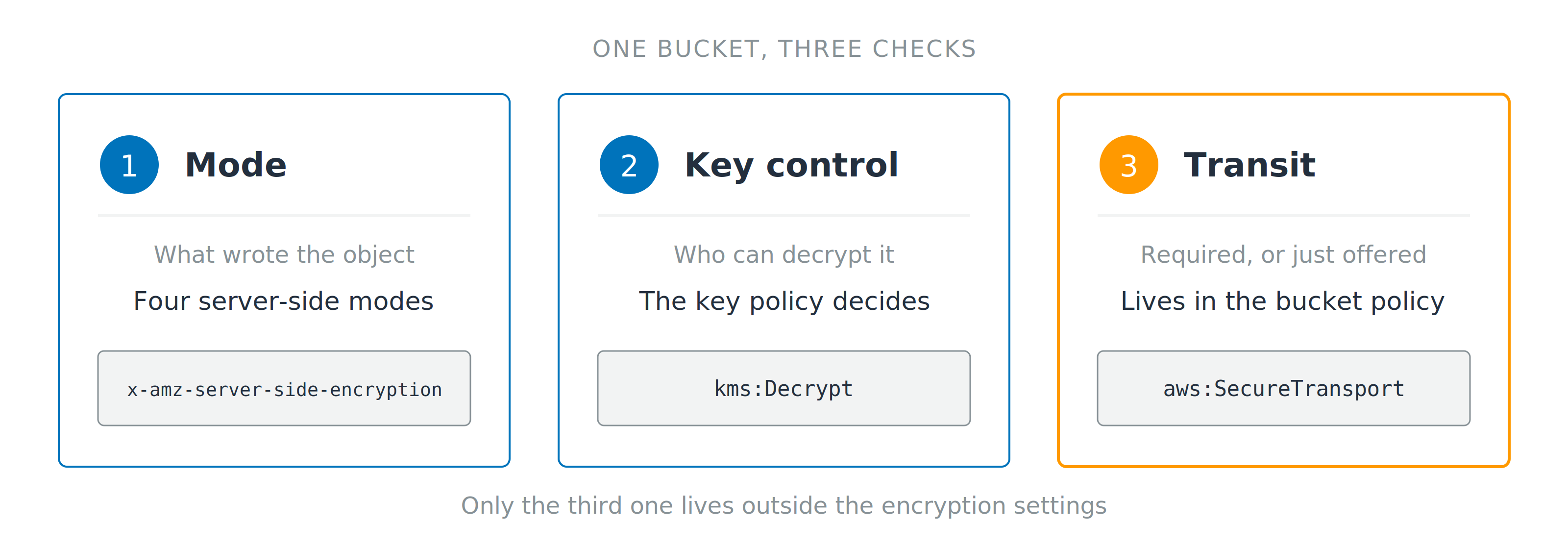
Three numbered cards for mode, key control and transit, each showing the header or condition key that answers it. A line below notes that only the third check lives outside the encryption settings.

  1. Mode: what wrote the object
  2. Key control: who can decrypt it, in this account or another
  3. Transit: required, or only offered
Using AWS Security for Developers

Let's practice!

Using AWS Security for Developers

Preparing Video For Download...