Keep secrets out of code and logs

Using AWS Security for Developers

Rahul Singh

Technical Product Manager

Not everything sensitive is a secret
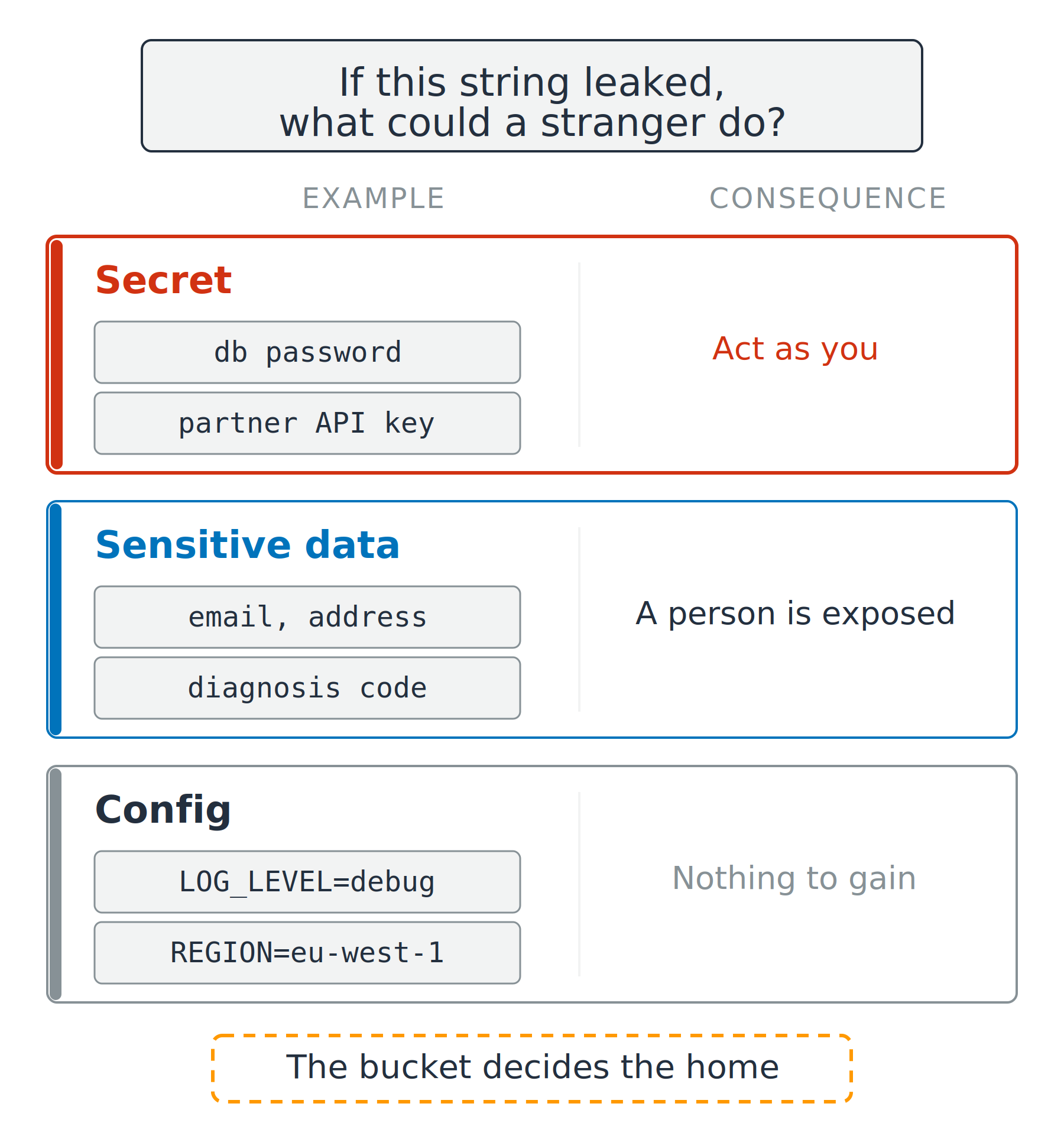
Three kinds of string

  • Secret: a stranger can act as you
  • Sensitive data: a person is exposed
  • Config: nothing to gain

Three stacked rows comparing a secret, sensitive data and config. Each row shows two example values and what a stranger could do with them, from acting as you down to nothing to gain.

Using AWS Security for Developers

Not everything sensitive is a secret

Three kinds of string

  • Secret: a stranger can act as you
  • Sensitive data: a person is exposed
  • Config: nothing to gain

Two names for personal data

  • PII: personally identifiable information
  • PHI: protected health information

Three stacked rows comparing a secret, sensitive data and config. Each row shows two example values and what a stranger could do with them, from acting as you down to nothing to gain.

Using AWS Security for Developers

Four ways a secret gets out

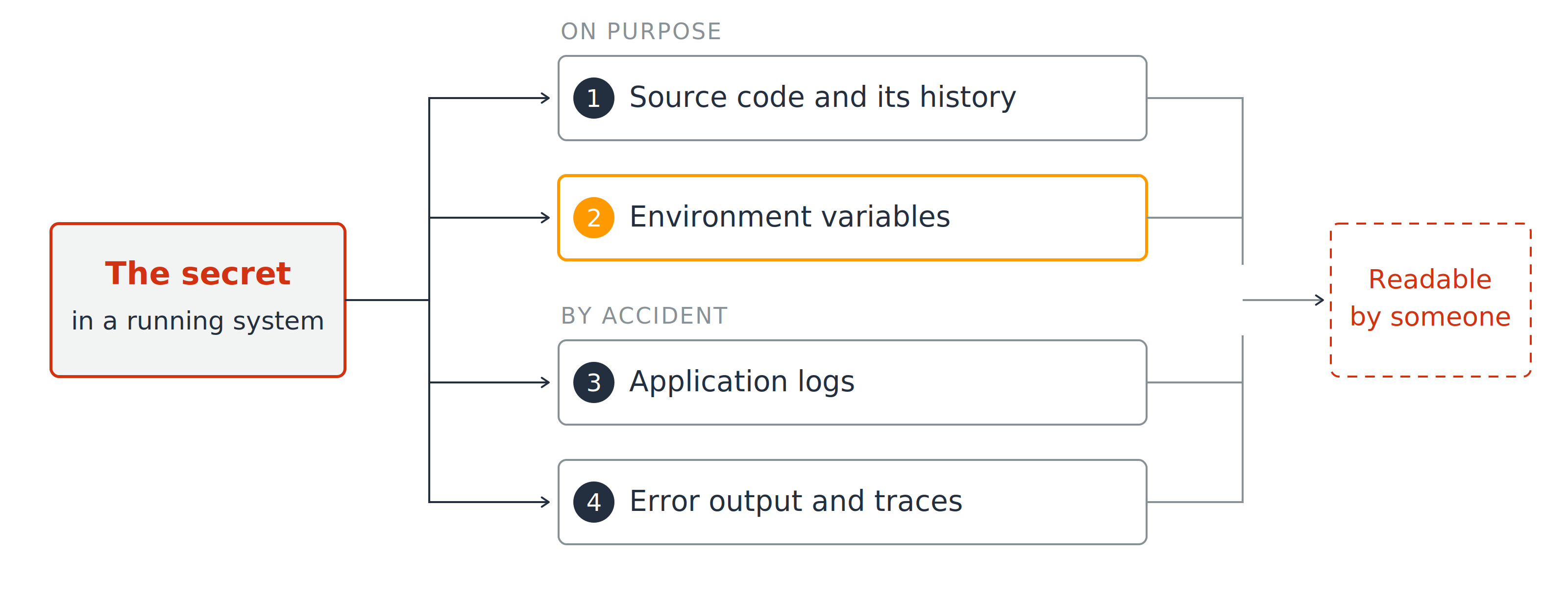
A secret in a running system fans out to four numbered exits, marker one to source code and its history, marker two to environment variables, marker three to application logs, marker four to error output and traces. All four converge on a box reading readable by someone.

  1. Source code and its history
  2. Environment variables
Using AWS Security for Developers

Four ways a secret gets out

A secret in a running system fans out to four numbered exits, marker one to source code and its history, marker two to environment variables, marker three to application logs, marker four to error output and traces. All four converge on a box reading readable by someone.

  1. Source code and its history
  2. Environment variables
  3. Application logs
  4. Error output and traces
Using AWS Security for Developers

Encrypted at rest is not hidden

The safe-feeling choice

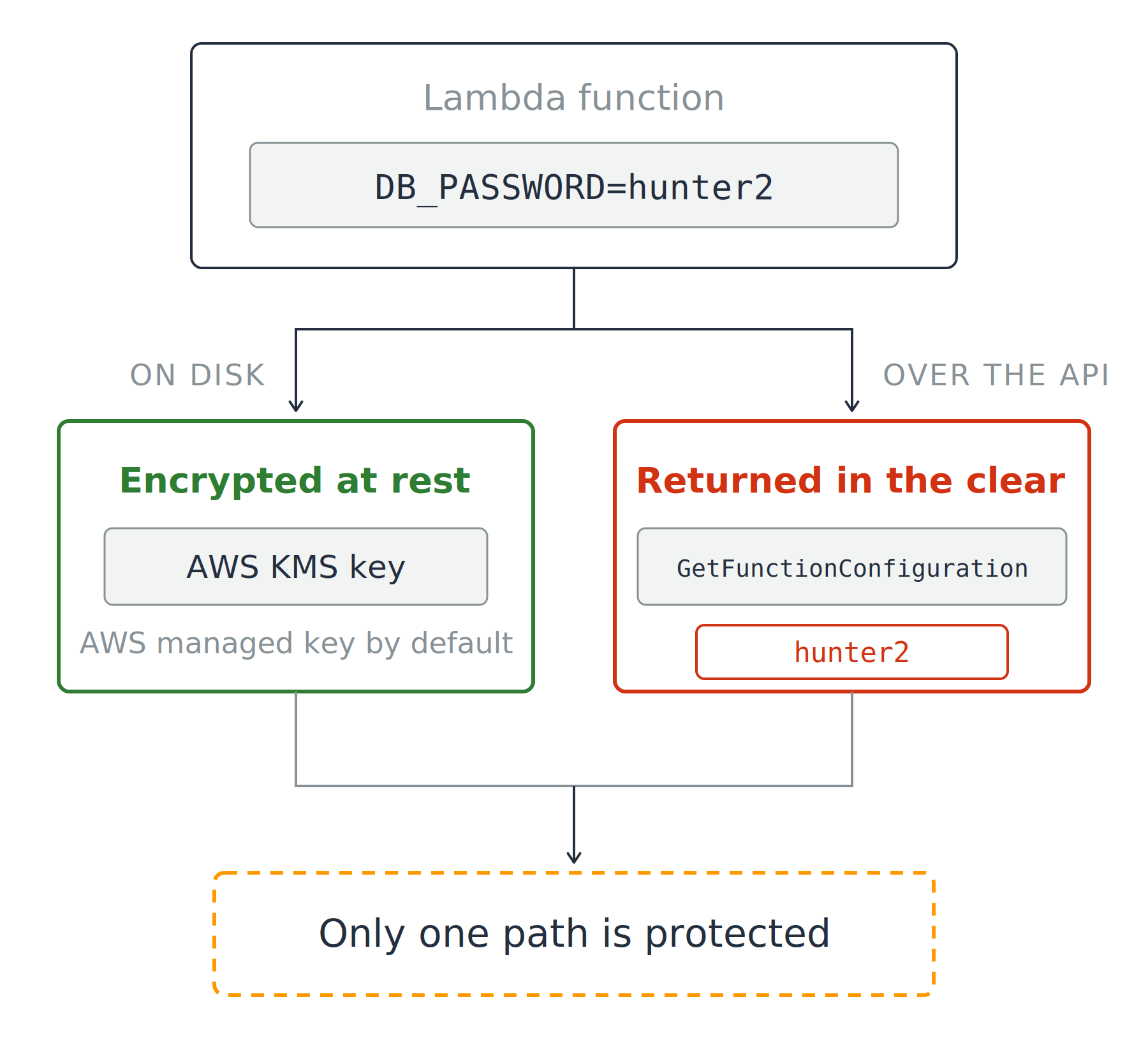
  • Encrypted at rest, always
  • AWS KMS key, AWS managed by default

A Lambda function holding an environment variable splits into two paths. On disk it is encrypted at rest with an AWS KMS key, shown in green. Over the API a call to GetFunctionConfiguration returns the value in the clear, shown in red. Both paths meet at a note saying only one path is protected.

Using AWS Security for Developers

Encrypted at rest is not hidden

The safe-feeling choice

  • Encrypted at rest, always
  • AWS KMS key, AWS managed by default

What GetFunctionConfiguration returns

  • The value, in plain text

A storage answer to an access question

A Lambda function holding an environment variable splits into two paths. On disk it is encrypted at rest with an AWS KMS key, shown in green. Over the API a call to GetFunctionConfiguration returns the value in the clear, shown in red. Both paths meet at a note saying only one path is protected.

Using AWS Security for Developers

Which store, and why

Two services, one job each

  • Secrets Manager: built for secrets
  • Parameter Store: built for config, and a SecureString parameter is encrypted with a KMS key

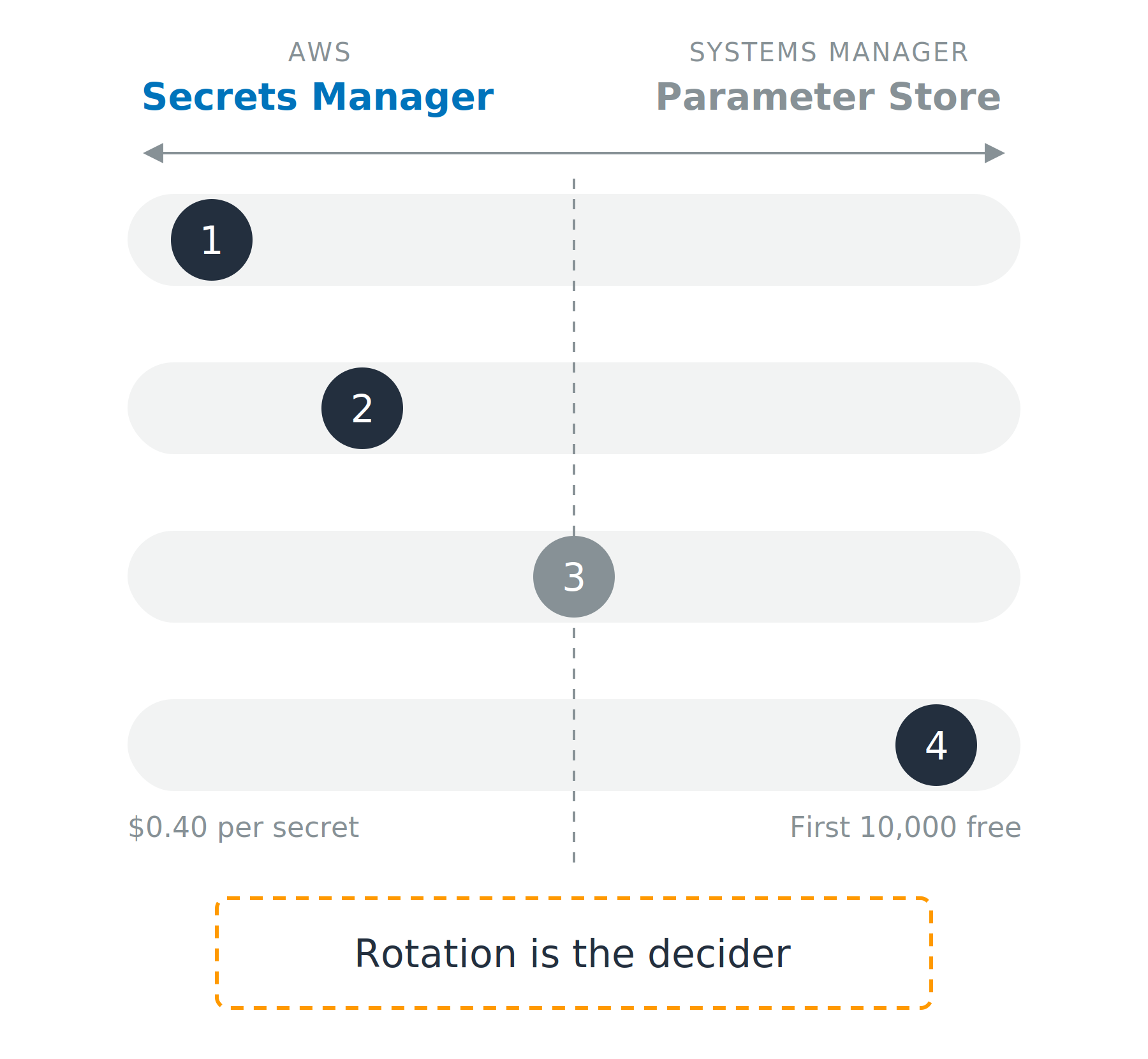
A spectrum diagram. Secrets Manager is named on the left, Systems Manager Parameter Store on the right, and four horizontal rails run between them. A numbered marker sits on each rail: marker one far left, marker two left of center, marker three on the center line, marker four far right, with the cost figures at each end of the fourth rail and a note reading rotation is the decider.

Using AWS Security for Developers

Which store, and why

Two services, one job each

  • Secrets Manager: built for secrets
  • Parameter Store: built for config, and a SecureString parameter is encrypted with a KMS key

Four things decide it

  1. Managed rotation
  2. Cross-account sharing
  3. Versioning
  4. Cost

A spectrum diagram. Secrets Manager is named on the left, Systems Manager Parameter Store on the right, and four horizontal rails run between them. A numbered marker sits on each rail: marker one far left, marker two left of center, marker three on the center line, marker four far right, with the cost figures at each end of the fourth rail and a note reading rotation is the decider.

Using AWS Security for Developers

Read it fresh, cache it briefly

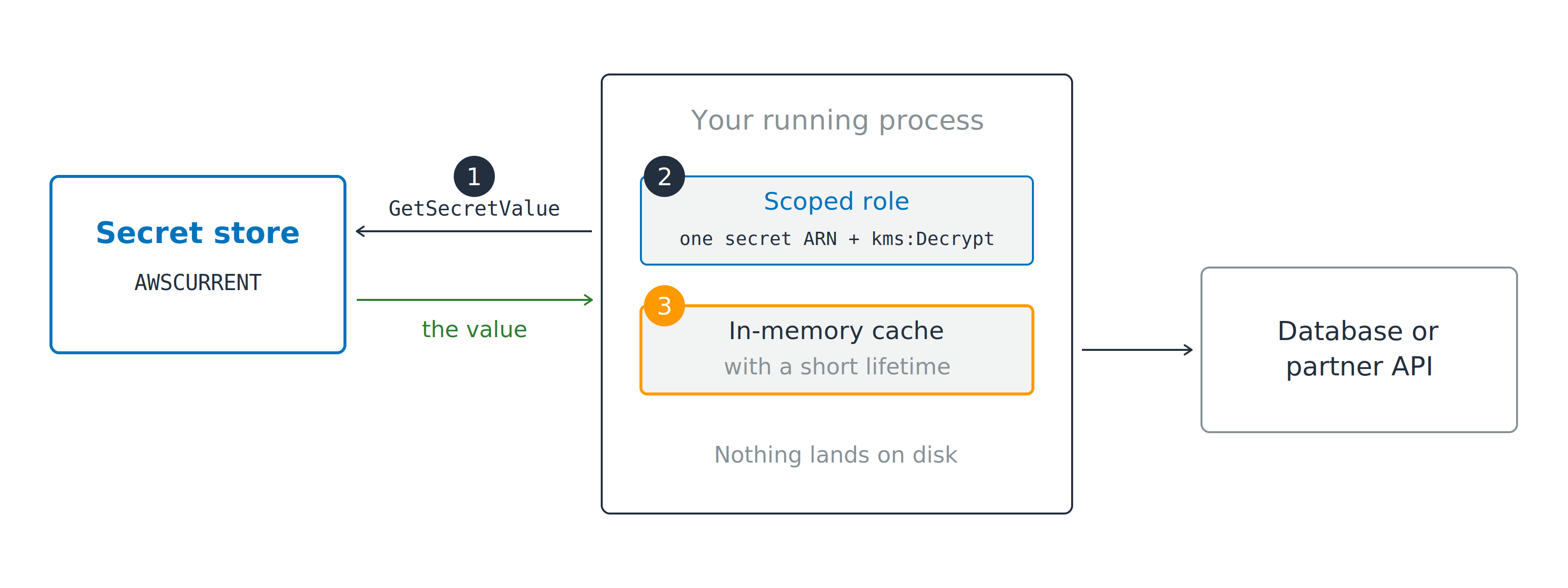
Your running process calls GetSecretValue on a secret store at marker one, using a scoped role at marker two limited to one secret ARN plus kms:Decrypt, and holds the returned value in an in-memory cache at marker three before calling a database or partner API.

  1. Call GetSecretValue at startup
  2. Role scoped to one secret ARN plus kms:Decrypt
Using AWS Security for Developers

Read it fresh, cache it briefly

Your running process calls GetSecretValue on a secret store at marker one, using a scoped role at marker two limited to one secret ARN plus kms:Decrypt, and holds the returned value in an in-memory cache at marker three before calling a database or partner API.

  1. Call GetSecretValue at startup
  2. Role scoped to one secret ARN plus kms:Decrypt
  3. Cache the value in memory

Cache forever, and rotation breaks you

Using AWS Security for Developers

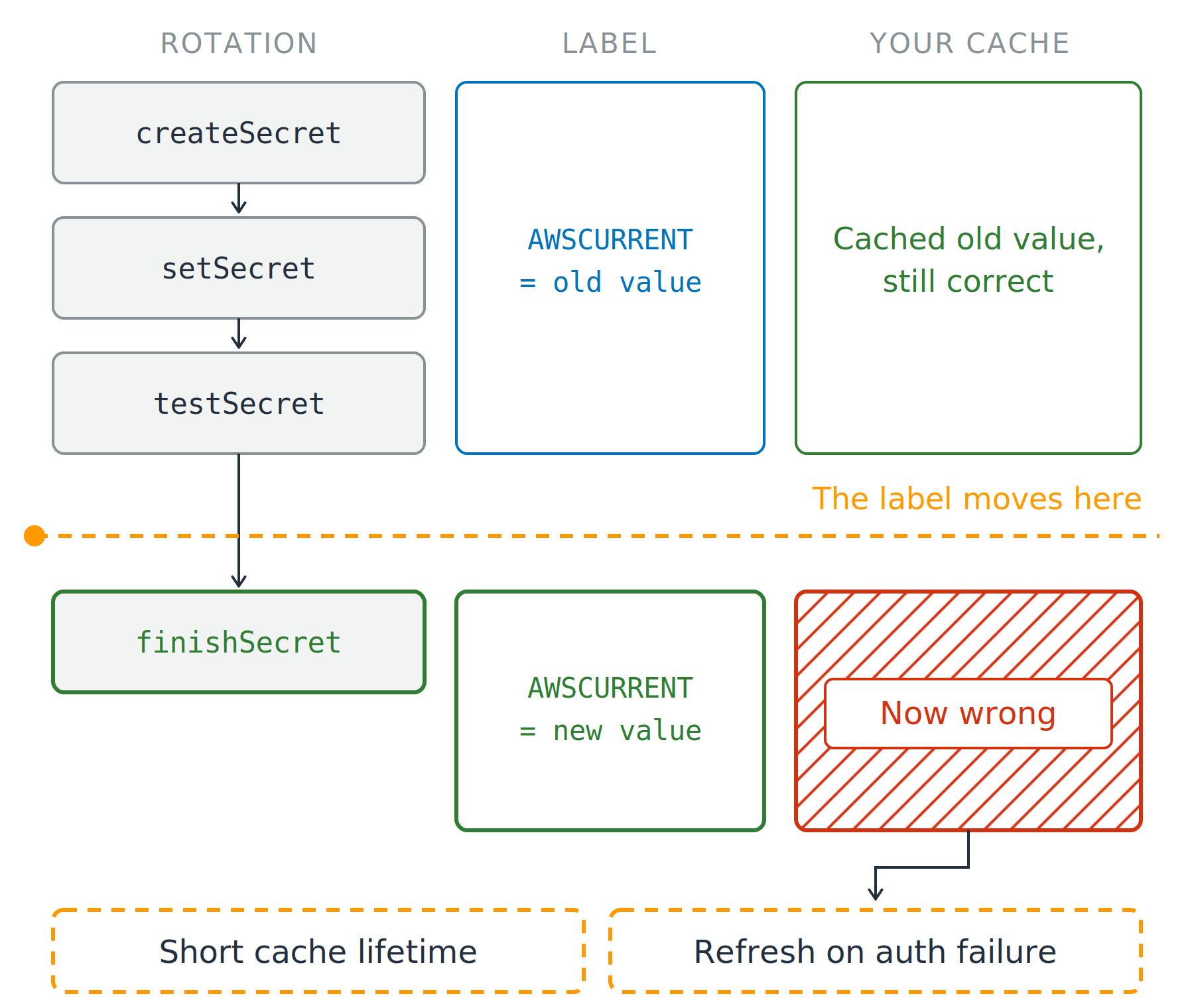
Rotation moves the value under you

Why four steps, not one swap

  • The new value is proven before anyone uses it
  • One swap would break every client at once

Three columns running down the page: the rotation steps, the label, and your cache. Secrets Manager runs createSecret, setSecret and testSecret, then a dashed line marks the moment finishSecret moves the label. Above that line the label reads AWSCURRENT equals the old value and the cache is correct; below it the label reads AWSCURRENT equals the new value and the same cache is hatched red. Two fixes close the diagram: a short cache lifetime and a refresh on authentication failure.

Using AWS Security for Developers

Rotation moves the value under you

Why four steps, not one swap

  • The new value is proven before anyone uses it
  • One swap would break every client at once

Four steps, one handover

  • AWSPENDING, AWSCURRENT, AWSPREVIOUS

Three columns running down the page: the rotation steps, the label, and your cache. Secrets Manager runs createSecret, setSecret and testSecret, then a dashed line marks the moment finishSecret moves the label. Above that line the label reads AWSCURRENT equals the old value and the cache is correct; below it the label reads AWSCURRENT equals the new value and the same cache is hatched red. Two fixes close the diagram: a short cache lifetime and a refresh on authentication failure.

Using AWS Security for Developers

Rotation moves the value under you

Why four steps, not one swap

  • The new value is proven before anyone uses it
  • One swap would break every client at once

Four steps, one handover

  • AWSPENDING, AWSCURRENT, AWSPREVIOUS

Nothing tells your cache

  • Lifetime of minutes, then re-read
  • Refresh on an authentication failure

Three columns running down the page: the rotation steps, the label, and your cache. Secrets Manager runs createSecret, setSecret and testSecret, then a dashed line marks the moment finishSecret moves the label. Above that line the label reads AWSCURRENT equals the old value and the cache is correct; below it the label reads AWSCURRENT equals the new value and the same cache is hatched red. Two fixes close the diagram: a short cache lifetime and a refresh on authentication failure.

Using AWS Security for Developers

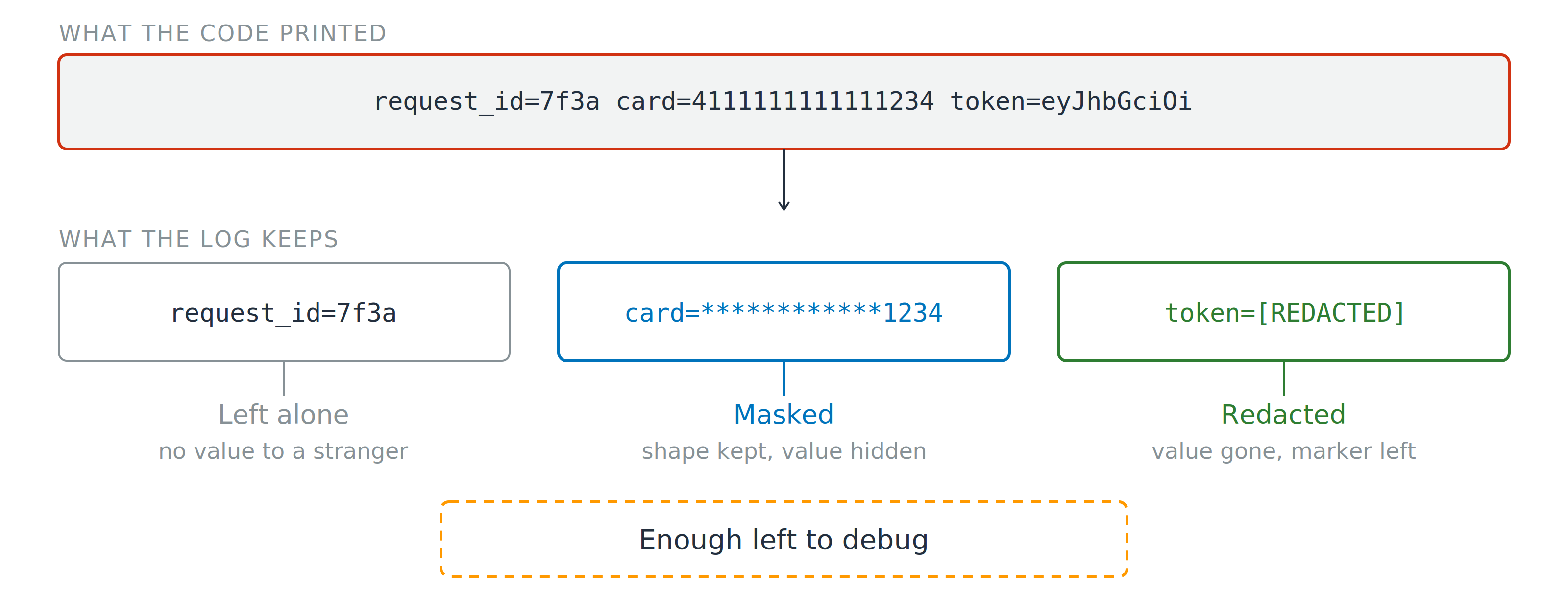
Mask, redact, stay debuggable

One raw log line containing a request ID, a full card number and a token, outlined in red. Below it the same three fields after treatment: the request ID left alone, the card masked to its last four digits, and the token replaced by a redacted marker, under a note reading enough left to debug.

Sanitize before you write

  • Mask: shape kept, value hidden
Using AWS Security for Developers

Mask, redact, stay debuggable

One raw log line containing a request ID, a full card number and a token, outlined in red. Below it the same three fields after treatment: the request ID left alone, the card masked to its last four digits, and the token replaced by a redacted marker, under a note reading enough left to debug.

Sanitize before you write

  • Mask: shape kept, value hidden
  • Redact: value gone, marker left
Using AWS Security for Developers

Mask, redact, stay debuggable

One raw log line containing a request ID, a full card number and a token, outlined in red. Below it the same three fields after treatment: the request ID left alone, the card masked to its last four digits, and the token replaced by a redacted marker, under a note reading enough left to debug.

Sanitize before you write

  • Mask: shape kept, value hidden
  • Redact: value gone, marker left

On-call needs config, a stranger needs the rest

Using AWS Security for Developers

Let's practice!

Using AWS Security for Developers

Preparing Video For Download...