감성 분석

Python으로 소셜 미디어 데이터 분석하기

Alex Hanna

Computational Social Scientist

감성 분석 이해

  • 방법
    • 문서 내 긍정/부정 단어 계산
    • 문서 전체의 긍정/부정 평가
  • 활용
    • 기업, 제품, 정치인, 정책에 대한 반응 분석
Python으로 소셜 미디어 데이터 분석하기

감성 분석 도구

  • VADER SentimentIntensityAnalyzer()
    • 자연어 처리 도구(nltk)의 일부
    • 트윗과 같은 짧은 텍스트에 적합
    • 특정 단어의 감성 측정 (예: angry, happy)
    • 이모지(😀) 및 대소문자(Nice vs NICE)의 감성도 고려
Python으로 소셜 미디어 데이터 분석하기

감성 분석 구현

from nltk.sentiment.vader import SentimentIntensityAnalyzer

sid = SentimentIntensityAnalyzer()
sentiment_scores = tweets['text'].apply(sid.polarity_scores)
Python으로 소셜 미디어 데이터 분석하기

감성 점수 해석

  • 분석 과정에서 트윗 직접 확인
    • 표면 타당성 검토 (즉, 긍정/부정 판단이 직관과 일치하는가?)
Python으로 소셜 미디어 데이터 분석하기

감성 점수 해석

tweet1 = 'RT @jeffrey_heer: Thanks for inviting me, and thanks 
for the lovely visualization of the talk! ...'
print(sid.polarity_scores(tweet1))
{'neg': 0.0, 'neu': 0.496, 'pos': 0.504, 'compound': 0.9041}
tweet2 = 'i am having problems with google play music'
print(sid.polarity_scores(tweet2)
{'neg': 0.267, 'neu': 0.495, 'pos': 0.238, 'compound': -0.0772}
Python으로 소셜 미디어 데이터 분석하기

감성 평균 생성

sentiment = sentiment_scores.apply(lambda x: x['compound'])

sentiment_fb = sentiment[check_word_in_tweet('facebook', tweets)] .resample('1 min').mean() sentiment_gg = sentiment[check_word_in_tweet('google', tweets)] .resample('1 min').mean()
Python으로 소셜 미디어 데이터 분석하기

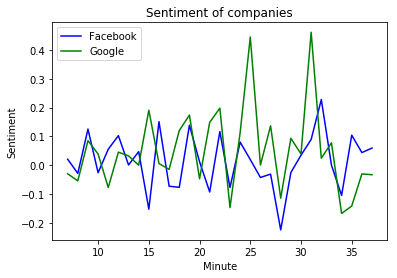
감성 점수 시각화

plt.plot(
    sentiment_fb.index.minute, 
    sentiment_fb, color = 'blue'
    )
plt.plot(
    sentiment_g.index.minute, 
    sentiment_gg, color = 'green'
    )   
plt.xlabel('Minute')
plt.ylabel('Sentiment')
plt.title('Sentiment of companies')
plt.legend(('Facebook', 'Google'))
plt.show()

Facebook 대 Google 감성

Python으로 소셜 미디어 데이터 분석하기

연습해 봅시다!

Python으로 소셜 미디어 데이터 분석하기

Preparing Video For Download...