더 유용한 요약 도구
스프레드시트 사용자를 위한 Python

Chris Cardillo
Data Scientist
.mean()
fruit_sales.groupby('store', as_index=False).mean()

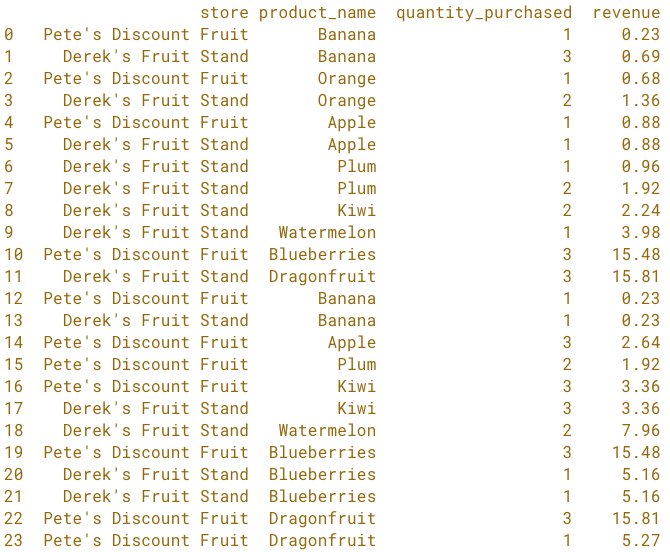
1: 과일 매장 거래
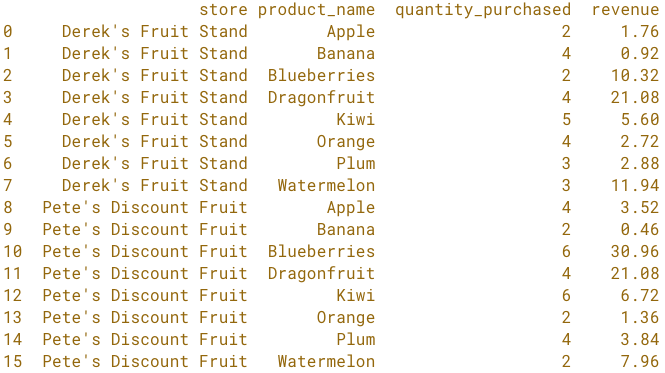
2: 매장별 과일 총매출
totals = fruit_sales.groupby(['store', 'product_name'], as_index=False).sum()
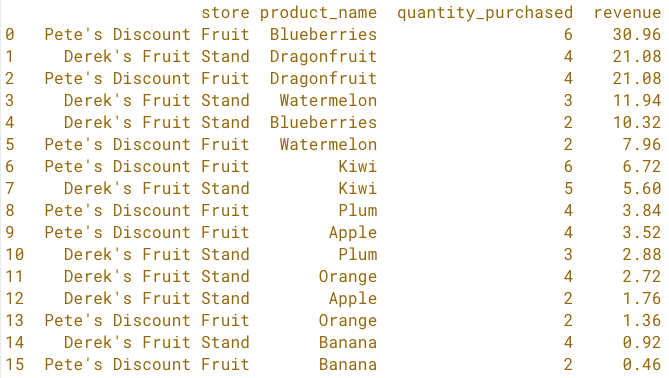
3: 매장별 과일 매출 정렬
totals = (totals.sort_values('revenue', ascending=False)
.reset_index(drop=True))
4: 매장별 상위 행
top_store_sellers = totals.groupby('store').head(1).reset_index(drop=True)

해답까지의 단계
# Raw data
fruit_sales

# Summary - by fruit by store
totals = fruit_sales.groupby(['store', 'product_name'], as_index=False).sum()

# Sort the Summary
totals = (totals.sort_values('revenue', ascending=False)
.reset_index(drop=True))

# First row for each store
top_store_sellers = totals.groupby('store').head(1).reset_index(drop=True)
해답까지의 단계
1: 원시 거래 데이터
2: 과일/매장별 요약
해답까지의 단계
2: 과일/매장별 요약
3: 과일/매장별 정렬
해답까지의 단계
3: 과일/매장별 정렬
4: 매장별 첫 번째 행

