데이터 정제 소개
SQL Server 데이터베이스에서 데이터 정제하기

Miriam Antona
Software Engineer
학습 주제
- 1장: 데이터 정제 시작하기
- 2장: null, 중복 데이터, 날짜 처리
- 3장: 범위 밖 값, 데이터 타입, 패턴 매칭 처리
- 4장: 데이터 결합, 분할, 변환
데이터셋: 미국 공항 월별 항공편(2014-2015)
airports
| airport_code | airport_name                              | airport_city      | airport_state |
|--------------|-------------------------------------------|-------------------|---------------|
| MSP          |  Minneapolis-St Paul International        | Minneapolis       | Minnesota     |
| JFK          |  John F. Kennedy International            | New York City     | New York      |
| LAX          |  Los Angeles International                | Los Angeles       | California    |
| DFW          |       Dallas/Fort Worth International     | Dallas/Fort Worth | Texas         |
| BOS          | Logan International                       | Boston            | Massachusetts |
| SFO          |  San Francisco International              | San Francisco     | Californiaa   |
| ATL          |  Hartsfield-Jackson Atlanta International | Atlanta           | Georgia       |
| ...          | ...                                       | ...               | ...           |
데이터셋: 미국 공항 월별 항공편(2014-2015)
carriers
| code | name                            |
|------|---------------------------------|
| YV   | Mesa Airlines Inc.              |
| AA   |   American Airlines Inc.        |
| DL   |   Delta Air Lines Inc.          |
| HA   |   Hawaiian Airlines Inc.        |
| MQ   |   American Eagle Airlines Inc.  |
| EV   |  ExpressJet Airlines Inc.       |
| ...  | ...                             |
데이터셋: 미국 공항 월별 항공편(2014-2015)
flight statistics
| registration_code | airport_code | carrier_code | canceled | on_time | delayed | ... |
|-------------------|--------------|--------------|----------|---------|---------|-----|
| ...               | ...          | ...          | ...      | ...     | ...     | ... |
| 000000119         | JFK          | AA           | 74       | 819     | 233     | ... |
| 120               | JFK          | B6           | 438      | 1865    | 1010    | ... |
| 000000121         | JFK          | HA           | 0        | 25      | 3       | ... |
| 122               | JFK          | MQ           | 102      | 386     | 159     | ... |
| 000000124         | JFK          | UA           | 22       | 296     | 88      | ... |
| 000000125         | JFK          | US           | 15       | 191     | 63      | ... |
| 000000126         | JFK          | VX           | 12       | 225     | 61      | ... |
| ...               | ...          | ...          | ...      | ...     | ...     | ... |
데이터셋: 미국 공항 월별 항공편(2014-2015)
pilots
| pilot_code | pilot_name | pilot_surname | carrier_code | entry_date |
|------------|------------|---------------|--------------|------------|
| 1          | Thomas     | Peters        | HA           | 2011-10-01 |
| 2          | Hiroki     | Konoe         | MQ           | 2011-01-21 |
| 3          | Arturo     | Montero       | UA           | 2012-12-28 |
| 4          | David      | Captain       | US           | 2000-10-01 |
| 5          | Ainhoa     | Guerrera      | VX           | 2000-10-05 |
| 6          | Alvin      | Andersen      | OO           | 2012-01-15 |
| 7          | William    | Champy        | F9           | 2011-03-15 |
| ...        | ...        | ...           | ...          | ...        |
왜 데이터 정제가 중요할까요?
- 분석에 바로 쓰기 어려운 지저분한 데이터를 얻는 경우가 흔함
- 분석보다 정제에 더 많은 시간이 듦
- 정제 과정을 통해 정보가 명확해짐
숫자 앞에 0 채우기
SELECT * FROM flight_statistics
| registration_code | airport_code | carrier_code | canceled | on_time | delayed | ... |
|-------------------|--------------|--------------|----------|---------|---------|-----|
| ...               | ...          | ...          | ...      | ...     | ...     | ... |
| 000000119         | JFK          | AA           | 74       | 819     | 233     | ... |
| 120               | JFK          | B6           | 438      | 1865    | 1010    | ... |
| 000000121         | JFK          | HA           | 0        | 25      | 3       | ... |
| 122               | JFK          | MQ           | 102      | 386     | 159     | ... |
| 000000124         | JFK          | UA           | 22       | 296     | 88      | ... |
| 000000125         | JFK          | US           | 15       | 191     | 63      | ... |
| 000000126         | JFK          | VX           | 12       | 225     | 61      | ... |
| ...               | ...          | ...          | ...      | ...     | ...     | ... |
숫자 앞에 0 채우기
유효: 000000128 - 최대 9자리
무효: 128
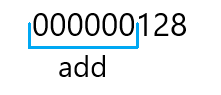
숫자 앞 0 채우기 - REPLICATE와 LEN 사용
REPLICATE (string, integer)
지정한 횟수만큼 문자열을 반복합니다.
숫자 앞 0 채우기 - REPLICATE와 LEN 사용
REPLICATE (string, integer)
지정한 횟수만큼 문자열을 반복합니다.
REPLICATE('0', 9 - LEN(registration_code))
숫자 앞 0 채우기 - REPLICATE와 LEN 사용
REPLICATE (string, integer)
지정한 횟수만큼 문자열을 반복합니다.
REPLICATE('0', 9 - LEN(registration_code))
-- registration_code: 120 => LEN(120) = 3
REPLICATE('0', 6)
숫자 앞 0 채우기 - REPLICATE, LEN 사용
+ 연산자
SELECT
    REPLICATE('0', 9 - LEN(registration_code)) + registration_code AS registration_code
FROM flight_statistics
CONCAT - SQL Server 2012부터
SELECT
    CONCAT(REPLICATE('0', 9 - LEN(registration_code)), registration_code) AS registration_code
FROM flight_statistics
숫자 앞 0 채우기 - REPLICATE, LEN, CONCAT 사용
| registration_code |
|-------------------|
| ...               |
| 000000119         |
| 000000120         |
| 000000121         |
| 000000122         |
| 000000123         |
| 000000124         |
| 000000125         |
| 000000126         |
| ...               |
숫자 앞 0 채우기 - FORMAT 사용
FORMAT (value, format [, culture ] )
- SQL Server 2012부터 사용 가능
- value: 숫자, 날짜/시간
SELECT
    FORMAT(CAST(registration_code AS INT), '000000000') AS registration_code
FROM flight_statistics;
숫자 앞 0 채우기 - FORMAT 사용
| registration_code |
|-------------------|
| ...               |
| 000000119         |
| 000000120         |
| 000000121         |
| 000000122         |
| 000000123         |
| 000000124         |
| 000000125         |
| 000000126         |
| ...               |
Ayo berlatih!
SQL Server 데이터베이스에서 데이터 정제하기

