pandas를 사용한 재무 비율 계산
Python으로 재무제표 분석하기

Rohan Chatterjee
Risk Modeler
대차대조표 데이터 구조
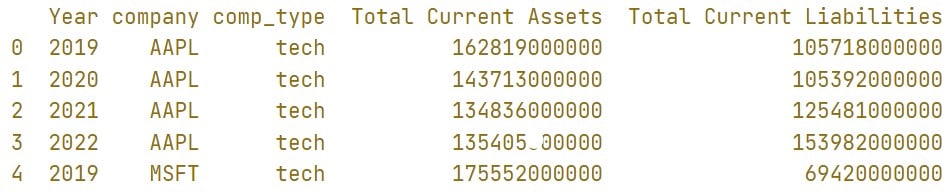
- 대차대조표 데이터가
balance_sheet라는 이름의pandasDataFrame에 로드되어 있습니다.
----CODE_GLUE----
```print(balance_sheet.head())
----CODE_GLUE----
`
유동비율 계산
balance_sheet["current_ratio"] = balance_sheet["Total Current Assets"] /
                                 balance_sheet["Total Current Liabilities"]
print(balance_sheet.head())

그룹별 결과를 얻기 위한 .groupby() 사용
- 업종별 평균 유동비율을 구하려면:
balance_sheet.groupby("comp_type")["current_ratio"].mean()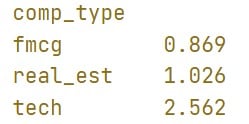
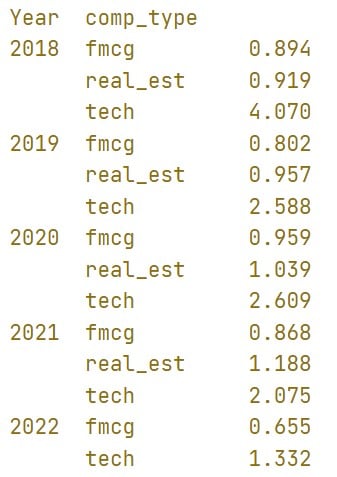
그룹별 결과를 얻기 위한 .groupby() 사용
balance_sheet.groupby(["Year","comp_type"])["current_ratio"].mean()
groupby().transform() 사용
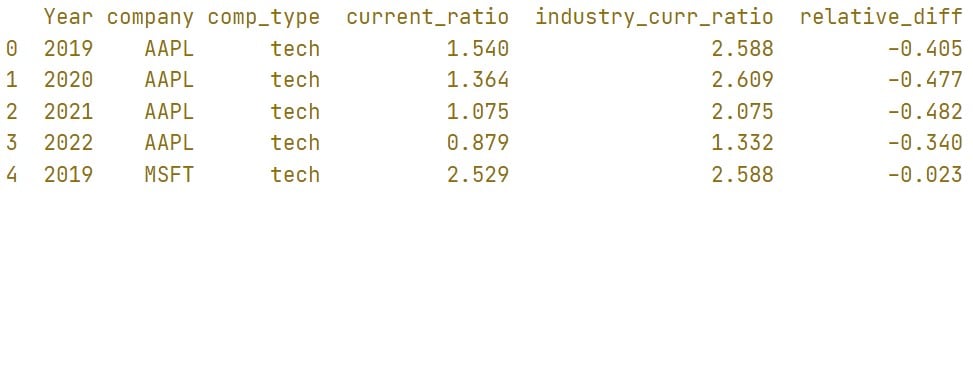
.transform()은.groupby()다음에 사용하여 각 행이 속한 그룹의 결과값을 해당 행에 추가할 수 있습니다.balance_sheet["industry_curr_ratio"] = balance_sheet.groupby([ "Year","comp_type"])["current_ratio"].transform("mean") print(balance_sheet.head())

.groupby().transform() 사용
balance_sheet["relative_diff"] =
                            (balance_sheet["current_ratio"] /
                             balance_sheet["industry_curr_ratio"]) - 1