병렬 디버깅
R의 병렬 프로그래밍

Nabeel Imam
Data Scientist
디버깅이란?

파일 병렬 읽기
print(file_list)
 [1] "./stocks/2011.csv"
 [2] "./stocks/2012.csv"
 [3] "./stocks/2013.csv"
 [4] "./stocks/2014.csv"
 [5] "./stocks/2015.csv"
 ...
필터링 함수
filterCSV <- function (filepath) {

  # Read CSV
  df <- read.csv(filepath)

  # Filter data
  df <- df %>%
    dplyr::filter(Company == "Tesla")

  # Write to back to same path
  write.csv(df, filepath)
}
병렬 적용
cl <- makeCluster(4)clusterEvalQ(cl, library(dplyr))dummy <- parLapply(cl, file_list, filterCSV)stopCluster(cl)
Error in checkForRemoteErrors(val) :
  one node produced an error: ℹ In argument: `Company == "Tesla"`.
Caused by error:
! object 'Company' not found
순차 실행
short_list <- file_list[1:5]dummy <- lapply(short_list, filterCSV)read.csv(short_list[1])
         Date  Open  High   Low Close Adj.Close   Volume Company Year
1  2011-01-03 5.368 5.400 5.180 5.324     5.324  6415000   Tesla 2011
2  2011-01-04 5.332 5.390 5.204 5.334     5.334  5937000   Tesla 2011
3  2011-01-05 5.296 5.380 5.238 5.366     5.366  7233500   Tesla 2011
...
오류 위치 찾기
오류 메시지
Error in checkForRemoteErrors(val) :
  one node produced an error:
  In argument: `Company == "Tesla"`.
Caused by error:
! object 'Company' not found

오류 위치 찾기
filterCSV <- function (filepath) {

  # Read CSV
  df <- read.csv(filepath)

  # Filter data
  df <- df %>%
    dplyr::filter(Company == "Tesla")

  # Write to back to same path
  write.csv(df, filepath)
}
filterCSV_debug <- function (filepath) { df <- read.csv(filepath)print(# Paste file path and column names paste(filepath, ":",# Collapse column names into one string paste0(colnames(df), collapse = ",")))df <- df %>% dplyr::filter(Company == "Tesla") write.csv(df, filepath) }
오류 위치 찾기
cl <- makeCluster(4)
clusterEvalQ(cl, library(dplyr))

dummy <- parLapply(cl, file_list, filterCSV_debug)
stopCluster(cl)
Error in checkForRemoteErrors(val) :
  one node produced an error: ℹ In argument: `Company == "Microsoft"`.
Caused by error:
! object 'Company' not found
오류 위치 찾기
cl <- makeCluster(4, outfile = "log.txt") # Log print messages into "log.txt"clusterEvalQ(cl, library(dplyr)) parLapply(cl, file_list, filterCSV_debug) stopCluster(cl)
Error in checkForRemoteErrors(val) :
  one node produced an error: ℹ In argument: `Company == "Tesla"`.
Caused by error:
! object 'Company' not found
로그 확인
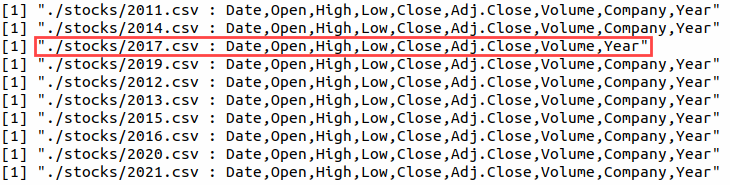
foreach로 디버깅
cl <- makeCluster(4,
                  # Supply a text file name to log print messages
                  outfile = "log.txt")

registerDoParallel(cl)

foreach(f = file_list,
        .packages = "dplyr") %dopar% {
  filterCSV_debug(f)
}

stopCluster(cl)
furrr의 장점
plan(multisession, workers = 4)
future_map(file_list, filterCSV_debug)
plan(sequential)
furrr의 장점
[1] "./stocks/2011.csv : Date,Open,High,Low,Close,Adj.Close,Volume,Company,Year"
[1] "./stocks/2012.csv : Date,Open,High,Low,Close,Adj.Close,Volume,Company,Year"
[1] "./stocks/2013.csv : Date,Open,High,Low,Close,Adj.Close,Volume,Company,Year"
[1] "./stocks/2014.csv : Date,Open,High,Low,Close,Adj.Close,Volume,Company,Year"
[1] "./stocks/2015.csv : Date,Open,High,Low,Close,Adj.Close,Volume,Company,Year"
[1] "./stocks/2016.csv : Date,Open,High,Low,Close,Adj.Close,Volume,Company,Year"
[1] "./stocks/2017.csv : Date,Open,High,Low,Close,Adj.Close,Volume,Year"
Error in (function (.x, .f, ..., .progress = FALSE)  :
  ℹ In index: 1.
Caused by error in `dplyr::filter()`:
ℹ In argument: `Company == "Tesla"`.
Caused by error:
! object 'Company' not found
절차
병렬 오류 대응
- 입력 일부로 순차 실행
- 오류 메시지 확인 후 적절히 출력
- 출력 또는 로그로 위치 파악
- 오류 수정
연습해 봅시다!
R의 병렬 프로그래밍

