均一性

Pythonによるデータクリーニング

Adel Nehme

VP of AI Curriculum, DataCamp

この章では

第3章 - 高度なデータ課題

Pythonによるデータクリーニング

データ範囲制約

範囲の例

Pythonによるデータクリーニング

均一性

列 単位
温度 32°C も 89.6°F
重み 70 Kg も 11 st.
日付 26-11-2019 も 26, November, 2019
お金 100$ も 10763.90¥
Pythonによるデータクリーニング

例

temperatures = pd.read_csv('temperature.csv')
temperatures.head()
       Date  Temperature
0  03.03.19         14.0
1  04.03.19         15.0
2  05.03.19         18.0
3  06.03.19         16.0
4  07.03.19         62.6
Pythonによるデータクリーニング

例

temperatures = pd.read_csv('temperature.csv')
temperatures.head()
       Date  Temperature
0  03.03.19         14.0
1  04.03.19         15.0
2  05.03.19         18.0
3  06.03.19         16.0
4  07.03.19         62.6   <--
Pythonによるデータクリーニング

例

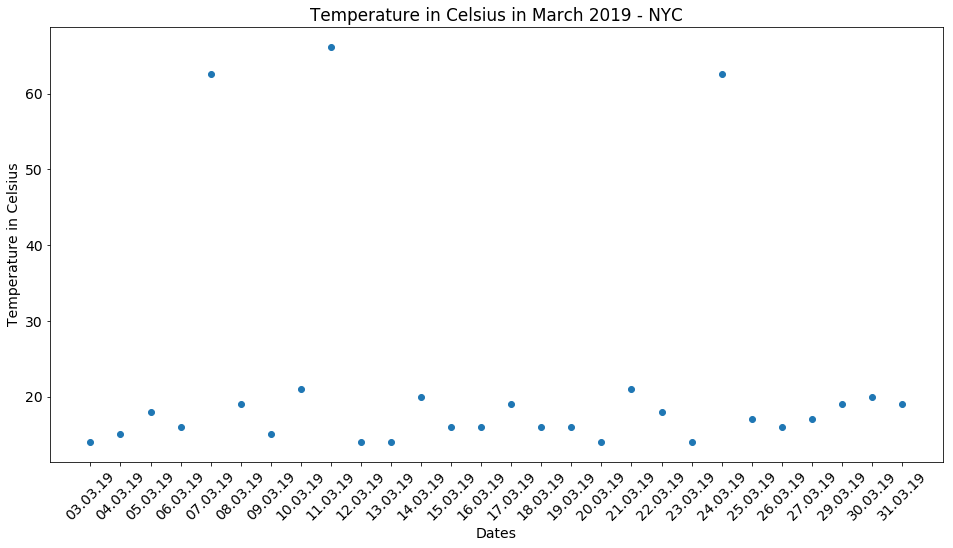
# Import matplotlib
import matplotlib.pyplot as plt

# Create scatter plot plt.scatter(x = 'Date', y = 'Temperature', data = temperatures)
# Create title, xlabel and ylabel plt.title('Temperature in Celsius March 2019 - NYC') plt.xlabel('Dates') plt.ylabel('Temperature in Celsius')
# Show plot plt.show()
Pythonによるデータクリーニング

Pythonによるデータクリーニング

Pythonによるデータクリーニング

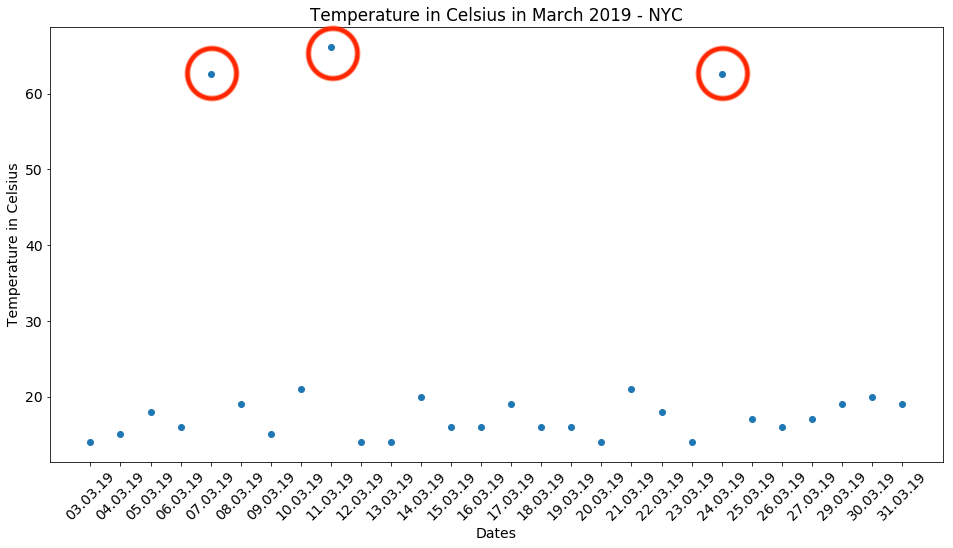
気温データの処理

$$C = (F - 32) \times \frac{5}{9}$$

temp_fah = temperatures.loc[temperatures['Temperature'] > 40, 'Temperature']

temp_cels = (temp_fah - 32) * (5/9)
temperatures.loc[temperatures['Temperature'] > 40, 'Temperature'] = temp_cels
# Assert conversion is correct
assert temperatures['Temperature'].max() < 40
Pythonによるデータクリーニング

日付データの処理

birthdays.head()
          Birthday First name Last name
0         27/27/19      Rowan     Nunez
1         03-29-19      Brynn      Yang
2  March 3rd, 2019     Sophia    Reilly
3         24-03-19     Deacon    Prince
4         06-03-19   Griffith      Neal
Pythonによるデータクリーニング

日付データの処理

birthdays.head()

誕生日データセットの出力を示すテーブル — 1行目は月/日/年の形式の日付、2行目は完全に書き出された形式、最後の行は明らかなエラーで日の部分が2回繰り返されています。

Pythonによるデータクリーニング

日時の書式設定

datetime は日付を表すのに便利です

日付 datetime 形式
25-12-2019 %d-%m-%Y
2019年12月25日 %c
12-25-2019 %m-%d-%Y
... ...

pandas.to_datetime()

  • ほとんどの形式を自動的に認識できます
  • ときどき、誤った形式や認識できない形式が原因で失敗することがあります
Pythonによるデータクリーニング

日付データの処理

# Converts to datetime - but won't work!
birthdays['Birthday'] = pd.to_datetime(birthdays['Birthday'])
ValueError: month must be in 1..12
# Will work!
birthdays['Birthday'] = pd.to_datetime(birthdays['Birthday'],
                                       # Return NA for rows where conversion failed
                                       errors = 'coerce')
Pythonによるデータクリーニング

日付データの処理

birthdays.head()
    Birthday First name Last name
0        NaT      Rowan     Nunez
1 2019-03-29      Brynn      Yang
2 2019-03-03     Sophia    Reilly
3 2019-03-24     Deacon    Prince
4 2019-06-03   Griffith      Neal
Pythonによるデータクリーニング

日付データの処理

birthdays['Birthday'] = birthdays['Birthday'].dt.strftime("%d-%m-%Y")
birthdays.head()
     Birthday First name Last name
0         NaT      Rowan     Nunez
1  29-03-2019      Brynn      Yang
2  03-03-2019     Sophia    Reilly
3  24-03-2019     Deacon    Prince
4  03-06-2019   Griffith      Neal
Pythonによるデータクリーニング

あいまいな日付データの処理

は 2019-03-08 8月ですか、それとも3月ですか?

  • NAに変換し、それに応じて扱う
  • データソースを理解してフォーマットを推測する
  • 前後のデータから DataFrame {{4}} の形式を推測する
Pythonによるデータクリーニング

お疲れさまでした!

Pythonによるデータクリーニング

Preparing Video For Download...