Tóm tắt và chỉnh sửa văn bản

Làm việc với OpenAI API

James Chapman

Curriculum Manager, DataCamp

Tóm lược...

  • Hỏi đáp
response = client.chat.completions.create(
  model="gpt-4o-mini",
  messages=[{"role": "user", "content": "How many days are in October?"}]
)

print(response.choices[0].message.content)
Tháng Mười có 31 ngày.
Làm việc với OpenAI API

Chỉnh sửa văn bản

  • Ví dụ: cập nhật tên, đại từ nhân xưng và chức danh

$$

prompt = """
Update name to Maarten, pronouns to he/him, and job title to Senior Content Developer
in the following text:

Joanne is a Content Developer at DataCamp. Her favorite programming language is R,
which she uses for her statistical analyses.
"""
Làm việc với OpenAI API

Chỉnh sửa văn bản

response = client.chat.completions.create(
    model="gpt-4o-mini",

messages=[{"role": "user", "content": prompt}]
) print(response.choices[0].message.content)
Maarten là Senior Content Developer tại DataCamp. Ngôn ngữ lập trình ưa thích của anh ấy
là R, được anh dùng cho các phân tích thống kê.
Làm việc với OpenAI API

Tóm tắt văn bản

  • Ví dụ: tóm tắt nhật ký trò chuyện với khách hàng

Nhóm hỗ trợ khách hàng

text = """
Customer: Hi, I'm trying to log into 
my account, but it keeps saying 
my password is incorrect. I'm sure 
I'm entering the right one.  

Support: I'm sorry to hear that! 
Have you tried resetting your password?  
...
"""
Làm việc với OpenAI API

Tóm tắt văn bản

prompt = f"""Summarize the customer support chat 
             in three concise key points: {text}"""


response = client.chat.completions.create( model="gpt-4o-mini", messages=[{"role": "user", "content": prompt}] ) print(response.choices[0].message.content)
1. Khách hàng không đăng nhập được do lỗi mật khẩu và thiếu liên kết đặt lại.  
2. Hỗ trợ đã gửi lại email đặt lại sau khi xác nhận email đã được gửi.  
3. Khách hàng giải quyết bằng cách dùng đăng nhập Google.
Làm việc với OpenAI API

Kiểm soát độ dài phản hồi

  • max_completion_tokens = 5
response = client.chat.completions.create(
  model="gpt-4o-mini",
  messages=[{"role": "user", 
  "content": "Write a haiku about AI."}],
  max_completion_tokens=5
)

AI đầy sức mạnh
Máy tính
  • max_completion_tokens = 30
response = client.chat.completions.create(
  model="gpt-4o-mini",
  messages=[{"role": "user", 
  "content": "Write a haiku about AI."}],
  max_completion_tokens=30
)

Trí tuệ máy nghĩ
Lựa chọn theo lý tính
Con người ngẫm suy
Làm việc với OpenAI API

Hiểu về token

$$

  • Token: đơn vị văn bản giúp AI hiểu và xử lý nội dung

$$
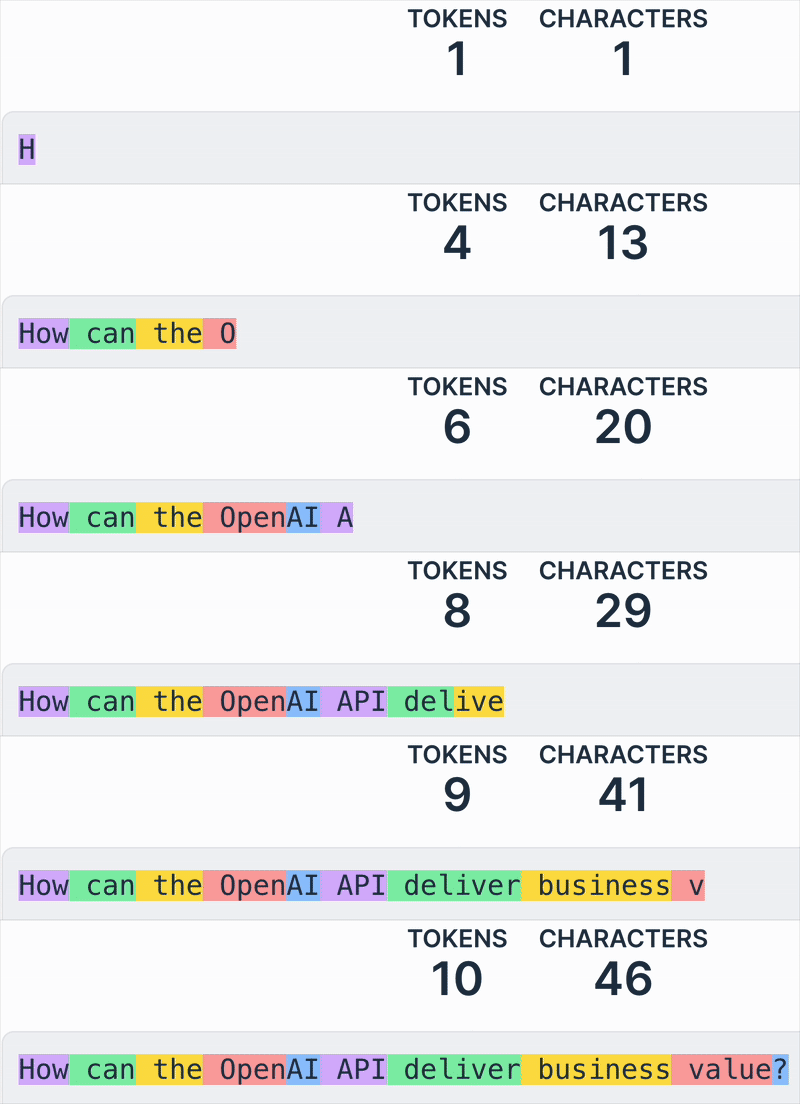
Câu "How can the OpenAI API deliver business value?" với mỗi token được tô màu khác nhau.

1 https://platform.openai.com/tokenizer
Làm việc với OpenAI API

Tính chi phí


  • Chi phí phụ thuộc vào mô hình và số token 💰

    • Mô hình được tính theo chi phí/token
    • Token đầu vào và đầu ra có thể có chi phí khác nhau
  • Tăng max_completion_tokens làm tăng chi phí 📈

Ảnh chụp màn hình 2025-03-05 lúc 11.46.54.png

Làm việc với OpenAI API

Tính chi phí

prompt = f"""Summarize the customer support chat 
             in three concise key points: {text}"""

max_completion_tokens = 500

response = client.chat.completions.create(
  model="gpt-4o-mini",
  messages=[{"role": "user", "content": prompt}], 
  max_completion_tokens=max_completion_tokens
  )

Làm việc với OpenAI API

Tính chi phí

# Define price per token
input_token_price = 0.15 / 1_000_000
output_token_price = 0.6 / 1_000_000

# Extract token usage input_tokens = response.usage.prompt_tokens
output_tokens = max_completion_tokens
# Calculate cost cost = (input_tokens * input_token_price + output_tokens * output_token_price) print(f"Estimated cost: ${cost}")
Estimated cost: $0.00124
1 https://openai.com/pricing
Làm việc với OpenAI API

Ayo berlatih!

Làm việc với OpenAI API

Preparing Video For Download...