反復的なプロンプトエンジニアリングと改善

OpenAI API によるプロンプトエンジニアリング

Fouad Trad

Machine Learning Engineer

反復的なプロンプトエンジニアリング

  • どんなプロンプトも最初から完璧にはなりません
  • プロンプトエンジニアリングは反復的なプロセスであり、次のことを行います:
    • プロンプトエンジニアリングは反復的なプロセスであり、次のことを行います:
    • モデルに入力する
    • 出力を観察・分析する
    • プロンプトを改善するために繰り返す

Image representing a cycle. A blue circle with four arrows feeding into each other.

OpenAI API によるプロンプトエンジニアリング

プロンプトの改善

初期プロンプト
prompt = "Generate an Excel sheet containing
five student names and their grades"

print(get_response(prompt))
I'm sorry, but as a text-based AI, I am 
unable to directly provide an Excel sheet. 
However, I can help you generate a sample
representation of the data you requested.
改善されたプロンプト
prompt = "Generate a table that I can copy 
to Excel, containing five student names and 
their grades"
print(get_response(prompt))
| Student Name | Grade |
|--------------|-------|
| Student 1    |  90   |
| Student 2    |  85   |
| Student 3    |  95   |
| Student 4    |  88   |
| Student 5    |  92   |
OpenAI API によるプロンプトエンジニアリング

Python関数の分析例

code = '''
def calculate_rectangle_area(length, width):
    area = length * width
    return area
'''
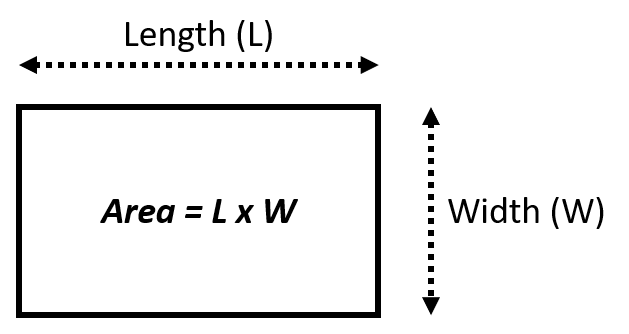
Image showing a rectangle and the formula to compute its area given its width and length. Area = length\*width.

OpenAI API によるプロンプトエンジニアリング

例:初期プロンプト

prompt = f"""
  Analyze the code delimited by triple backticks with one sentence
  ```{code}```.
"""
print(get_response(prompt))
The code calculates the area of a rectangle based on its length and width.
OpenAI API によるプロンプトエンジニアリング

プロンプトの改善例

プログラミング言語も回答させるためにプロンプトを修正します

prompt = f"""
  Analyze the code delimited by triple backticks and provide its programming 
  language with one sentence 
  ```{code}```.
"""
print(get_response(prompt))
The provided code is a function written in Python that calculates the area of a 
rectangle based on its length and width.
OpenAI API によるプロンプトエンジニアリング

プロンプトの改善例

構造化出力を得るためにプロンプトを修正します

prompt = f"""
  For the function delimited by triple backticks, provide in a structured format
  the following:
  - description: one sentence short description
  - language: the programming language used
  - input: the inputs to the function
  - output: the output returned by the function
  ```{code}```.
"""
print(get_response(prompt))
OpenAI API によるプロンプトエンジニアリング

プロンプトの改善例

description: This function calculates the area of a rectangle.

language: Python

input:
 - length: The length of the rectangle.
 - width: The width of the rectangle.

output:
 - area: The calculated area of the rectangle, which is the product of the length 
 and width.
OpenAI API によるプロンプトエンジニアリング

few-shotプロンプトの改善

  • 天気の説明を分類する

初期プロンプト

prompt = """
Clear skies and a gentle breeze. -> Sunny
Heavy rain and thunderstorms expected. -> Rainy
Fresh snowfall with freezing temperatures. -> 
"""
print(get_response(prompt))
Snowy
OpenAI API によるプロンプトエンジニアリング

few-shotプロンプトの改善

  • 天気の説明を分類する

初期プロンプト

prompt = """
Clear skies and a gentle breeze. -> Sunny
Heavy rain and thunderstorms expected. -> Rainy
The wind of change brought a refreshing breeze to the company's operations. -> 
"""
print(get_response(prompt))
Windy
OpenAI API によるプロンプトエンジニアリング

few-shotプロンプトの改善

改善されたプロンプト

prompt = """
Clear skies and a gentle breeze. -> Sunny
Heavy rain and thunderstorms expected. -> Rainy
The political climate in the country was stormy -> Unknown
The wind of change brought a refreshing breeze to the company's operations. -> 
"""
print(get_response(prompt))
Unknown
OpenAI API によるプロンプトエンジニアリング

さまざまな種類のプロンプトの改善

  • few-shotプロンプト:例を改善する
  • マルチステップ・プロンプト:手順を改善する
  • 思考の連鎖プロンプトと自己一貫性プロンプト:問題の記述を改善する

Image showing three rows with toggles with a hand adjusting the toggles to reflect refinement.

OpenAI API によるプロンプトエンジニアリング

練習しましょう!

OpenAI API によるプロンプトエンジニアリング

Preparing Video For Download...