構造化データを扱う

Python で学ぶ API 入門

Chris Ramakers

Engineering manager

複雑なデータ構造

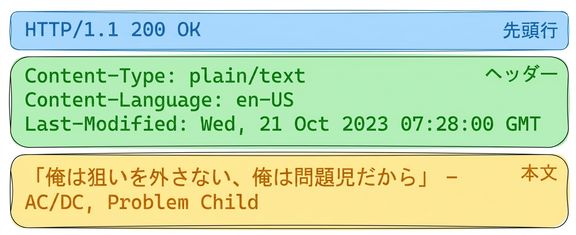
歌詞 API のレスポンス

HTTP 200 OK の歌詞 API レスポンス。ヘッダー: Content-Type: plain/text、Content-Language: en-US、Last-Modified: Wed, 21 Oct 2023。本文: AC/DC「Problem Child」の歌詞。

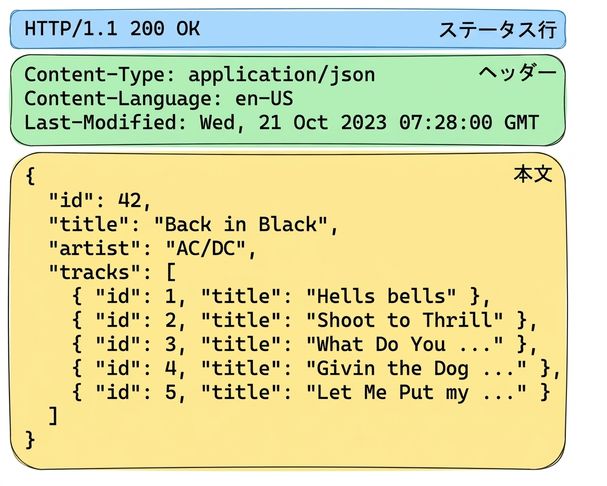
アルバム API のレスポンス

HTTP 200 OK のアルバム API レスポンス。ヘッダーは JSON コンテンツを指定。本文は AC/DC「Back in Black」のアルバム詳細と曲名一覧。

Python で学ぶ API 入門

複雑なデータ構造: JSON

  • JSON
    • JavaScript Object Notation
    • 広くサポート
    • 人が読みやすく機械で扱いやすい
  • Content-Type(MIME/メディアタイプ)
  • その他の形式
    • XML
    • CSV
    • YAML

アルバム API のレスポンス

HTTP 200 OK のアルバム API レスポンス。ヘッダーは JSON コンテンツを指定。本文は AC/DC「Back in Black」のアルバム詳細と曲名一覧。

Python で学ぶ API 入門

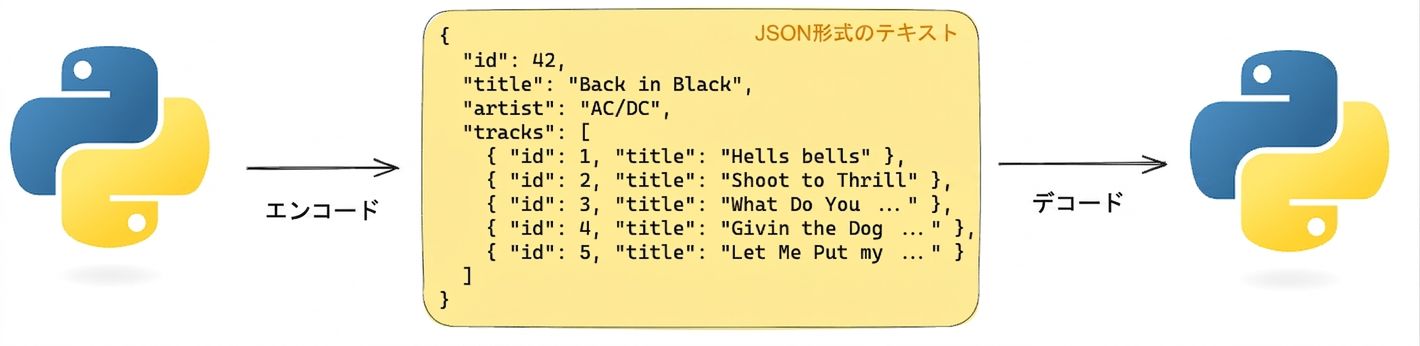
Python から JSON へ、そして戻す

  Python で JSON テキストをエンコード/デコードする図。「Back in Black」のアルバム情報を含む JSON。

import json
album =  {'id': 42, 'title':"Back in Black"}
string = json.dumps(album) # Encodes a python object to a JSON string
album = json.loads(string) # Decodes a JSON string to a Python object
Python で学ぶ API 入門

JSON データを要求する

# GET request without headers
response = requests.get('http://api.music-catalog.com/lyrics')
print(response.text)
N' I never miss Cause I'm a problem child - AC/DC, Problem Child
# GET request with an accept header
response = requests.get('http://api.music-catalog.com/lyrics', headers={'accept': 'application/json'})

# Print the JSON text
print(response.text)

# Decode into a Python object data = response.json() print(data['artist'])
{'artist': 'AC/DC', 'lyric': "N' I never miss Cause I'm a problem child", 'track': 'Problem Child'}

AC/DC
Python で学ぶ API 入門

JSON データを送信する

import requests
playlist = {"name": "Road trip", "genre":"rock", "private":"true"}

# Add the playlist using via the `json` argument 
response = requests.post("http://api.music-catalog.com/playlists", json=playlist)
# Get the request object
request = response.request

# Print the request content-type header
print(request.headers['content-type'])
application/json
Python で学ぶ API 入門

練習しましょう!

Python で学ぶ API 入門

Preparing Video For Download...