CSS ロケーター

Pythonで学ぶWebスクレイピング

Thomas Laetsch

Data Scientist, NYU

ロゼッタCSストーン

  • /> に置換(先頭文字を除く)
    • XPath: /html/body/div
    • CSS ロケーター: html > body > div
  • // は空白に置換(先頭文字を除く)
    • XPath: //div/span//p
    • CSS ロケーター: div > span p
  • [N]:nth-of-type(N) に置換
    • XPath: //div/p[2]
    • CSS ロケーター: div > p:nth-of-type(2)
Pythonで学ぶWebスクレイピング

ロゼッタCSストーン

XPATH

xpath = '/html/body//div/p[2]'

CSS

css = 'html > body div > p:nth-of-type(2)'
Pythonで学ぶWebスクレイピング

CSS の属性

  • クラスで要素を探すには、ピリオド . を使用
    • 例: p.class-1class-1 の段落要素を選択
  • id で要素を探すには、ハッシュ # を使用
    • 例: div#uididuiddiv 要素を選択
Pythonで学ぶWebスクレイピング

CSS の属性

クラス class1 内の段落要素を選択:

css_locator = 'div#uid > p.class1'

クラス属性が class1 のすべての要素を選択:

css_locator = '.class1'
Pythonで学ぶWebスクレイピング

クラスの状態

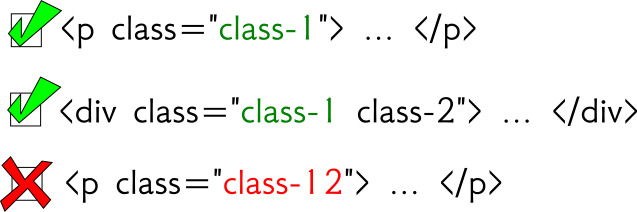
css = '.class1'

クラス選択-XPath-classonly.png

Pythonで学ぶWebスクレイピング

クラスの状態

xpath = '//*[@class="class1"]'
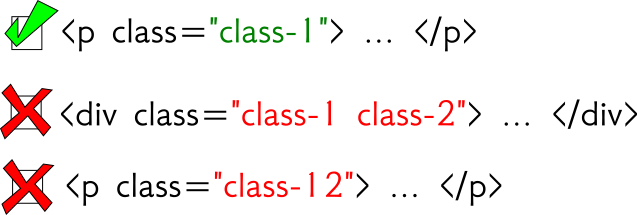
クラス選択-XPath-等号.png

Pythonで学ぶWebスクレイピング

クラスの状態

xpath = '//*[contains(@class,"class1")]'
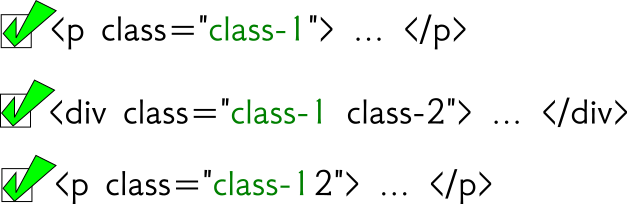
クラス選択-XPath-contains.png

Pythonで学ぶWebスクレイピング

CSS によるセレクター

from scrapy import Selector 

html = '''
<html>
  <body>
    <div class="hello datacamp">
      <p>Hello World!</p>
    </div>
    <p>Enjoy DataCamp!</p>
  </body>
</html>
''' 
sel = Selector( text = html )
>>> sel.css("div > p")
out: [<Selector xpath='...' data='<p>Hello World!</p>'>] 

>>> sel.css("div > p").extract()
out: [ '<p>Hello World!</p>' ]
Pythonで学ぶWebスクレイピング

C(SS) You Soon!

Pythonで学ぶWebスクレイピング

Preparing Video For Download...