pandasでの拡大ウィンドウ関数

Pythonでの時系列データ操作

Stefan Jansen

Founder & Lead Data Scientist at Applied Artificial Intelligence

pandasの拡大ウィンドウ

  • ローリングから拡大ウィンドウへ
  • 現在までの期間で指標を計算
  • 新しい系列は全履歴を反映
  • ランニングリターン、最小/最大に有用
  • pandasでの選択肢:
    • .expanding().rolling()と同様
    • .cumsum(), .cumprod(), cummin()/max()
Pythonでの時系列データ操作

基本アイデア

df = pd.DataFrame({'data': range(5)})

df['expanding sum'] = df.data.expanding().sum()
df['cumulative sum'] = df.data.cumsum()
df
   data  expanding sum  cumulative sum
0     0            0.0               0
1     1            1.0               1
2     2            3.0               3
3     3            6.0               6
4     4           10.0              10
Pythonでの時系列データ操作

S&P 500のデータ取得

data = pd.read_csv('sp500.csv', parse_dates=['date'], index_col='date')
DatetimeIndex: 2519 entries, 2007-05-24 to 2017-05-24
Data columns (total 1 columns):
SP500    2519 non-null float64
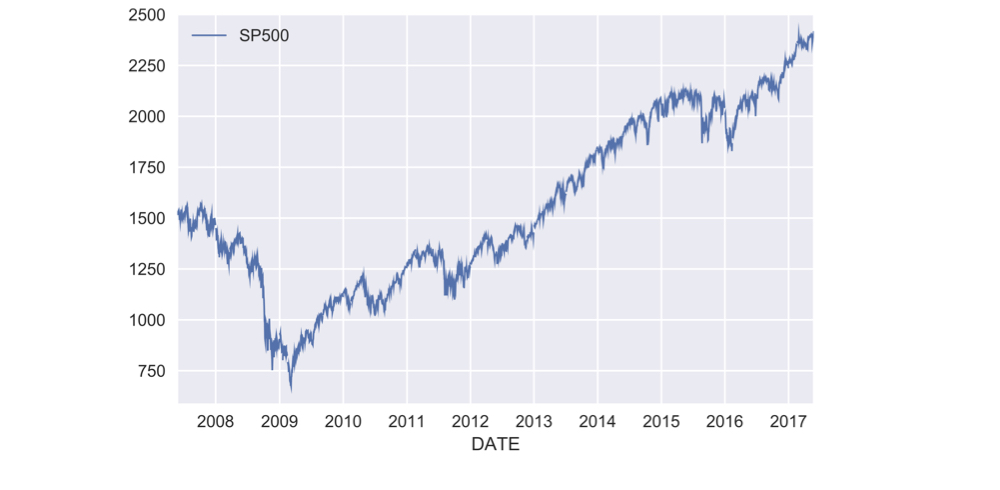
ch3_2_v2 - pandasでの拡大ウィンドウ関数.013.png

Pythonでの時系列データ操作

ランニングリターンの計算方法

  • 単期間リターン $r_t$: 現在価格/直前価格 − 1

    $$r_t = \frac{P_t}{P_{t-1}} - 1$$

    • 複数期間リターン: 全期間の$(1 + r_t)$の積 − 1

    $$R_T = (1 + r_1)(1 + r_2)...(1 + r_T) - 1$$

    • 期間リターン: .pct_change()
    • 基本演算: .add(), .sub(), .mul(), .div()
    • 累積積: .cumprod()
Pythonでの時系列データ操作

実務でのランニングリターン

pr = data.SP500.pct_change() # 期間リターン

pr_plus_one = pr.add(1)
cumulative_return = pr_plus_one.cumprod().sub(1)
cumulative_return.mul(100).plot()

ch3_2_v2 - pandasでの拡大ウィンドウ関数.021.png

Pythonでの時系列データ操作

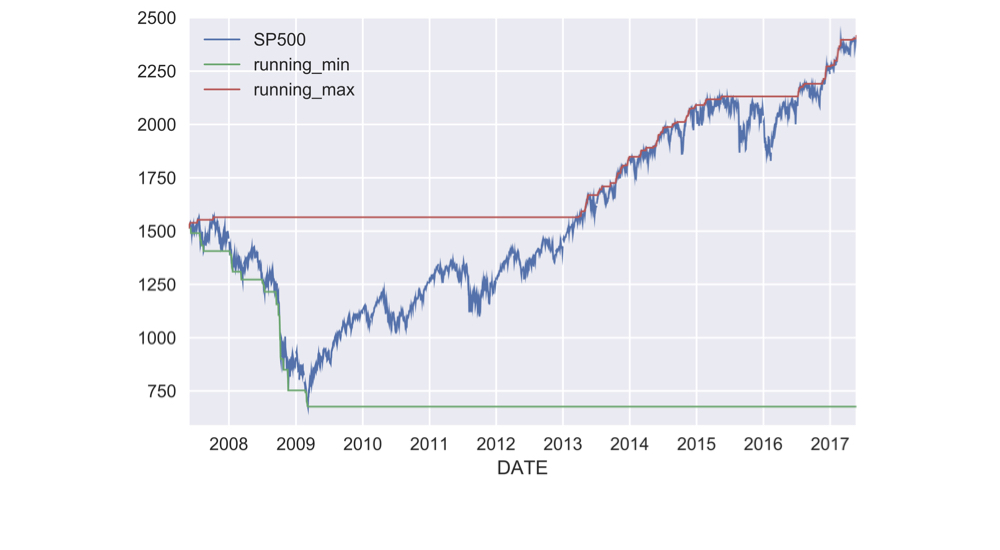
ランニング最小・最大の取得

data['running_min'] = data.SP500.expanding().min()

data['running_max'] = data.SP500.expanding().max()
data.plot()

ch3_2_v2 - pandasでの拡大ウィンドウ関数.023.png

Pythonでの時系列データ操作

ローリング年率リターン

def multi_period_return(period_returns):
    return np.prod(period_returns + 1) - 1

pr = data.SP500.pct_change() # 期間リターン
r = pr.rolling('360D').apply(multi_period_return)
data['Rolling 1yr Return'] = r.mul(100)
data.plot(subplots=True)
Pythonでの時系列データ操作

ローリング年率リターン

data['Rolling 1yr Return'] = r.mul(100)

data.plot(subplots=True)

ch3_2_v2 - pandasでの拡大ウィンドウ関数.027.png

Pythonでの時系列データ操作

Passons à la pratique !

Pythonでの時系列データ操作

Preparing Video For Download...