pandasで日付・時刻を使う方法
Pythonでの時系列データ操作

Stefan Jansen
Founder & Lead Data Scientist at Applied Artificial Intelligence
日付・時系列機能
- 基本: 日付・時刻データ型
- 時点と期間のオブジェクト
- 属性・メソッドは時間情報を反映
- 日付・期間のシーケンス:
- Series または DataFrame 列
- Index: オブジェクトを時系列に変換
- 多くの Series/DataFrame メソッドは、インデックスの時間情報に依存して時系列機能を提供
基本要素: pd.Timestamp
import pandas as pd # assumed imported going forward from datetime import datetime # To manually create datestime_stamp = pd.Timestamp(datetime(2017, 1, 1))pd.Timestamp('2017-01-01') == time_stamp
True # Understands dates as strings
time_stamp # type: pandas.tslib.Timestamp
Timestamp('2017-01-01 00:00:00')
基本要素: pd.Timestamp
- Timestamp は時間情報の属性を多数保持
time_stamp.year
2017
time_stamp.day_name()
'Sunday'
追加の基本要素: pd.Period と freq
period = pd.Period('2017-01')period # 既定: 月末
Period('2017-01', 'M')
period.asfreq('D') # 日次に変換
Period('2017-01-31', 'D')
period.to_timestamp().to_period('M')
Period('2017-01', 'M')
- Period は freq 属性で頻度情報を保持
pd.Period()をpd.Timestamp()に、またその逆に変換可能
追加の基本要素: pd.Period と freq
period + 2
Period('2017-03', 'M')
pd.Timestamp('2017-01-31', 'M') + 1
Timestamp('2017-02-28 00:00:00', freq='M')
- 周期情報により基本的な日付演算が可能
日付・時刻のシーケンス
pd.date_range:start,end,periods,freq
index = pd.date_range(start='2017-1-1', periods=12, freq='M')
index
DatetimeIndex(['2017-01-31', '2017-02-28', '2017-03-31', ...,
               '2017-09-30', '2017-10-31', '2017-11-30', '2017-12-31'],
              dtype='datetime64[ns]', freq='M')
pd.DateTimeIndex: 周期情報を持つTimestampの列
日付・時刻のシーケンス
index[0]
Timestamp('2017-01-31 00:00:00', freq='M')
index.to_period()
PeriodIndex(['2017-01', '2017-02', '2017-03', '2017-04', ...,
             '2017-11', '2017-12'], dtype='period[M]', freq='M')
時系列の作成: pd.DateTimeIndex
pd.DataFrame({'data': index}).info()
RangeIndex: 12 entries, 0 to 11
Data columns (total 1 columns):
data    12 non-null datetime64[ns]
dtypes: datetime64[ns](1)
時系列の作成: pd.DateTimeIndex
np.random.random:- 乱数:
[0,1] - 12行・2列
- 乱数:
data = np.random.random((size=12,2))pd.DataFrame(data=data, index=index).info()
DatetimeIndex: 12 entries, 2017-01-31 to 2017-12-31
Freq: M
Data columns (total 2 columns):
0    12 non-null float64
1    12 non-null float64
dtypes: float64(2)
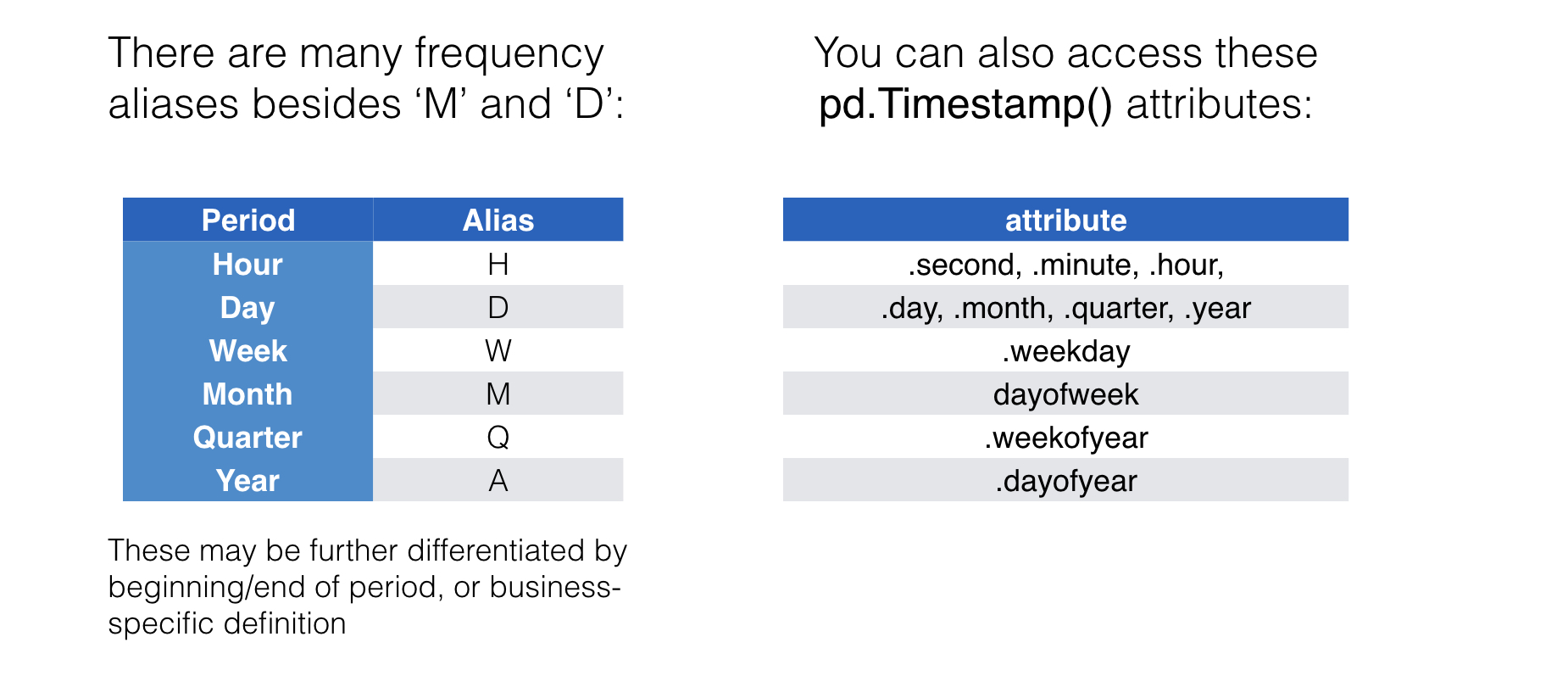
頻度エイリアスと時間情報
Passons à la pratique !
Pythonでの時系列データ操作

