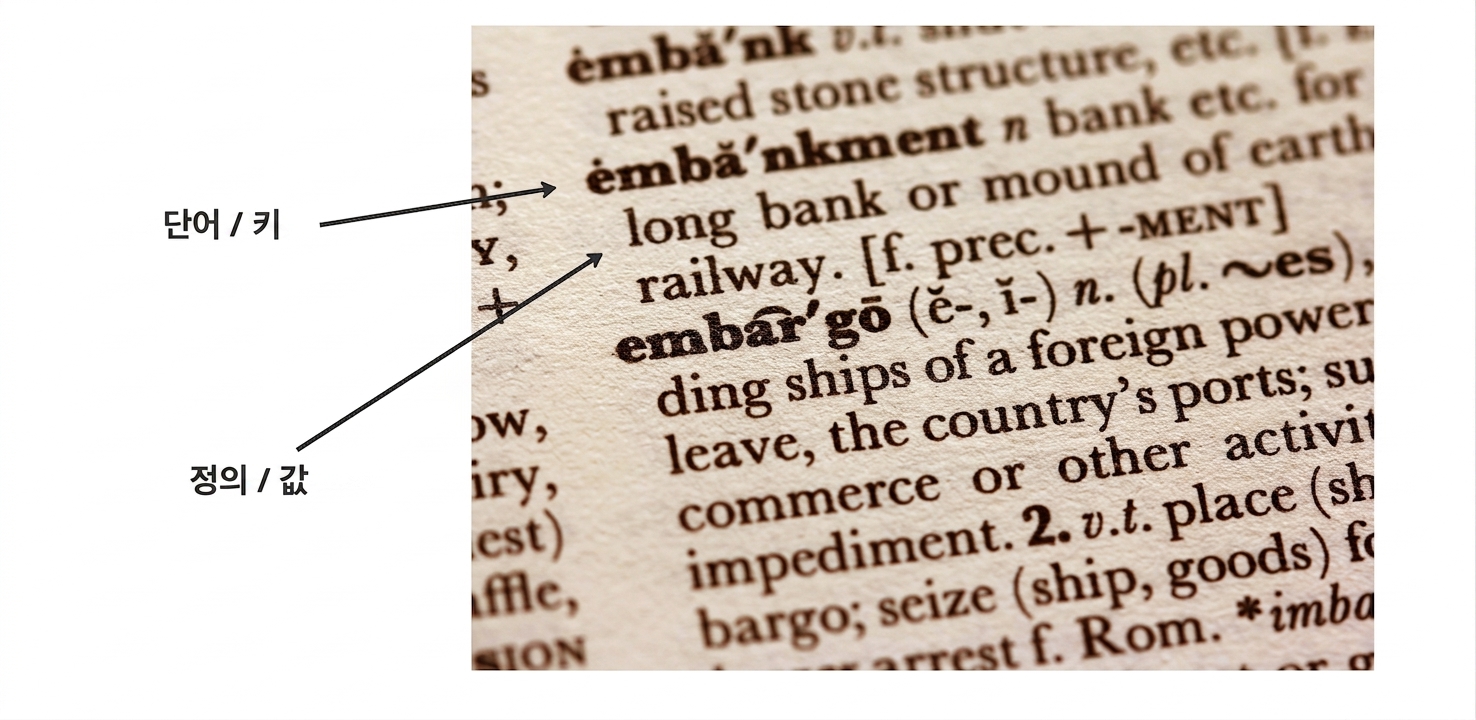
딕셔너리

개발자를 위한 Python 입문

Jasmin Ludolf

Senior Data Science Content Developer

재료 리스트

ingredients = ["pasta", "tomatoes", "garlic", "basil", "olive oil", "salt"]

# Ingredient quantities (in grams) quantities = [500, 400, 15, 20, 30, 5]
개발자를 위한 Python 입문

딕셔너리

  • 딕셔너리 = 키-값 쌍

딕셔너리 주석: 단어(키)와 정의(값)

1 https://unsplash.com/@sandym10
개발자를 위한 Python 입문

왜 딕셔너리를 사용해야 할까요?

  • username
  • email
  • preferences
  • ip_address
  • location

$$

  • 레시피 계산기: 재료를 수량에 연결

사용자 정보

컴퓨터 네트워크

1 사용자 이미지: Bilobaba Vladimir, Aviavlad, https://unsplash.com/@jjying
개발자를 위한 Python 입문

딕셔너리 만들기

# Creating a dictionary
recipe = 
개발자를 위한 Python 입문

딕셔너리 만들기

# Creating a dictionary
recipe = {
개발자를 위한 Python 입문

딕셔너리 만들기

# Creating a dictionary
recipe = {"pasta"
개발자를 위한 Python 입문

딕셔너리 만들기

# Creating a dictionary
recipe = {"pasta":
개발자를 위한 Python 입문

딕셔너리 만들기

# Creating a dictionary
recipe = {"pasta": 500
개발자를 위한 Python 입문

딕셔너리 만들기

# Creating a dictionary
recipe = {"pasta": 500,
개발자를 위한 Python 입문

딕셔너리 만들기

# Creating a dictionary
recipe = {"pasta": 500,
          "tomatoes": 400,
개발자를 위한 Python 입문

딕셔너리 만들기

# Creating a dictionary
recipe = {"pasta": 500,
          "tomatoes": 400, 
          "garlic": 15,
          "basil": 20, 
          "olive oil": 30,
          "salt": 5
개발자를 위한 Python 입문

딕셔너리 만들기

# Creating a dictionary
recipe = {"pasta": 500,
          "tomatoes": 400, 
          "garlic": 15,
          "basil": 20, 
          "olive oil": 30,
          "salt": 5}
개발자를 위한 Python 입문

키를 기반으로 값에 접근하기

  • 딕셔너리는 순서대로 정렬됩니다

    • 키의 부분 집합으로 값에 접근할 수 있습니다
  • 얼마나 많은 파스타가 필요할까요?

# Find the ingredient's quantity
print(recipe["pasta"])
500
개발자를 위한 Python 입문

모든 값에 접근하기

# Get all values from a dictionary
print(recipe.values())
dict_values([500, 400, 15, 20, 30, 5])
개발자를 위한 Python 입문

모든 키에 접근하기

# Retrieve all keys in a dictionary
print(recipe.keys())
dict_keys(['pasta', 'tomatoes', 'garlic', 'basil', 'olive oil', 'salt'])
개발자를 위한 Python 입문

딕셔너리 전체 보기

# Print the dictionary
print(recipe)
{'pasta': 500, 'tomatoes': 400, 'garlic': 15, 'basil': 20, 'olive oil': 30,
'salt': 5}
# Get all items (key-value pairs)
print(recipe.items())
dict_items([('pasta', 500), ('tomatoes', 400), ('garlic', 15), ('basil', 20), 
('olive oil', 30), ('salt', 5)])
개발자를 위한 Python 입문

키-값 쌍 추가하기

# Add a new key-value pair
recipe["parmesan"] = 50
print(recipe)
{'pasta': 500, 'tomatoes': 400, 'garlic': 15, 'basil': 20, 'olive oil': 30,
'salt': 5, 'parmesan': 50}
개발자를 위한 Python 입문

값 업데이트하기

print(recipe)
{'pasta': 500, 'tomatoes': 400, 'garlic': 15, 'basil': 20, 'olive oil': 30,
'salt': 5, 'parmesan': 50}
# Updating a value associated with an existing key
recipe["pasta"] = 1000
print(recipe)
{'pasta': 1000, 'tomatoes': 400, 'garlic': 15, 'basil': 20, 'olive oil': 30,
'salt': 5, 'parmesan': 50}
개발자를 위한 Python 입문

중복 키

# Creating a dictionary with a duplicate key
recipe = {"pasta": 500, "garlic": 5, 
          "garlic": 15, "basil": 20, 
          "olive oil": 30, "salt": 5}

# Print the duplicate key's value print(recipe["garlic"])
15
개발자를 위한 Python 입문

연습해 봅시다!

개발자를 위한 Python 입문

Preparing Video For Download...