텍스트 요약 및 편집하기

OpenAI API 활용하기

James Chapman

Curriculum Manager, DataCamp

복습...

  • Q&A
response = client.chat.completions.create(
  model="gpt-4o-mini",
  messages=[{"role": "user", "content": "How many days are in October?"}]
)

print(response.choices[0].message.content)
October has 31 days.
OpenAI API 활용하기

텍스트 편집

  • 예시: 이름, 대명사, 직함 업데이트

$$

prompt = """
Update name to Maarten, pronouns to he/him, and job title to Senior Content Developer
in the following text:

Joanne is a Content Developer at DataCamp. Her favorite programming language is R,
which she uses for her statistical analyses.
"""
OpenAI API 활용하기

텍스트 편집

response = client.chat.completions.create(
    model="gpt-4o-mini",

messages=[{"role": "user", "content": prompt}]
) print(response.choices[0].message.content)
Maarten is a Senior Content Developer at DataCamp. His favorite programming language
is R, which he uses for his statistical analyses.
OpenAI API 활용하기

텍스트 요약

  • 예시: 고객 채팅 전사문 요약

고객 지원 팀

text = """
Customer: Hi, I'm trying to log into 
my account, but it keeps saying 
my password is incorrect. I'm sure 
I'm entering the right one.  

Support: I'm sorry to hear that! 
Have you tried resetting your password?  
...
"""
OpenAI API 활용하기

텍스트 요약

prompt = f"""Summarize the customer support chat 
             in three concise key points: {text}"""


response = client.chat.completions.create( model="gpt-4o-mini", messages=[{"role": "user", "content": prompt}] ) print(response.choices[0].message.content)
1. Customer couldn't log in due to a password issue and missing reset link.  
2. Support resent the reset email after confirming it was sent.  
3. Customer resolved the issue by using Google sign-in.
OpenAI API 활용하기

응답 길이 조절하기

  • max_completion_tokens = 5
response = client.chat.completions.create(
  model="gpt-4o-mini",
  messages=[{"role": "user", 
  "content": "Write a haiku about AI."}],
  max_completion_tokens=5
)

AI so powerful
Computers
  • max_completion_tokens = 30
response = client.chat.completions.create(
  model="gpt-4o-mini",
  messages=[{"role": "user", 
  "content": "Write a haiku about AI."}],
  max_completion_tokens=30
)

A machine mind thinks
Logic dictates its choices
Mankind ponders anew
OpenAI API 활용하기

토큰 이해하기

$$

  • 토큰: AI가 텍스트를 이해하고 해석하는 데 도움이 되는 텍스트 단위

$$
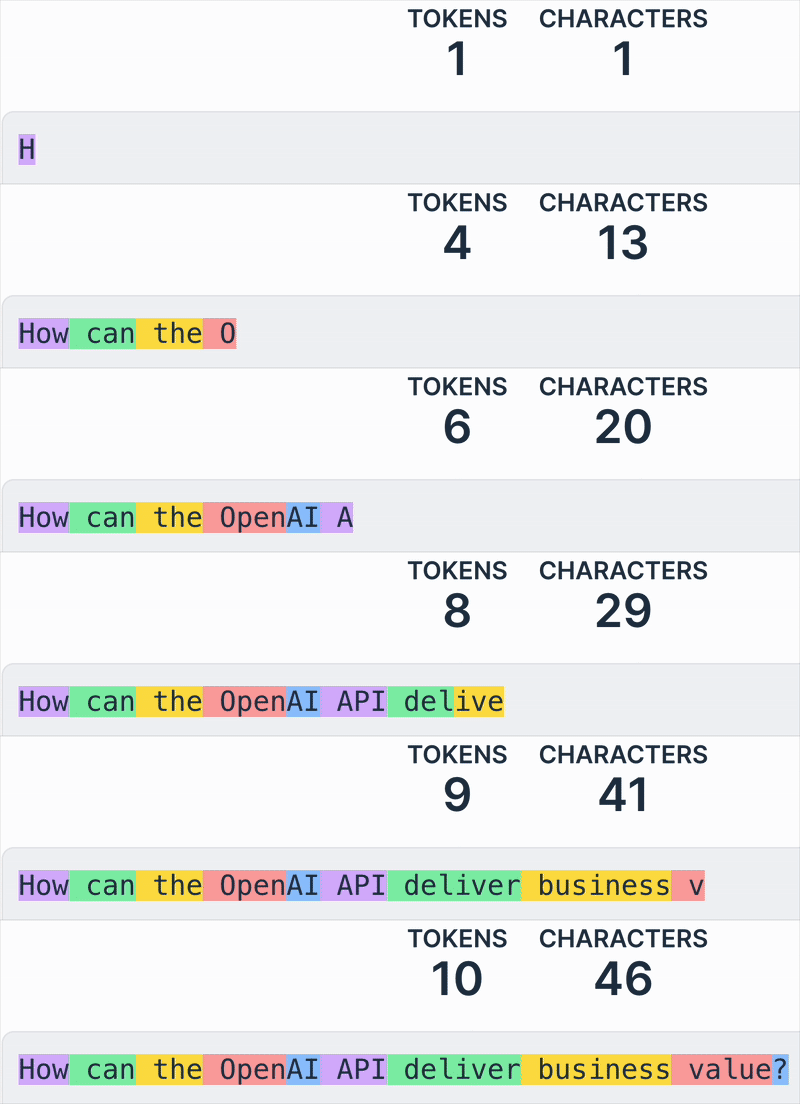
"OpenAI API가 비즈니스 가치를 어떻게 제공할 수 있을까요?" 문장의 각 토큰이 서로 다른 색으로 강조 표시된 모습.

1 https://platform.openai.com/tokenizer
OpenAI API 활용하기

비용 계산하기

  • 사용 비용은 모델토큰 수에 따라 달라집니다 💰

    • 모델은 비용/토큰 기준으로 가격이 책정됩니다
    • 입력 및 출력 토큰의 비용은 다를 수 있습니다
  • max_completion_tokens이 증가하면 비용이 증가합니다 📈

스크린샷 2025-03-05 at 11.46.54.png

OpenAI API 활용하기

비용 계산하기

prompt = f"""Summarize the customer support chat 
             in three concise key points: {text}"""

max_completion_tokens = 500

response = client.chat.completions.create(
  model="gpt-4o-mini",
  messages=[{"role": "user", "content": prompt}], 
  max_completion_tokens=max_completion_tokens
  )

OpenAI API 활용하기

비용 계산하기

# Define price per token
input_token_price = 0.15 / 1_000_000
output_token_price = 0.6 / 1_000_000

# Extract token usage input_tokens = response.usage.prompt_tokens
output_tokens = max_completion_tokens
# Calculate cost cost = (input_tokens * input_token_price + output_tokens * output_token_price) print(f"Estimated cost: ${cost}")
Estimated cost: $0.00124
1 https://openai.com/pricing
OpenAI API 활용하기

연습해 봅시다!

OpenAI API 활용하기

Preparing Video For Download...