나만의 Docker 이미지 만들기
Docker 입문

Tim Sangster
Software Engineer @ DataCamp
Dockerfile로 이미지 만들기
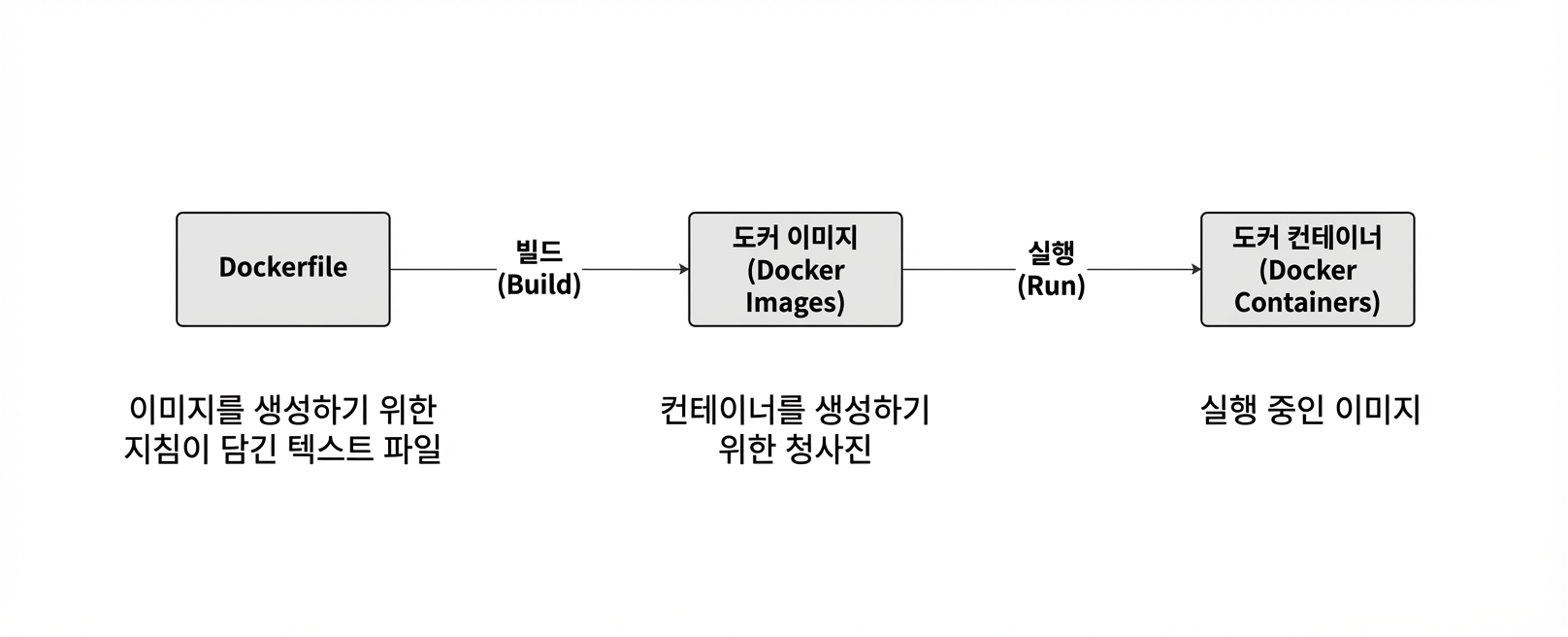
Dockerfile 시작하기
Dockerfile은 항상 FROM 지시어로 다른 이미지에서 시작합니다.
FROM postgres
FROM ubuntu
FROM hello-world
FROM my-custom-data-pipeline
FROM postgres:15.0
FROM ubuntu:22.04
FROM hello-world:latest
FROM my-custom-data-pipeline:v1
Dockerfile 빌드하기
Dockerfile을 빌드하면 이미지가 생성됩니다.
docker build /location/to/Dockerfile
docker build .
[+] Building 0.1s (5/5) FINISHED
 => [internal] load build definition from Dockerfile
 => => transferring dockerfile: 54B
...
 => CACHED [1/1] FROM docker.io/library/ubuntu
 => exporting to image
 => => exporting layers
 => => writing image sha256:a67f41b1d127160a7647b6709b3789b1e954710d96df39ccaa21..
이미지 이름 지정
실무에서는 -t 플래그로 이미지에 이름을 거의 항상 지정합니다:
docker build -t first_image .
...
=> => writing image sha256:a67f41b1d127160a7647b6709b3789b1e954710d96df39ccaa21..
=> => naming to docker.io/library/first_image
docker build -t first_image:v0 .
=> => writing image sha256:a67f41b1d127160a7647b6709b3789b1e954710d96df39ccaa21..
=> => naming to docker.io/library/first_image:v0
이미지 커스터마이즈
RUN <valid-shell-command>
FROM ubuntu
RUN apt-get update
RUN apt-get install -y python3
프롬프트를 피하려면 -y 플래그를 사용하십시오:
...
After this operation, 22.8 MB of additional disk space will be used.
Do you want to continue? [Y/n]
비 trivial Dockerfile 빌드하기
이미지를 빌드할 때 RUN 뒤 명령을 Docker가 실제로 실행합니다
RUN apt-get update를 Docker가 실행하는 데 걸리는 시간은 우리가 직접 실행하는 것과 같습니다!
root@host:/# apt-get update
Get:1 http://ports.ubuntu.com/ubuntu-ports jammy InRelease [270 kB]
...
Get:17 http://ports.ubuntu.com/ubuntu-ports jammy-security/restricted arm64 Pack..
Fetched 23.0 MB in 2s (12.3 MB/s)
Reading package lists... Done
요약
| 사용 | Dockerfile 지시어 |
|---|---|
| 이미지에서 Dockerfile 시작 | FROM <image-name> |
| 셸 명령을 이미지에 추가 | RUN <valid-shell-command> |
| 셸 명령에 사용자 입력이 필요 없게 함 | RUN apt-get install -y python3 |
| 사용 | 셸 명령 |
|---|---|
| Dockerfile로 이미지 빌드 | docker build /location/to/Dockerfile |
| 현재 작업 디렉터리에서 빌드 | docker build . |
| 빌드 시 이름 지정 | docker build -t first_image . |
연습해 봅시다!
Docker 입문

