Tạo đặc trưng mới

Phân tích dữ liệu khám phá trong Python

George Boorman

Curriculum Manager, DataCamp

Tương quan

sns.heatmap(planes.corr(numeric_only=True), annot=True)
plt.show()
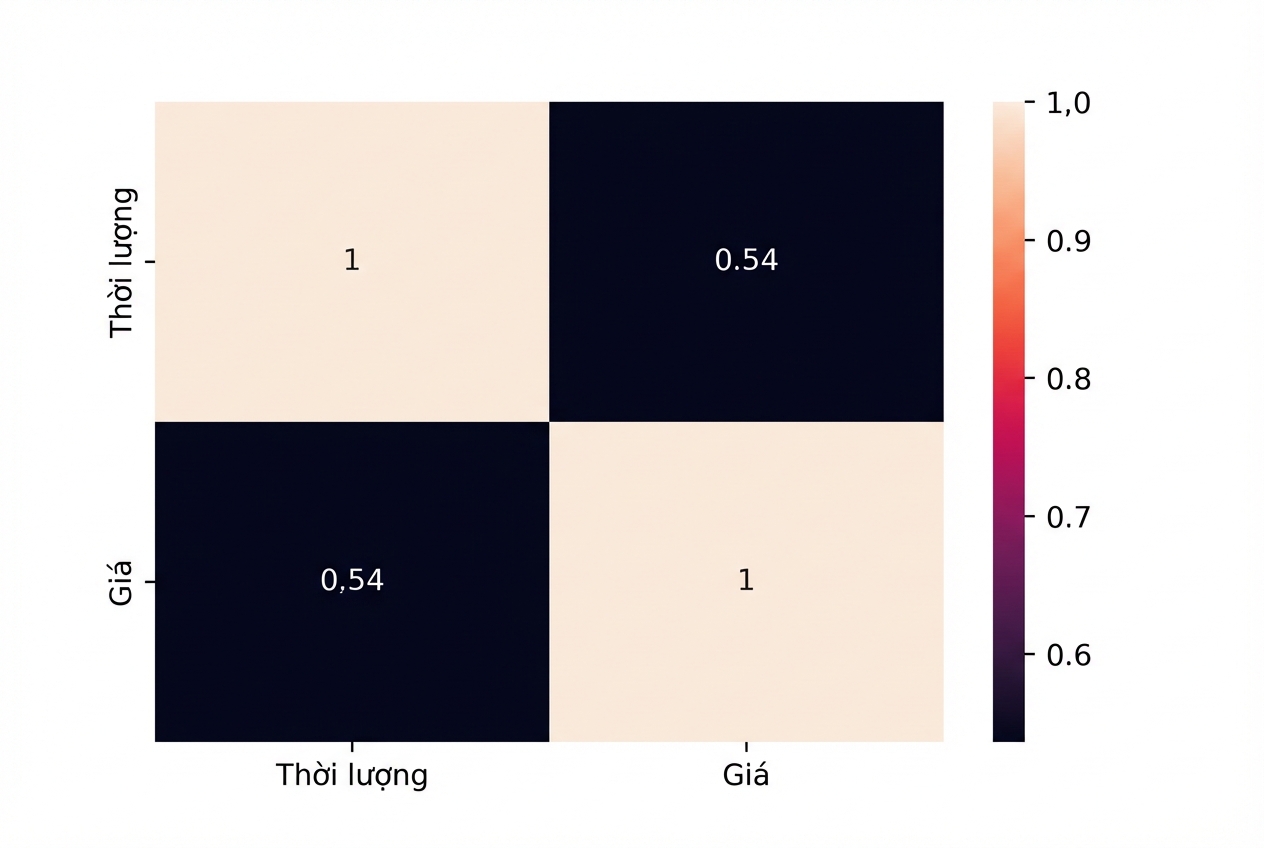
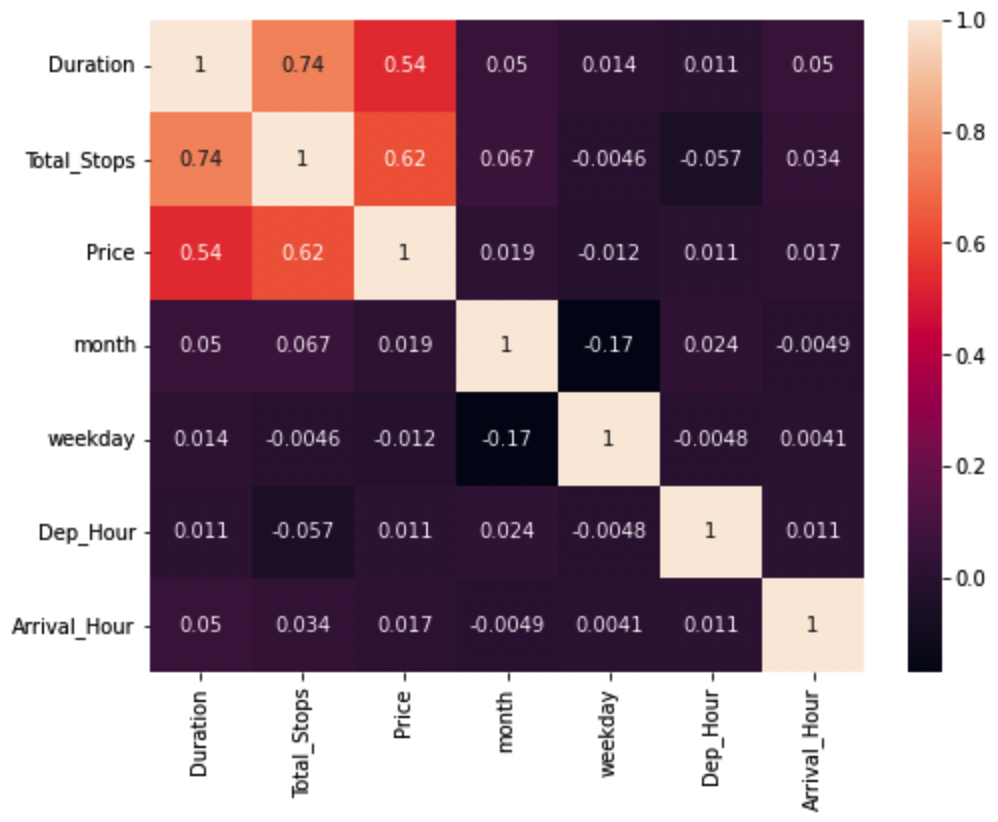
Bản đồ nhiệt cho thấy hệ số tương quan Pearson 0,54 giữa Price và Duration

Phân tích dữ liệu khám phá trong Python

Xem kiểu dữ liệu

print(planes.dtypes)
Airline                    object
Date_of_Journey    datetime64[ns]
Source                     object
Destination                object
Route                      object
Dep_Time           datetime64[ns]
Arrival_Time       datetime64[ns]
Duration                  float64
Total_Stops                object
Additional_Info            object
Price                     float64
dtype: object
Phân tích dữ liệu khám phá trong Python

Tổng số điểm dừng

print(planes["Total_Stops"].value_counts())
1 stop      4107
non-stop    2584
2 stops     1127
3 stops       29
4 stops        1
Name: Total_Stops, dtype: int64
Phân tích dữ liệu khám phá trong Python

Làm sạch tổng điểm dừng

planes["Total_Stops"] = planes["Total_Stops"].str.replace(" stops", "")

planes["Total_Stops"] = planes["Total_Stops"].str.replace(" stop", "")
planes["Total_Stops"] = planes["Total_Stops"].str.replace("non-stop", "0")
planes["Total_Stops"] = planes["Total_Stops"].astype(int)
Phân tích dữ liệu khám phá trong Python

Tương quan

sns.heatmap(planes.corr(numeric_only=True), annot=True)
plt.show()
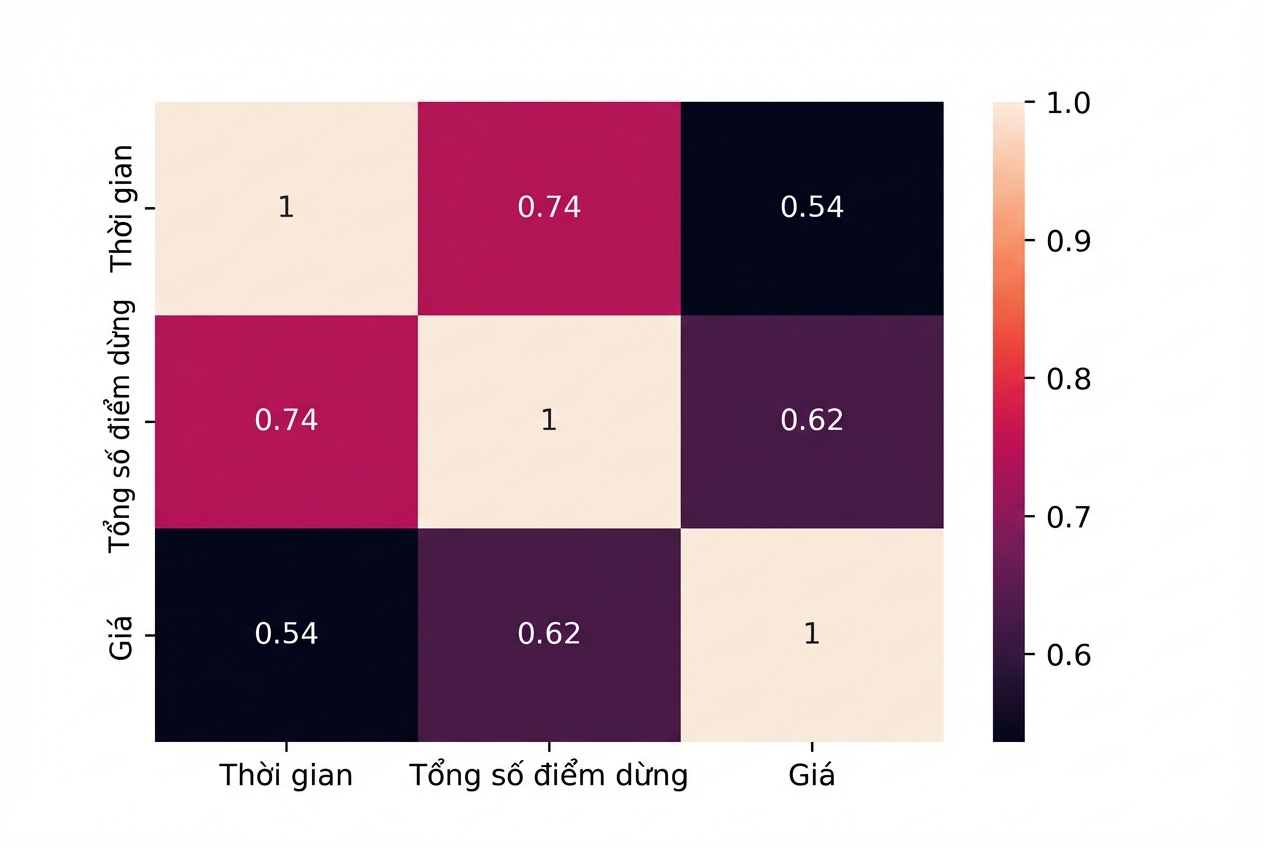
Bản đồ nhiệt cho thấy tương quan Pearson 0,62 giữa Price và Total Stops và 0,74 giữa Duration và Total Stops

Phân tích dữ liệu khám phá trong Python

Ngày tháng

print(planes.dtypes)
Airline                    object
Date_of_Journey    datetime64[ns]
Source                     object
Destination                object
Route                      object
Dep_Time           datetime64[ns]
Arrival_Time       datetime64[ns]
Duration                  float64
Total_Stops                 int64
Additional_Info            object
Price                     float64
dtype: object
Phân tích dữ liệu khám phá trong Python

Trích xuất tháng và thứ

planes["month"] = planes["Date_of_Journey"].dt.month

planes["weekday"] = planes["Date_of_Journey"].dt.weekday
print(planes[["month", "weekday", "Date_of_Journey"]].head())
   month  weekday   Date_of_Journey
0      9        4        2019-09-06
1     12        3        2019-12-05
2      1        3        2019-01-03
3      6        0        2019-06-24
4     12        1        2019-12-03
Phân tích dữ liệu khám phá trong Python

Giờ đi và giờ đến

planes["Dep_Hour"] = planes["Dep_Time"].dt.hour
planes["Arrival_Hour"] = planes["Arrival_Time"].dt.hour
Phân tích dữ liệu khám phá trong Python

Tương quan

Bản đồ nhiệt cho thấy không có quan hệ giữa thuộc tính thời gian và giá

Phân tích dữ liệu khám phá trong Python

Tạo nhóm hạng

print(planes["Price"].describe())
count     7848.000000
mean      9035.413609
std       4429.822081
min       1759.000000
25%       5228.000000
50%       8355.000000
75%      12373.000000
max      54826.000000
Name: Price, dtype: float64
Khoảng Hạng vé
<= 5228 Phổ thông
> 5228 <= 8355 Phổ thông đặc biệt
> 8335 <= 12373 Thương gia
> 12373 Hạng nhất
Phân tích dữ liệu khám phá trong Python

Thống kê mô tả

twenty_fifth = planes["Price"].quantile(0.25)

median = planes["Price"].median()
seventy_fifth = planes["Price"].quantile(0.75)
maximum = planes["Price"].max()
Phân tích dữ liệu khám phá trong Python

Nhãn và khoảng

labels = ["Economy", "Premium Economy", "Business Class", "First Class"]

bins = [0, twenty_fifth, median, seventy_fifth, maximum]
Phân tích dữ liệu khám phá trong Python

pd.cut()

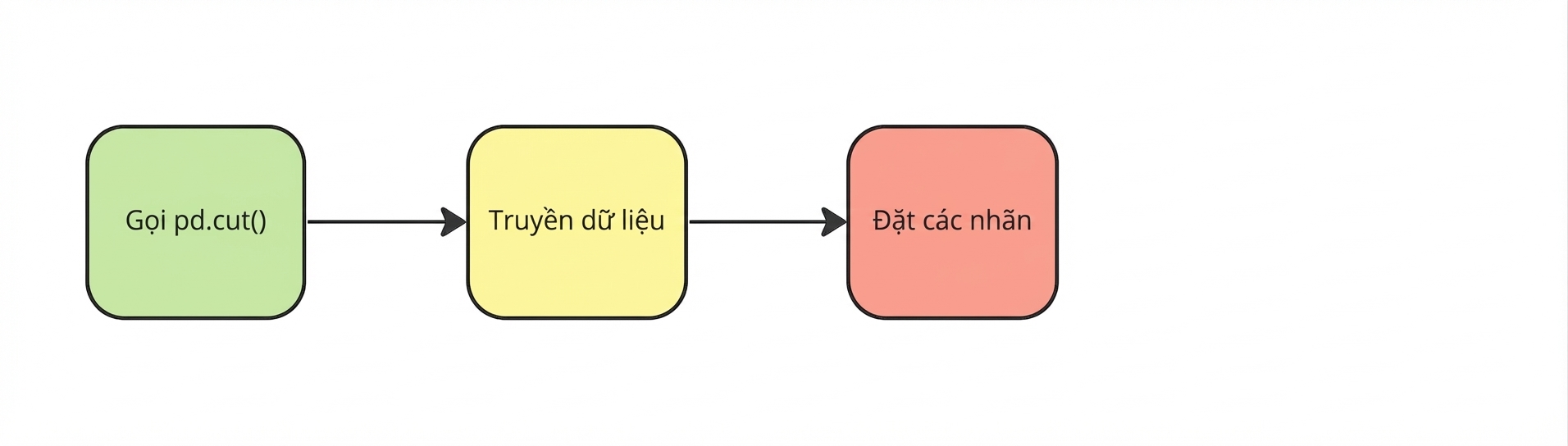
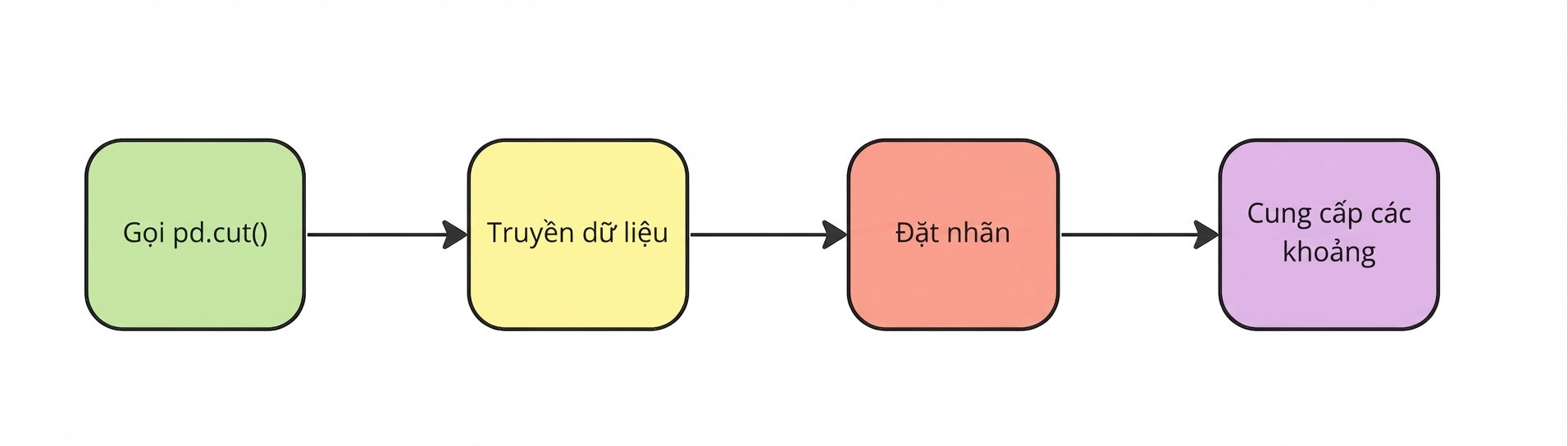
Gọi pd-dot-cut

planes["Price_Category"] = pd.cut(


Phân tích dữ liệu khám phá trong Python

pd.cut()

Truyền dữ liệu

planes["Price_Category"] = pd.cut(planes["Price"],


Phân tích dữ liệu khám phá trong Python

pd.cut()

Đặt nhãn

planes["Price_Category"] = pd.cut(planes["Price"],
                                  labels=labels,

Phân tích dữ liệu khám phá trong Python

pd.cut()

Cung cấp các khoảng

planes["Price_Category"] = pd.cut(planes["Price"],
                                  labels=labels,
                                  bins=bins)
Phân tích dữ liệu khám phá trong Python

Nhóm giá vé

print(planes[["Price","Price_Category"]].head())
     Price   Price_Category
0  13882.0      First Class
1   6218.0  Premium Economy
2  13302.0      First Class
3   3873.0          Economy
4  11087.0   Business Class
Phân tích dữ liệu khám phá trong Python

Hạng giá theo hãng bay

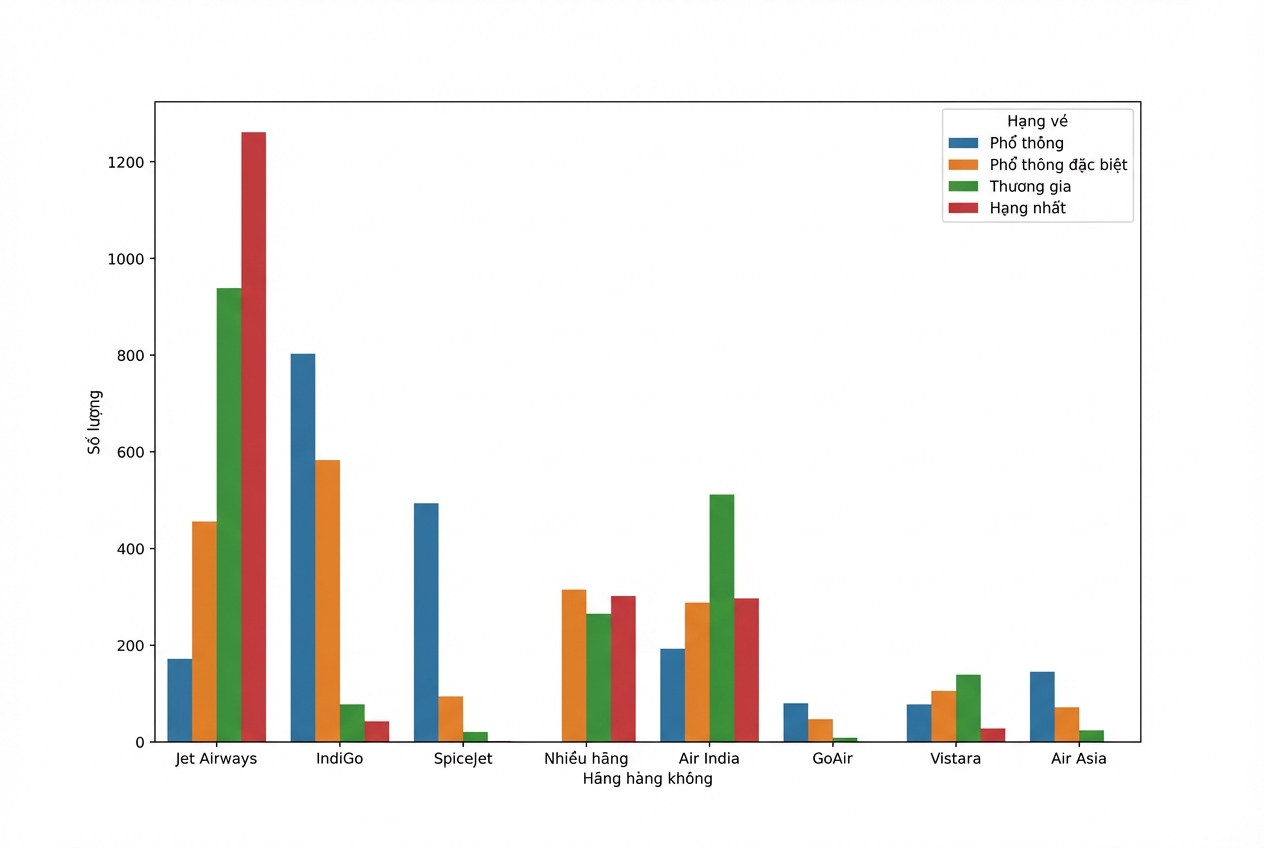
sns.countplot(data=planes, x="Airline", hue="Price_Category")
plt.show()
Phân tích dữ liệu khám phá trong Python

Hạng giá theo hãng bay

Biểu đồ đếm số chuyến theo hãng trong các hạng giá; Jet Airways có nhiều vé Hạng nhất nhất

Phân tích dữ liệu khám phá trong Python

Ayo berlatih!

Phân tích dữ liệu khám phá trong Python

Preparing Video For Download...