SNS and SQS integration with CloudWatch

Monitoring and troubleshooting AWS

John Q. Martin

Principal Consultant

Connecting CloudWatch alarms to SNS
aws cloudwatch put-metric-alarm \
  --alarm-name HighCPUUtilization \
  --metric-name CPUUtilization \
  --namespace AWS/EC2 \
  --statistic Average \
  --period 300 \
  --evaluation-periods 2 \
  --threshold 80 \
  --comparison-operator GreaterThanThreshold \
  --alarm-actions arn:aws:sns:us-east-1:123456789012:production-alerts \
  --ok-actions arn:aws:sns:us-east-1:123456789012:recovery-notifications


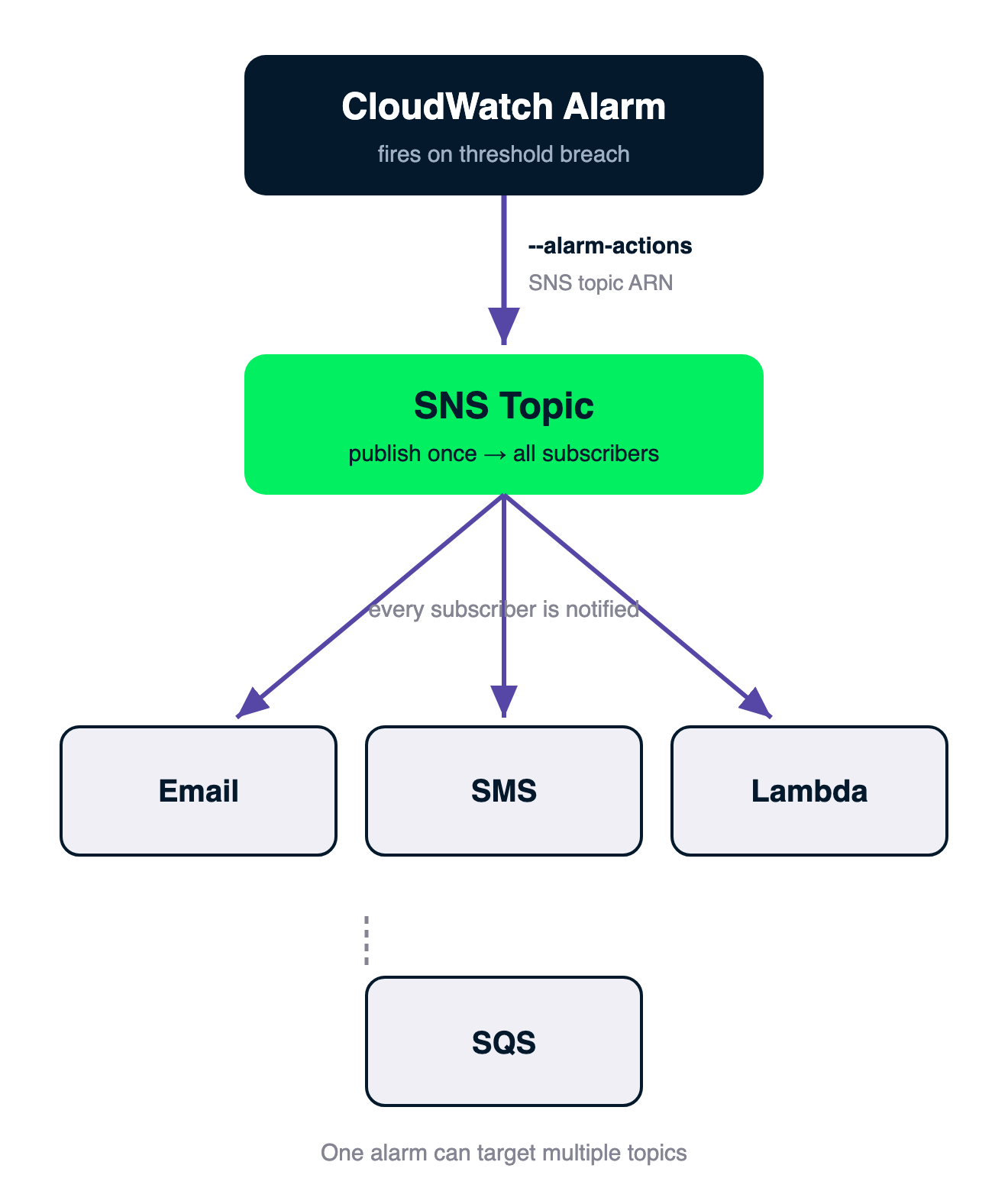
Flow: a CloudWatch Alarm sends via --alarm-actions to an SNS topic, which fans out to subscribers — Email, SMS, Lambda, and SQS

Monitoring and troubleshooting AWS

Core SNS Concepts

Components

  • SNS is publisher/subscriber: topics, publishers, subscribers
  • Topic: named channel; publishers send, subscribers receive
  • Publish once, delivered simultaneously to all subscribers

Subscriber protocols (one topic, many endpoints):

  • Email, SMS
  • HTTP / HTTPS
  • Lambda, SQS
  • Mobile push, Kinesis Firehose
Monitoring and troubleshooting AWS

SNS topic types


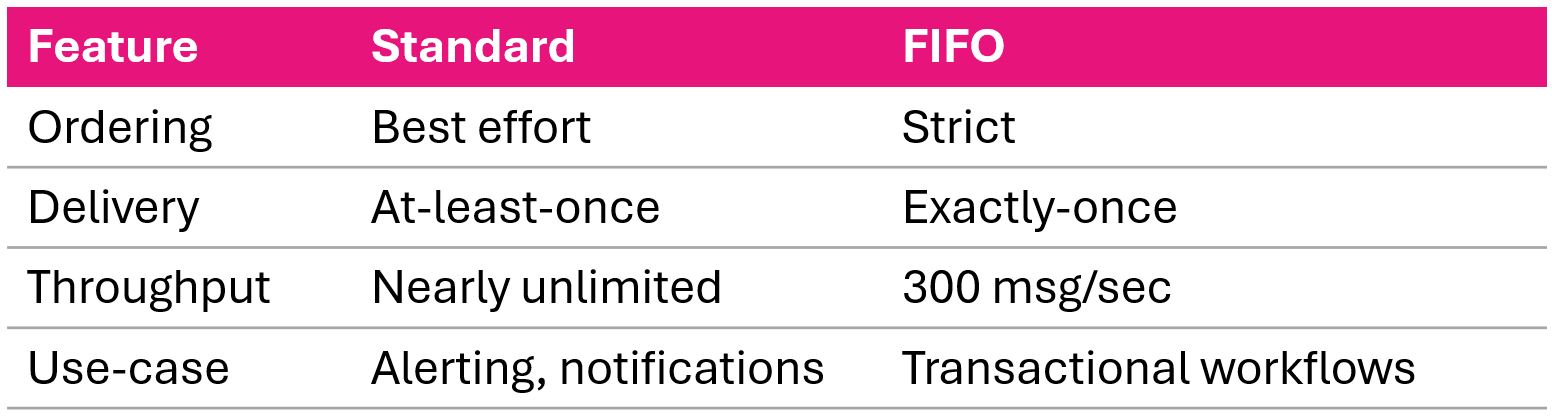
Comparison of SNS Standard and FIFO topic types by ordering throughput and delivery guarantees

Monitoring and troubleshooting AWS

Creating SNS topics: AWS CLI

Standard topic

aws sns create-topic \
  --name production-alerts

FIFO topic

aws sns create-topic \
  --name production-alerts.fifo \
  --attributes FifoTopic=true,\
    ContentBasedDeduplication=true

With encryption

aws sns create-topic \
  --name production-alerts \
  --attributes KmsMasterKeyId=alias/aws/sns
Monitoring and troubleshooting AWS

Adding Lambda and SMS subscribers


Lambda

aws sns subscribe \
  --topic-arn arn:aws:sns:us-east-1:123456789012:production-alerts \
  --protocol lambda \
  --notification-endpoint arn:aws:lambda:us-east-1:123456789012:function:ProcessAlert

SMS

aws sns subscribe \
  --topic-arn arn:aws:sns:us-east-1:123456789012:critical-alerts \
  --protocol sms \
  --notification-endpoint +1234567890
Monitoring and troubleshooting AWS

SNS message format from CloudWatch alarms

{
  "AlarmName": "HighCPUUtilization",
  "NewStateValue": "ALARM",
  "OldStateValue": "OK",
  "NewStateReason": "Threshold Crossed: 2 datapoints [85.0, 90.0] were greater than the threshold (80.0).",
  "StateChangeTime": "2026-03-27T10:30:45.123+0000",
  "Trigger": {
    "MetricName": "CPUUtilization",
    "Namespace": "AWS/EC2",
    "Statistic": "AVERAGE",
    "Period": 300,
    "Threshold": 80.0,
    "ComparisonOperator": "GreaterThanThreshold"
  }
}
Monitoring and troubleshooting AWS

SNS message filtering

aws sns set-subscription-attributes \
  --subscription-arn arn:aws:sns:...:production-alerts:abc123 \
  --attribute-name FilterPolicy \
  --attribute-value '{"AlarmName":["HighCPUUtilization"],"NewStateValue":["ALARM"]}'

aws sns set-subscription-attributes \
  --subscription-arn arn:aws:sns:...:production-alerts:abc123 \
  --attribute-name FilterPolicyScope \
  --attribute-value MessageBody
Monitoring and troubleshooting AWS

Custom notification formatting with Lambda
def lambda_handler(event, context):
    alarm = json.loads(event['Records'][0]['Sns']['Message'])

    message = f"""
ALERT: {alarm['AlarmName']}
Status: {alarm['NewStateValue']}
Reason: {alarm['NewStateReason']}
Resource: {alarm['Trigger']['Dimensions'][0]['value']}
Runbook: https://wiki.example.com/runbooks/high-cpu
    """

    sns.publish(
        TopicArn='arn:aws:sns:...:formatted-alerts',
        Subject=f"{alarm['AlarmName']}",
        Message=message
    )


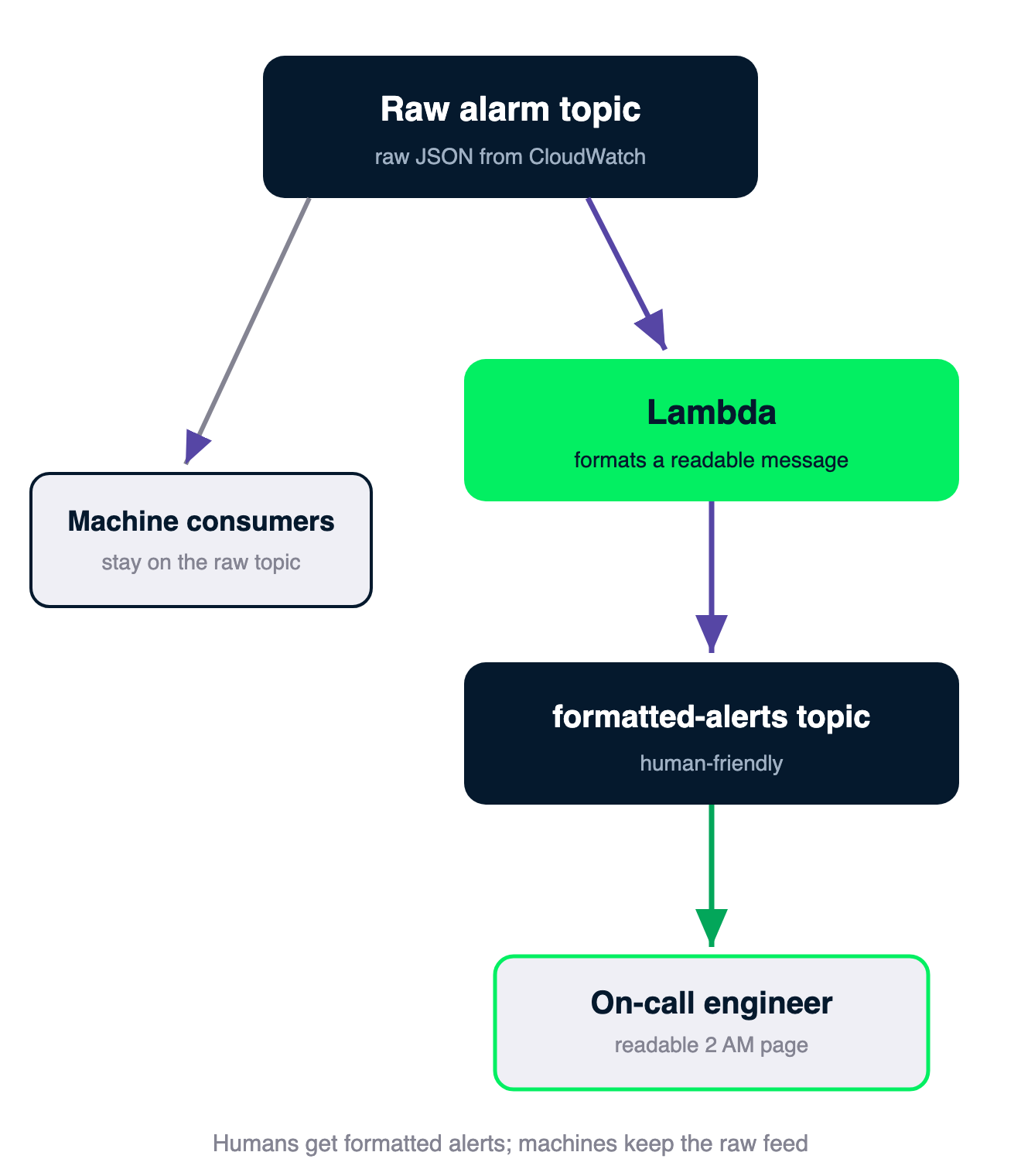
Chain: the raw alarm topic feeds a Lambda that formats a readable message and publishes to the formatted-alerts topic for the on-call engineer, while machine consumers stay on the raw topic

Monitoring and troubleshooting AWS

Fan out architecture with SQS

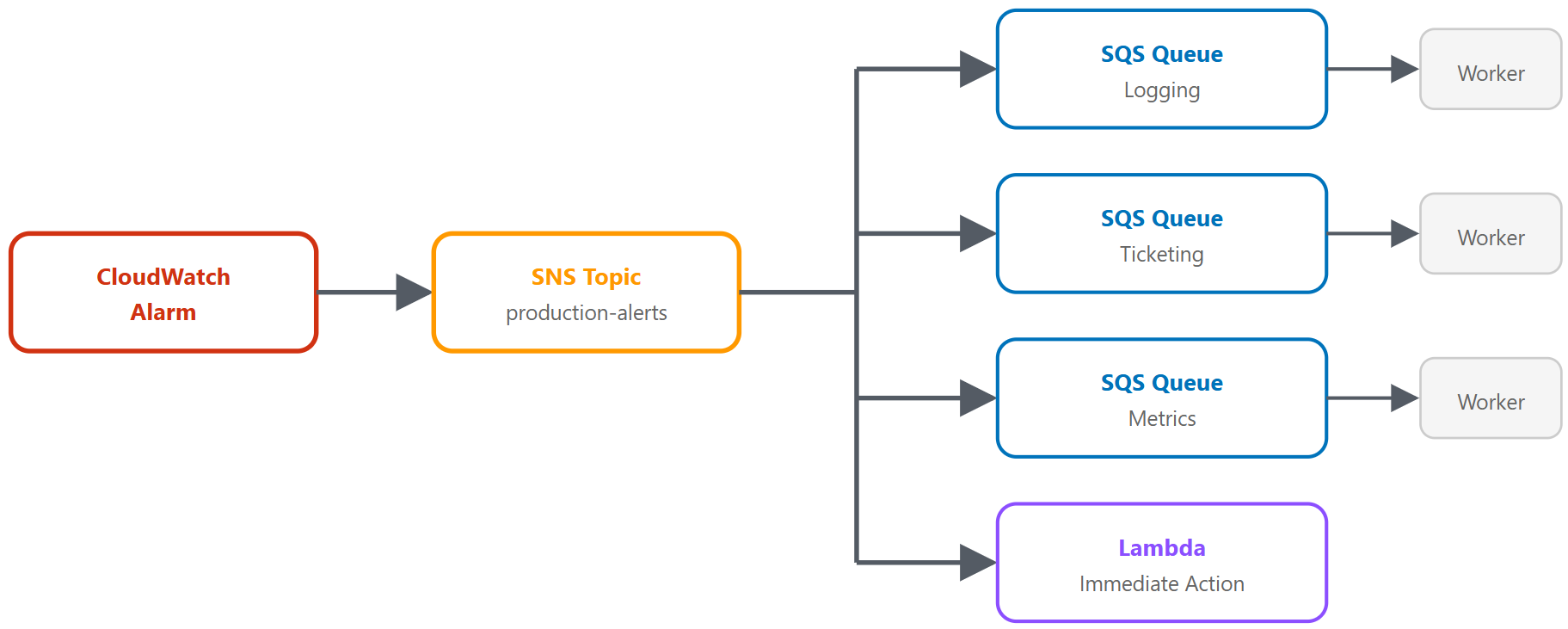
Fan out architecture where one SNS message delivers to multiple SQS queues and a Lambda consumer

Monitoring and troubleshooting AWS

Setting Up Fan-Out

Four steps

  1. Create SQS queues (one per consumer)
  2. Configure queue policies (allow SNS to send messages)
  3. Subscribe queues to the SNS topic
  4. Build consumers (poll, process, delete)

Queue policy

{
  "Effect": "Allow",
  "Principal": { "Service": "sns.amazonaws.com" },
  "Action": "sqs:SendMessage",
  "Resource": "arn:aws:sqs:...:alarm-logging-queue",
  "Condition": {
    "ArnEquals": {
      "aws:SourceArn": "arn:aws:sns:...:production-alerts"
    }
  }
}
Monitoring and troubleshooting AWS

Subscribing Queues


Subscribe each queue

aws sns subscribe \
  --topic-arn arn:aws:sns:...:production-alerts \
  --protocol sqs \
  --notification-endpoint arn:aws:sqs:...:alarm-logging-queue
Monitoring and troubleshooting AWS

Processing Messages

Consumer pattern

response = sqs.receive_message(
    QueueUrl=queue_url,
    MaxNumberOfMessages=10,
    WaitTimeSeconds=20       # Long polling
)
for message in response.get('Messages', []):
    sns_msg = json.loads(message['Body'])
    alarm = json.loads(sns_msg['Message'])
    # Process alarm data
    sqs.delete_message(QueueUrl=queue_url,
                       ReceiptHandle=message['ReceiptHandle'])
Monitoring and troubleshooting AWS

Fan-Out with filtering and dead letter queues

Targeted delivery per subscription

  • Ticketing queue: {"NewStateValue":["ALARM"],"Severity":["Critical"]}
  • Logging queue: no filter (receives everything)
  • Metrics queue: {"MessageType":["Metric"]}


Dead letter queues (DLQ)

aws sqs set-queue-attributes \
  --queue-url https://sqs..../alarm-logging-queue \
  --attributes '{
    "RedrivePolicy": "{\"deadLetterTargetArn\":\"arn:aws:sqs:...:alarm-logging-dlq\",\"maxReceiveCount\":\"3\"}"
  }'
Monitoring and troubleshooting AWS

SNS vs. SQS: When to Use Each

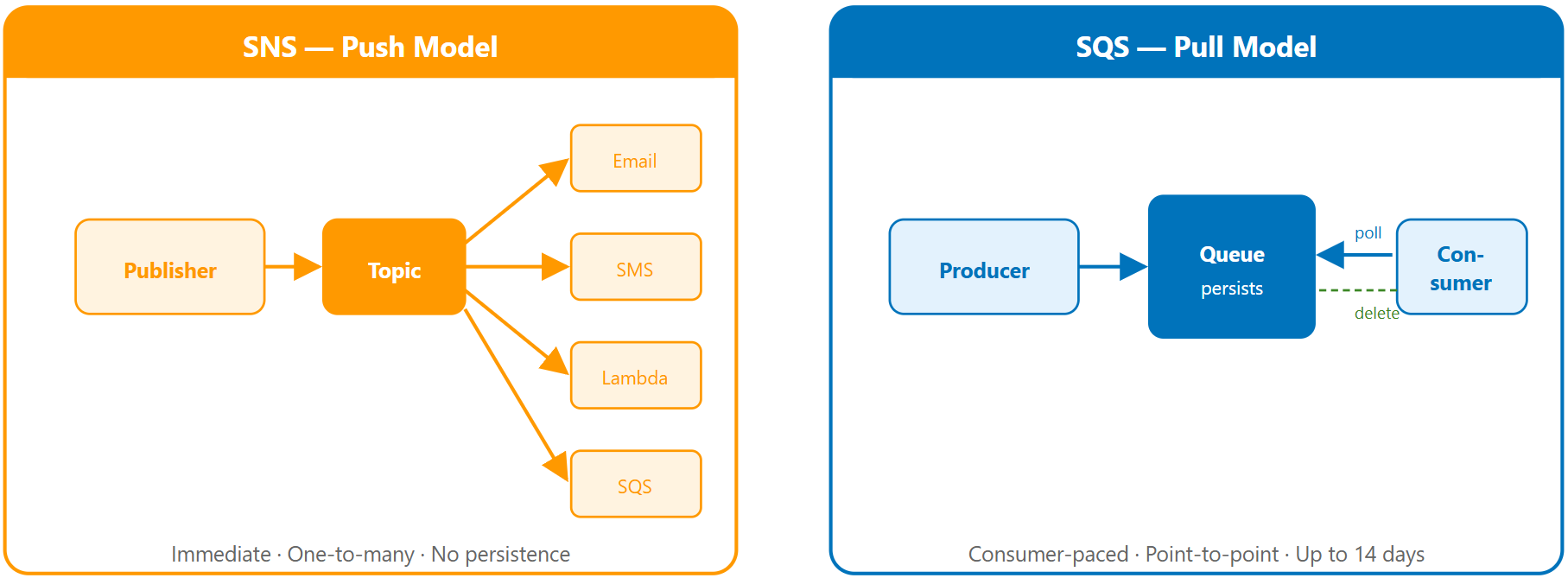
Comparison of SNS push based delivery versus SQS pull based message queuing

Monitoring and troubleshooting AWS

Architecture examples


Simple alert pattern sending an SNS notification to email


Async processing pattern with an API sending to an SQS queue consumed by a worker

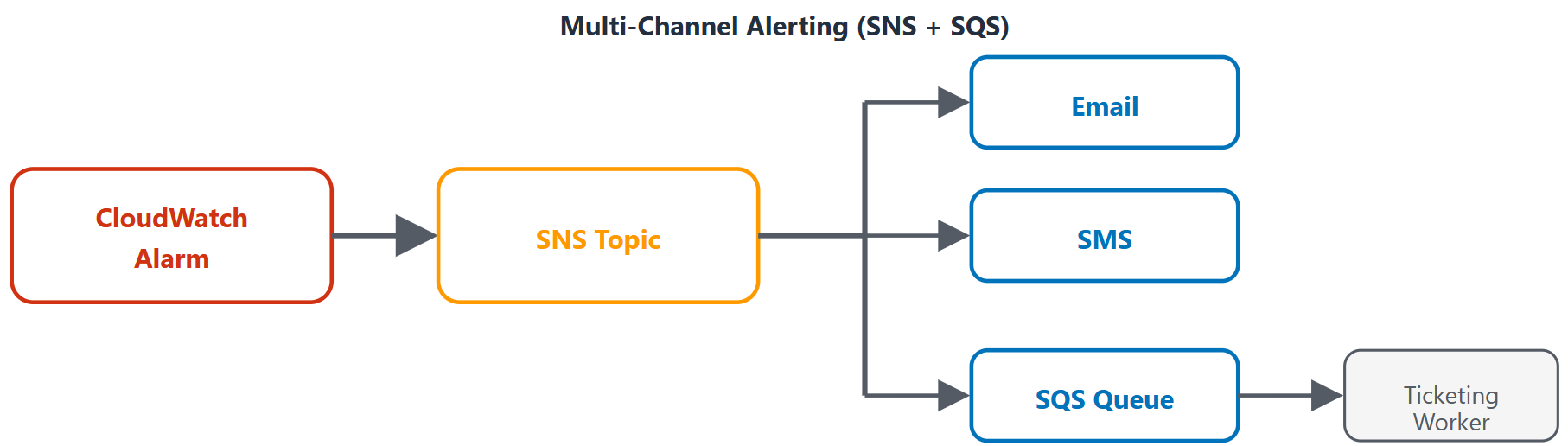
Multi channel alerting pattern where one alarm fans out to several notification channels

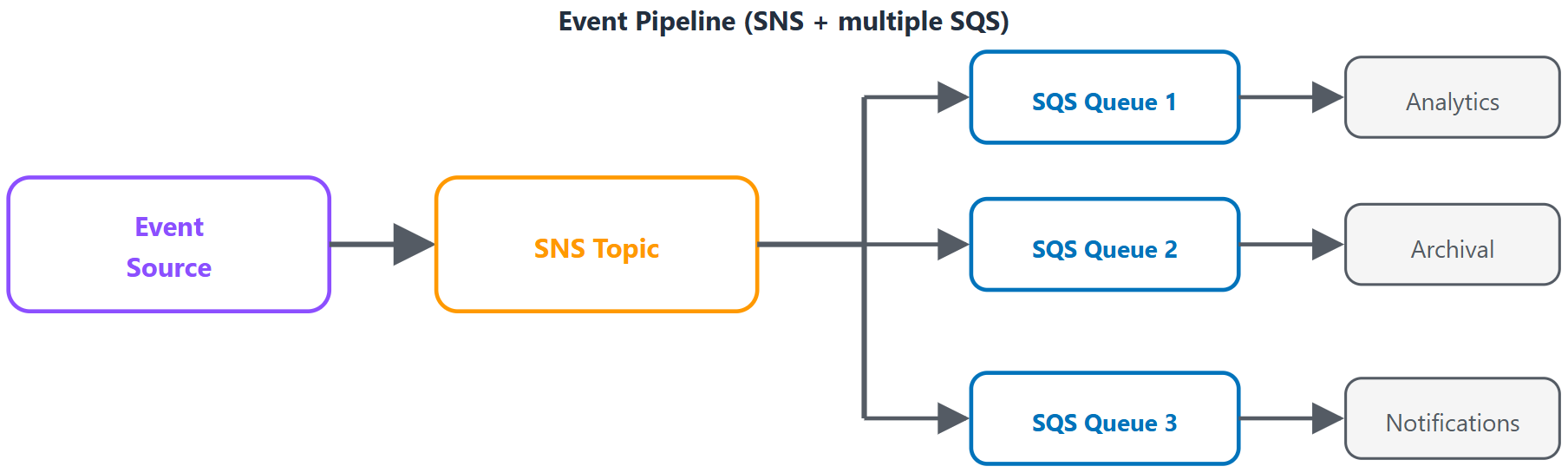
Event pipeline pattern routing a source event to multiple SQS queues for processing

Monitoring and troubleshooting AWS

Video summary


  • SNS topics deliver alarm notifications via email, SMS, HTTP, Lambda, and SQS
  • Fan-out pattern: one SNS message → multiple SQS queues for parallel, reliable processing
  • Message filtering reduces noise per subscriber
  • Dead letter queues catch failed messages
  • SNS for push notifications, SQS for reliable processing, both for fan-out with reliability
Monitoring and troubleshooting AWS

Let's practice!

Monitoring and troubleshooting AWS

Preparing Video For Download...