Analyzing traces and service maps

Monitoring and troubleshooting AWS

John Q. Martin

Principal Consultant

What is a service map?


Auto-generated from your trace data: no manual setup
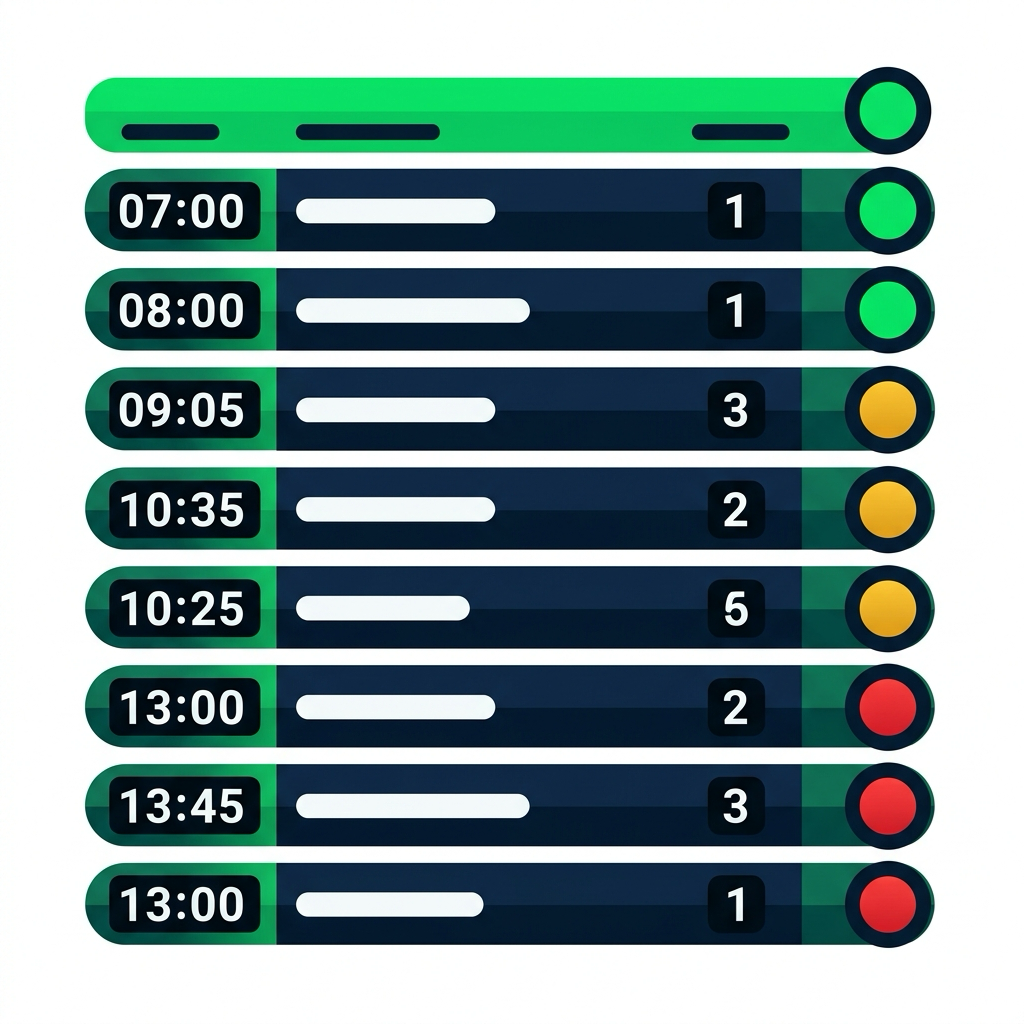
Railway departure board with rows of services, each with a colored status light: green for on time, amber for delayed, red for stopped

At a glance: green = on time · amber = delayed · red = stopped


Access it:

  • X-Ray console → Service map
  • Apply filters
  • Click a node → detailed breakdown
Monitoring and troubleshooting AWS

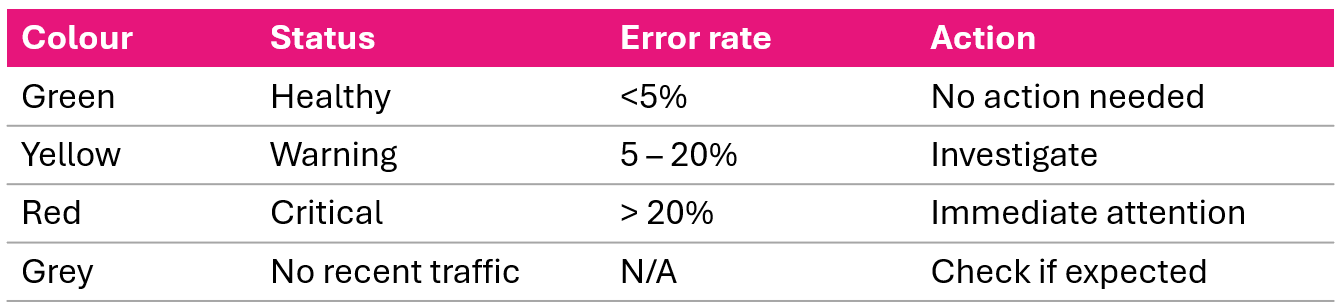
Service map color coding


Service map color coding key: green successful calls, yellow client errors, red server faults, purple throttling, gray no traffic

When you open a service map, go straight to anything that isn't green.

Click any node to see: response time distribution, HTTP status breakdown, error types.

Monitoring and troubleshooting AWS

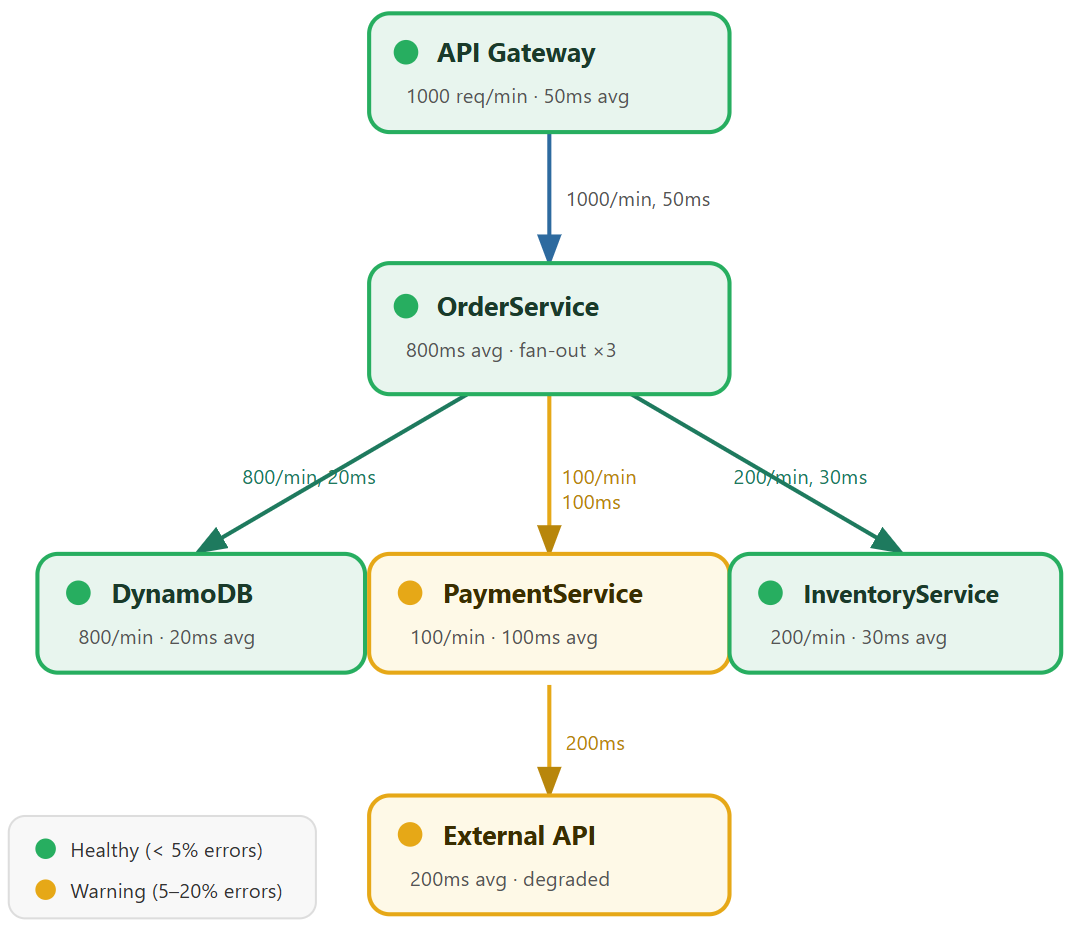
Reading a service map


Service map with API Gateway and OrderService fanning out to DynamoDB Inventory and a yellow Payment service

Monitoring and troubleshooting AWS

Critical path analysis


Critical path = longest service call chain

API Gateway (50ms)
  -> OrderService (50ms)
    -> PaymentService (100ms)
      -> External API (200ms)

Total: 400ms

External API = 50% of total latency


What to do with this:

  • External API is your optimization target
  • Options: add caching, implement timeout + fallback, negotiate SLAs

Compare alternative path:

OrderService -> DynamoDB
Total: 120ms (fast)
Monitoring and troubleshooting AWS

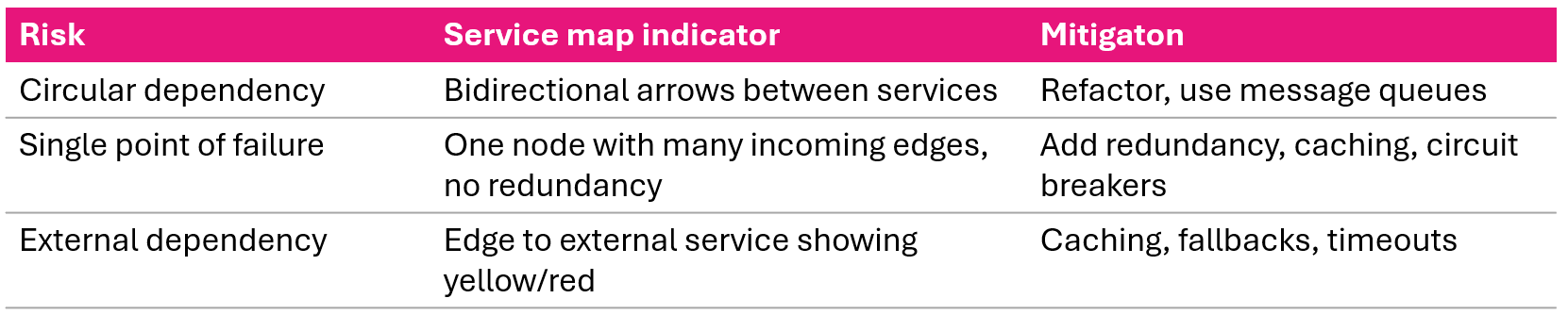
Dependency risks


Service map dependency risks circular dependencies single points of failure and risky external dependencies

Monitoring and troubleshooting AWS

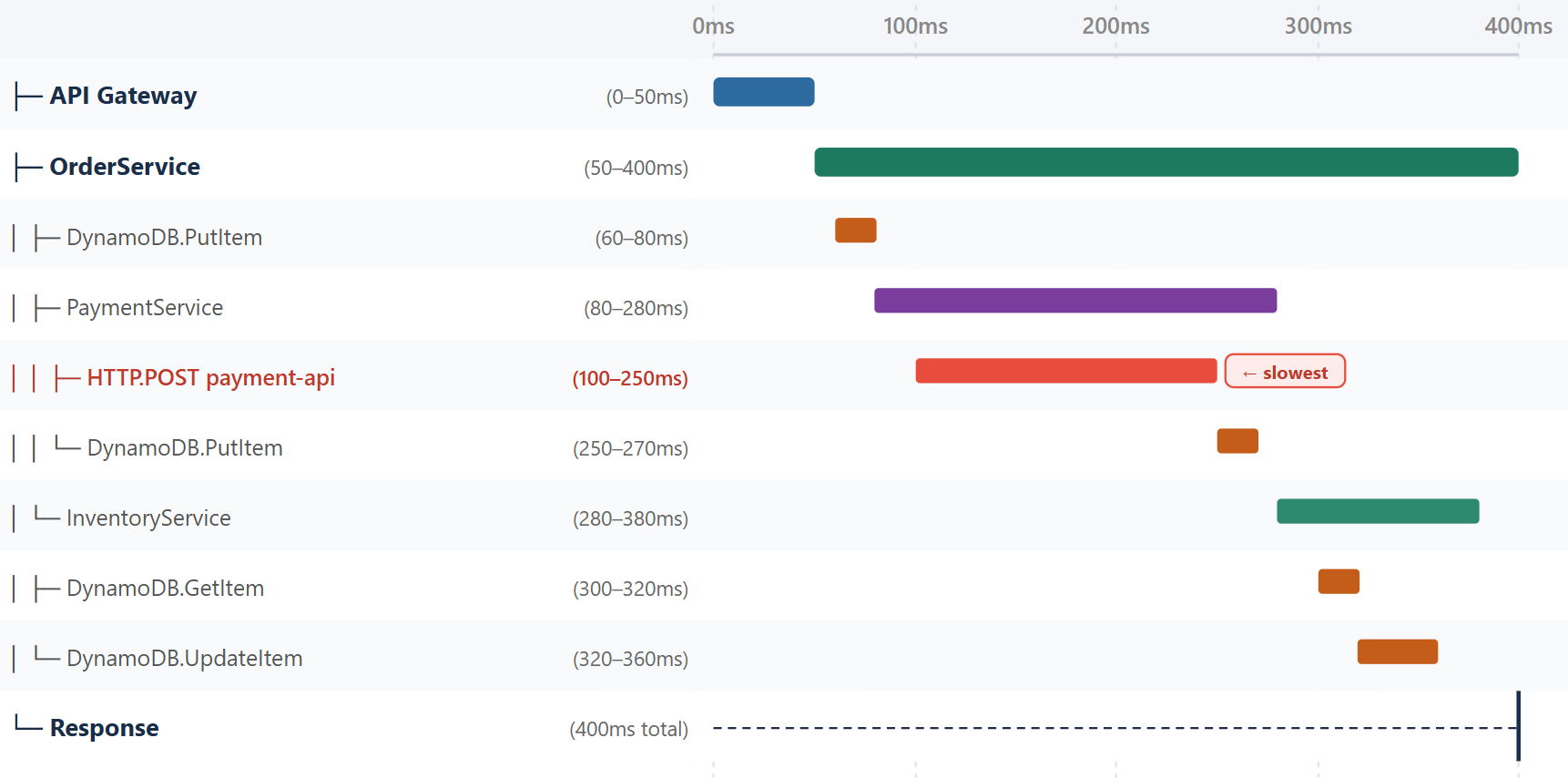
Understanding trace timelines


Trace timeline with subsegments along a time axis showing a payment-api call as the longest operation


  • Horizontal axis time: when operations started and how long they lasted
  • Vertical axis service hierarchy: subsegments indented under parents
  • HTTP.POST to payment-api (100-250ms) = the single longest operation
Monitoring and troubleshooting AWS

Pattern 1: Sequential bottlenecks


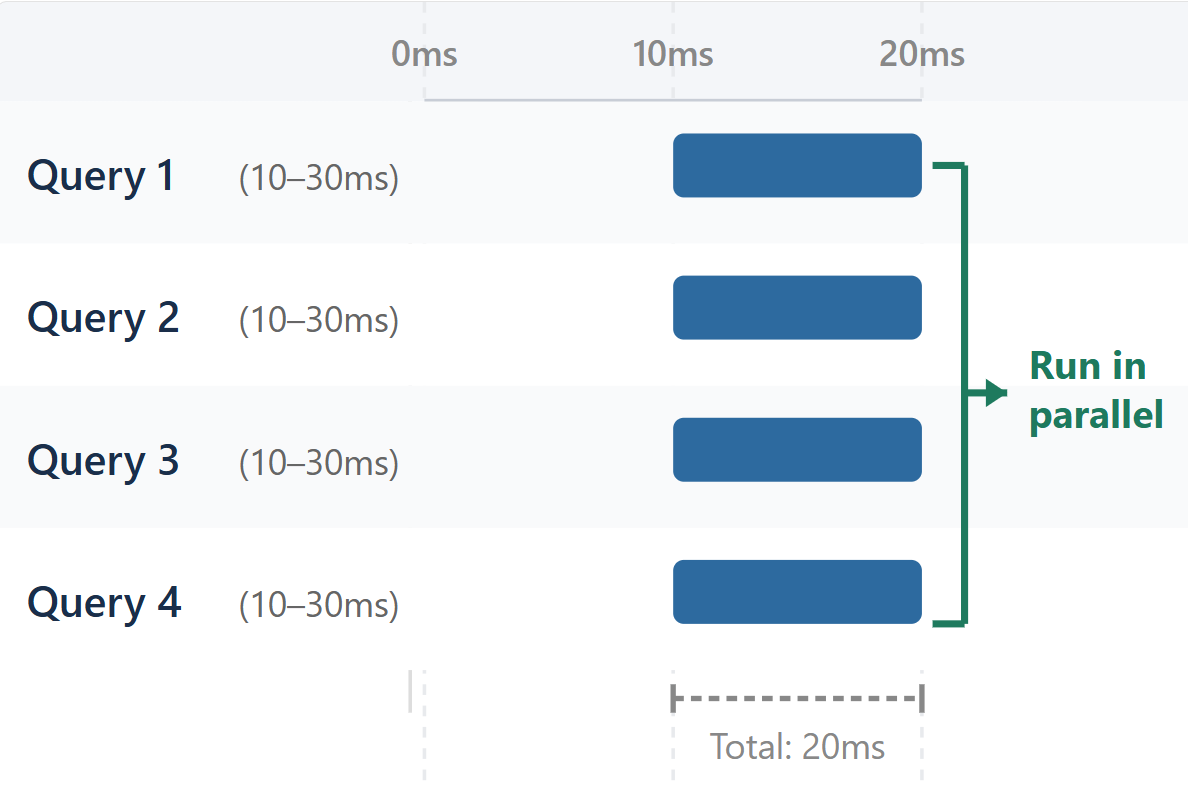
Before (sequential - 80ms):

Query 1 (10-30ms)
         -> Query 2 (30-50ms)
                  -> Query 3 (50-70ms)
                           -> Query 4 (70-90ms)


After (parallel - 20ms):

Trace timeline of four queries running in parallel overlapping to finish in 20ms

Monitoring and troubleshooting AWS

Pattern 2: N+1 queries and chatty services


N+1 Query Problem:

Get user list       (10-20ms)
Get user 1 details  (20-30ms)
Get user 2 details  (30-40ms)
... ×100 sequential queries

Fix: batch queries, eager loading


Chatty Services:

  • 50 small calls between two services instead of 1 batch
  • Each call: connection setup + serialization + round-trip
  • 50× the overhead

Fix: batch requests, message queues, caching

Monitoring and troubleshooting AWS

Pattern 3: Cold starts and cascading failures
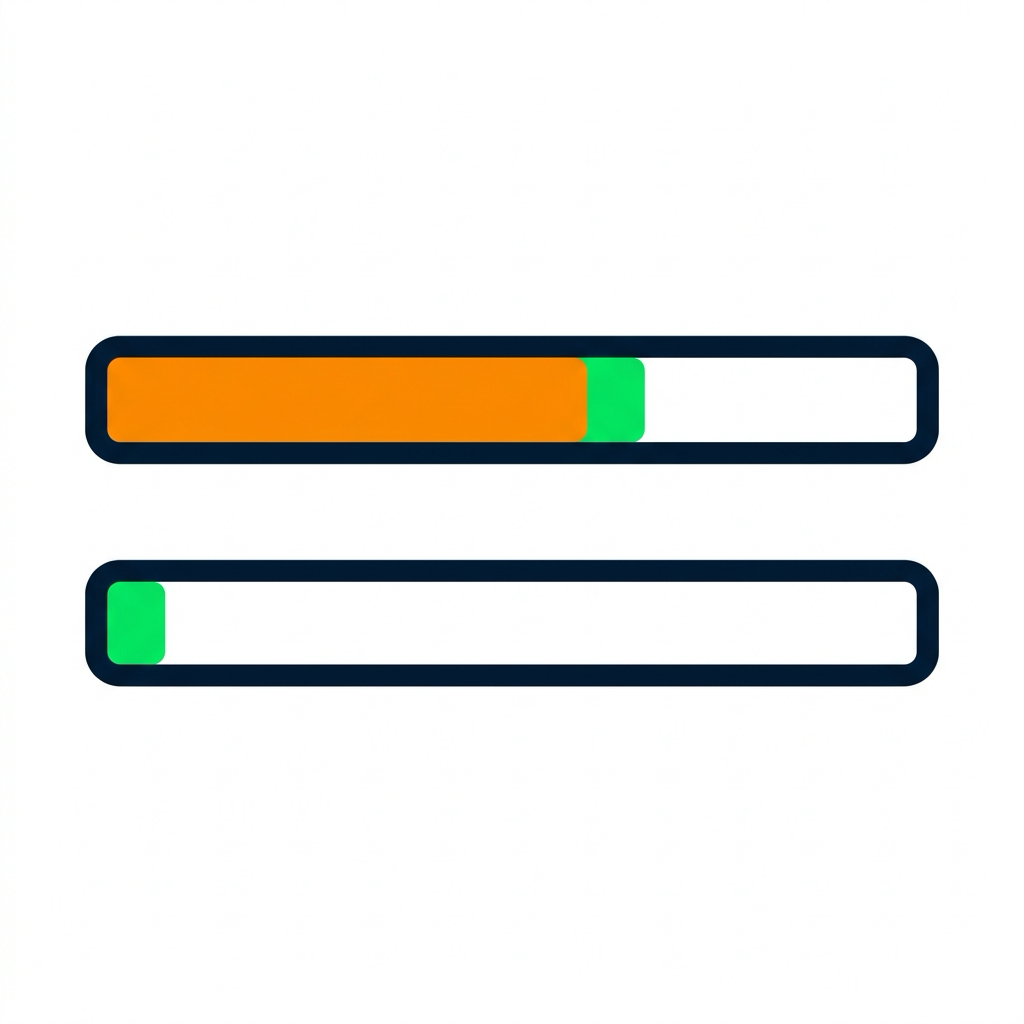
 

Two timeline bars: a cold start has a large orange initialization block then a small green handler; a warm start is just the small green handler

Lambda Cold Start:

  • Cold: 3000ms (2500ms init + 500ms handler)
  • Warm: 500ms (handler only)
  • Visible as large init segment on first invocation

Fix: provisioned concurrency, optimize initialization


Cascading Failure:

Service A [Error]
  -> Service B [Timeout 5s]
    -> Service C [Timeout 5s]
      -> Database [Timeout 5s]

Matching timeout blocks stacked through the trace hierarchy

Fix: timeouts, circuit breakers, fallbacks

Monitoring and troubleshooting AWS

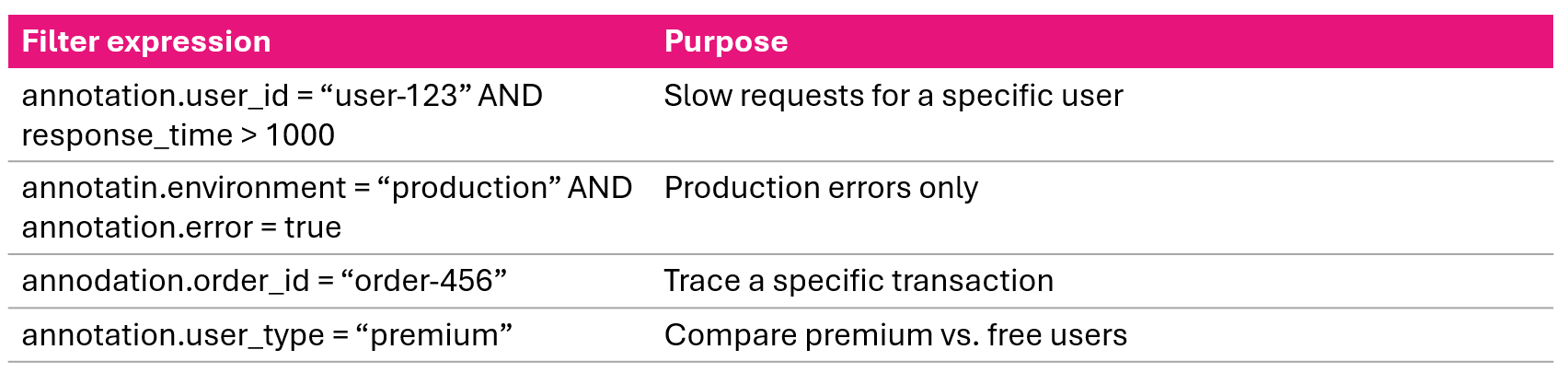
Filtering traces with annotations

X-Ray console filtering traces by annotation key value pairs

Compare groups:

  • Premium users avg 200ms vs. free users avg 150ms → premium features adding latency
  • EU West 3× slower than US East → cross-region data access problem
Monitoring and troubleshooting AWS

Trace analysis workflow


  1. Identify - filter: response_time > 1000ms, sort by duration
  2. Analyze - find longest operations, sequential bottlenecks, parallel opportunities
  3. Annotate - check annotations for business context: user ID, order ID, environment
  4. Review - examine metadata: request details, error messages
  5. Correlate - cross-reference with CloudWatch Logs
  6. Diagnose - root cause: slow query, timeout, algorithm, resource exhaustion
  7. Fix - optimize code, add caching, parallelize, scale
  8. Verify - compare before/after traces, monitor latency and error rates
Monitoring and troubleshooting AWS

Creating alerts from X-Ray data


# High latency alarm
aws cloudwatch put-metric-alarm \
  --alarm-name HighLatency \
  --metric-name ResponseTime \
  --namespace AWS/XRay \
  --statistic Average \
  --period 300 \
  --threshold 1000 \
  --comparison-operator GreaterThanThreshold


# High error count alarm
aws cloudwatch put-metric-alarm \
  --alarm-name HighErrorCount \
  --metric-name ErrorCount \
  --namespace AWS/XRay \
  --statistic Sum \
  --period 300 \
  --threshold 50 \
  --comparison-operator GreaterThanThreshold
Monitoring and troubleshooting AWS

Video summary


  • Service maps - auto-generated architecture diagrams: nodes (services), edges (connections), color-coded health
  • Color coding - green (success), yellow (4xx), red (5xx faults), purple (429), gray (no traffic)
  • Critical path - longest call chain, identifies your optimization target
  • Trace timelines - reveal sequential bottlenecks, N+1 queries, cold starts, cascading failures
  • Annotations - filter and group traces by business context
  • Workflow - eight steps: identify → analyze → annotate → review → correlate → diagnose → fix → verify
Monitoring and troubleshooting AWS

Let's practice!

Monitoring and troubleshooting AWS

Preparing Video For Download...