CloudWatch alarms and notifications

Monitoring and troubleshooting AWS

John Q. Martin

Principal Consultant

What are CloudWatch Alarms
 

Key concepts

  • Watches a single metric over a time period
  • Performs actions when metric crosses a threshold


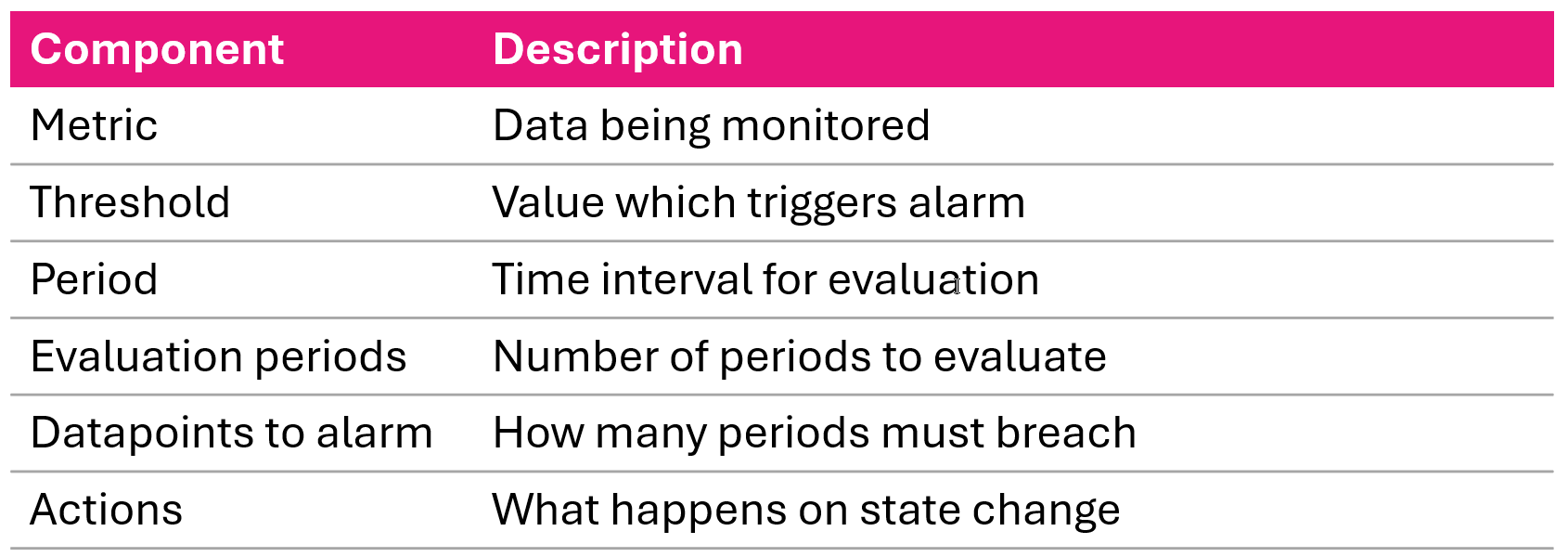
Six core CloudWatch alarm components metric threshold period evaluation periods datapoints to alarm and actions

Monitoring and troubleshooting AWS

Alarm States

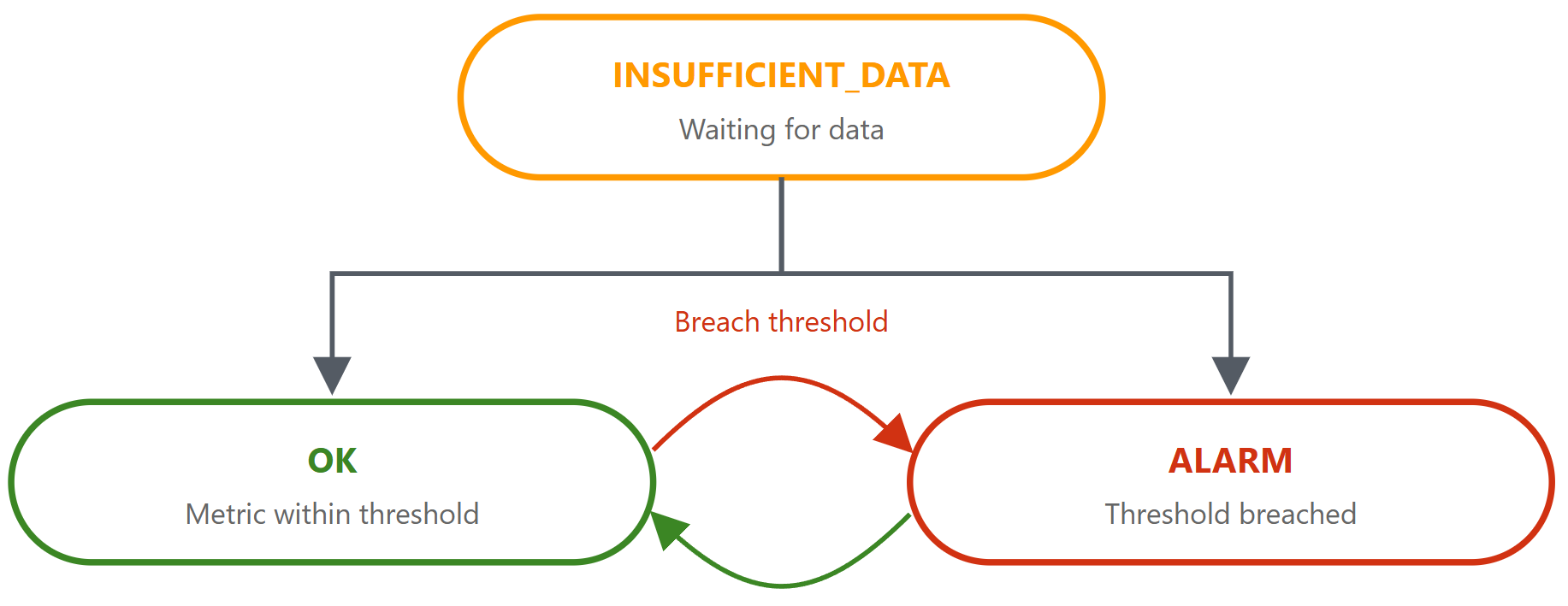
The three CloudWatch alarm states OK ALARM and INSUFFICIENT_DATA

Diagram of how a CloudWatch alarm transitions between states as metric data arrives

Monitoring and troubleshooting AWS

Alarm evaluation


  1. Collect data points at specified intervals
  2. Apply statistic (Average, Sum, Max, Min) over period
  3. Compare result to threshold
  4. Count breaching evaluation periods
  5. Change state if datapoints-to-alarm threshold met


Metric: CPUUtilization > 80%
Period: 5 min | 
Eval Periods: 3 | 
Datapoints to Alarm: 2 of 3

Period 1: 85% (breach) | 
Period 2: 75% (ok) | 
Period 3: 90% (breach)
Result: ALARM — 2 of 3 breached
Monitoring and troubleshooting AWS

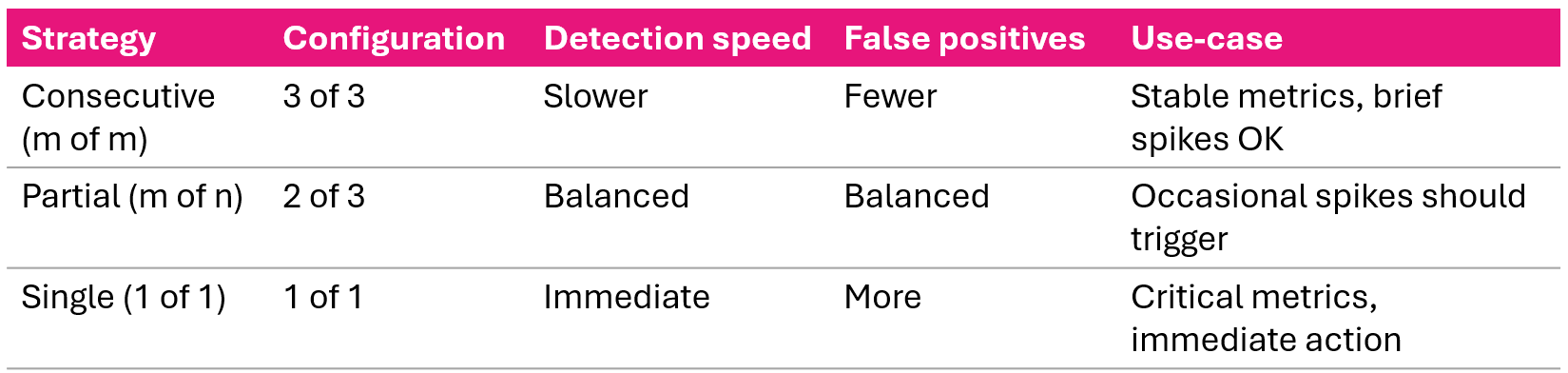
Evaluation strategies


Three alarm evaluation strategies consecutive partial and single breach with their sensitivity tradeoffs

Monitoring and troubleshooting AWS

Alarm action types and triggers


Action triggers

  • OK
  • ALARM
  • INSUFFICIENT_DATA


Action types

  • SNS Notification
  • Auto Scaling
  • EC2 Action (stop/terminate/reboot/recover)
  • Systems Manager
Monitoring and troubleshooting AWS

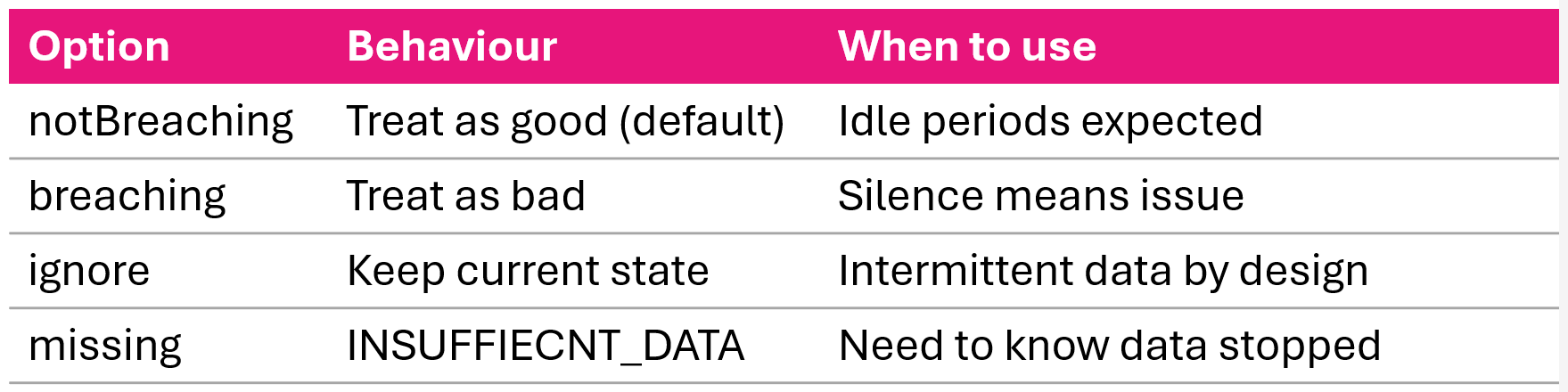
Missing data behavior


Alarm missing data behavior options notBreaching breaching ignore and missing

Monitoring and troubleshooting AWS

Creating a standard alarm: AWS CLI

aws cloudwatch put-metric-alarm \
  --alarm-name HighCPUUtilization \
  --alarm-description "Alert when CPU exceeds 80%" \
  --metric-name CPUUtilization \
  --namespace AWS/EC2 \
  --statistic Average \
  --period 300 \
  --evaluation-periods 2 \
  --threshold 80 \
  --comparison-operator GreaterThanThreshold \
  --dimensions Name=InstanceId,Value=i-1234567890abcdef0 \
  --alarm-actions arn:aws:sns:us-east-1:123456789012:my-topic
Monitoring and troubleshooting AWS

Composite alarms: what and why

Problem

  • Multiple related alarms fire separately = alert fatigue

Solution

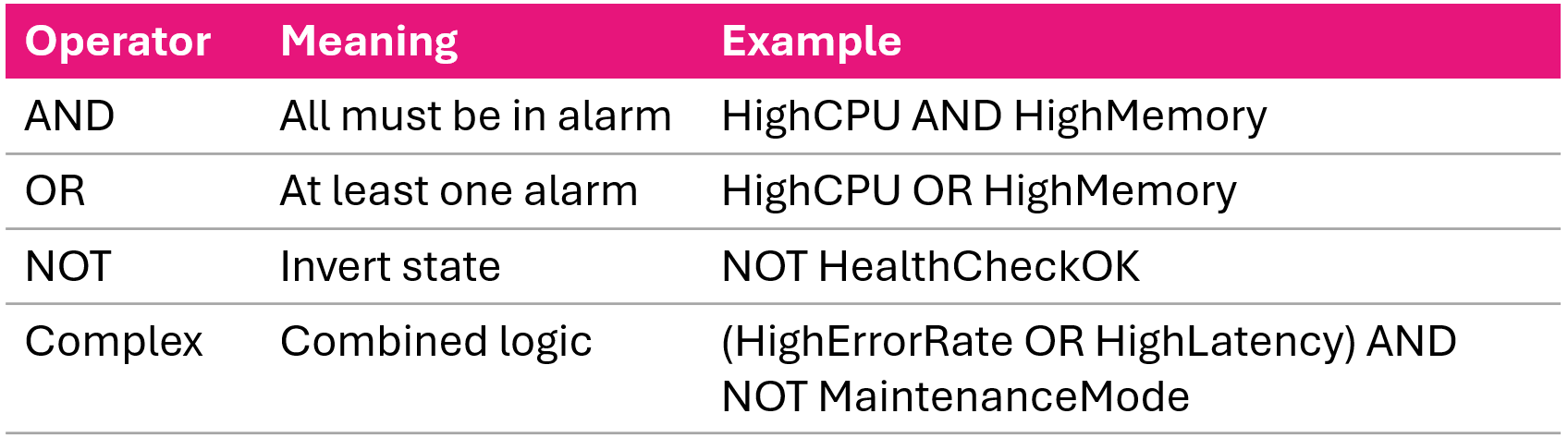
  • Combine alarms with logical operators

Composite alarm logic combining child alarms with AND OR and NOT operators

Monitoring and troubleshooting AWS

Creating composite alarm: AWS CLI

aws cloudwatch put-composite-alarm \
  --alarm-name CriticalSystemHealth \
  --alarm-description "Critical when CPU and Memory both high" \
  --actions-enabled \
  --alarm-actions arn:aws:sns:us-east-1:123456789012:critical-alerts \
  --alarm-rule "ALARM(HighCPUAlarm) AND ALARM(HighMemoryAlarm)"
Complex rule example
--alarm-rule "(ALARM(HighErrorRate) OR ALARM(HighLatency)) \
  AND NOT ALARM(MaintenanceMode)"
Monitoring and troubleshooting AWS

Threshold selection strategy

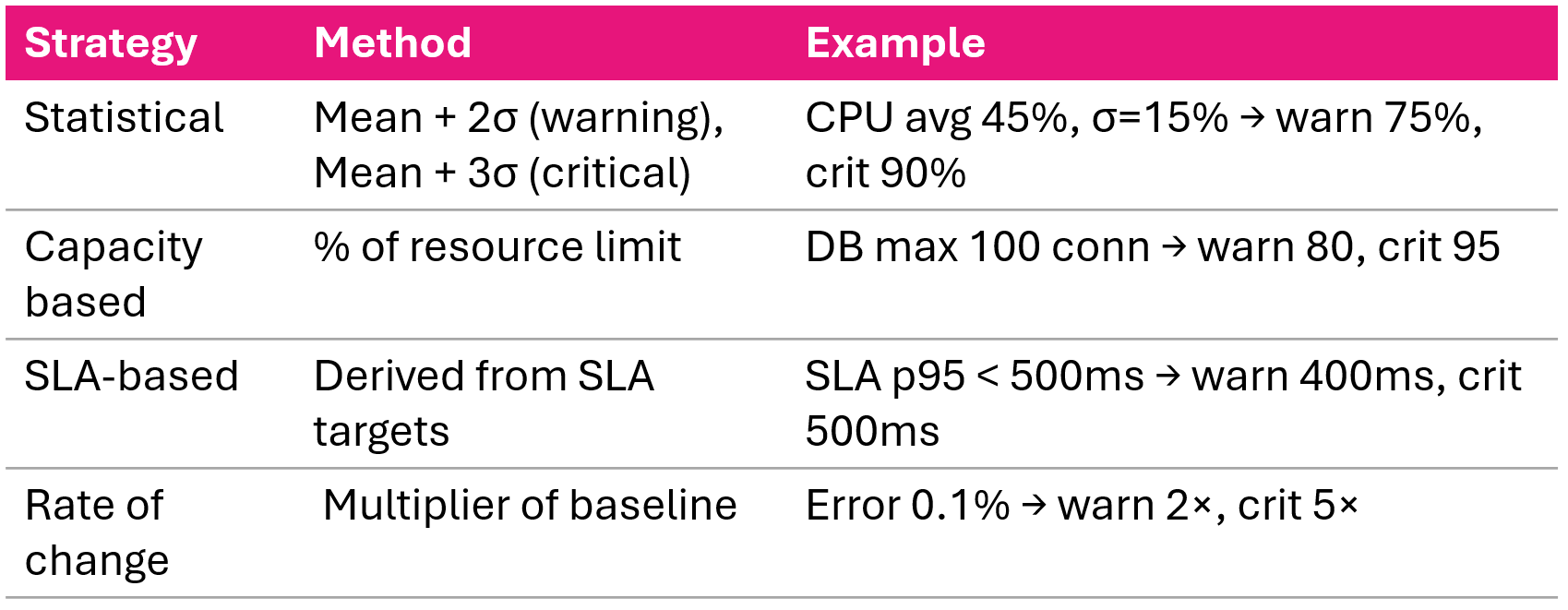
Four threshold selection strategies baseline deviation capacity limits SLA targets and rate of change

Monitoring and troubleshooting AWS

Multi-tier alarm strategy


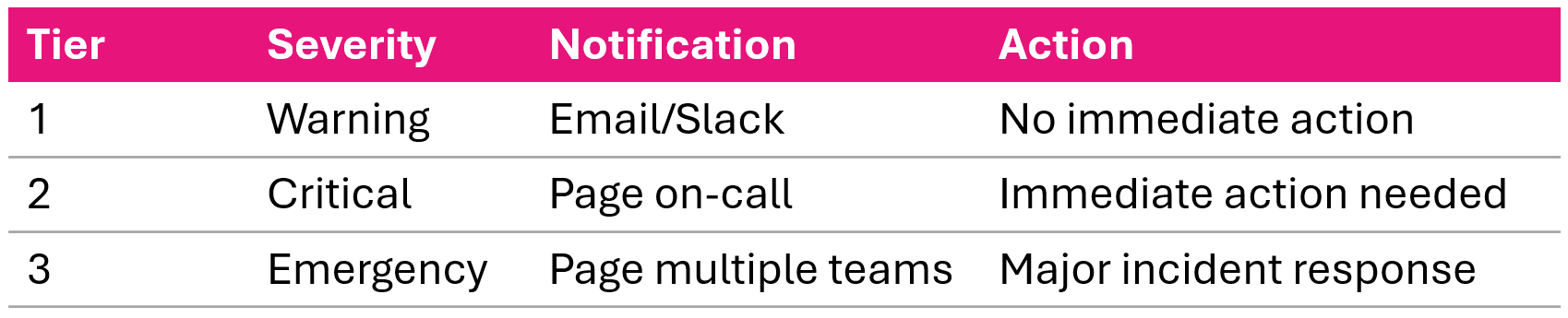
Multi tier alarm response with warning critical and emergency tiers routed to separate SNS topics

Example: CPU Warning at 75%, Critical at 90%, each with different SNS topics

Monitoring and troubleshooting AWS

Anomaly detection alarms

aws cloudwatch put-metric-alarm \
  --alarm-name AnomalousTraffic \
  --comparison-operator LessThanLowerOrGreaterThanUpperThreshold \
  --metrics '[
    {"Id":"m1","MetricStat":{"Metric":{"Namespace":"AWS/ApplicationELB",
      "MetricName":"RequestCount"},"Period":300,"Stat":"Average"}},
    {"Id":"e1","Expression":"ANOMALY_DETECTION_BAND(m1, 2)"}
  ]'
  • ML model learns normal metric behavior
  • Creates dynamic threshold band (configurable)
  • Adapts to daily/weekly patterns
  • Reduces manual threshold tuning
Monitoring and troubleshooting AWS

Resource alarms: Lambda and ALB

Lambda alarms

Recommended Lambda alarms watching error count throttles and high duration near the timeout limit

ALB alarms

Recommended ALB alarms watching target response time unhealthy hosts and 5xx error counts

Monitoring and troubleshooting AWS

Alarm management recommended practices

  • Naming: <Service>-<Metric>-<Resource>-<Severity>
  • Descriptions: what's monitored, threshold, troubleshooting hints, runbook links
  • Tags: Environment, Team, Severity
  • Review monthly: adjust thresholds, remove obsolete, update actions
aws cloudwatch set-alarm-state \
  --alarm-name MyAlarm \
  --state-value ALARM \
  --state-reason "Testing alarm notification"
Monitoring and troubleshooting AWS

Video summary

  • Three alarm states: OK, ALARM, INSUFFICIENT_DATA
  • Evaluation strategies: consecutive, partial, single breach
  • Composite alarms combine multiple alarms with AND, OR, NOT
  • Four threshold strategies: statistical, capacity, SLA, rate of change
  • Multi-tier alerting: warning → critical → emergency
  • Resource alarms for Lambda (errors, throttles, duration) and ALB (5xx, latency)
Monitoring and troubleshooting AWS

Let's practice!

Monitoring and troubleshooting AWS

Preparing Video For Download...