X-Ray concepts and architecture

Monitoring and troubleshooting AWS

John Q. Martin

Principal Consultant

The challenge of distributed systems


Monolithic application

  • Linear flow, contained in one process
  • Straightforward to debug


Distributed application

  • One request touches multiple services, DBs, external APIs
  • When it fails, which service caused it?

A big tangled knot of many colored threads snarled together, conveying how hard it is to trace one request through a distributed system

Monitoring and troubleshooting AWS

What is AWS X-Ray?


X-Ray is a distributed tracing service that:

  • Tracks requests across services end-to-end
  • Measures latency and detects errors at each step
  • Visualizes application architecture as a service map


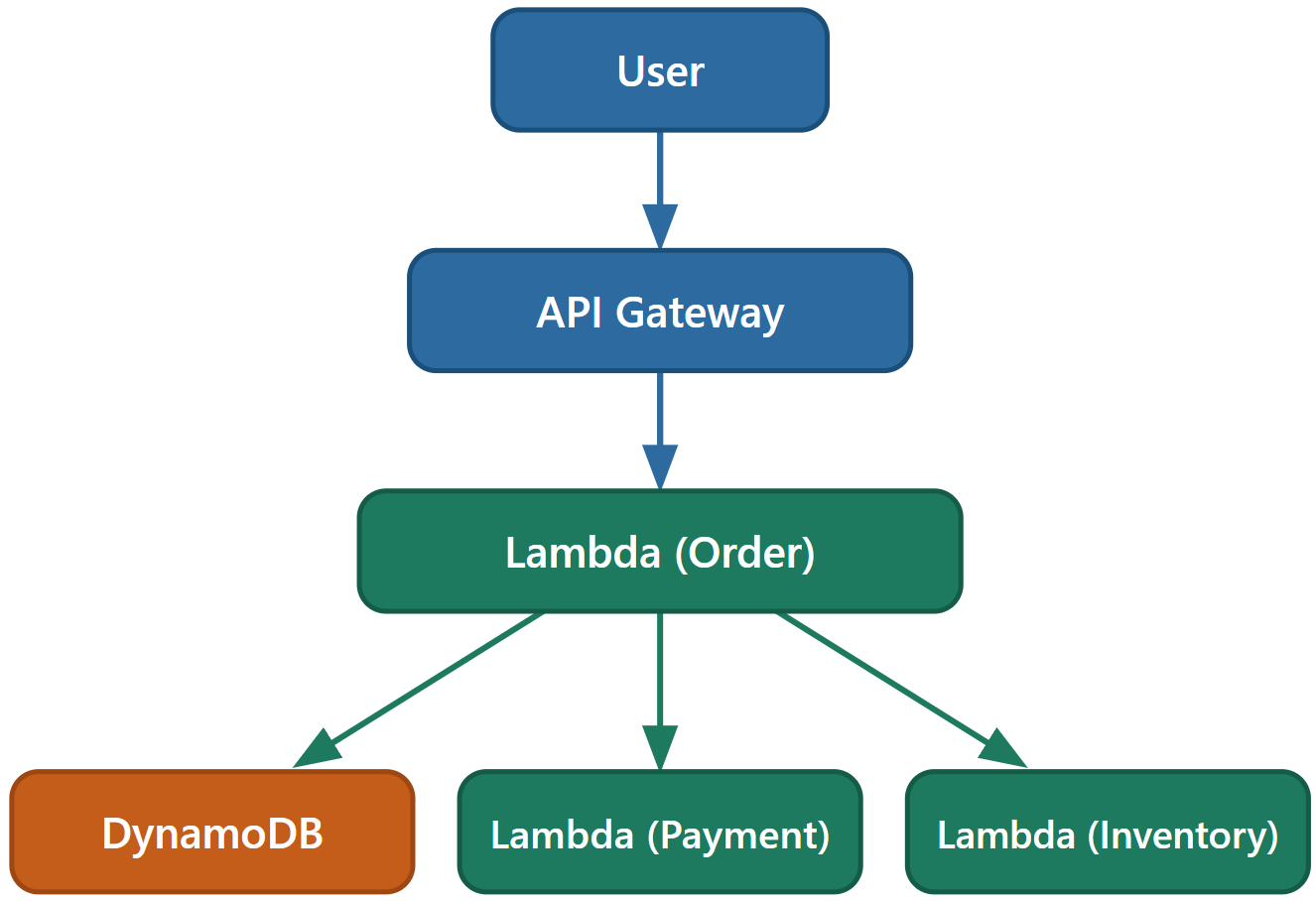
Example request path:

  Diagram of a request path flowing through multiple services in a distributed trace

Monitoring and troubleshooting AWS

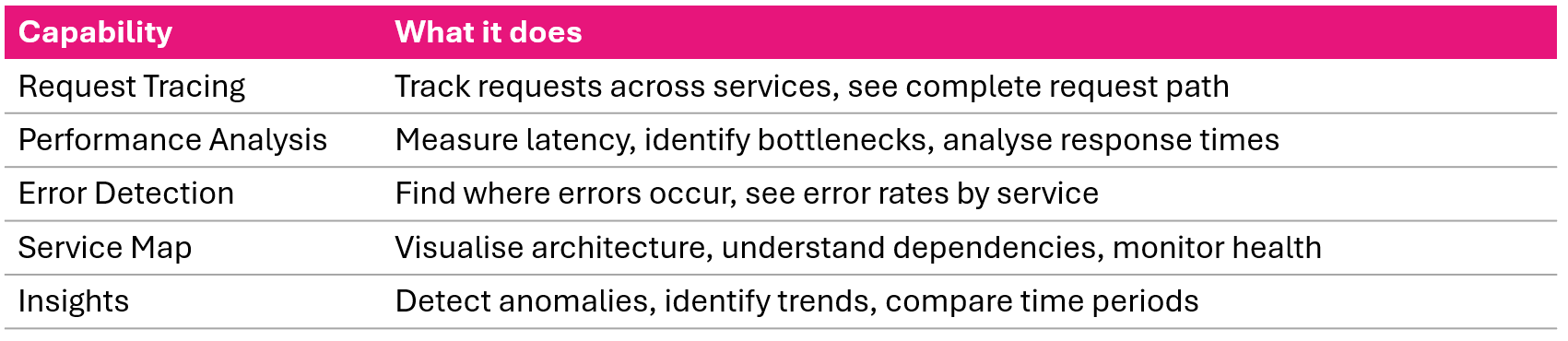
Five core capabilities


Five core X-Ray capabilities request tracing performance analysis error detection service map and insights

Monitoring and troubleshooting AWS

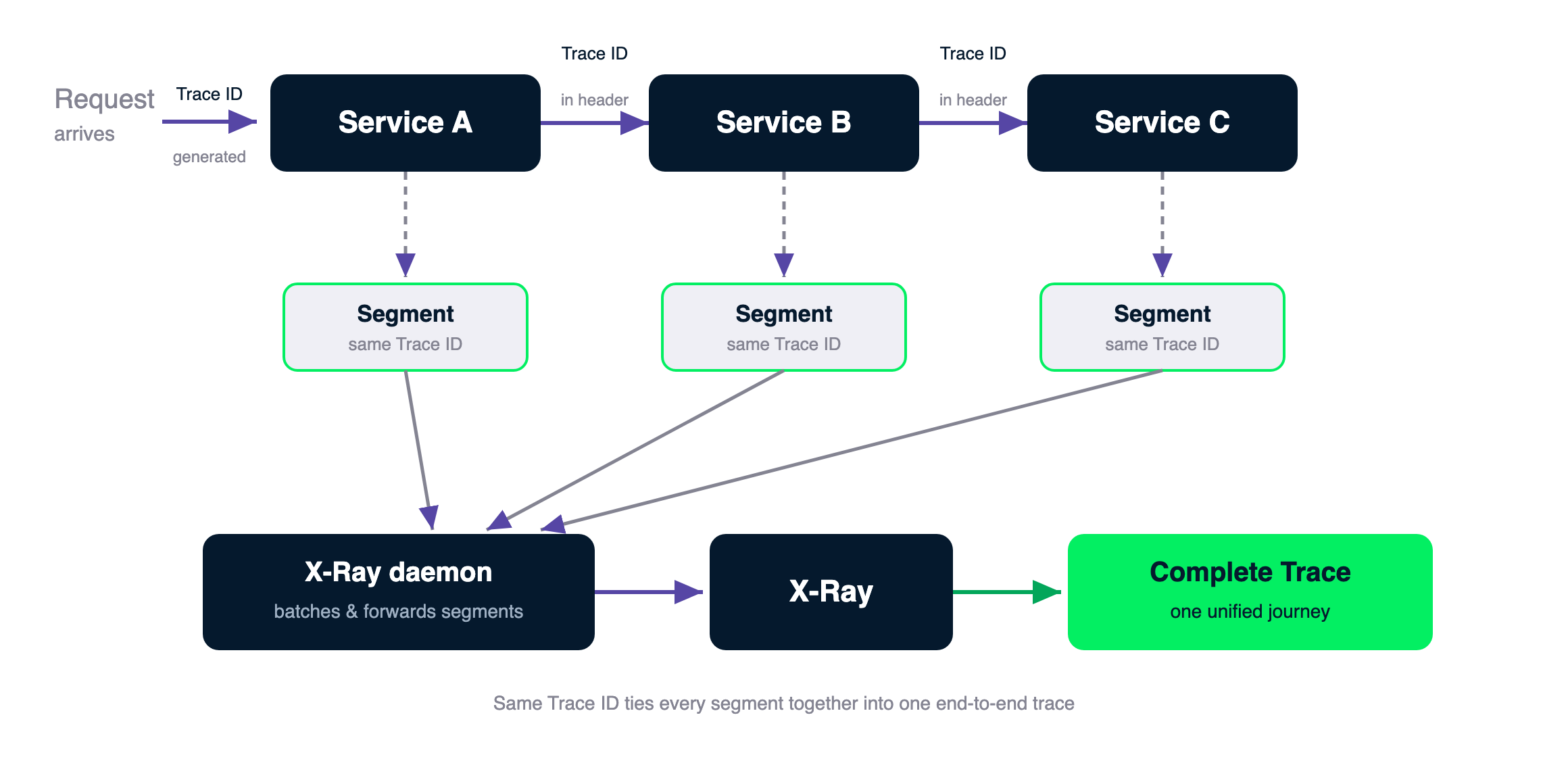
How tracing works


Distributed tracing flow: a request enters Service A, which calls Service B then Service C, each passing the Trace ID in the HTTP header; every service emits a segment with the same Trace ID to the X-Ray daemon, which forwards them to X-Ray, where they are assembled into one complete trace

Monitoring and troubleshooting AWS

Trace ID and header propagation


Trace ID format:
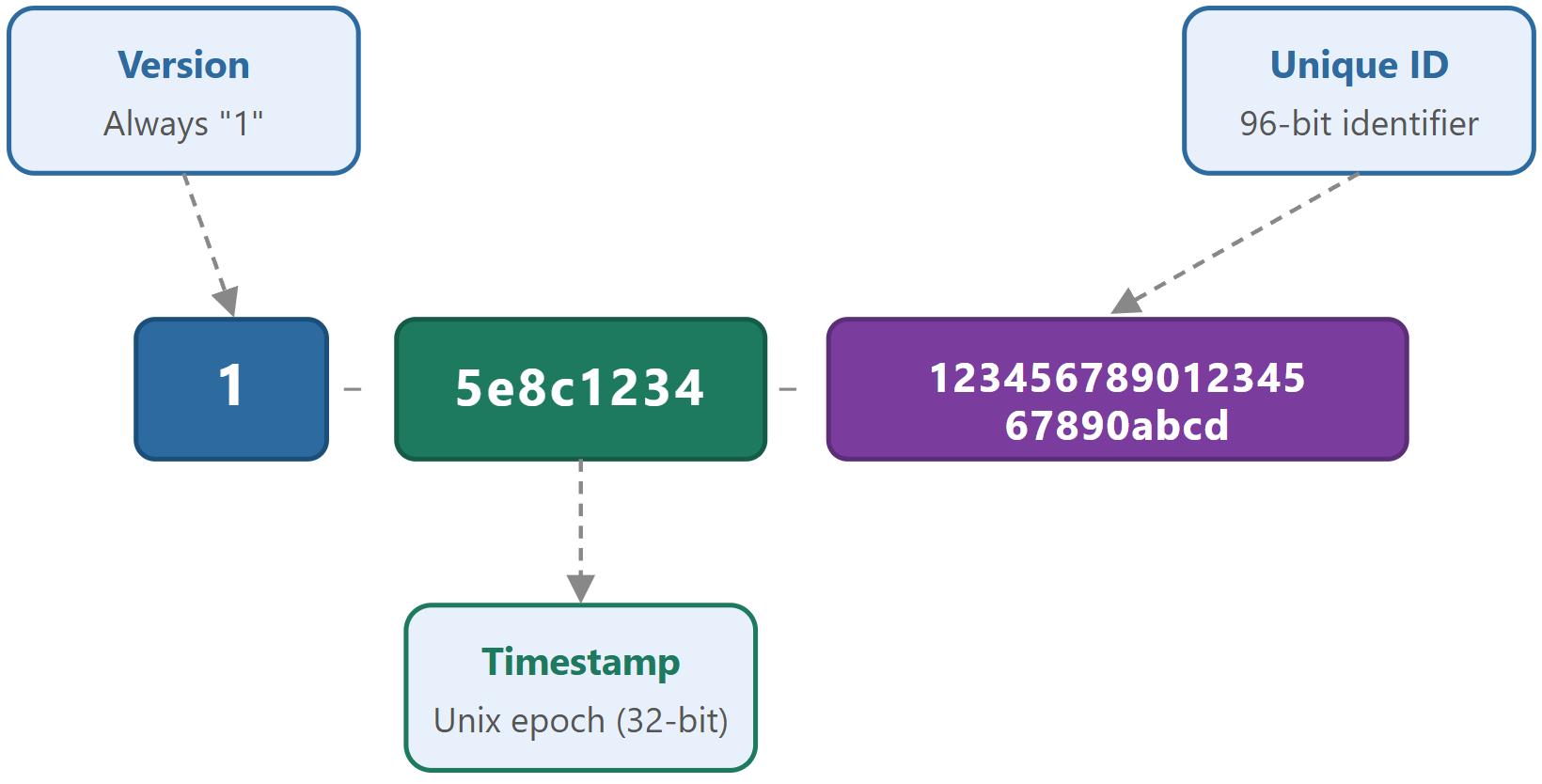
X-Ray trace ID format with version number Unix timestamp in hex and unique identifier


HTTP header:

X-Amzn-Trace-Id:
  Root=1-5e8c1234-...;
  Parent=abc123;
  Sampled=1
  • Root, Trace ID, same across all services
  • Parent, Upstream segment ID
  • Sampled, 0 or 1, traced or skipped
Monitoring and troubleshooting AWS

The X-Ray daemon


What it does:

  • Listens on UDP port 2000
  • Receives segment data from your application
  • Buffers, batches, and forwards to X-Ray API
  • Decouples your app from the X-Ray service


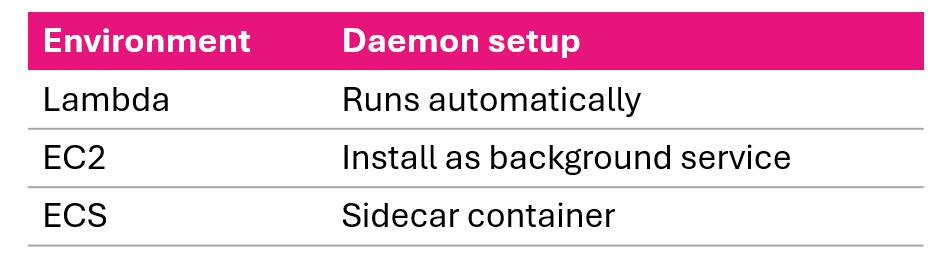
Deployment by environment:

X-Ray daemon deployment by environment automatic on Lambda a service on EC2 and a sidecar on ECS

Monitoring and troubleshooting AWS

Sampling


Default rule:

  • First request per second - always traced
  • 5% of additional requests - sampled

Custom rule fields:

  • fixed_target - requests/sec to always trace
  • rate - percentage of additional requests
  • priority - lower number wins


Example strategy:

Rule 1 (priority 1):
  5xx errors -> 100% sampling

Rule 2 (priority 10):
  Normal traffic -> 5% sampling
Monitoring and troubleshooting AWS

Segments


What a segment records:

  • Service name
  • Start and end time
  • Trace ID
  • HTTP request and response details
  • AWS account and region


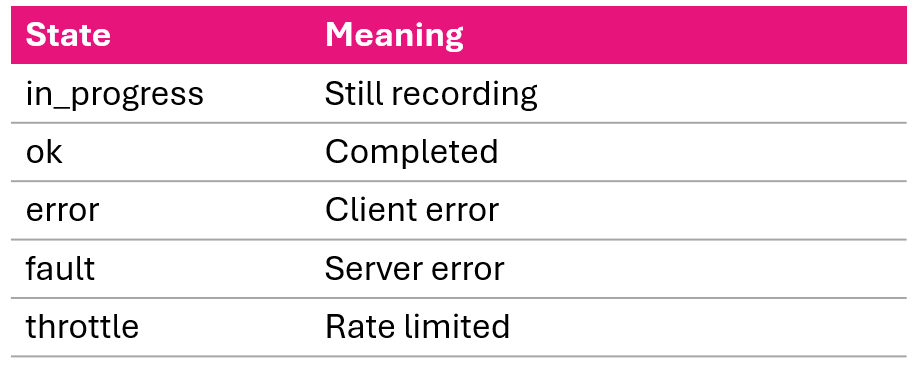
Segment states:

Five X-Ray segment states in progress ok error fault and throttle

Monitoring and troubleshooting AWS

Subsegments


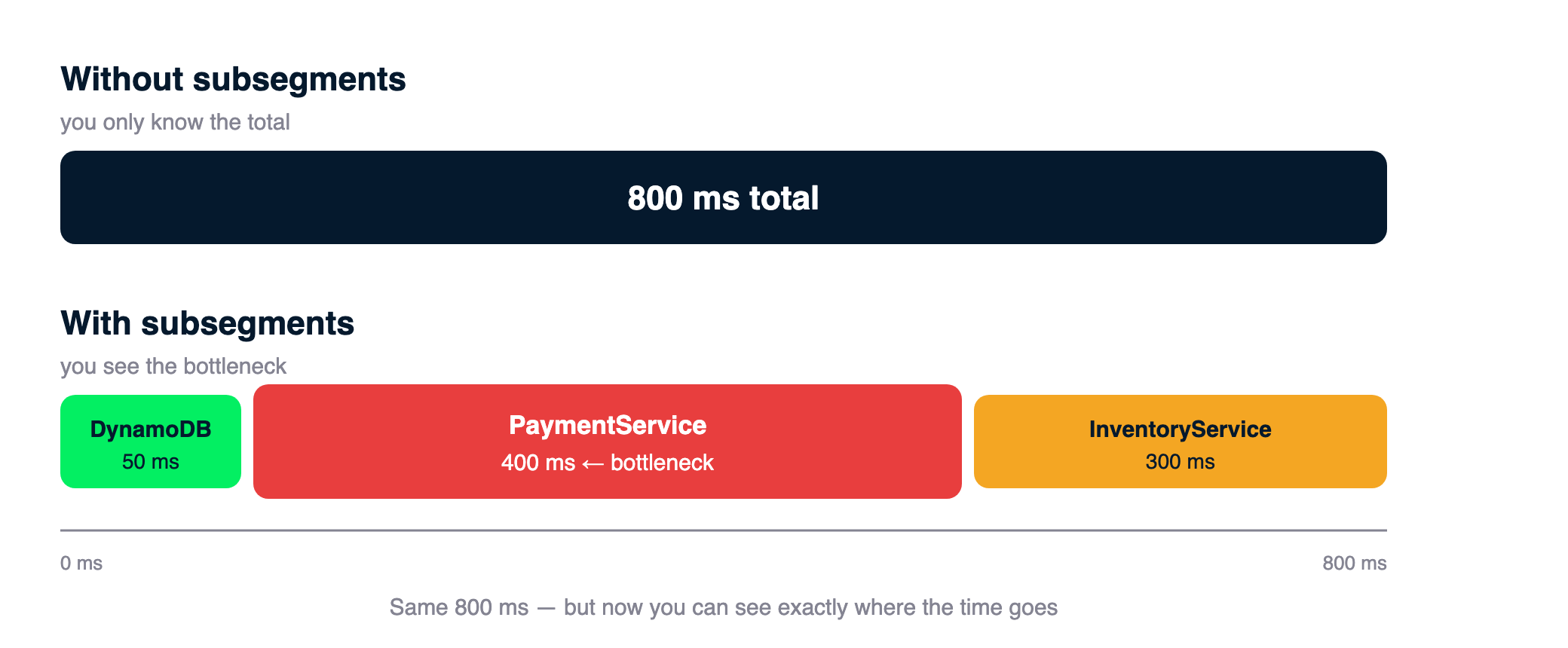
Timeline comparison: without subsegments a single 800ms total bar; with subsegments the same 800ms broken into DynamoDB 50ms, PaymentService 400ms highlighted as the bottleneck, and InventoryService 300ms

What subsegments do:

  • Provide granular timing within a segment
  • Track downstream calls
  • Turn 800ms total into:
    • DynamoDB.PutItem: 50ms
    • PaymentService call: 400ms
    • InventoryService call: 300ms


Namespaces:
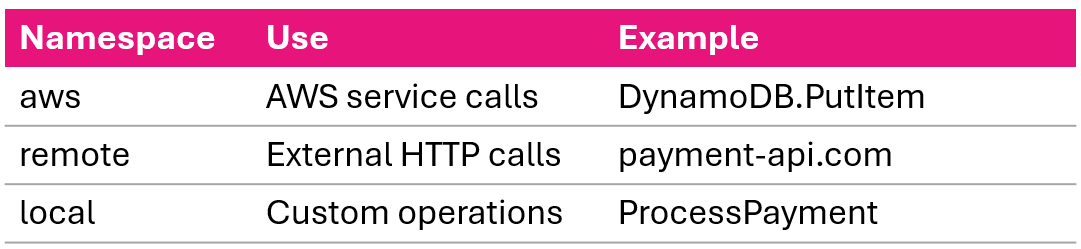
Three subsegment namespaces aws for AWS calls remote for external HTTP and local for custom code

Monitoring and troubleshooting AWS

Annotations


Key facts:

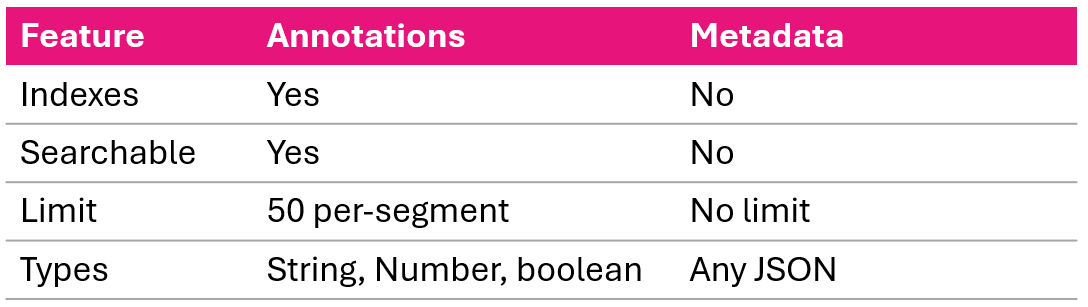
  • Indexed key-value pairs - searchable and filterable
  • Limit: 50 indexed per trace
  • Types: string, number, boolean

Use for:

  • user_id, order_id, environment
  • version, feature flags, error codes


Filter syntax:

annotation.user_id = "user-123"
annotation.environment = "production"
AND annotation.version = "1.2.3"
Monitoring and troubleshooting AWS

Metadata


Key facts:

  • Not indexed - cannot search or filter
  • No size limit
  • Supports any JSON structure

Use for:

  • Full request and response bodies
  • Error messages and stack traces
  • Business context (order items, addresses)


Annotations vs. Metadata:

Comparison table of annotations indexed and searchable versus metadata detailed and not indexed

Monitoring and troubleshooting AWS

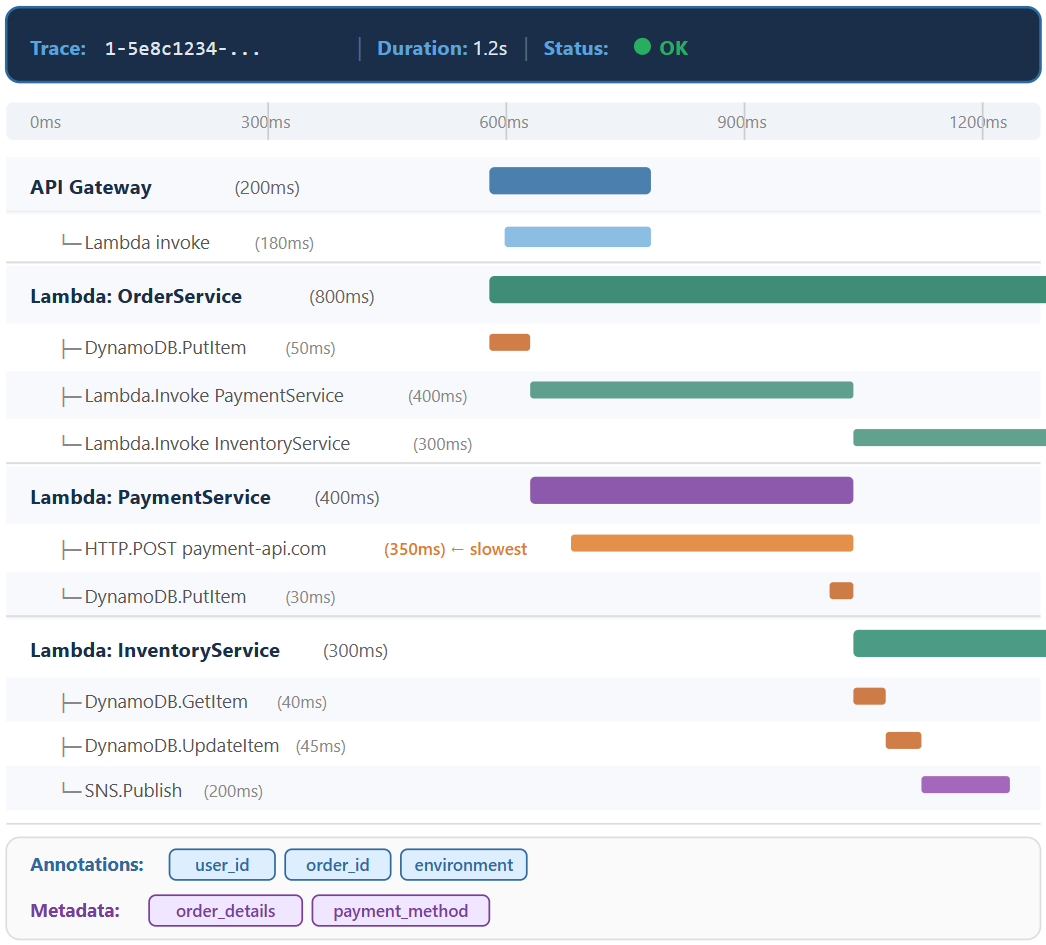
Complete trace structure


Complete trace structure with four segments and the external payment API as the slowest operation

Monitoring and troubleshooting AWS

Lesson summary


  • X-Ray - distributed tracing service for end-to-end visibility across services
  • Tracing mechanism - trace ID propagation via HTTP headers, segments collected by the daemon, configurable sampling rules
  • Trace components:
    • Segments - service-level work records
    • Subsegments - granular downstream operation timing
    • Annotations - indexed key-value pairs for filtering and searching
    • Metadata - detailed context, not indexed
Monitoring and troubleshooting AWS

Let's practice!

Monitoring and troubleshooting AWS

Preparing Video For Download...