FastAPI入門
Matt Eckerle
Software and Data Engineering Leader
HTTP プロトコルには複数の操作があります
例: https://www.google.com:80/search?q=fastapi
https://www.google.com:80/search?q=fastapi
GET リクエストの主要要素:
www.google.com
80
/search
?q=fastapi
最も簡単な FastAPI アプリ:
from fastapi import FastAPI


# アプリを作成
app = FastAPI()


# ルートへの GET を処理
@app.get("/")
def root():
    return {"message": "Hello World"}
from fastapi import FastAPI
# アプリを作成 app = FastAPI()
# ルートへの GET を処理 @app.get("/") def root(): return {"message": "Hello World"}
主な cURL オプション:
$ curl -h
Usage: curl [options...] <url>
 -v, --verbose               Make the operation more talkative
 -H, --header <header/@file> Pass custom header(s) to server
 -d, --data <data>           HTTP POST data
使用例:
$ curl http://localhost:8000
{"message":"Hello World"}
新しいエンドポイント:
@app.get("/hello")
def hello(name: str = "Alan"):
    return {"message": f"Hello {name}"}
リクエストに名前なし:
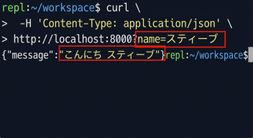
リクエストに名前あり: