ウィンドウ関数

BigQuery入門

Matthew Forrest

Field CTO

ウィンドウ関数とは
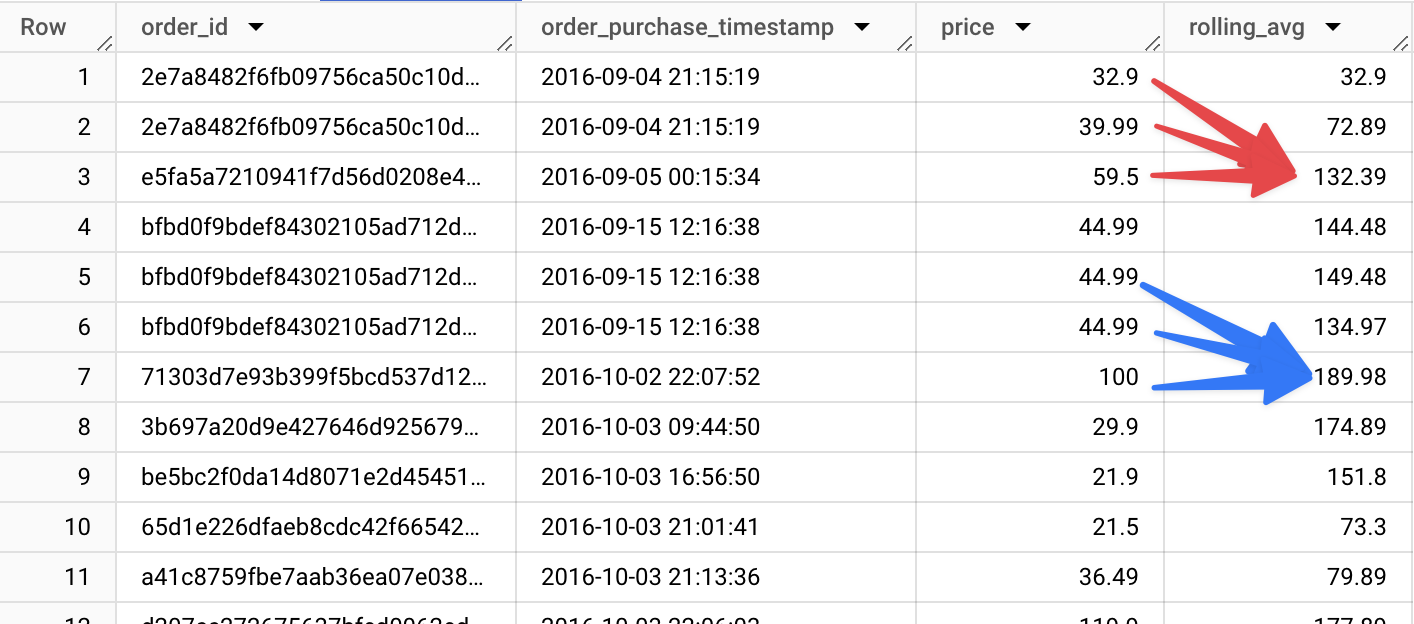
ロールリング SUM を用いたウィンドウの図解

BigQuery入門

ウィンドウ関数を使う場面

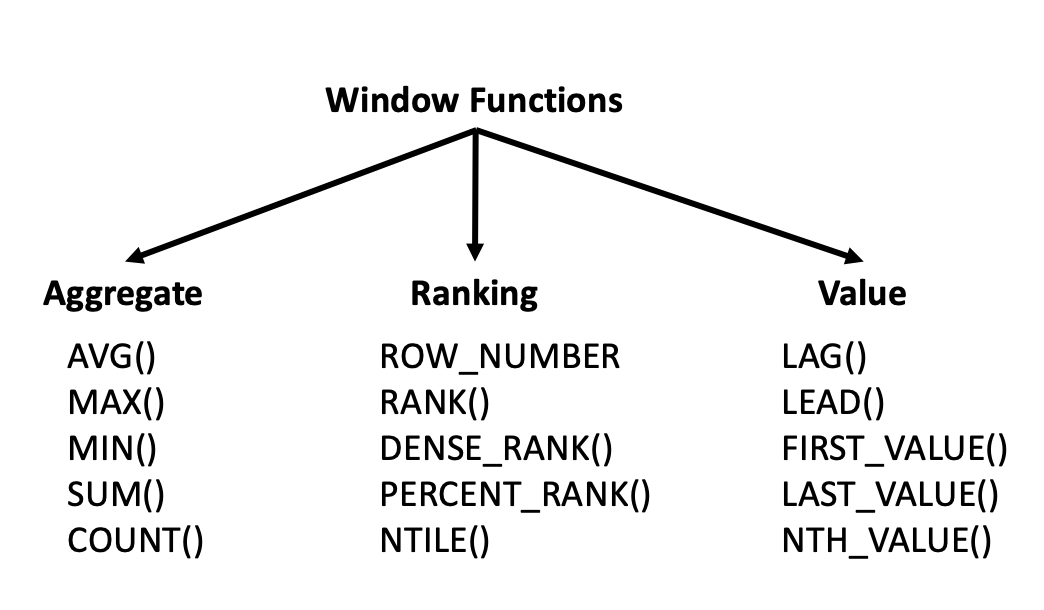
種類別にまとめたウィンドウ関数

1 https://towardsdatascience.com/a-guide-to-advanced-sql-window-functions-f63f2642cbf9
BigQuery入門

ウィンドウの構造、PARTITION、ORDER BY

SELECT
  customer_id,
  order_date,
  order_total,
  ROW_NUMBER() OVER(

PARTITION BY customer_id
ORDER BY order_date
) AS order_sequence FROM orders;
  • ROW_NUMBER(): 行番号を返すウィンドウ関数
  • OVER(): ウィンドウ枠を定義
  • PARTITION BY customer_id: 顧客単位でグループ化
  • ORDER BY order_date: 各パーティション内で並べ替え
  • order_sequence: ウィンドウ関数の結果列名
BigQuery入門

RANK と PERCENT_RANK

SELECT
  product_id,
  product_photos_qty,
  -- 各行の序数順位
  RANK() OVER(
    ORDER BY product_photos_qty DESC
  ) as rank,
  -- 各行のパーセンタイル順位
  PERCENT_RANK() OVER(
    ORDER BY product_photos_qty
  ) as percent
FROM ecommerce.ecomm_products 
ORDER BY product_photos_qty DESC;

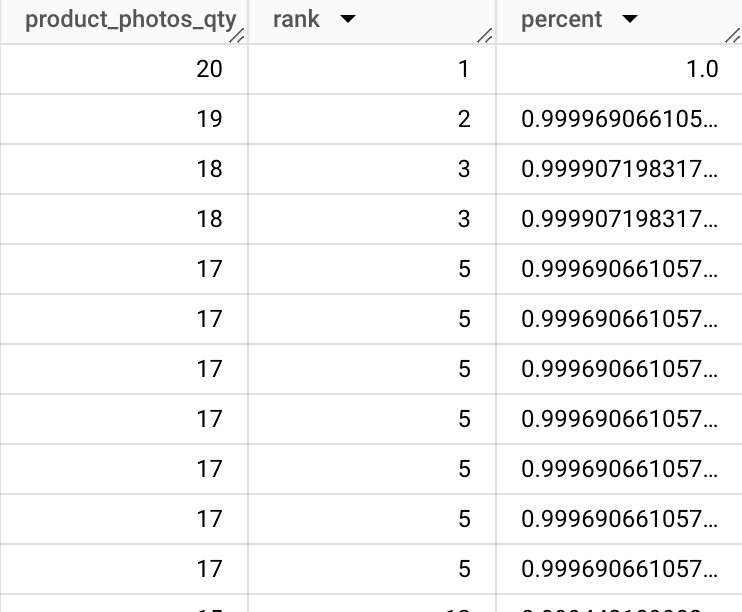
RANK と PERCENT_RANK のクエリ結果

BigQuery入門

LAG と LEAD

SELECT
  product_id,
  -- 前の行の値を返す
  LAG(product_photos_qty) OVER(
    ORDER BY product_photos_qty
  ) as lag,
  product_photos_qty,
  -- 次の行の値を返す
  LEAD(product_photos_qty) OVER(
    ORDER BY product_photos_qty
  ) as lead
FROM ecommerce.ecomm_products 
ORDER BY product_photos_qty DESC;

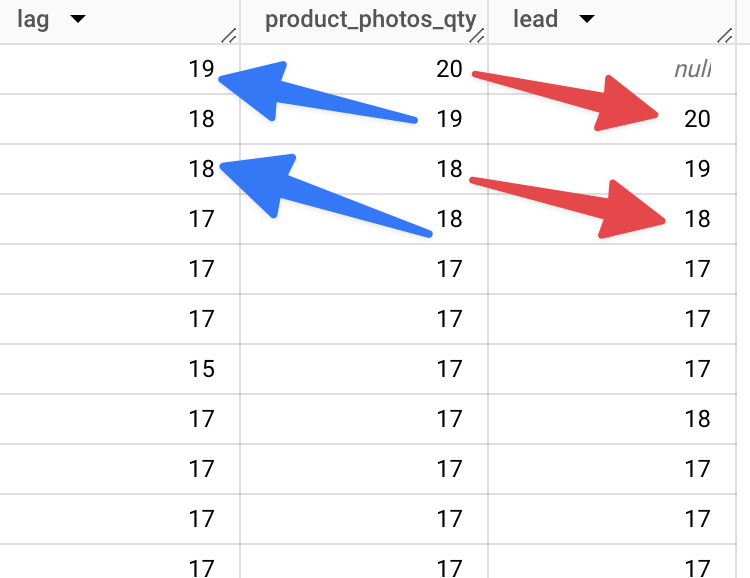
クエリ結果での LAG と LEAD の例

BigQuery入門

RANGE BETWEEN と CURRENT ROW

SELECT
  order_id,
  order_timestamp,
  SUM(cost) OVER(
    ORDER BY order_timestamp 
    ROWS BETWEEN 2 PRECEDING 
    AND CURRENT ROW) as rolling_avg
FROM sales_data
ORDER BY order_timestamp

行ベースの境界指定:

  • UNBOUNDED PRECEDING: 先頭までの全行
  • UNBOUNDED FOLLOWING: 末尾までの全行
  • [INT] ROWS PRECEDING: 前の指定行数
  • [INT] ROWS FOLLOWING: 後の指定行数
BigQuery入門

QUALIFY

SELECT
  product_id,
  product_photos_qty,
  RANK() OVER(
    ORDER BY product_photos_qty DESC
  ) as rank
FROM ecommerce.ecomm_products 
-- QUALIFY でフィルタ
QUALIFY rank < 4
ORDER BY product_photos_qty DESC;

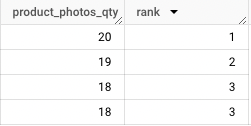
QUALIFY で順位が3以上の値を抽出した結果

  • 集計でないため HAVING は使えない
BigQuery入門

練習しましょう!

BigQuery入門

Preparing Video For Download...