全結合(Dense)層

Introduction to TensorFlow in Python

Isaiah Hull

Visiting Associate Professor of Finance, BI Norwegian Business School

線形回帰モデル
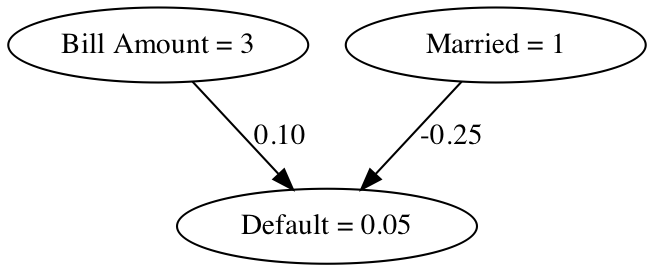
この図は、2つの特徴量(婚姻状況と年齢)を持つ回帰モデルを示します。目的変数はクレジットカード借り手の延滞有無です。

Introduction to TensorFlow in Python

ニューラルネットワークとは?

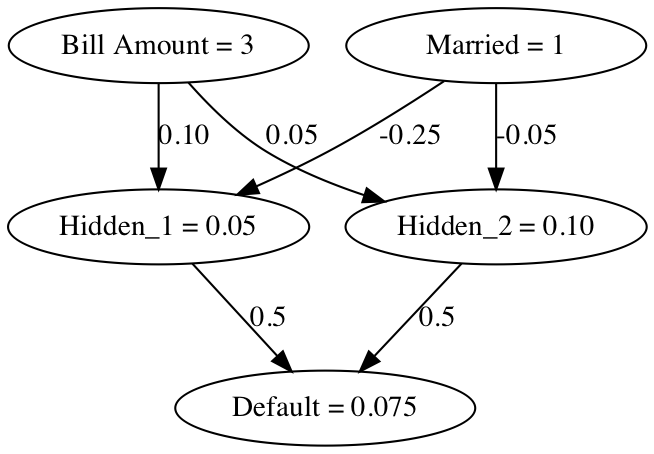
この図は、2つの特徴量(婚姻状況と年齢)を入力とするニューラルネットワークを示します。目的はクレジットカード借り手の延滞有無です。

Introduction to TensorFlow in Python

ニューラルネットワークとは?

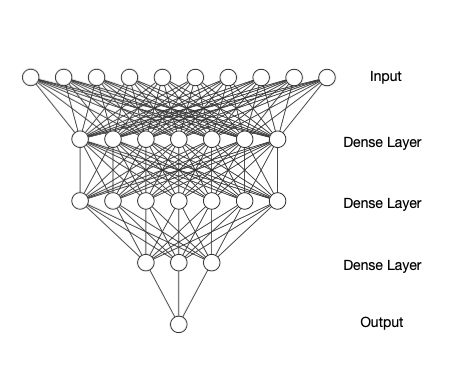
この画像は、10個の入力特徴量、3つの全結合の中間層、1つの出力層を持つより複雑なニューラルネットワークを示します。

  • 全結合層は、直前の層のすべてのノードに重みを適用します。
Introduction to TensorFlow in Python

シンプルな全結合層

import tensorflow as tf
# 入力(特徴量)を定義
inputs = tf.constant([[1, 35]])
# 重みを定義
weights = tf.Variable([[-0.05], [-0.01]])
# バイアスを定義
bias = tf.Variable([0.5])
Introduction to TensorFlow in Python

シンプルな全結合層

# 入力(特徴量)に重みを掛ける
product = tf.matmul(inputs, weights)
# 全結合層を定義
dense = tf.keras.activations.sigmoid(product+bias)

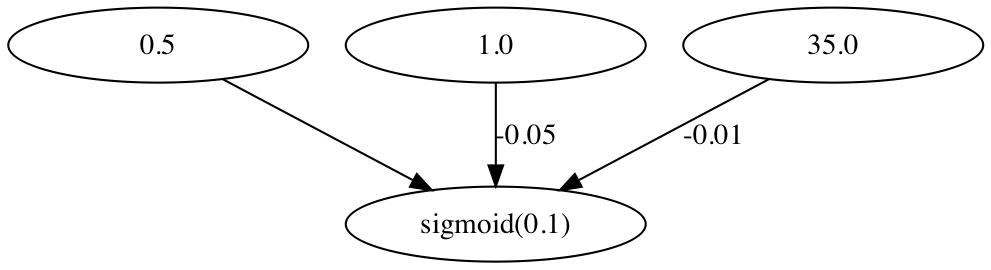
この図は、2つの入力ノードから1つの出力を生成する全結合層を示します。

Introduction to TensorFlow in Python

完全なモデルの定義

import tensorflow as tf
# 入力(特徴量)層を定義
inputs = tf.constant(data, tf.float32)
# 第1全結合層を定義
dense1 = tf.keras.layers.Dense(10, activation='sigmoid')(inputs)
Introduction to TensorFlow in Python

完全なモデルの定義

# 第2全結合層を定義
dense2 = tf.keras.layers.Dense(5, activation='sigmoid')(dense1)
# 出力(予測)層を定義
outputs =  tf.keras.layers.Dense(1, activation='sigmoid')(dense2)

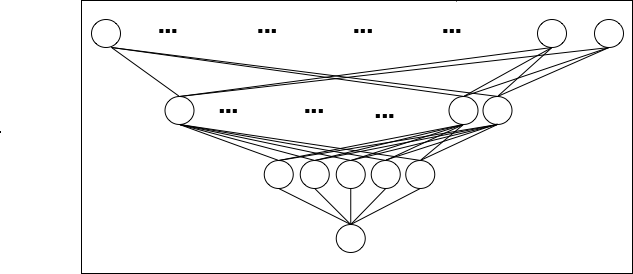
この図は、2つの入力ノードから1つの出力を生成する全結合層を示します。

Introduction to TensorFlow in Python

高レベル vs 低レベル手法

  • 高レベル手法
    • 高レベルAPIの操作
dense = keras.layers.Dense(10,\
 activation='sigmoid')
  • 低レベル手法
    • 線形代数の操作
prod = matmul(inputs, weights)
dense = keras.activations.sigmoid(prod)
Introduction to TensorFlow in Python

練習しましょう!

Introduction to TensorFlow in Python

Preparing Video For Download...