PySparkで学ぶ特徴量エンジニアリング
John Hogue
Lead Data Scientist, General Mills

df.select(['NO', 'UNITNUMBER', 'CLASS']).show()
+----+----------+-----+
| NO|UNITNUMBER|CLASS|
+----+----------+-----+
| 1| null| SF|
| 156| A8| SF|
| 157| 207| SF|
| 158| 701G| SF|
| 159| 36| SF|
以下の列は分析に不要
'NO' 自動生成されたレコード番号'UNITNUMBER' 無関係なデータ'CLASS' すべて定数 drop(*cols)
*cols – 削除する列名、または列名のリスト。# List of columns to drop cols_to_drop = ['NO', 'UNITNUMBER', 'CLASS']# Drop the columns df = df.drop(*cols_to_drop)
where(condition)types.BooleanType の列、またはSQL式の文字列。like(other)~df = df.where(~df['POTENTIALSHORTSALE'].like('Not Disclosed'))
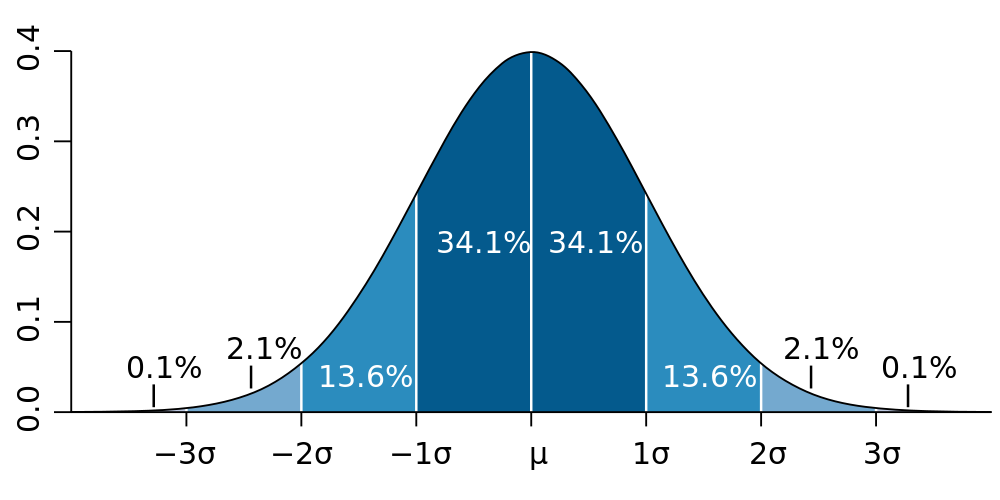
データを平均(μ)の3標準偏差(3σ)以内にフィルタリングする

# Calculate values used for filtering std_val = df.agg({'SALESCLOSEPRICE': 'stddev'}).collect()[0][0] mean_val = df.agg({'SALESCLOSEPRICE': 'mean'}).collect()[0][0]# Create three standard deviation (μ ± 3σ) upper and lower bounds for data hi_bound = mean_val + (3 * std_val) low_bound = mean_val - (3 * std_val)# Use where() to filter the DataFrame between values df = df.where((df['LISTPRICE'] < hi_bound) & (df['LISTPRICE'] > low_bound))
DataFrame.dropna()
how: 'any' または 'all'。'any' の場合、NULL が1つでもあればレコードを削除。'all' の場合、すべての値がNULLの場合のみ削除。thresh: int、デフォルトはNone。指定した場合、非NULL値がthresh未満のレコードを削除。howパラメータより優先される。subset: 対象とする列名のリスト(任意)。# Drop any records with NULL values df = df.dropna()# drop records if both LISTPRICE and SALESCLOSEPRICE are NULL df = df.dropna(how='all', subset['LISTPRICE', 'SALESCLOSEPRICE '])# Drop records where at least two columns have NULL values df = df.dropna(thresh=2)
重複とは?
dropDuplicates()
# Entire DataFrame df.dropDuplicates()# Check only a column list df.dropDuplicates(['streetaddress'])
PySparkで学ぶ特徴量エンジニアリング