CSV からのデータ読込・確認・クリーニング
Pythonでの金融データのインポートと管理

Stefan Jansen
Instructor
データの読み込みとクリーニング
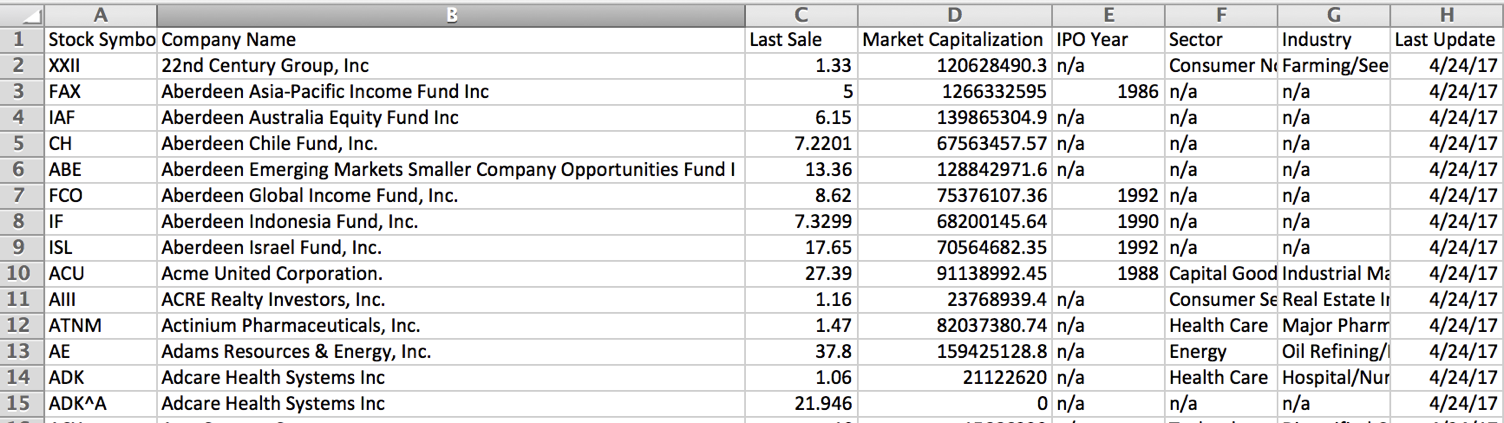
pd.DataFrame()が CSV ソース {{1}} と同一であることを確認- 株式上場リスト:
amex-listings.csv
pandas のデータ格納方式
- 列ごとに固有のデータ型(
dtype)があります dtypeは計算や可視化に影響します
pandas dtype |
列の特徴 |
|---|---|
object |
文字列、または文字列と数値の混在 |
int64 |
数値: 整数(64 ビット、$\le 2^{64}$) |
float64 |
数値: 小数、または欠損を含む整数 |
datetime64 |
日時情報 |
読み込みと構造の確認
import pandas as pdamex = pd.read_csv('amex-listings.csv')amex.info() # 表構造とデータ型を確認
RangeIndex: 360 entries, 0 to 359
Data columns (total 8 columns):
 #   Column                 Non-Null Count  Dtype
 --  ------                 --------------  -----
 0   Stock Symbol           360 non-null    object
 1   Company Name           360 non-null    object
 2   Last Sale              346 non-null    float64
 3   Market Capitalization  360 non-null    float64
 4   IPO Year               105 non-null    float64
 5   Sector                 238 non-null    object
 6   Industry               238 non-null    object
 7   Last Update            360 non-null    object
dtypes: float64(3), object(5)
欠損値への対応
# 'n/a' を np.nan に置換 amex = pd.read_csv('amex-listings.csv', na_values='n/a')amex.info()
RangeIndex: 360 entries, 0 to 359
Data columns (total 8 columns):
 #   Column                 Non-Null Count  Dtype
 --  ------                 --------------  -----
 0   Stock Symbol           360 non-null    object
 1   Company Name           360 non-null    object
 2   Last Sale              346 non-null    float64
 3   Market Capitalization  360 non-null    float64
 4   IPO Year               105 non-null    float64
 5   Sector                 238 non-null    object
 6   Industry               238 non-null    object
 7   Last Update            360 non-null    object
dtypes: float64(3), object(5)
日付を正しくパースする
amex = pd.read_csv('amex-listings.csv', na_values='n/a', parse_dates=['Last Update'])amex.info()
RangeIndex: 360 entries, 0 to 359
Data columns (total 8 columns):
 #   Column                 Non-Null Count  Dtype
 --  ------                 --------------  -----
 0   Stock Symbol           360 non-null    object
 1   Company Name           360 non-null    object
 2   Last Sale              346 non-null    float64
 3   Market Capitalization  360 non-null    float64
 4   IPO Year               105 non-null    float64
 5   Sector                 238 non-null    object
 6   Industry               238 non-null    object
 7   Last Update            360 non-null    datetime64[ns]
dtypes: datetime64[ns](1), float64(3), object(4)
結果を表示する
amex.head(2) # 先頭 n 行を表示(既定: 5)
  Stock Symbol   Company Name
0         XXII   22nd Century Group, Inc
1          FAX   Aberdeen Asia-Pacific Income Fund Inc

   Last Sale  Market Capitalization  IPO Year
0     1.3300           1.206285e+08       NaN
1     5.0000           1.266333e+09    1986.0

   Sector        Industry              Last Update
0  Non-Durables  Farming/Seeds/Milling  2017-04-26
1  NaN           NaN                    2017-04-25
¡Vamos a practicar!
Pythonでの金融データのインポートと管理

