k-meansクラスタリングの実装

Pythonで学ぶカスタマーセグメンテーション

Karolis Urbonas

Head of Data Science, Amazon

主要ステップ

  • データ前処理
  • クラスタ数の選択
  • 前処理済みデータでk-means実行
  • 各クラスタの平均RFMを分析
Pythonで学ぶカスタマーセグメンテーション

データ前処理

前処理が完了し、次の2つのオブジェクトがあります:

  • datamart_rfm
  • datamart_normalized
import numpy as np
datamart_log = np.log(datamart_rfm)

from sklearn.preprocessing import StandardScaler
scaler = StandardScaler()
scaler.fit(datamart_log)

datamart_normalized = scaler.transform(datamart_log)
Pythonで学ぶカスタマーセグメンテーション

クラスタ数の決め方

  • 可視化手法: エルボー法
  • 数理手法: シルエット係数
  • 試行と解釈
Pythonで学ぶカスタマーセグメンテーション

k-meansの実行

# Import package
from sklearn.cluster import KMeans
kmeans = KMeans(n_clusters=2, random_state=1)
# Compute k-means clustering on pre-processed data
kmeans.fit(datamart_normalized)
# Extract cluster labels from labels_ attribute
cluster_labels = kmeans.labels_
Pythonで学ぶカスタマーセグメンテーション

各クラスタの平均RFMを分析

# Create a cluster label column in the original DataFrame
datamart_rfm_k2 = datamart_rfm.assign(Cluster = cluster_labels)
# Calculate average RFM values and size for each cluster
datamart_rfm_k2.groupby(['Cluster']).agg({
    'Recency': 'mean',
    'Frequency': 'mean',
    'MonetaryValue': ['mean', 'count'],
}).round(0)
Pythonで学ぶカスタマーセグメンテーション

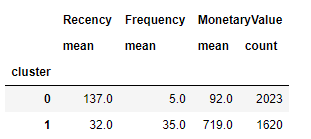
各クラスタの平均RFMを分析

単純な2クラスタ解の結果:

Pythonで学ぶカスタマーセグメンテーション

k-meansを実行してみましょう!

Pythonで学ぶカスタマーセグメンテーション

Preparing Video For Download...