MLモデルのパッケージング

本番環境向けのMachine Learningモデル開発

Sinan Ozdemir

Data Scientist, Entrepreneur, and Author

パッケージングが重要な理由

  • パフォーマンスを最適化
  • 互換性を確保
  • デプロイを容易にする

【パッケージング手法】

  • シリアライズ: シンプル・軽量・言語非依存
  • 環境パッケージング: ソフトウェア環境全体を固定
  • コンテナ化: 可搬・再現可能・分離された環境
本番環境向けのMachine Learningモデル開発

MLモデルのパッケージ方法

  • シリアライズ: MLモデルの保存と読み込み

  • 環境パッケージング: MLモデル用に一貫性・再現性のある環境

  • コンテナ化: モデル・依存関係・環境を単一の「コンテナ」に封入

本番環境向けのMachine Learningモデル開発

scikit-learnモデルのシリアライズ

scikit-learnモデルをpickleでシリアライズ:

import pickle

model = ...  # Train the scikit-learn model

# Serialize the model to a file
with open('model.pkl', 'wb') as f:
    pickle.dump(model, f)

# Load the serialized model from the file
with open('model.pkl', 'rb') as f:
    model = pickle.load(f)

scikit-learnモデルをHDF5形式でシリアライズ:

import h5py
import numpy as np
from sklearn.externals import joblib

model = ...  # Train the scikit-learn model

# Serialize the model to an HDF5 file
with h5py.File('model.h5', 'w') as f:
    f.create_dataset('model_weights',
    data=joblib.dump(model))

# Load the serialized model from the HDF5 file
with h5py.File('model.h5', 'r') as f:
    model = joblib.load(f['model_weights'][:])
本番環境向けのMachine Learningモデル開発

PyTorch/TensorFlowモデルのシリアライズ

PyTorchモデルのシリアライズ:

import torch

# Train a PyTorch model and store it in a variable
trained_model = ...

# Serialize the trained model to a file
serialized_model_path = 'model.pt'
torch.save(trained_model.state_dict(), serialized_model_path)

# Load the serialized model from a file
loaded_model = ... # Initialize the model
loaded_model.load_state_dict(
    torch.load(serialized_model_path))

TensorFlowモデルのシリアライズ:

import tensorflow as tf

# Train a Tensorflow model
trained_model = ...

# Save the trained model to a directory 
saved_model_directory = 'model/'
tf.saved_model.save
    (trained_model, saved_model_directory)

# Load the saved model from the directory 
loaded_model = tf.saved_model.load(
    saved_model_directory)
本番環境向けのMachine Learningモデル開発

DockerでのML環境パッケージング

  • モデルが実行できる環境を整備する
  • virtualenv等で一貫性・再現性のある環境を作成
  • Dockerコンテナは自己完結でデプロイが容易

docker

本番環境向けのMachine Learningモデル開発

Dockerfile例

# Use an existing image as the base image
FROM python:3.8-slim

# Set the working directory
WORKDIR /app

# Copy the requirements file to the image
COPY requirements.txt .

# Install the required dependencies
RUN pip install -r requirements.txt

# Copy the ML model and its dependencies to the image
COPY model/ .

# Set the entrypoint to run the model
ENTRYPOINT ["python", "run_model.py"]

<---- Python 3.8のベースイメージを使用


<---- 作業ディレクトリを設定


<---- requirements.txtをコピー


<---- 依存パッケージをインストール


<---- モデルをコンテナにコピー


<---- コンテナの起動方法を指定
本番環境向けのMachine Learningモデル開発

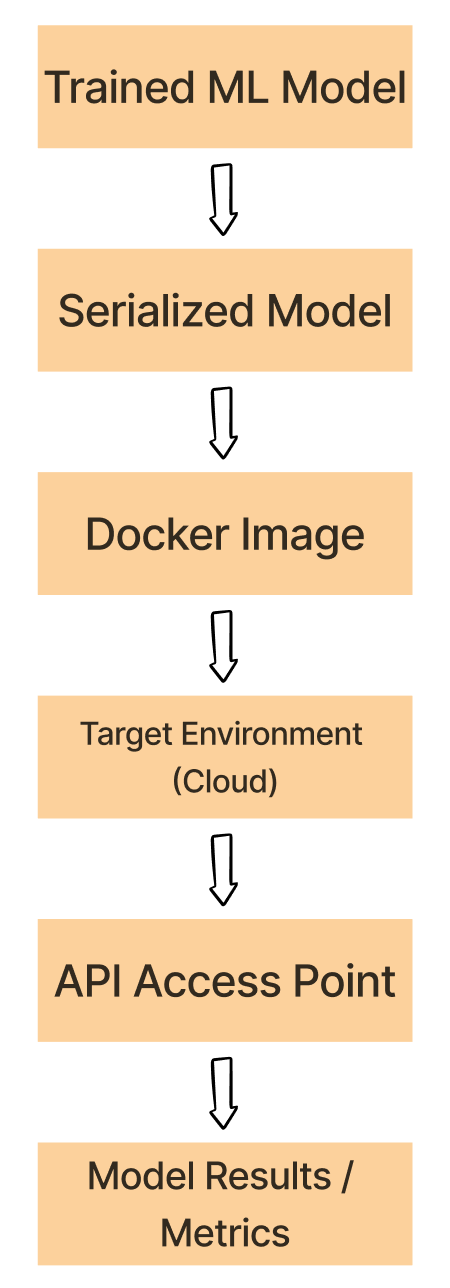
実験 → Dockerワークフロー

  1. 学習済みモデルをpickle、HDF5、PyTorchなどで「シリアライズ」する。

  2. シリアライズ済みモデル、依存関係、環境を「コンテナ化」する。

  3. Dockerイメージをクラウド等のターゲット環境へ「デプロイ」する。

  4. デプロイしたイメージからコンテナを起動し、モデルを「実行」する。

  5. コンテナ内のモデルをAPI等から「利用」する。

Dockerのワークフロー

本番環境向けのMachine Learningモデル開発

演習に進みましょう!

本番環境向けのMachine Learningモデル開発

Preparing Video For Download...