さらに役立つ要約ツール
スプレッドシートユーザーのための Python

Chris Cardillo
Data Scientist
.mean()
fruit_sales.groupby('store', as_index=False).mean()

1: 果物店の取引
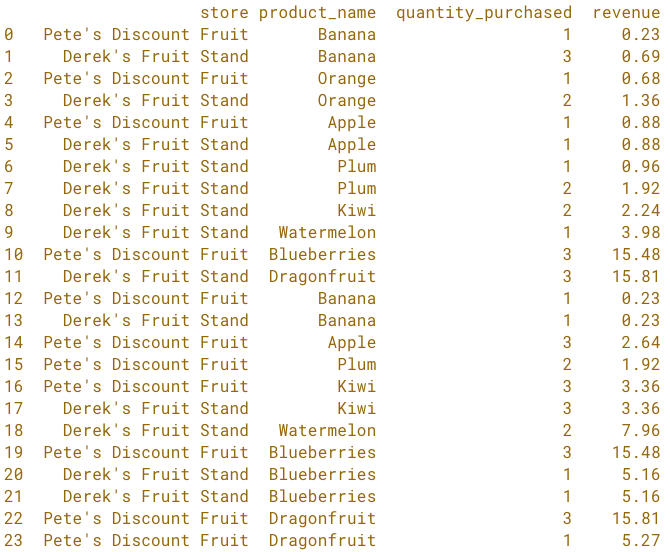
2: 店舗ごとの果物別売上合計
totals = fruit_sales.groupby(['store', 'product_name'], as_index=False).sum()
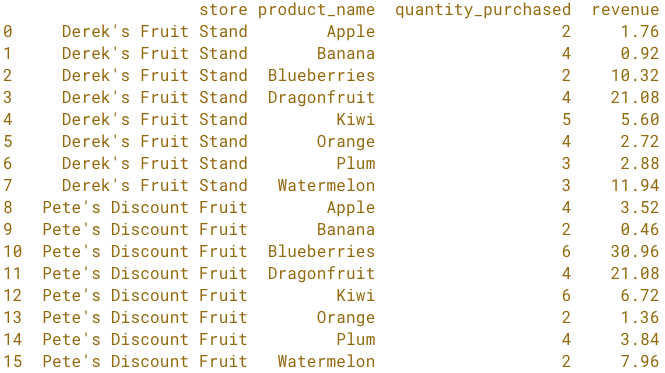
3: 店舗ごとの果物別売上の並べ替え
totals = (totals.sort_values('revenue', ascending=False)
.reset_index(drop=True))
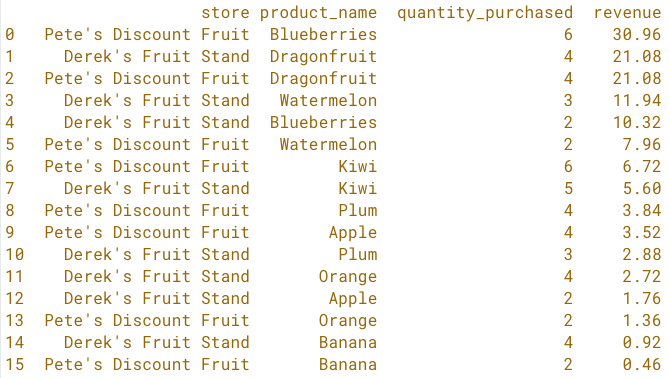
4: 店舗ごとの先頭行
top_store_sellers = totals.groupby('store').head(1).reset_index(drop=True)

解法の手順
# Raw data
fruit_sales

# Summary - by fruit by store
totals = fruit_sales.groupby(['store', 'product_name'], as_index=False).sum()

# Sort the Summary
totals = (totals.sort_values('revenue', ascending=False)
.reset_index(drop=True))

# First row for each store
top_store_sellers = totals.groupby('store').head(1).reset_index(drop=True)
解法の手順
1: 生取引データ
2: 果物/店舗別の要約
解法の手順
2: 果物/店舗別の要約
3: 果物/店舗別の並べ替え
解法の手順
3: 果物/店舗別の並べ替え
4: 店舗ごとの先頭行

