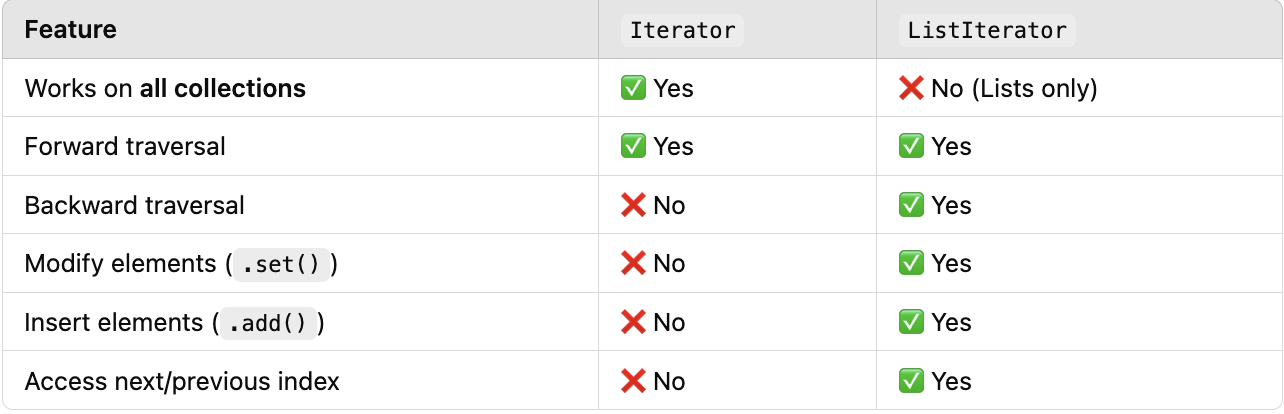
// サンプルリスト `names` の ListIterator を作成
ListIterator<String> it = names.listIterator(names.size());
// .hasPrevious() で先頭到達を確認
while (it.hasPrevious()) {
    // .previous() で逆順に取得
    System.out.println(it.previous());}
逆順で出力:
Charlie
Bob
Alice
反復中に要素を変更
.set() メソッドを使用
// サンプルリスト names の ListIterator を作成
ListIterator<String> it = names.listIterator();

// 反復中に .set() で要素を変更
while (it.hasNext()) {
    String name = it.next();
    if ("Bob".equals(name)) it.set("Bobby");
}
更新後の names リスト:
[Alice, Bobby, Charlie]
反復中に要素を追加
要素追加は .add() を使用
ListIterator<String> it = names.listIterator();


// 反復中に .add() で要素を挿入
while (it.hasNext()) {
    String name = it.next();
    if ("Charlie".equals(name)) it.add("David");
}