テキストの要約と編集

Python で DeepSeek を使いこなす

James Chapman

AI Curriculum Lead, DataCamp

振り返り

  • Q&A
response = client.chat.completions.create(
  model="deepseek-ai/DeepSeek-V4.1-Flash",
  messages=[{"role": "user", "content": "How many days are in October?"}]
)

print(response.choices[0].message.content)
October has **31 days**.  

It's one of the seven months in the Gregorian calendar with 31 days...
Python で DeepSeek を使いこなす

テキストの編集

  • 例:名前、代名詞、役職の更新

$$

prompt = """
Update name to Maarten, pronouns to he/him, and job title to Senior Content Developer
in the following text:

Joanne is a Content Developer at DataCamp. Her favorite programming language is R,
which she uses for her statistical analyses.
"""
Python で DeepSeek を使いこなす

テキストの編集

response = client.chat.completions.create(
    model="deepseek-ai/DeepSeek-V4.1-Flash",

messages=[{"role": "user", "content": prompt}]
) print(response.choices[0].message.content)
Here's the updated text with the requested changes:

Maarten is a Senior Content Developer at DataCamp. His favorite programming language
is R, which he uses for his statistical analyses.

Let me know if you'd like any further adjustments!
Python で DeepSeek を使いこなす

テキストの要約

  • 例:顧客チャット記録の要約

カスタマーサポートチーム

text = """
Customer: Hi, I'm trying to log into 
my account, but it keeps saying 
my password is incorrect. I'm sure 
I'm entering the right one.  

Support: I'm sorry to hear that! 
Have you tried resetting your password?  
...
"""
Python で DeepSeek を使いこなす

テキストの要約

prompt = f"""Summarize the customer support chat 
             in three concise key points: {text}"""


response = client.chat.completions.create( model="deepseek-ai/DeepSeek-V4.1-Flash", messages=[{"role": "user", "content": prompt}] ) print(response.choices[0].message.content)
1. **Login Issue**: Customer couldn't log in due to a password issue and missing reset link.  
2. **Password Reset Suggestion**: Support resent the reset email after confirming it was sent.  
3. **Prompt Assistance**: Customer resolved the issue by using Google sign-in.
Python で DeepSeek を使いこなす

応答の長さを制御する

  • max_tokens = 5
response = client.chat.completions.create(
  model="deepseek-ai/DeepSeek-V4.1-Flash",
  messages=[{"role":"user",
      "content":"Write a haiku about AI."}],
  max_tokens=5
)

**Silent circuits hum
  • max_tokens = 30
response = client.chat.completions.create(
    model="deepseek-ai/DeepSeek-V4.1-Flash",
    messages=[{"role":"user",
      "content":"Write a haiku about AI."}],
    max_tokens=30
)

**Silent circuits hum,**  
**thoughts of light and logic bloom—**  
**minds beyond our own.**
Python で DeepSeek を使いこなす

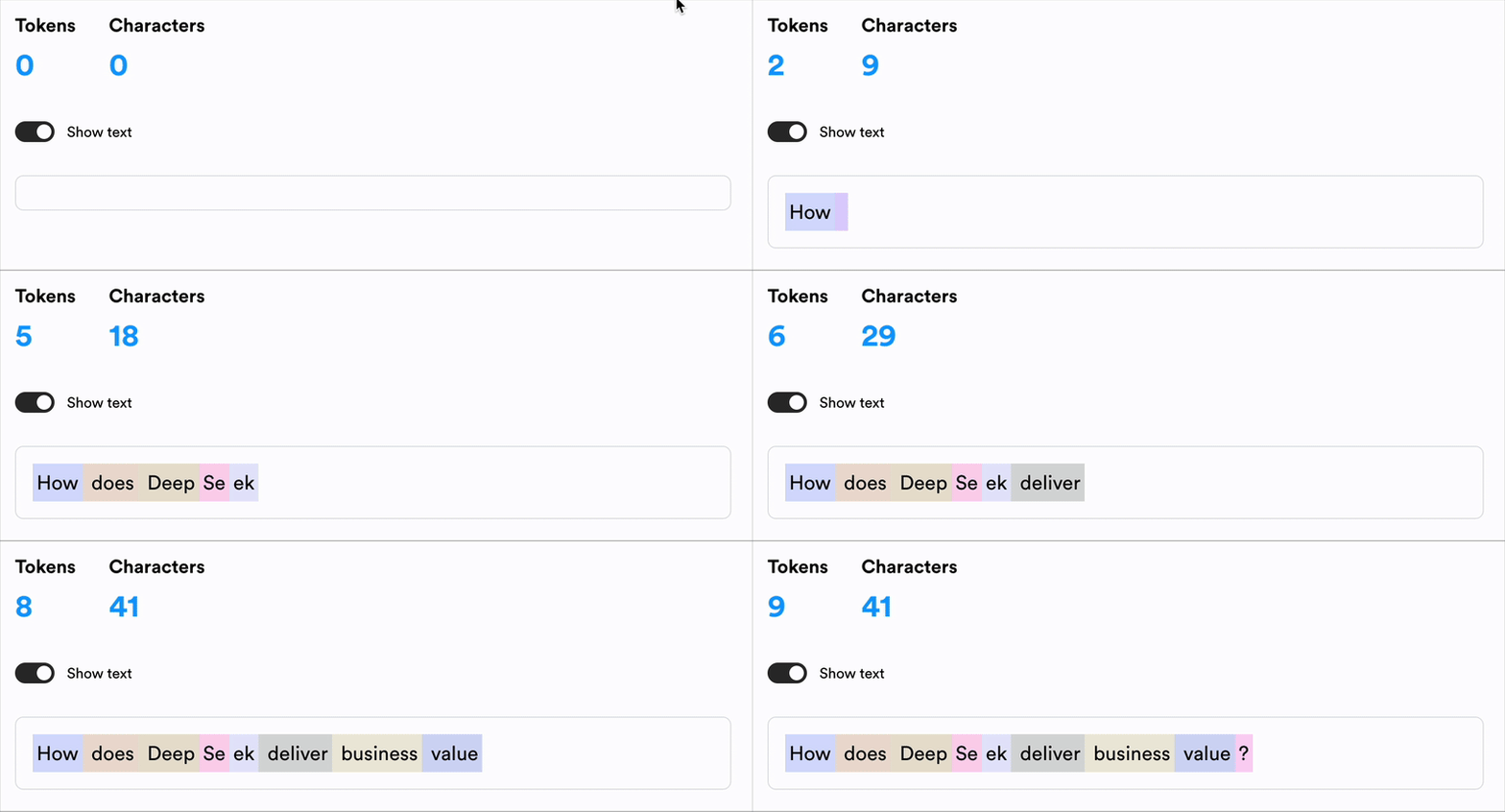
トークンを理解する

$$

  • トークン:AIがテキストを理解し解釈するのに役立つ単位

$$

文「How can the OpenAI API deliver business value?」の各トークンが異なる色でハイライトされている様子

1 https://lunary.ai/deepseek-tokenizer
Python で DeepSeek を使いこなす

コストを計算する


  • API利用料金はプラットフォーム、モデル、トークン数によって決まります 💰

    • モデルの価格はコスト/トークンで設定されます
    • 入力トークンと出力トークンでコストが異なる場合があります
  • max_tokensを増やすとコストが増加します 📈

Screenshot 2025-03-05 at 11.46.54.png

Python で DeepSeek を使いこなす

コストを計算する

prompt = f"""Summarize the customer support chat 
             in three concise key points: {text}"""

max_tokens = 500

response = client.chat.completions.create(
    model="deepseek-ai/DeepSeek-V4.1-Flash",
    messages=[{"role": "user", "content": prompt}], 
    max_tokens=max_tokens
)
Python で DeepSeek を使いこなす

コストを計算する

# Define price per token
input_token_price = 2.1 / 1_000_000
output_token_price = 4.4 / 1_000_000

# Extract token usage input_tokens = response.usage.prompt_tokens
output_tokens = max_tokens
# Calculate cost cost = (input_tokens * input_token_price + output_tokens * output_token_price) print(f"Estimated cost: ${cost}")
Estimated cost: $0.0153964
Python で DeepSeek を使いこなす

練習しましょう!

Python で DeepSeek を使いこなす

Preparing Video For Download...