Đánh chỉ mục & lấy mẫu lại chuỗi thời gian
Xử lý dữ liệu chuỗi thời gian trong Python

Stefan Jansen
Founder & Lead Data Scientist at Applied Artificial Intelligence
Biến đổi chuỗi thời gian
Các biến đổi chuỗi thời gian cơ bản gồm:
Phân tích cú pháp ngày dạng chuỗi và chuyển sang
datetime64Chọn & cắt lát các giai đoạn cụ thể
Đặt & thay đổi tần suất
DateTimeIndex- Tăng mẫu vs Giảm mẫu
Lấy giá cổ phiếu GOOG
google = pd.read_csv('google.csv') # import pandas as pdgoogle.info()
<class 'pandas.core.frame.DataFrame'>
RangeIndex: 504 entries, 0 to 503
Data columns (total 2 columns):
date     504 non-null object
price    504 non-null float64
dtypes: float64(1), object(1)
google.head()
         date   price
0  2015-01-02  524.81
1  2015-01-05  513.87
2  2015-01-06  501.96
3  2015-01-07  501.10
4  2015-01-08  502.68
Chuyển chuỗi ngày sang datetime64
pd.to_datetime():- Phân tích chuỗi ngày
- Chuyển thành
datetime64
google.date = pd.to_datetime(google.date)google.info()
<class 'pandas.core.frame.DataFrame'>
RangeIndex: 504 entries, 0 to 503
Data columns (total 2 columns):
date     504 non-null datetime64[ns]
price    504 non-null float64
dtypes: datetime64[ns](1), float64(1)
Chuyển chuỗi ngày sang datetime64
.set_index():- Đưa cột ngày vào index
inplace:- không tạo bản sao
google.set_index('date', inplace=True)google.info()
<class 'pandas.core.frame.DataFrame'>
DatetimeIndex: 504 entries, 2015-01-02 to 2016-12-30
Data columns (total 1 columns):
price    504 non-null float64
dtypes: float64(1)
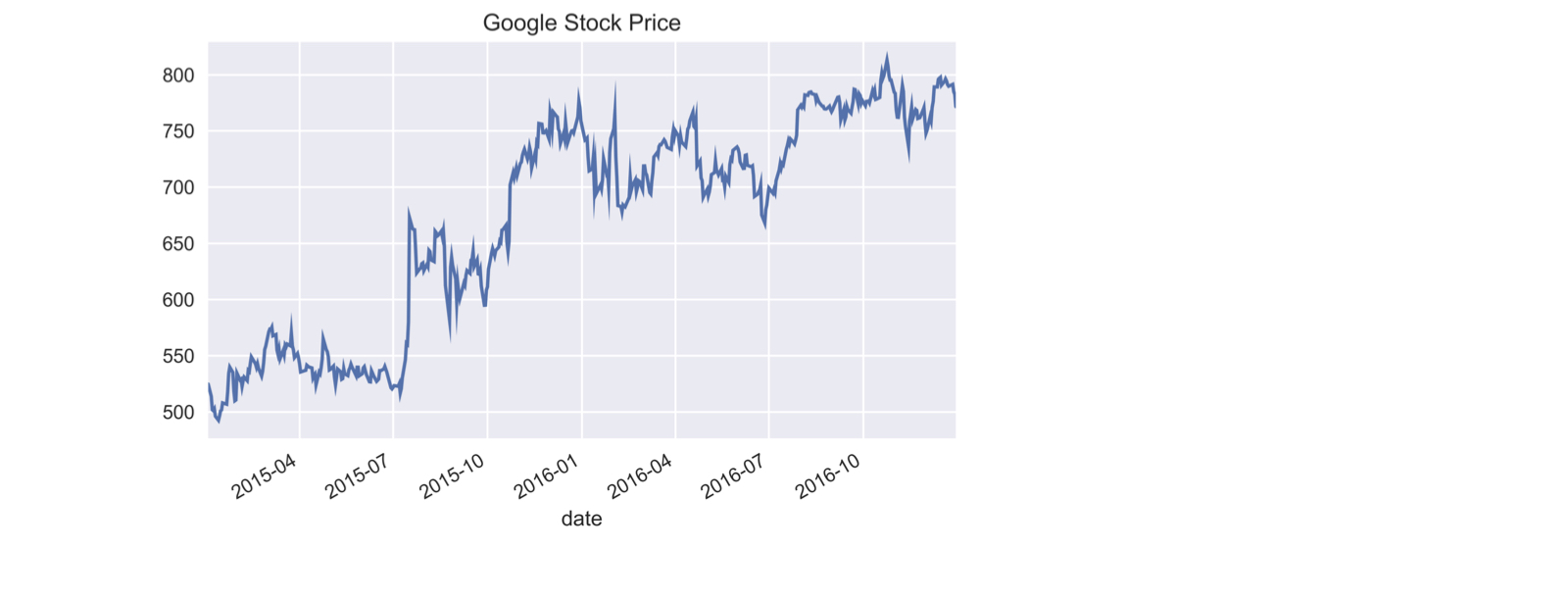
Vẽ chuỗi thời gian giá cổ phiếu Google
google.price.plot(title='Google Stock Price')plt.tight_layout(); plt.show()
Đánh chỉ mục bằng chuỗi một phần
- Chọn/đánh chỉ mục bằng chuỗi có thể phân tích thành ngày
google['2015'].info() # Truyền chuỗi cho một phần của ngày
DatetimeIndex: 252 entries, 2015-01-02 to 2015-12-31
Data columns (total 1 columns):
price    252 non-null float64
dtypes: float64(1)
google['2015-3': '2016-2'].info() # Cắt lát bao gồm cả tháng cuối
DatetimeIndex: 252 entries, 2015-03-02 to 2016-02-29
Data columns (total 1 columns):
price    252 non-null float64
dtypes: float64(1)
memory usage: 3.9 KB
Đánh chỉ mục bằng chuỗi một phần
google.loc['2016-6-1', 'price'] # Dùng ngày đầy đủ với .loc[]
734.15
.asfreq(): đặt tần suất
.asfreq('D'):- Chuyển
DateTimeIndexsang tần suất ngày lịch
- Chuyển
google.asfreq('D').info() # đặt tần suất ngày lịch
DatetimeIndex: 729 entries, 2015-01-02 to 2016-12-30
Freq: D
Data columns (total 1 columns):
price    504 non-null float64
dtypes: float64(1)
.asfreq(): đặt tần suất
- Tăng mẫu:
- Tần suất cao hơn tạo ngày mới => thiếu dữ liệu
google.asfreq('D').head()
             price
date
2015-01-02  524.81
2015-01-03     NaN
2015-01-04     NaN
2015-01-05  513.87
2015-01-06  501.96
.asfreq(): đặt lại tần suất
.asfreq('B'):- Chuyển
DateTimeIndexsang tần suất ngày làm việc
- Chuyển
google = google.asfreq('B') # Đổi sang tần suất ngày lịchgoogle.info()
DatetimeIndex: 521 entries, 2015-01-02 to 2016-12-30
Freq: B
Data columns (total 1 columns):
price    504 non-null float64
dtypes: float64(1)
.asfreq(): đặt lại tần suất
google[google.price.isnull()] # Chọn các giá trị 'price' bị thiếu
            price
date
2015-01-19    NaN
2015-02-16    NaN
...
2016-11-24    NaN
2016-12-26    NaN
- Ngày làm việc nhưng không giao dịch
Cùng luyện tập nào!
Xử lý dữ liệu chuỗi thời gian trong Python

