Snowpipe and Snowpipe Streaming

Data Pipeline Automation in Snowflake

Emily Melhuish

Technical Curriculum Developer, Snowflake

Snowpipe
Use Case:

  • Delivery events arrive continuously

Solution: Snowpipe

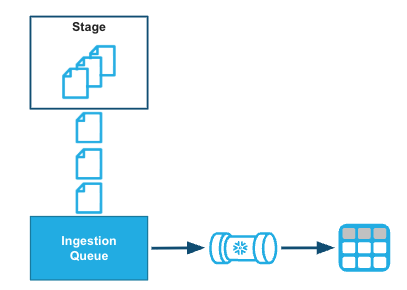
  • Snowpipe loads data from files as soon as they are available in a stage.

Screenshot 2026-05-11 at 12.24.14 pm.png

1 * Snowflake Learning Material
Data Pipeline Automation in Snowflake

The Problem with Batch Loading

  • Files arrive in S3 every few minutes throughout the day
  • Scheduled COPY INTO runs at midnight — 24-hour lag
  • Delayed shipments won't appear until the following day.
  • Snowpipe closes the gap
-- Nightly batch: runs at 00:00, data arrives all day
COPY INTO logistics.delivery_events
FROM @harbr_s3_stage/events/
FILE_FORMAT = (FORMAT_NAME = 'harbr_json_format');
-- A 9am exception won't appear until tomorrow
Data Pipeline Automation in Snowflake

What is Snowpipe?

  • Wraps a COPY INTO statement — same syntax, same file formats
  • Triggers automatically as new files arrive in a stage
  • Loads in micro-batches, typically within minutes
  • Serverless — no warehouse to provision
CREATE PIPE harbr_events_pipe AS
  COPY INTO logistics.delivery_events
  FROM @harbr_s3_stage/events/
  FILE_FORMAT = (FORMAT_NAME = 'harbr_json_format');
Data Pipeline Automation in Snowflake

How Snowpipe Works

Workflow for Snowpipe

  • AUTO_INGEST — event-driven; cloud storage publishes a notification
  • Amazon S3 | Azure Event Grid | GCP Pub/Sub
  • REST API trigger — call insertFiles or insertReport endpoints directly from orchestration code
Data Pipeline Automation in Snowflake

Snowpipe Billing

Screenshot 2026-05-11 at 12.24.14 pm.png

  • Billed based on a fixed credit amount per GB consumed
  • Text files: charge based on uncompressed size
  • Binary files: charged based on observed size
Data Pipeline Automation in Snowflake

Snowpipe Streaming

Snowpipe Snowpipe Streaming
Trigger File lands in stage Row written by application
Latency Minutes Seconds
Use case File-based event feeds GPS, IoT, real-time app data


Removes the file boundary entirely

  • Rows written directly from the application via the Streaming Ingest SDK
  • No files, no stages — latency in seconds
# Snowpipe Streaming: application writes rows directly
channel = client.openChannel('GPS_CHANNEL', 'LOGISTICS', 'GPS_EVENTS')
channel.insertRows(rows=[
    {'vehicle_id': 'V001', 'lat': 51.5, 'lng': -0.12, 'ts': now()}
])
Data Pipeline Automation in Snowflake

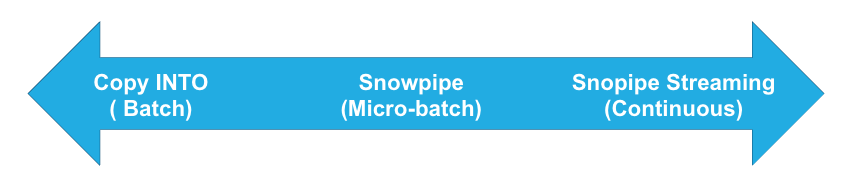
Choosing the Right Ingestion Method

Ingestion Methods

Method When to use
COPY INTO Scheduled batch loads - nightly files, weekly exports, hours of latency acceptable
Snowpipe Continuous file arrivals, loads needed within minutes of arrival
Snowpipe Streaming Application-generated data - GPS, IoT, financial markets - data available in seconds
1 * Snowflake Learning Resource
Data Pipeline Automation in Snowflake

Let's practice!

Data Pipeline Automation in Snowflake

Preparing Video For Download...