Streams and Change Data Capture
Data Pipeline Automation in Snowflake

Emily Melhuish
Technical Curriculum Developer, Snowflake
Processing Only What's Changed
CDC: Change Data Capture
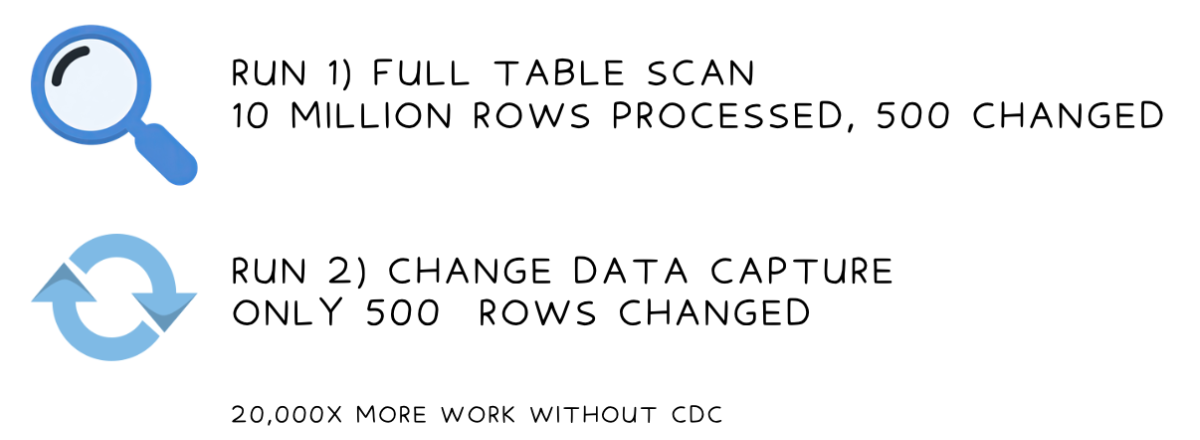
Streams
What a stream does
- Tracks every INSERT, UPDATE, and DELETE on a source table
- Maintains a running change log — no data duplication
- Once consumed, the offset advances; next read starts fresh
1 * Snowflake Learning Resource
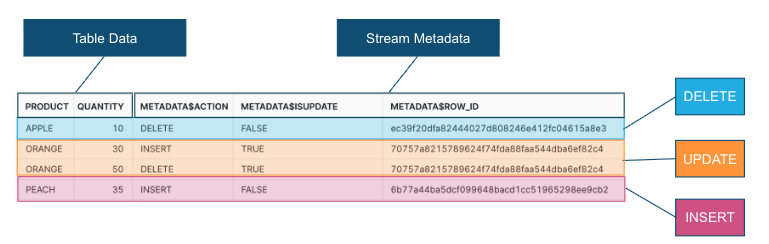
Stream Metadata Columns
SELECT product, quantity, METADATA$ACTION, METADATA$ISUPDATE, METADATA$ROW_ID
FROM shipments_stream;
METADATA$ACTION:INSERTorDELETEMETADATA$ISUPDATE:TRUEwhen part of an update pairMETADATA$ROW_ID: Unique physical row identifier- Updates appear as a DELETE + INSERT pair, both flagged with
METADATA$ISUPDATE = TRUE

The Stream Offset

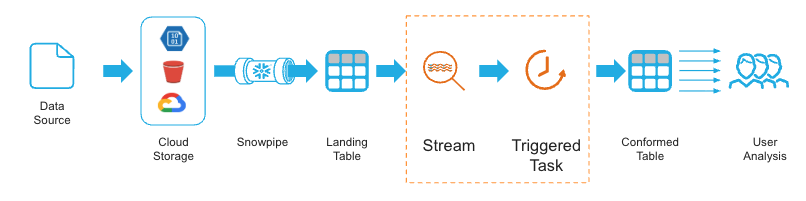
Streams in a Pipeline Overview
- Streams pair with tasks — Snowflake objects that run SQL on a schedule
- Task reads only changed rows; with 10M rows: 2 seconds vs 2 minutes
1 * Snowflake Learning Resource

