Začínáme s prahováním

Image Processing in Python

Rebeca Gonzalez

Data Engineer

Prahování
Rozdělení obrazu na popředí a pozadí

Převodem na černobílý obraz

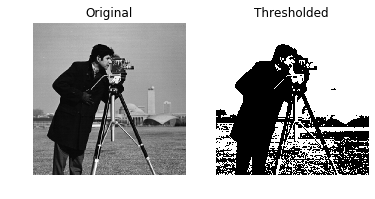
Každý pixel se nastaví takto:

  • 255 (bílá), pokud pixel $\gt$ prahová hodnota
  • 0 (černá), pokud pixel $\lt$ prahová hodnota

Prahovaný snímek muže s fotoaparátem

Image Processing in Python

Prahování

Nejjednodušší metoda segmentace obrazu

  • Izolace objektů
    • Detekce objektů
    • Detekce obličejů
    • Atd.

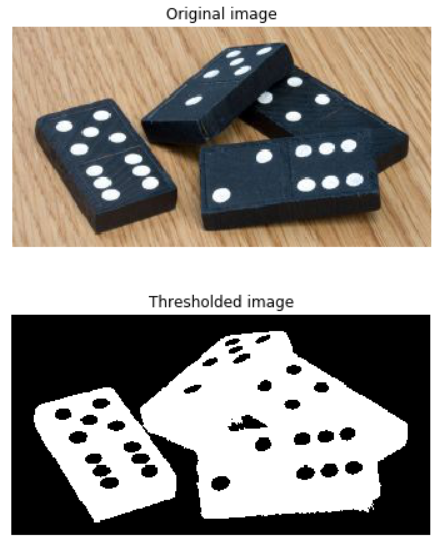
Prahovaný snímek domino kamenů

Image Processing in Python

Prahování

Pouze ze snímků ve stupních šedi

Kroky prahování na příkladu domino kamenů: původní RGB, stupně šedi a prahovaný snímek

Image Processing in Python

Použití prahování

# Obtain the optimal threshold value
thresh = 127

# Apply thresholding to the image binary = image > thresh
# Show the original and thresholded show_image(image, 'Original') show_image(binary, 'Thresholded')

Prahovaný snímek muže s fotoaparátem

Image Processing in Python

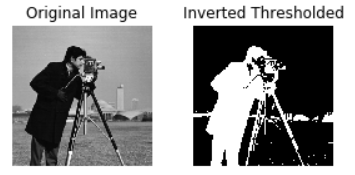
Invertované prahování

# Obtain the optimal threshold value
thresh = 127

# Apply thresholding to the image inverted_binary = image <= thresh
# Show the original and thresholded show_image(image, 'Original') show_image(inverted_binary, 'Inverted thresholded')

Invertovaný prahovaný snímek muže s fotoaparátem

Image Processing in Python

Kategorie

  • Globální (histogram): vhodné pro jednotné pozadí

  • Lokální (adaptivní): pro nerovnoměrné osvětlení pozadí
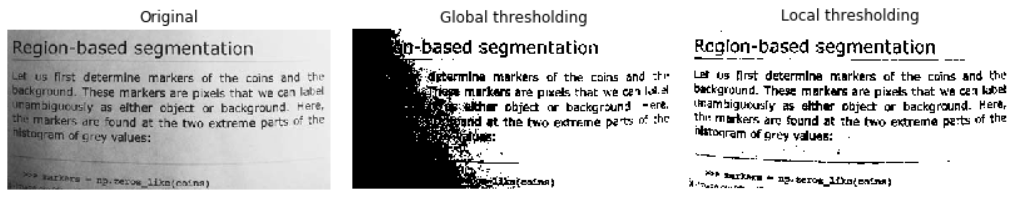
Porovnání globálního a lokálního prahování

Image Processing in Python

Vyzkoušejte další algoritmy prahování
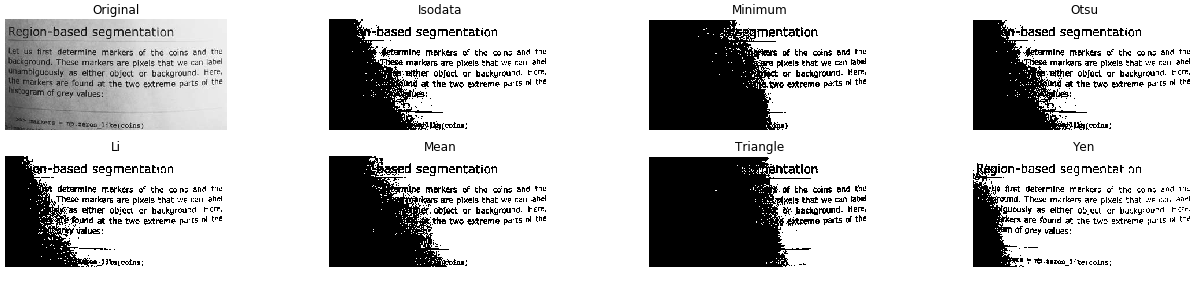
from skimage.filters import try_all_threshold

# Obtain all the resulting images fig, ax = try_all_threshold(image, verbose=False)
# Showing resulting plots show_plot(fig, ax)
Image Processing in Python

Vyzkoušejte další algoritmy prahování

Všechny globální metody prahování testované na snímku textové stránky ve stupních šedi

Image Processing in Python

Optimální prahová hodnota

Globální

Jednotné pozadí
# Import the otsu threshold function
from skimage.filters import threshold_otsu

# Obtain the optimal threshold value thresh = threshold_otsu(image)
# Apply thresholding to the image binary_global = image > thresh
Image Processing in Python

Optimální prahová hodnota

Globální

# Show the original and binarized image
show_image(image, 'Original')
show_image(binary_global, 'Global thresholding')
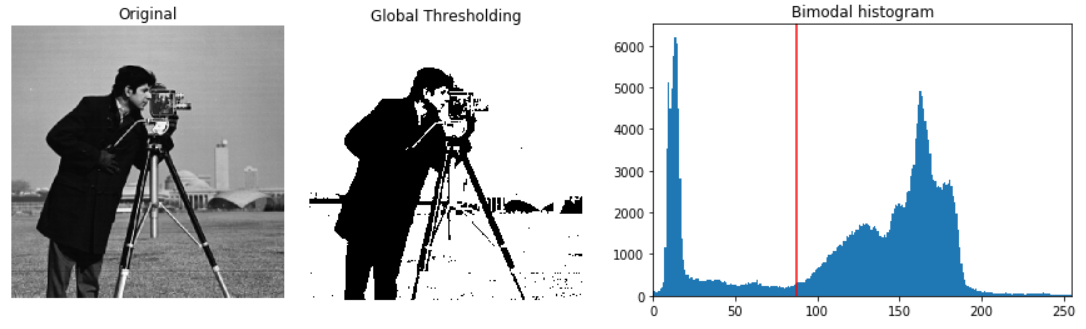
Původní snímek muže s fotoaparátem, prahovaný snímek a histogram s červenou čárou označující optimální prahovou hodnotu

Image Processing in Python

Optimální prahová hodnota

Lokální

Nerovnoměrné pozadí
# Import the local threshold function
from skimage.filters import threshold_local

# Set the block size to 35 block_size = 35
# Obtain the optimal local thresholding local_thresh = threshold_local(text_image, block_size, offset=10)
# Apply local thresholding and obtain the binary image binary_local = text_image > local_thresh
Image Processing in Python

Optimální prahová hodnota

Lokální

# Show the original and binarized image
show_image(text_image, 'Original')
show_image(binary_local, 'Local thresholding')
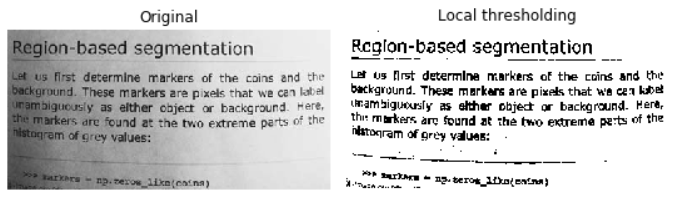
Lokálně prahovaný snímek textové stránky

Image Processing in Python

Pojďme cvičit!

Image Processing in Python

Preparing Video For Download...