Streams and Change Data Capture

Data Pipeline Automation in Snowflake

Emily Melhuish

Technical Curriculum Developer, Snowflake

Processing Only What's Changed

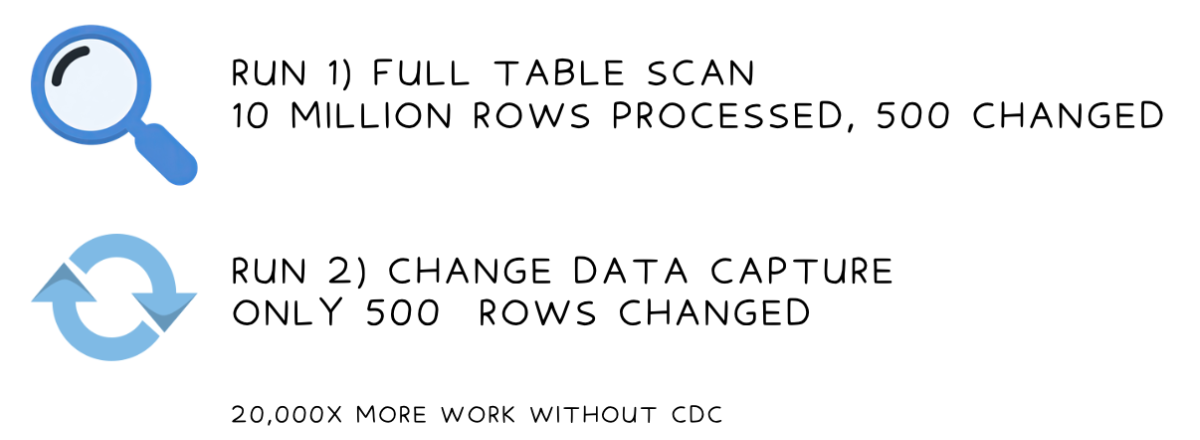
CDC: Change Data Capture Two comparisons on how data is run

Data Pipeline Automation in Snowflake

Streams

What a stream does

  • Tracks every INSERT, UPDATE, and DELETE on a source table

Screenshot 2026-05-11 at 10.50.31 am.png

  • Maintains a running change log — no data duplication
  • Once consumed, the offset advances; next read starts fresh
1 * Snowflake Learning Resource
Data Pipeline Automation in Snowflake

Stream Types


Stream Type Captures Best For
Standard All table types and views & all DML changes - tracks inserts, updates, deletes Tables where any row can change (e.g. shipments)
Append-only All table types and views, except external tables - tracks row inserts only Insert-once tables (e.g. delivery events) - more efficient
Insert-only Externally managed Apache Iceberg and external tables - tracks row inserts only External tables

Directory tables surface file metadata for a stage (name, size, last modified timestamp)

Data Pipeline Automation in Snowflake

Creating a Stream

Standard stream on the shipments table

CREATE STREAM shipments_stream
  ON TABLE logistics.shipments;

Append-only stream on the delivery events table

CREATE STREAM delivery_events_stream
  ON TABLE logistics.delivery_events
  APPEND_ONLY = TRUE;
Data Pipeline Automation in Snowflake

Stream Metadata Columns

SELECT product, quantity, METADATA$ACTION, METADATA$ISUPDATE, METADATA$ROW_ID
FROM shipments_stream;
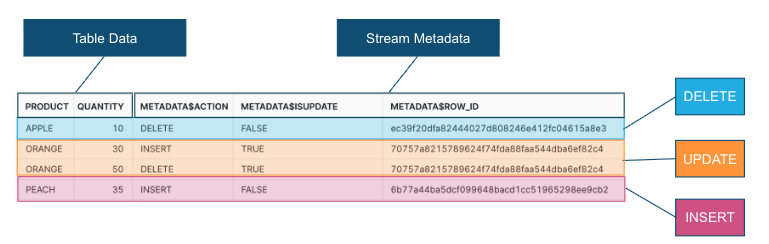
  • METADATA$ACTION: INSERT or DELETE
  • METADATA$ISUPDATE: TRUE when part of an update pair
  • METADATA$ROW_ID: Unique physical row identifier
  • Updates appear as a DELETE + INSERT pair, both flagged with METADATA$ISUPDATE = TRUE

Stream metadata columns showing METADATA$ACTION, METADATA$ISUPDATE, METADATA$ROW_ID columns with sample data

Data Pipeline Automation in Snowflake

The Stream Offset

Timeline diagram - Stream Created (offset starts here) → Changes happen in the source table (stream accumulates records) → Stream consumed in a transaction (offset advances to now

Data Pipeline Automation in Snowflake

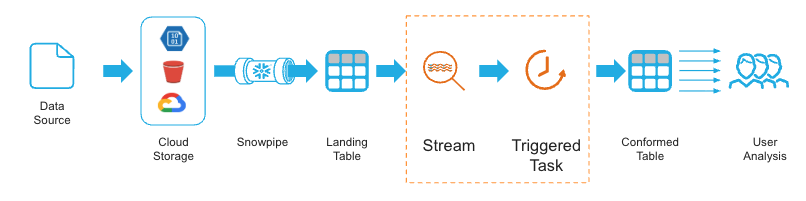
Streams in a Pipeline Overview

  • Streams pair with tasks — Snowflake objects that run SQL on a schedule
  • Task reads only changed rows; with 10M rows: 2 seconds vs 2 minutes

Screenshot 2026-05-11 at 10.48.51 am.png

1 * Snowflake Learning Resource
Data Pipeline Automation in Snowflake

Streams in a Pipeline Query

  • Streams pair with tasks - Snowflake objects that run SQL on a schedule
  • Task reads only changed rows; with 10M rows: 2 seconds vs 2 minutes
CREATE TASK logistics.sync_shipments
  WAREHOUSE = compute_wh
  SCHEDULE = '5 MINUTE'
  WHEN SYSTEM$STREAM_HAS_DATA('logistics.staging_shipments_stream')
AS
  INSERT INTO logistics.shipments
  SELECT shipment_id, region, carrier, delivery_days
  FROM logistics.staging_shipments_stream
  WHERE METADATA$ACTION = 'INSERT';
Data Pipeline Automation in Snowflake

Let's practice!

Data Pipeline Automation in Snowflake

Preparing Video For Download...