Stages, File Formats, and COPY INTO

Data Pipeline Automation in Snowflake

Emily Melhuish

Technical Curriculum Developer, Snowflake

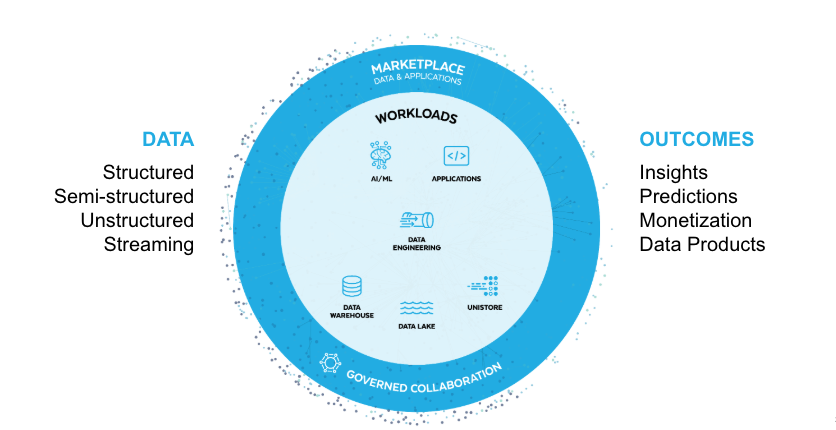
Snowflake powers many workloads

Screenshot 2026-05-11 at 11.52.34 am.png

1 * Snowflake Learning Material
Data Pipeline Automation in Snowflake

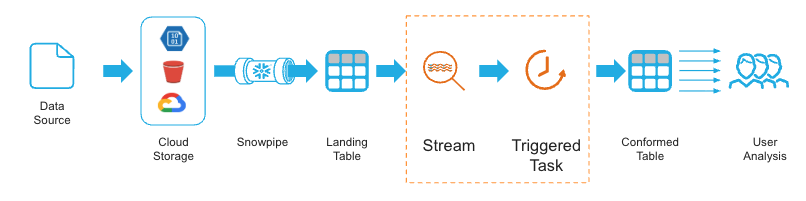
Example pipeline


Screenshot 2026-05-11 at 10.48.51 am.png

1 * Snowflake Learning Material
Data Pipeline Automation in Snowflake

Meet Harbr

Fake logo for Harbr

About Harbr

  • Global logistics and supply chain platform
  • Uses Snowflake to track shipments, warehouse inventory, and delivery performance
  • Ingests data from supplier systems across multiple regions
Data Pipeline Automation in Snowflake

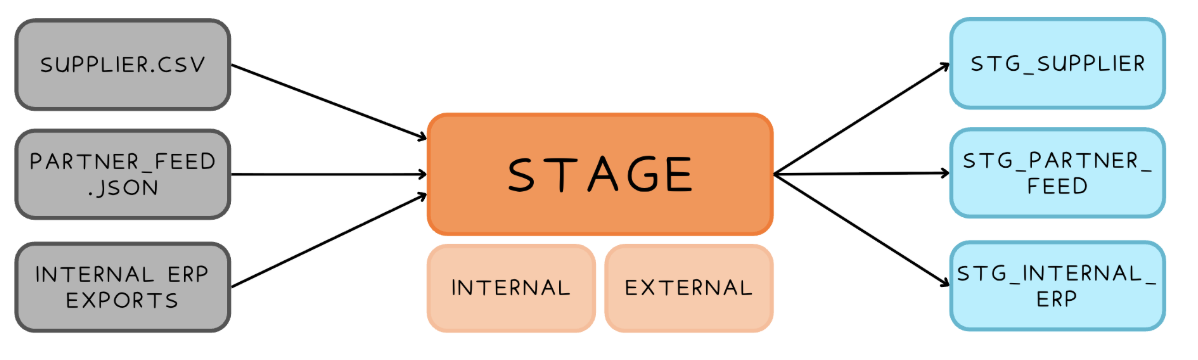
The Data Loading Problem

Data loading diagram

Stage = temporary storage location

Data Pipeline Automation in Snowflake

Stage Types

Two stage types

Internal Stages

  • User
    • Personal staging area for a single user
  • Table
    • Tied to a specific table
  • Named
    • Database object that gets created in the schema

External Stage

  • Named
    • Points to cloud provider
Data Pipeline Automation in Snowflake

Stage Parameters

Directory Table

CREATE STAGE harbr_stage
  DIRECTORY = (ENABLE = TRUE)

Internal Stage Encryption

ENCRYPTION = (TYPE = SNOWFLAKE_FULL)
ENCRYPTION = (TYPE = SNOWFLAKE_SSE)

External Stage Encryption

ENCRYPTION = 
([ TYPE = 'AWS_CSE' ] MASTER_KEY = '') 

ENCRYPTION = 
([ TYPE = 'AWS_SSE_S3' ]) 

...
Data Pipeline Automation in Snowflake

File Formats

  • Structured formats: CSV with specific delimiters, header rows, quoting rules
  • Semi-structured formats: JSON, Parquet, Avro, ORC and XML.

    • Load directly into a VARIANT column
    • Define parsing rules once, reuse across all load operations
  • Update the format object once

SQL

CREATE FILE FORMAT harbr_csv_format
  TYPE = 'CSV'
  FIELD_DELIMITER = ','
  SKIP_HEADER = 1;
Data Pipeline Automation in Snowflake

COPY INTO

Load from a named stage using a named file format

COPY INTO logistics.shipments
FROM @harbr_internal_stage/shipments/
FILE_FORMAT = (FORMAT_NAME = 'harbr_csv_format')
Data Pipeline Automation in Snowflake

Error handling

ON_ERROR Options Behavior
ABORT_STATEMENT Fail entire load on first error (default)
CONTINUE Skip bad rows, load everything else
SKIP_FILE Skip entire file if it contains any errors
SKIP_FILE_<num> Skip file only if errors exceed a specified count
SKIP_FILE_<num>% Skip file only if errors exceed a specified % threshold
Data Pipeline Automation in Snowflake

Validation mode and COPY_HISTORY

Validate without loading = dry run

COPY INTO logistics.shipments
FROM @harbr_internal_stage/shipments/
FILE_FORMAT = (FORMAT_NAME = 'harbr_csv_format')
VALIDATION_MODE = RETURN_ERRORS;

Inspect load history

SELECT * FROM TABLE(INFORMATION_SCHEMA.COPY_HISTORY(
  TABLE_NAME => 'shipments',
  START_TIME => DATEADD('hour', -24,
    CURRENT_TIMESTAMP())));
Data Pipeline Automation in Snowflake

Let's practice!

Data Pipeline Automation in Snowflake

Preparing Video For Download...