Dynamic Tables

Data Pipeline Automation in Snowflake

Emily Melhuish

Technical Curriculum Developer, Snowflake

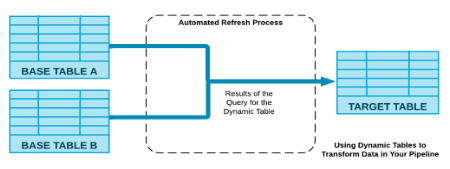
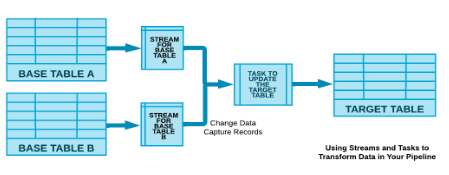
Dynamic Tables vs Streams and Tasks

Dynamic Tables:

Screenshot 2026-05-11 at 11.14.23 am.png

  • Simplify data pipeline transformation using SQL declarative statements
  • Automatic refresh process
  • Snowflake detects, schedules and merges

Streams and tasks:

Screenshot 2026-05-11 at 11.14.13 am.png

1 * Snowflake Learning Material
Data Pipeline Automation in Snowflake

What are Dynamic Tables?

Declarative pipeline automation

  • Contents defined by a SELECT query — describe the result, Snowflake manages the refresh
  • No stream configuration, no tasks to schedule
CREATE DYNAMIC TABLE logistics.delivery_summary
  TARGET_LAG = '1 hour'
  WAREHOUSE = harbr_wh
AS
  SELECT region, COUNT(*) AS shipments,
         AVG(delivery_days) AS avg_days
  FROM logistics.shipments GROUP BY region;
Data Pipeline Automation in Snowflake

TARGET_LAG: Reduce Staleness

The freshness contract between you and Snowflake

TARGET_LAG value Effect
'5 minutes' Table is never more than 5 minutes stale - refreshes frequently
'1 hour' Refreshes less often - lower compute consumption
DOWNSTREAM Infer lag from downstream dependents - ideal for chained tables
Data Pipeline Automation in Snowflake

Full vs Incremental Refresh

Incremental refresh

  • Tracks exactly which source rows changed
  • Refreshes only affected rows — faster, cheaper at scale
-- Incremental-friendly: 
SELECT region, COUNT(*) AS shipments
FROM logistics.shipments 
GROUP BY region;

Full refresh

  • Reprocesses the entire query
  • Required for certain aggregations and set operations
Data Pipeline Automation in Snowflake

Chaining Dynamic Tables

Pipeline diagram — delivery_events (source) → cleaned_events (target_lag = DOWNSTREAM) → delivery_summary (target_lag = 1 HOUR)

  • Each transformation is a separate dynamic table with its own query
  • Refreshes propagate automatically through the chain
  • DOWNSTREAM lag defers to what the next table needs - no over-refreshing
Data Pipeline Automation in Snowflake

Dynamic Tables vs Streams and Tasks

Dynamic tables: declarative

  • Describe the output; Snowflake manages refresh, easy to manage
  • Best for analytics/reporting layers
-- Declare the result for Snowflake 
CREATE DYNAMIC TABLE logistics.summary
  TARGET_LAG = '1 hour' 
  WAREHOUSE = harbr_wh
AS SELECT region, COUNT(*) 
FROM shipments 
GROUP BY 1;

Streams + Tasks: imperative

  • Control what runs and when
  • Best for branching complex custom logic and operational pipelines
-- You control every step
CREATE TASK process_events 
  SCHEDULE = '5 MINUTE'
  WHEN SYSTEM$STREAM_HAS_DATA
  ('events_stream')
AS CALL logistics.process_new_events();
Data Pipeline Automation in Snowflake

DYNAMIC_TABLE_REFRESH_HISTORY

SELECT name, state, refresh_start_time, refresh_end_time
FROM TABLE (
    INFORMATION_SCHEMA.DYNAMIC_TABLE_REFRESH_HISTORY (
      NAME_PREFIX => 'HARBR_DB.DELIVERY_SUMMARY.', ERROR_ONLY => TRUE
    )
  )
ORDER BY name, data_timestamp;
NAME TRIGGER STATE START END
DELIVERY_SUMMARY SCHEDULED SUCCEEDED 2026-03-01 05:00:00 2024-03-01 05:00:08
DELIVERY_SUMMARY SCHEDULED FAILED 2026-03-01 04:00:00 2024-03-01 04:00:03
Data Pipeline Automation in Snowflake

Let's practice!

Data Pipeline Automation in Snowflake

Preparing Video For Download...