Tworzenie modeli uczenia maszynowego na potrzeby produkcji
Sinan Ozdemir
Data Scientist, Entrepreneur, and Author
Metody pakowania
Serializacja – zapisywanie i odczytywanie modelu ML
Pakowanie środowiska – spójne i odtwarzalne środowisko dla modelu ML
Konteneryzacja – pakowanie modelu, zależności i środowiska w jednym „kontenerze"
Serializacja modelu sklearn przy użyciu pickle:
import pickle
model = ... # Train the scikit-learn model
# Serialize the model to a file
with open('model.pkl', 'wb') as f:
pickle.dump(model, f)
# Load the serialized model from the file
with open('model.pkl', 'rb') as f:
model = pickle.load(f)
Serializacja modelu sklearn w formacie HDF5:
import h5py
import numpy as np
from sklearn.externals import joblib
model = ... # Train the scikit-learn model
# Serialize the model to an HDF5 file
with h5py.File('model.h5', 'w') as f:
f.create_dataset('model_weights',
data=joblib.dump(model))
# Load the serialized model from the HDF5 file
with h5py.File('model.h5', 'r') as f:
model = joblib.load(f['model_weights'][:])
Serializacja modelu PyTorch:
import torch
# Train a PyTorch model and store it in a variable
trained_model = ...
# Serialize the trained model to a file
serialized_model_path = 'model.pt'
torch.save(trained_model.state_dict(), serialized_model_path)
# Load the serialized model from a file
loaded_model = ... # Initialize the model
loaded_model.load_state_dict(
torch.load(serialized_model_path))
Serializacja modelu TensorFlow:
import tensorflow as tf
# Train a Tensorflow model
trained_model = ...
# Save the trained model to a directory
saved_model_directory = 'model/'
tf.saved_model.save
(trained_model, saved_model_directory)
# Load the saved model from the directory
loaded_model = tf.saved_model.load(
saved_model_directory)

# Use an existing image as the base image
FROM python:3.8-slim
# Set the working directory
WORKDIR /app
# Copy the requirements file to the image
COPY requirements.txt .
# Install the required dependencies
RUN pip install -r requirements.txt
# Copy the ML model and its dependencies to the image
COPY model/ .
# Set the entrypoint to run the model
ENTRYPOINT ["python", "run_model.py"]
<---- Użyj bazowego obrazu Python 3.8
<---- Ustaw katalog roboczy
<---- Skopiuj plik requirements.txt
<---- Zainstaluj zależne pakiety modelu
<---- Skopiuj model do kontenera
<---- Określ sposób uruchomienia kontenera
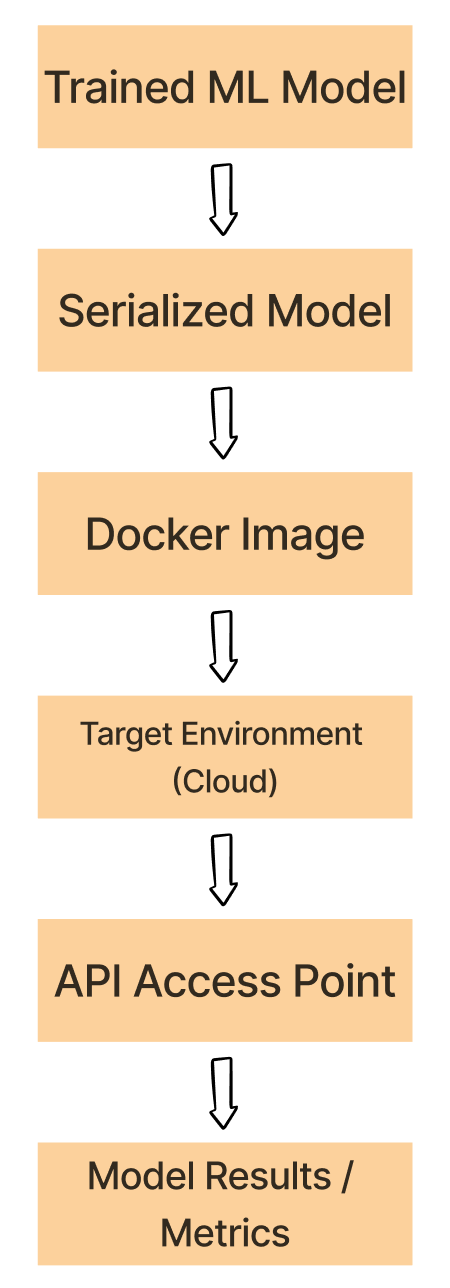
Serializacja wytrenowanego modelu ML w formacie pickle, HDF5 lub PyTorch.
Konteneryzacja modelu, jego zależności i środowiska
Wdrożenie obrazu Docker w środowisku docelowym, np. w chmurze
Uruchomienie kontenera Docker z wdrożonego obrazu i uruchomienie modelu ML.
Korzystanie z modelu w kontenerze przez API lub inny punkt dostępu.

Tworzenie modeli uczenia maszynowego na potrzeby produkcji