MCP et LLM : invites et ressources

Introduction au Model Context Protocol (MCP)

James Chapman

AI Curriculum Manager, DataCamp

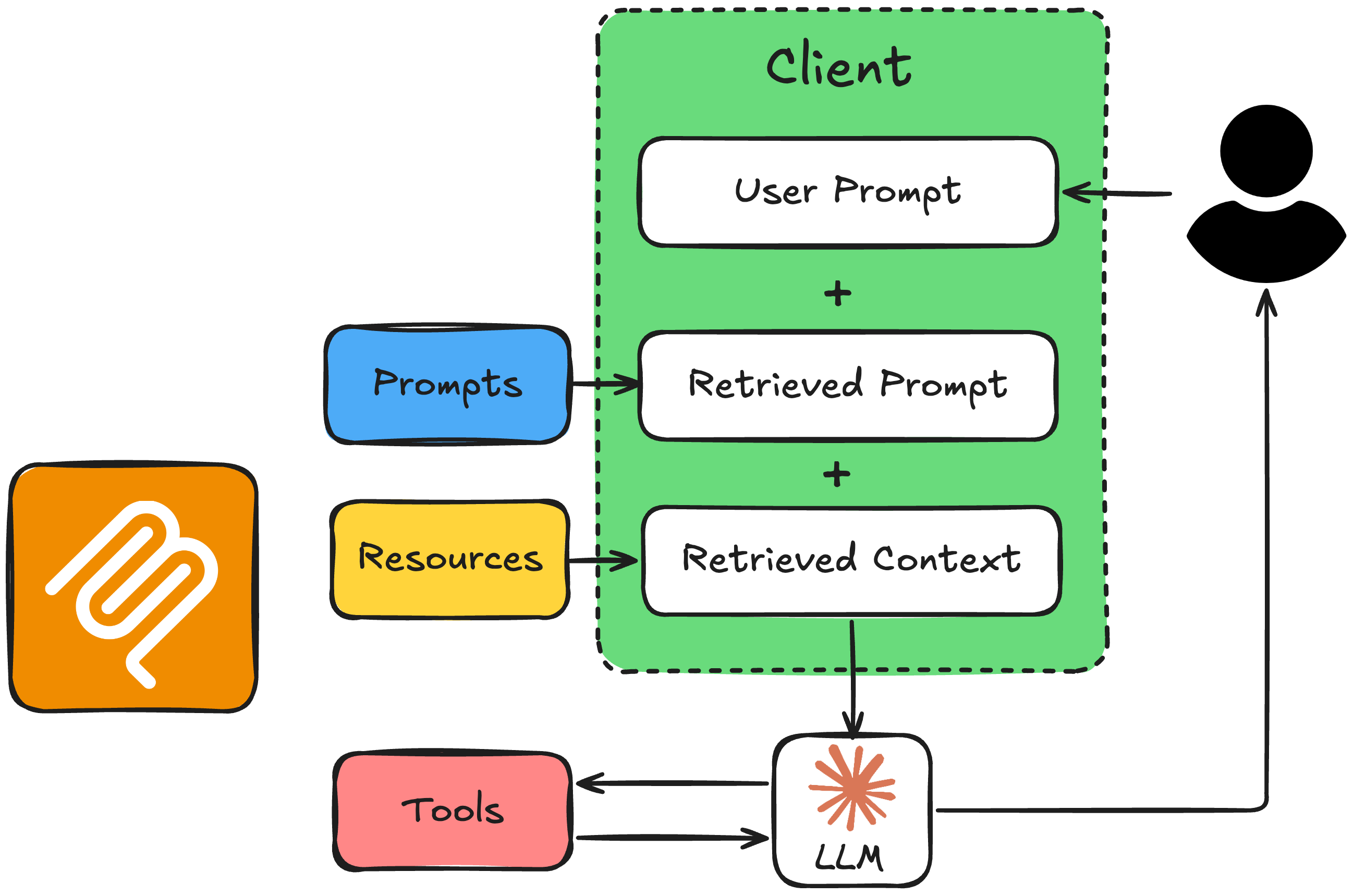
Ressources et invites dans le flux LLM
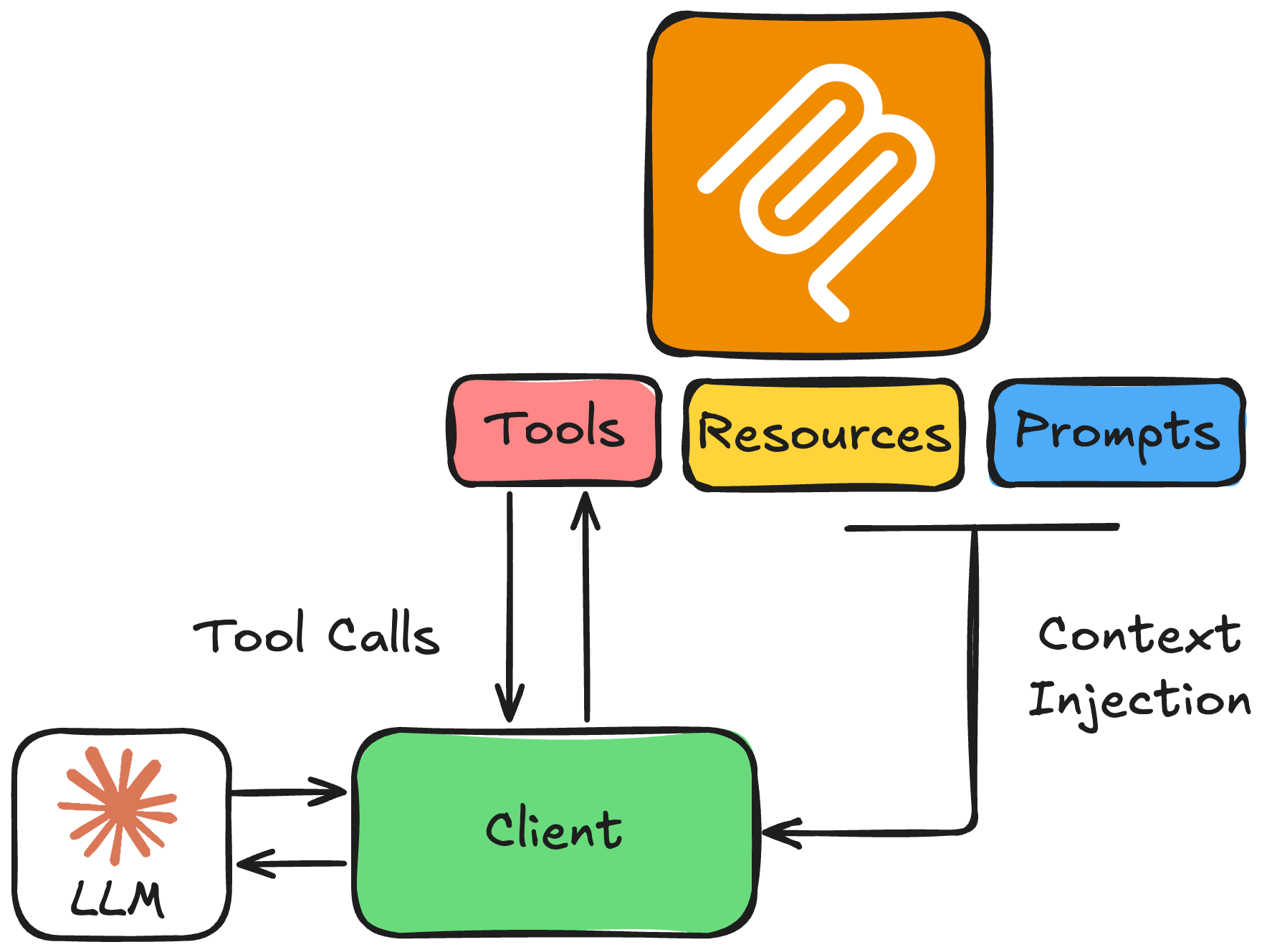
 

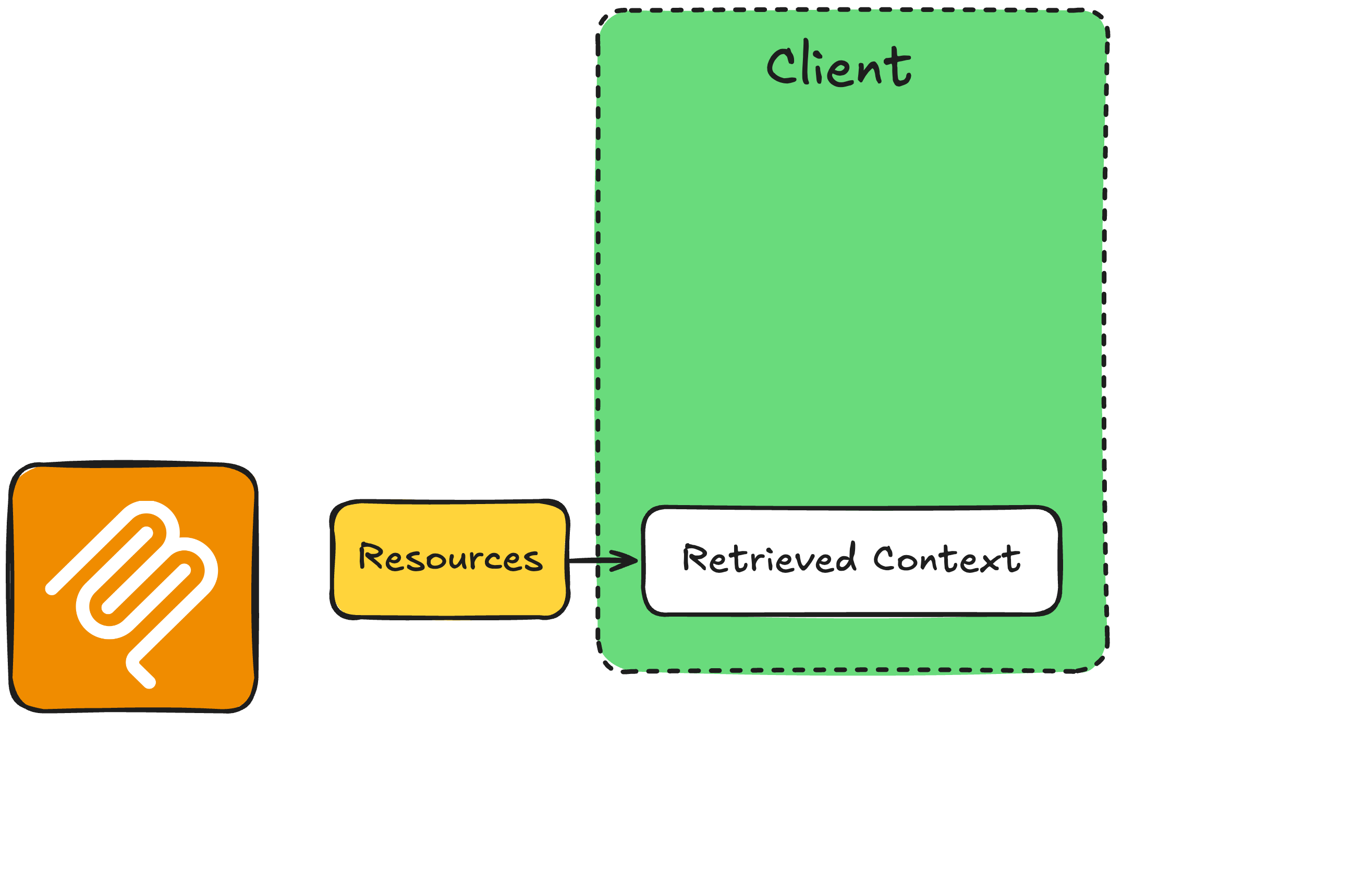
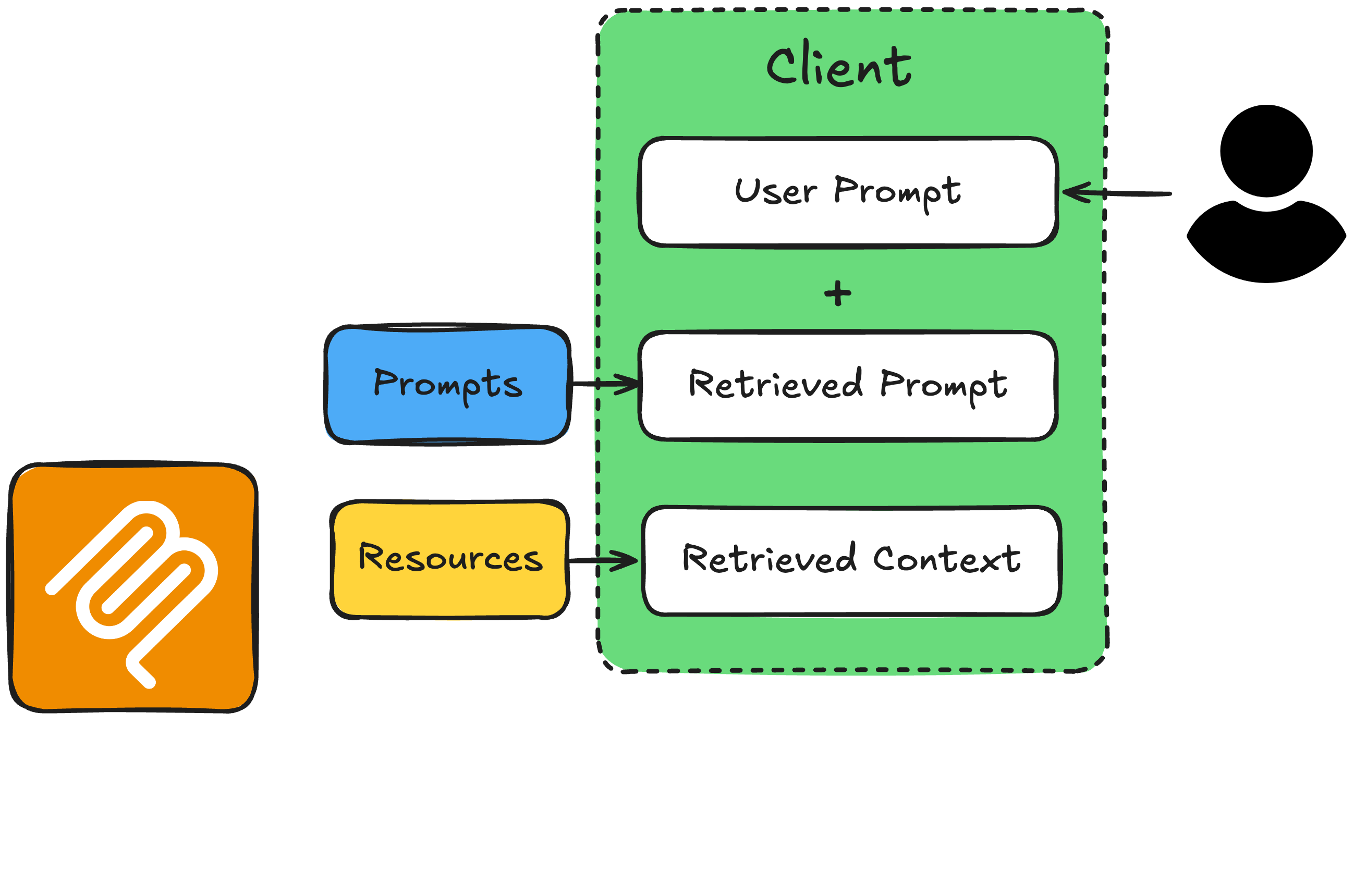
  • Ressources : contexte en lecture seule
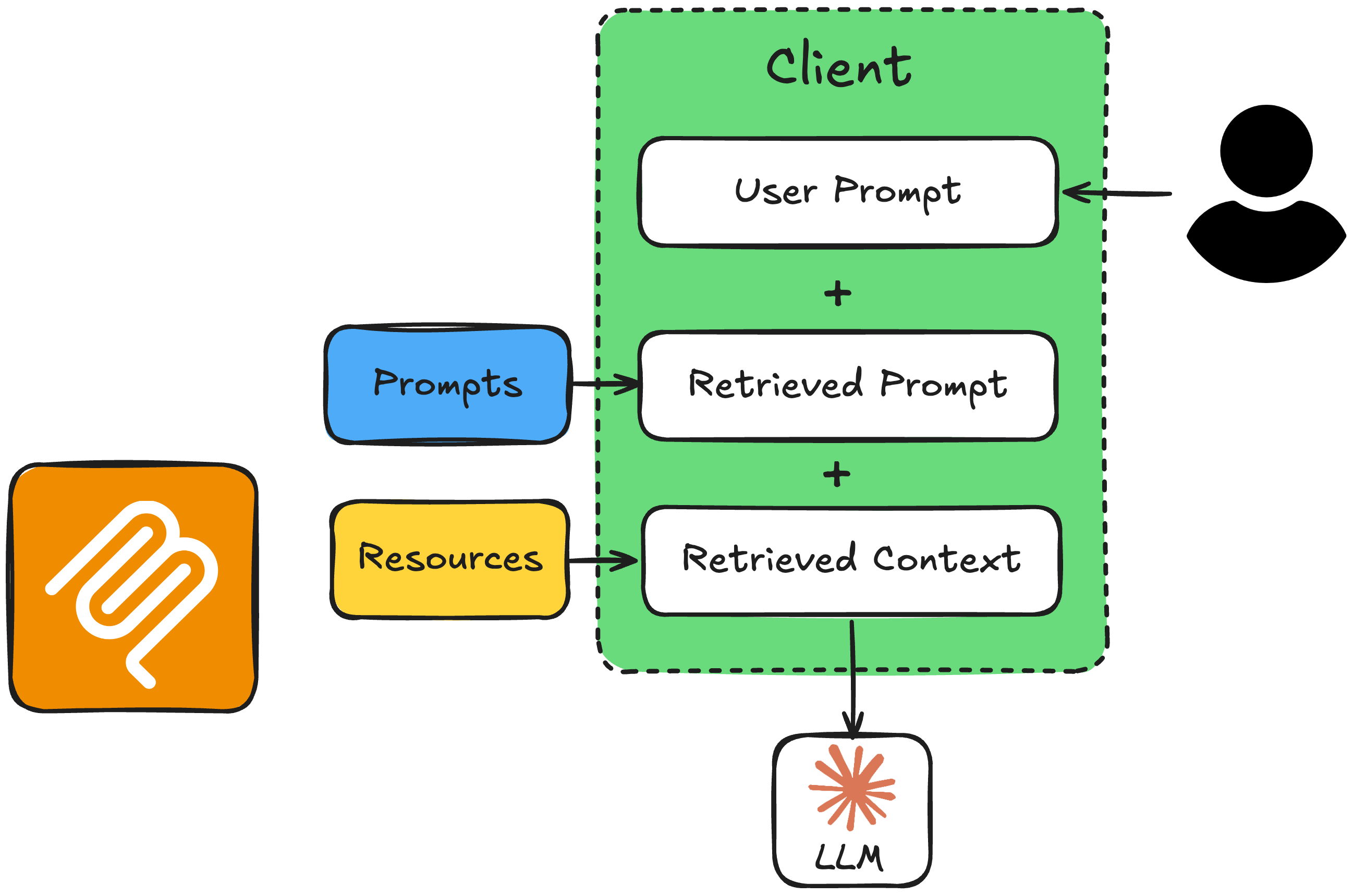
  • Invites : gabarits d'instructions pour définir le comportement et optimiser le modèle pour la tâche


→ Poursuivre avec l'API Messages d'Anthropic


primitifs des LLM

Introduction au Model Context Protocol (MCP)

Flux Invite-Ressource


Flux invite-ressource 1

Introduction au Model Context Protocol (MCP)

Flux Invite-Ressource


Flux invite-ressource 2

Introduction au Model Context Protocol (MCP)

Flux Invite-Ressource


Flux invite-ressource 3

Introduction au Model Context Protocol (MCP)

Flux Invite-Ressource


Flux invite-ressource

Introduction au Model Context Protocol (MCP)
from mcp.server.fastmcp import FastMCP

mcp = FastMCP("Timezone Converter")

@mcp.tool()
def convert_timezone(date_time: str, from_timezone: str, to_timezone: str) -> str:
    # ...

@mcp.resource("file://locations.txt")
def get_locations() -> str:
    # ...

@mcp.prompt(title="Timezone Conversion")
def convert_timezone_prompt(timezone_request: str) -> str:
    # ...

if __name__ == "__main__":
    mcp.run(transport="stdio")
Introduction au Model Context Protocol (MCP)

Fonctions utilitaires côté client


  • read_resource(resource_uri): récupère le contenu d'une ressource par URI
  • read_prompt(prompt_name, user_input): récupère le gabarit d'invite avec la demande de l'utilisateur injectée
Introduction au Model Context Protocol (MCP)

1. Récupérer la ressource et l'invite

async def get_context_from_mcp(user_query: str) -> tuple[str, str]:
    """Fetch resource content and prompt text from the MCP server."""
    params = StdioServerParameters(command=sys.executable, args=["timezone_server.py"])

    async with stdio_client(params) as (reader, writer):
        async with ClientSession(reader, writer) as session:
            await session.initialize()

# Get the resource (supported locations) resource_result = await session.read_resource("file://locations.txt") resource_text = resource_result.contents[0].text
# Get the prompt with the user's query prompt_result = await session.get_prompt("convert_timezone_prompt", arguments={"timezone_request": user_query}) prompt_text = prompt_result.messages[0].content.text
return resource_text, prompt_text
Introduction au Model Context Protocol (MCP)

2. Construire le message système et appeler le LLM

async def call_llm_with_context(user_query: str):
    """Call the LLM with resource and prompt context from MCP."""

resource_text, prompt_text = await get_context_from_mcp(user_query)
# Combine prompt (task + rules + user request) with resource (supported locations) full_prompt = prompt_text + "\n\nSupported locations:\n" + resource_text
client = AsyncAnthropic(api_key="<ANTHROPIC_API_TOKEN>") response = await client.messages.create( model="claude-sonnet-4-6", max_tokens=1024, messages=[{"role": "user", "content": full_prompt}], tools=anthropic_tools, # from get_tools_from_mcp(), formatted for Anthropic )
Introduction au Model Context Protocol (MCP)

3. Gérer la réponse

    if response.stop_reason == "end_turn":
        text = next((b.text for b in response.content if b.type == "text"), "")
        print(f"\nAssistant: {text}")
        return str(text)

if response.stop_reason == "tool_use": tool_use = next(b for b in response.content if b.type == "tool_use") result = await call_mcp_tool( tool_use.name, tool_use.input) # ... send the tool_result back in a follow-up # request, then print the reply, as before
Introduction au Model Context Protocol (MCP)

Exemple : demande ambiguë

if __name__ == "__main__":
    asyncio.run(call_llm_with_context("What time is it in Canada?"))
Assistant: Le Canada a plusieurs fuseaux horaires. Quelle ville ou région voulez-vous dire?
Par exemple, Toronto, Vancouver ou Halifax?
Introduction au Model Context Protocol (MCP)

Exemple : demande claire

if __name__ == "__main__":
    asyncio.run(call_llm_with_context("It is 9:50 AM in the UK in January. What
        time is it in Lisbon, Portugal?"))
Assistant: Il est aussi 9 h 50 à Lisbonne.
Introduction au Model Context Protocol (MCP)

Récapitulatif : ressources et invites avec le LLM


Flux invite-ressource

Introduction au Model Context Protocol (MCP)

Passons à la pratique !

Introduction au Model Context Protocol (MCP)

Preparing Video For Download...