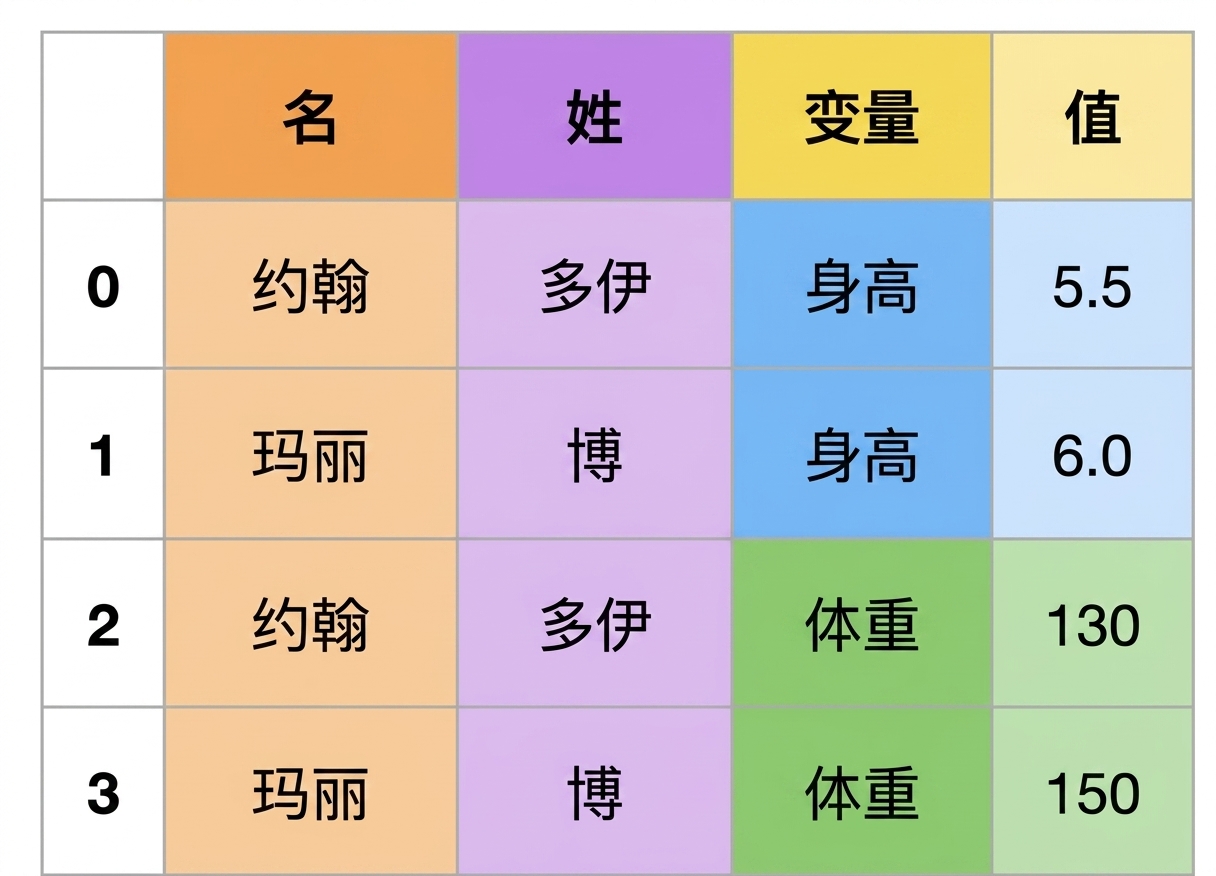
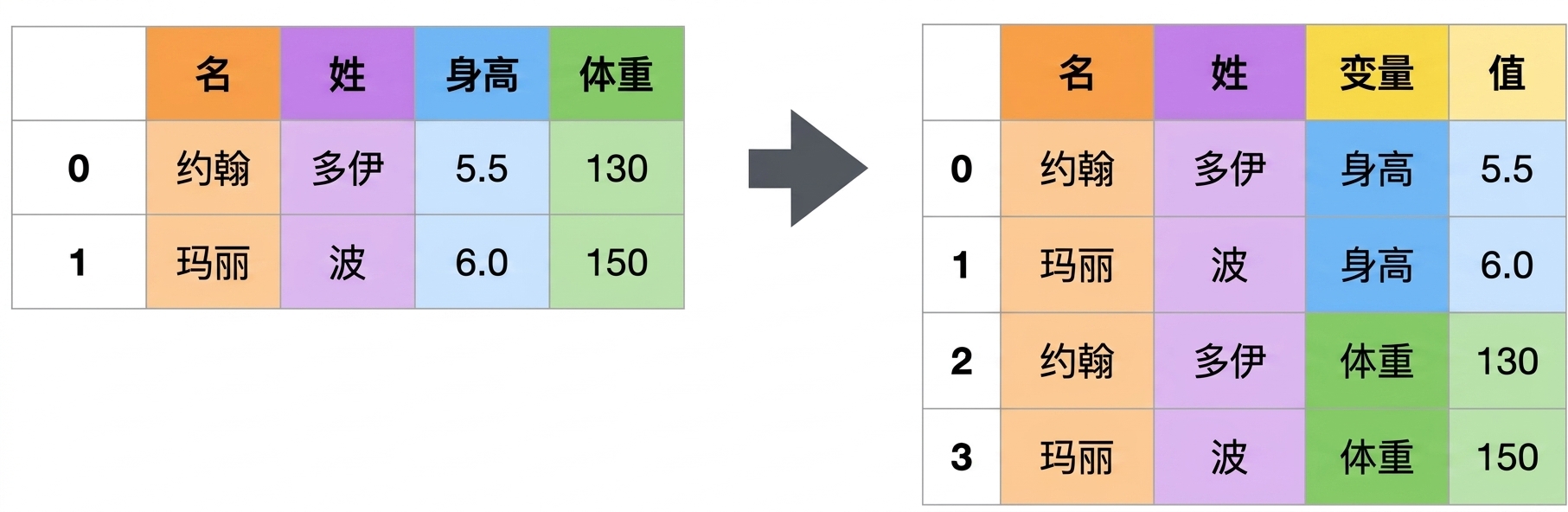
用 .melt() 重塑数据

使用 pandas 连接数据

Aaren Stubberfield

Instructor

宽表 vs 长表

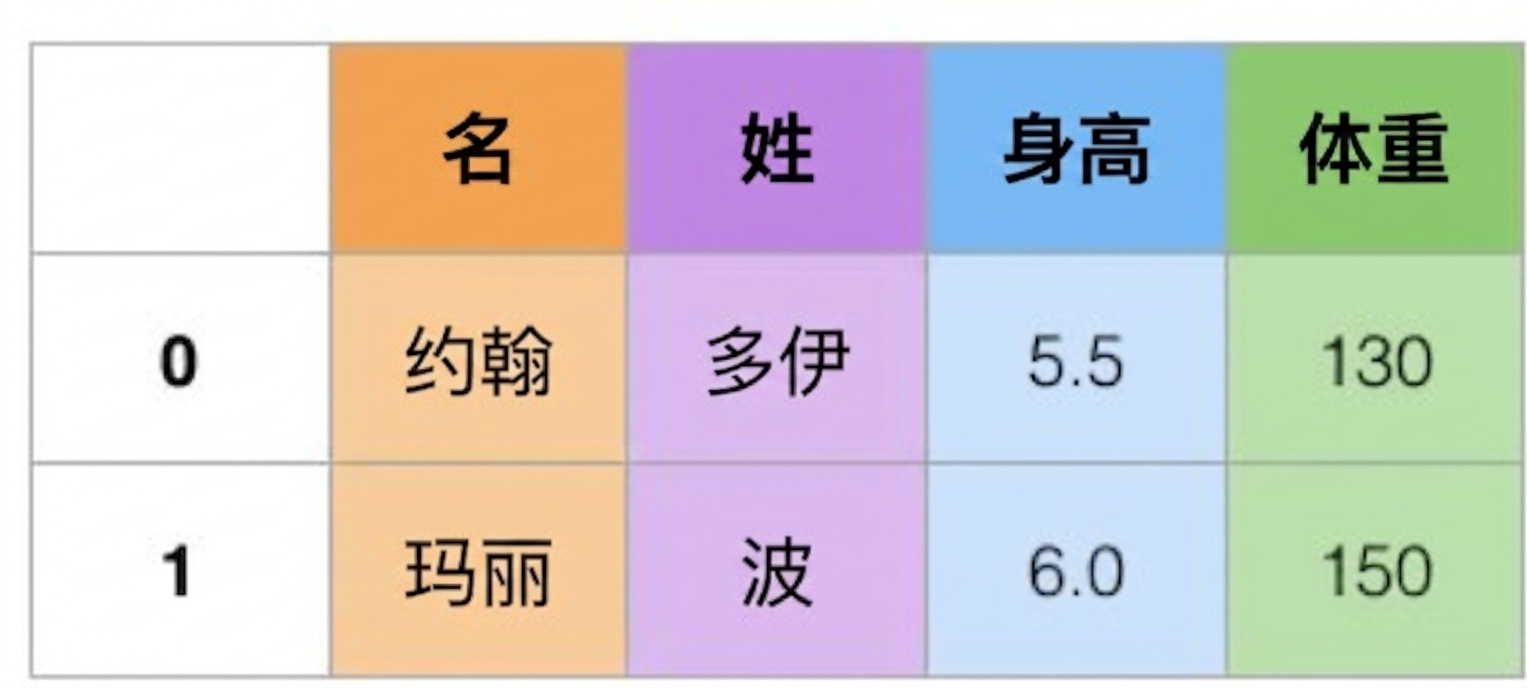
宽表 更宽格式的数据

长表 长格式的数据

使用 pandas 连接数据

.melt() 方法的作用是什么?

  • melt 方法可将数据从宽表透视为长表 取消透视的图片
使用 pandas 连接数据

宽表数据集

此表名为 social_fin

  financial      company   2019      2018      2017      2016    
0 total_revenue  twitter   3459329   3042359   2443299   2529619 
1 gross_profit   twitter   2322288   2077362   1582057   1597379 
2 net_income     twitter   1465659   1205596   -108063   -456873 
3 total_revenue  facebook  70697000  55838000  40653000  27638000
4 gross_profit   facebook  57927000  46483000  35199000  23849000
5 net_income     facebook  18485000  22112000  15934000  10217000
使用 pandas 连接数据

.melt() 示例

social_fin_tall = social_fin.melt(id_vars=['financial','company'])
print(social_fin_tall.head(10))
  financial      company   variable  value   
0 total_revenue  twitter   2019      3459329 
1 gross_profit   twitter   2019      2322288 
2 net_income     twitter   2019      1465659 
3 total_revenue  facebook  2019      70697000
4 gross_profit   facebook  2019      57927000
5 net_income     facebook  2019      18485000
6 total_revenue  twitter   2018      3042359 
7 gross_profit   twitter   2018      2077362 
8 net_income     twitter   2018      1205596 
9 total_revenue  facebook  2018      55838000
使用 pandas 连接数据

使用 value_vars 进行熔化

social_fin_tall = social_fin.melt(id_vars=['financial','company'], 
                                  value_vars=['2018','2017'])
print(social_fin_tall.head(9))
  financial      company   variable  value   
0 total_revenue  twitter   2018      3042359 
1 gross_profit   twitter   2018      2077362 
2 net_income     twitter   2018      1205596 
3 total_revenue  facebook  2018      55838000
4 gross_profit   facebook  2018      46483000
5 net_income     facebook  2018      22112000
6 total_revenue  twitter   2017      2443299 
7 gross_profit   twitter   2017      1582057 
8 net_income     twitter   2017      -108063
使用 pandas 连接数据

使用列名进行熔化

social_fin_tall = social_fin.melt(id_vars=['financial','company'], 
                                  value_vars=['2018','2017'],
                                  var_name='year', value_name='dollars')
print(social_fin_tall.head(8))
  financial      company   year  dollars 
0 total_revenue  twitter   2018  3042359 
1 gross_profit   twitter   2018  2077362 
2 net_income     twitter   2018  1205596 
3 total_revenue  facebook  2018  55838000
4 gross_profit   facebook  2018  46483000
5 net_income     facebook  2018  22112000
6 total_revenue  twitter   2017  2443299 
7 gross_profit   twitter   2017  1582057
使用 pandas 连接数据

¡Vamos a practicar!

使用 pandas 连接数据

Preparing Video For Download...