过滤型连接

使用 pandas 连接数据

Aaren Stubberfield

Instructor

变更型连接 vs 过滤型连接

变更型连接:

  • 基于两表中匹配的观测合并数据

过滤型连接:

  • 按是否与另一表中的观测匹配来筛选本表观测
使用 pandas 连接数据

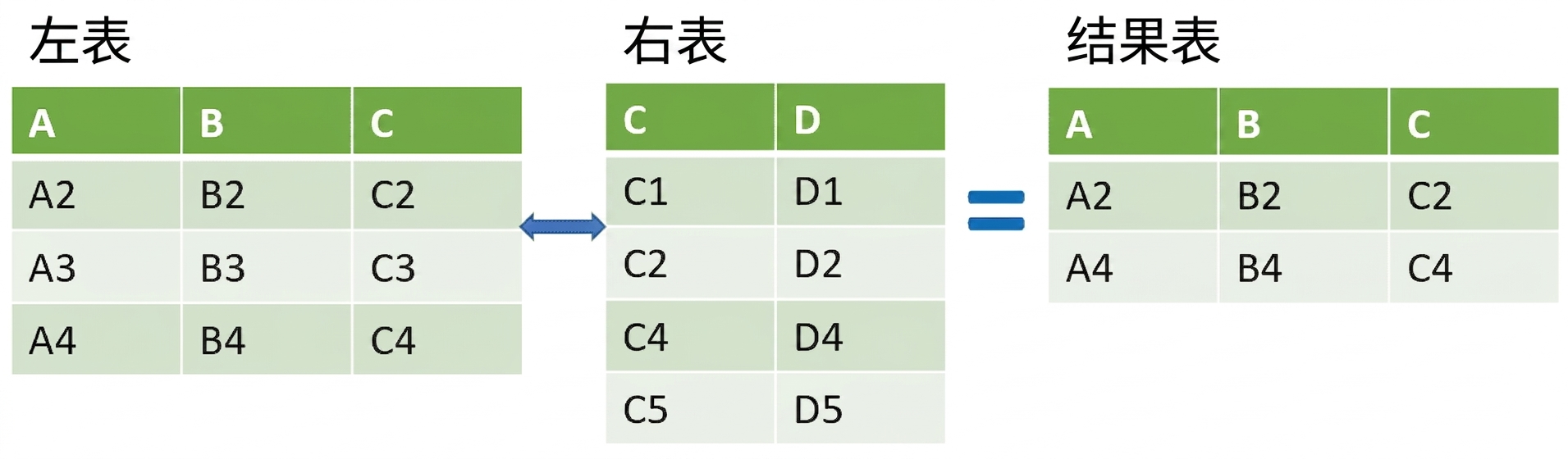
什么是半连接?

半连接的表格示意图,结果为交集

半连接

  • 返回交集,类似内连接
  • 只返回左表列,_不_返回右表列
  • 无重复
使用 pandas 连接数据

音乐数据集

带耳机的手机图片

SQLite 教程图片

1 照片作者:Vlad Bagacian,来源:Pexels
使用 pandas 连接数据

示例数据集

  gid  name           
0 1    Rock           
1 2    Jazz           
2 3    Metal          
3 4    Alternative ...
4 5    Rock And Roll  
  tid  name             aid  mtid  gid  composer         u_price
0 1    For Those Ab...  1    1     1    Angus Young,...  0.99   
1 2    Balls to the...  2    2     1    nan              0.99   
2 3    Fast As a Shark  3    2     1    F. Baltes, S...  0.99   
3 4    Restless and...  3    2     1    F. Baltes, R...  0.99   
4 5    Princess of ...  3    2     1    Deaffy & R.A...  0.99
使用 pandas 连接数据

步骤 1:半连接

genres_tracks = genres.merge(top_tracks, on='gid')
print(genres_tracks.head())
  gid  name_x  tid   name_y           aid  mtid  composer         u_price
0 1    Rock    2260  Don't Stop M...  185  1     Mercury, Fre...  0.99   
1 1    Rock    2933  Mysterious Ways  232  1     U2               0.99   
2 1    Rock    2618  Speed Of Light   212  1     Billy Duffy/...  0.99   
3 1    Rock    2998  When Love Co...  237  1     Bono/Clayton...  0.99   
4 1    Rock    685   Who'll Stop ...  54   1     J. C. Fogerty    0.99
使用 pandas 连接数据

步骤 2:半连接

genres['gid'].isin(genres_tracks['gid'])
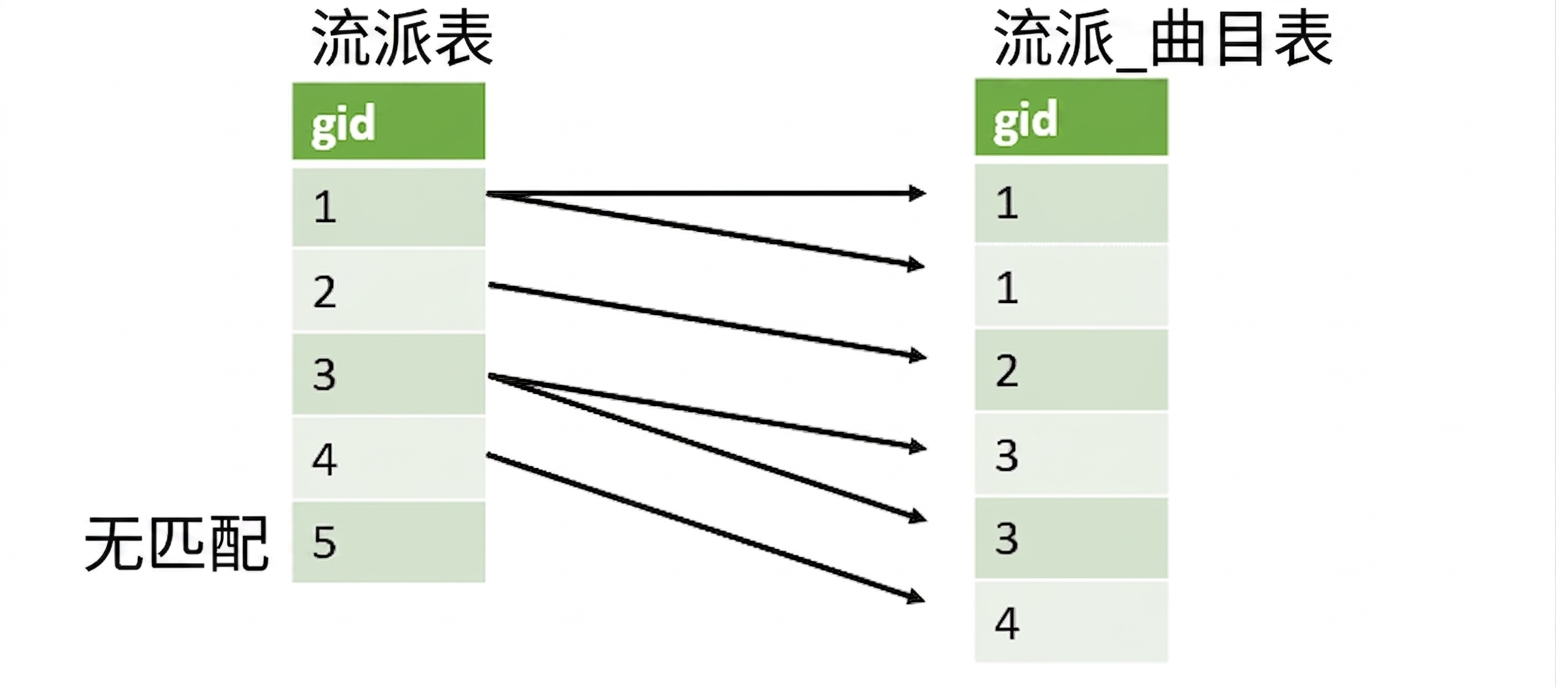
匹配两列 gid 的图示

使用 pandas 连接数据

步骤 2:半连接

genres['gid'].isin(genres_tracks['gid'])
0     True
1     True
2     True
3     True
4    False
Name: gid, dtype: bool
使用 pandas 连接数据

步骤 3:半连接

genres_tracks = genres.merge(top_tracks, on='gid')
top_genres = genres[genres['gid'].isin(genres_tracks['gid'])]
print(top_genres.head())
  gid  name           
0 1    Rock           
1 2    Jazz           
2 3    Metal          
3 4    Alternative & Punk
4 6    Blues
使用 pandas 连接数据

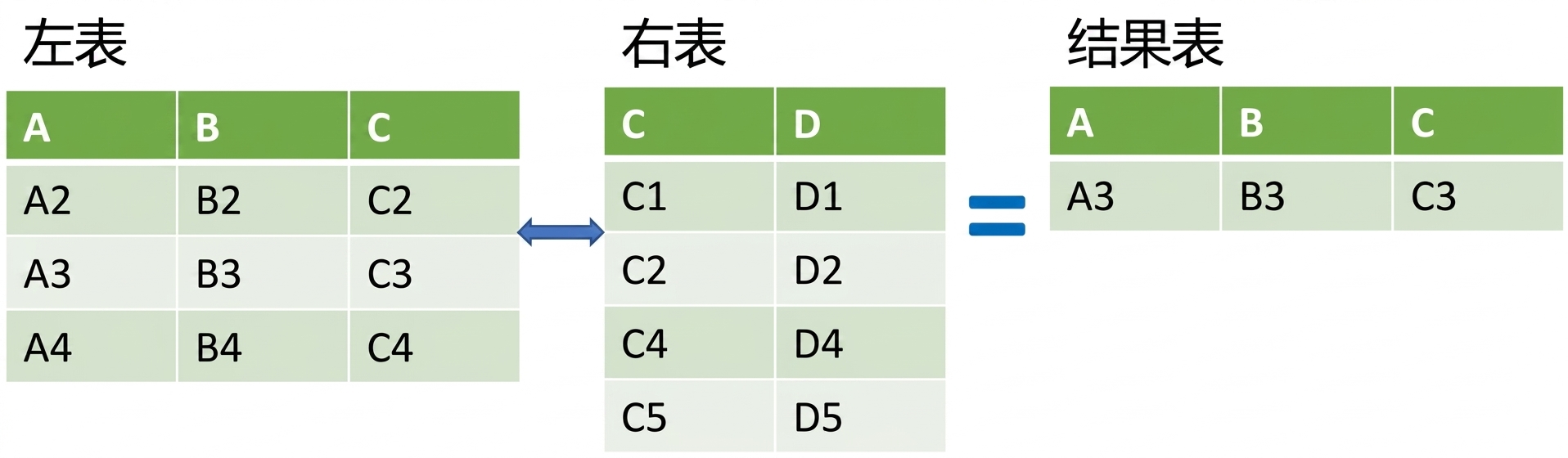
什么是反连接?

反连接的表格示意图,结果为左表减去交集

反连接:

  • 返回左表,排除交集
  • 只返回左表列,_不_返回右表列
使用 pandas 连接数据

步骤 1:反连接

genres_tracks = genres.merge(top_tracks, on='gid', how='left', indicator=True)
print(genres_tracks.head())
  gid  name_x           tid     name_y           aid    mtid  composer         u_price  _merge   
0 1    Rock             2260.0  Don't Stop M...  185.0  1.0   Mercury, Fre...  0.99     both  
1 1    Rock             2933.0  Mysterious Ways  232.0  1.0   U2               0.99     both  
2 1    Rock             2618.0  Speed Of Light   212.0  1.0   Billy Duffy/...  0.99     both  
3 1    Rock             2998.0  When Love Co...  237.0  1.0   Bono/Clayton...  0.99     both 
4 5    Rock And Roll    NaN     NaN              NaN    NaN   NaN              NaN      left_only
使用 pandas 连接数据

步骤 2:反连接

gid_list = genres_tracks.loc[genres_tracks['_merge'] == 'left_only', 'gid']
print(gid_list.head())
23     5
34     9
36    11
37    12
38    13
Name: gid, dtype: int64
使用 pandas 连接数据

步骤 3:反连接

genres_tracks = genres.merge(top_tracks, on='gid', how='left', indicator=True)
gid_list = genres_tracks.loc[genres_tracks['_merge'] == 'left_only','gid']
non_top_genres = genres[genres['gid'].isin(gid_list)]

print(non_top_genres.head())
  gid  name          
0 5    Rock And Roll 
1 9    Pop           
2 11   Bossa Nova    
3 12   Easy Listening
4 13   Heavy Metal
使用 pandas 连接数据

Passons à la pratique !

使用 pandas 连接数据

Preparing Video For Download...